A day with Vidai
Five moments from one day at the Grachtwerk Agency Group, a European creative agency whose client teams (Zuiderhoeve Dairy, Kessler Autohaus, Maison Ardelle, Fjordair and others) all use AI. Each story is a real flow through the product, with what the person sees on screen. None of them needed a change to an app beyond its base address and key.
09:10 · A developer ships an agent with one key
Joost, a platform engineer, has written a small agent that drafts campaign briefs. It uses the OpenAI SDK, but the team wants it to run on whichever model is cheapest for the job.
He opens Keys, chooses Issue a key, picks the agent and the environment it runs in, and copies the secret once. Connect your app beside the key gives him the gateway's address and, under Show SDK settings, the base URL for the OpenAI, Anthropic and Gemini SDKs. He changes two settings in the agent (the base URL and the key) and deploys.
His code still names the model it always did. The organisation decides which models the agent may call, and the gateway translates requests, streams and tool calls to whichever provider serves them. A couple of minutes later the agent's first calls are in Request logs: who made them, which model answered, what each rule did and what they cost.
What made it possible: Keys, Applications and agents, Translation between API formats.
11:30 · Finance answers "what did AI cost us, by team?" in a minute
The group CEO asks Amélie, the finance director, what AI cost over the last month, by client team. She opens Money › Cost, chooses the last 30 days and breaks spend down by team. Every call is already priced, at the price in force when it was made, and charged to the team whose key made it. Euros and dollars sit side by side, never added together.
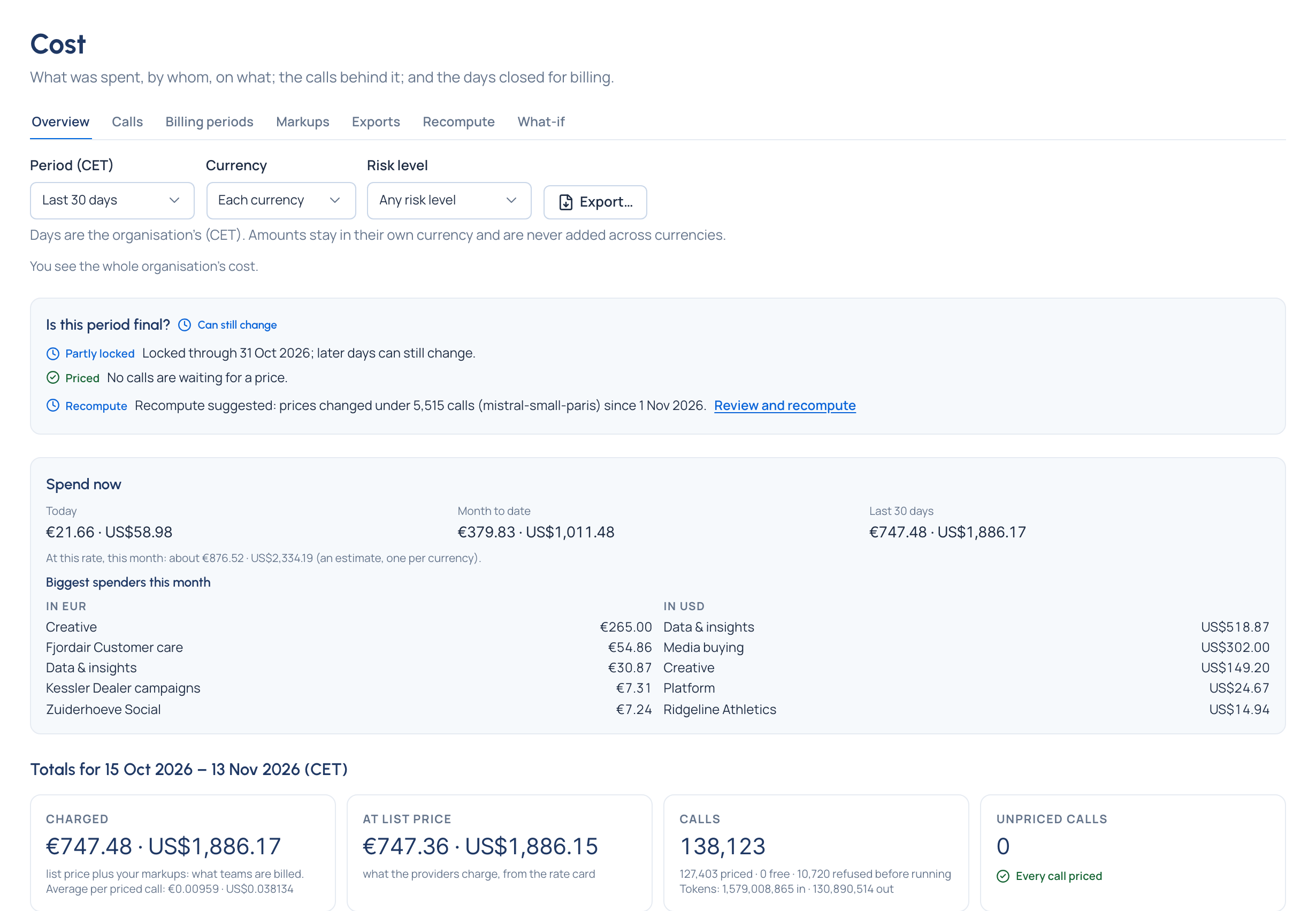
She exports the breakdown for the monthly chargeback and forwards the impact report (spend, savings from routing, calls rescued) to the CEO. No spreadsheet, no splitting provider invoices by hand.
What made it possible: Cost, Prices and the rate card, Dashboards and the impact report.
14:00 · A compliance officer hands an auditor a report they verify alone Enterprise
Internal audit wants evidence of how AI was governed last quarter. Katarzyna, the data protection officer, opens Proof › Evidence. The tamper evidence card reads Verified: the gateway and Vidai each seal their records and check each other's.
She chooses Auditor report, sets the period, takes A sample sized by confidence and tolerable error (every high-risk call is always included), and chooses Prepare the download.
The auditor gets one signed file: the sampled calls, the audit events, the policies in force, the seals and the keys, with a README on how to check it. They verify it on their own machine, without access to Grachtwerk's systems, trusting only the arithmetic.
The auditor report is part of the Enterprise edition; what Enterprise includes depends on the features your licence includes. What made it possible: Tamper evidence, Audit log.
16:45 · A leaked key is shut in seconds, and nothing else stops
A key turns up in a public code snippet: the key of kessler-dealer-copy production, the agent that drafts dealer copy for Kessler Autohaus. Sanne, head of platform, opens it on Keys and chooses Suspend. The gateway refuses that key within seconds; every other key, app and team carries on as before.
The agent's owner then chooses Replace secret with No time, so the leaked secret is refused for good, puts the new secret in the agent, and Sanne resumes the key. The models, rate limit, budgets and guardrails stay with the key, so nothing else needs setting up again. The refused attempts are in Request logs, and the suspension, the new secret and the resume are in the audit log, with who and why.
When the source of trouble isn't known yet (calls nobody can place, from keys nobody recognises), an organisation admin has a bigger switch: Stop AI traffic in the top bar refuses every AI call on every gateway node until it's released, and Settings › Gateway shows each node took it.
What made it possible: Keys, Safety switches.
19:20 · A provider fails, and calls move to the next model
In the evening, one provider stops answering. Fjordair's customer-care assistant doesn't notice. A fallback chain on its model sends each call to the next model in line before anything reaches the caller, and the answer's headers say a fallback was used.
The next morning, the Admin dashboard lists the outage (Down from, Back at, Down for) and Its calls: how many a fallback chain moved to another model and how many failed. Each rescued call in Request logs shows its Fallback chain: every model tried, in order, and which one answered.
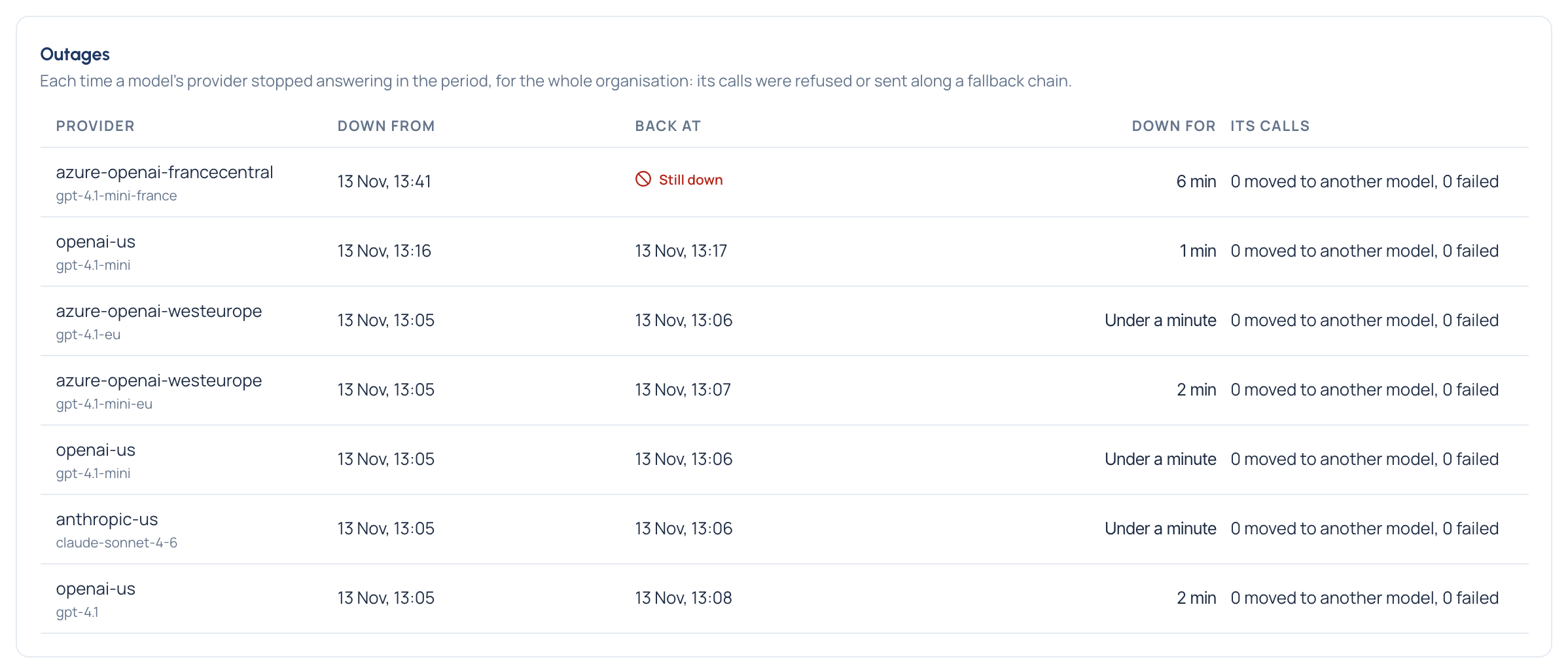
What made it possible: Routing and fallback chains, Provider keys and resilience.
The same day, without Vidai
Each of these is someone's afternoon: a key hunt across repositories, a month-end spreadsheet, weeks of evidence requests, a scramble to find which app a leaked key belongs to, a pager going off for a provider outage. With Vidai each one took minutes, on one screen.
Next: see what Vidai brings developers, Finance, compliance officers, organisation admins and security, or start with How Vidai works.