Connect your first program
Point a program at the gateway and it gains, without another line of code, everything your organisation set up: the models it may call, guardrails, budgets, routing and a record of every call with its cost. You keep the SDK you use today. Two settings change: the base URL and the key.
For: developers. You need: a Control room account in a team, and a program that calls an AI model through the OpenAI, Anthropic or Gemini SDK (or plain HTTP).
1. Give your program its own agent
A program that calls models on its own is an agent. Giving it its own name means a cost, a refusal or an incident lands on something with an owner, not on "a key", and its keys never depend on your own account.
- Open Applications & agents and choose New agent.
- About it: a name, such as
release-notes-writer, and what it's for. If you're in more than one team, choose the team it belongs to; its calls are charged there. - Models: keep Same as its team (for example Same as Creative), the usual choice.
- First key: choose Issue it now, keep the default environment, and name the key after where it runs ("release-notes-writer local").
- Check and create, then Create agent.
- Copy the key's secret. It's shown only now, with Copy; the panel stays open until you choose Done.
You're the agent's owner: you look after its keys from now on. More: Add an agent.
2. Point your SDK at the gateway
Connect your app, at the top of Keys, gives the gateway's address and, under Show SDK settings, the base URL
for each SDK and where the key goes. Copy them from there; the samples below use <your-gateway> in their place.
Keep the key out of your code: put it in an environment variable or your secret store.
import os
from openai import OpenAI

client = OpenAI(
    base_url="https://<your-gateway>/v1",
    api_key=os.environ["VIDAI_KEY"],
)

raw = client.chat.completions.with_raw_response.create(
    model="<a model your key may call>",
    messages=[{"role": "user", "content": "Write one line of release notes for a bug fix."}],
)
print(raw.headers.get("x-vidai-request-id"))
print(raw.parse().choices[0].message.content)
import OpenAI from "openai";

const client = new OpenAI({
  baseURL: "https://<your-gateway>/v1",
  apiKey: process.env.VIDAI_KEY,
});

const { data, response } = await client.chat.completions
  .create({
    model: "<a model your key may call>",
    messages: [{ role: "user", content: "Write one line of release notes for a bug fix." }],
  })
  .withResponse();
console.log(response.headers.get("x-vidai-request-id"));
console.log(data.choices[0].message.content);
import os
import anthropic

client = anthropic.Anthropic(
    base_url="https://<your-gateway>",
    api_key=os.environ["VIDAI_KEY"],
)

message = client.messages.create(
    model="<a model your key may call>",
    max_tokens=200,
    messages=[{"role": "user", "content": "Write one line of release notes for a bug fix."}],
)
print(message.content[0].text)
curl https://<your-gateway>/v1/chat/completions -i \
  -H "Authorization: Bearer $VIDAI_KEY" \
  -H "Content-Type: application/json" \
  -d '{"model": "<a model your key may call>",
       "messages": [{"role": "user", "content": "Write one line of release notes for a bug fix."}]}'
Which model names can I use? Ask the gateway: GET https://<your-gateway>/v1/models with your key lists exactly the
models it may call, by the names your organisation gave them. Your SDK can call any of them, whichever provider serves
it: the gateway translates requests, streams and tool calls between the OpenAI, Anthropic and Gemini formats both ways.
The key goes where your SDK already puts one: Authorization: Bearer for OpenAI-style SDKs, x-api-key for
Anthropic's and x-goog-api-key for Google's. The gateway removes it and uses your organisation's provider
credentials, so no provider key ever sits in your program.
3. Check it worked
- In the answer: the
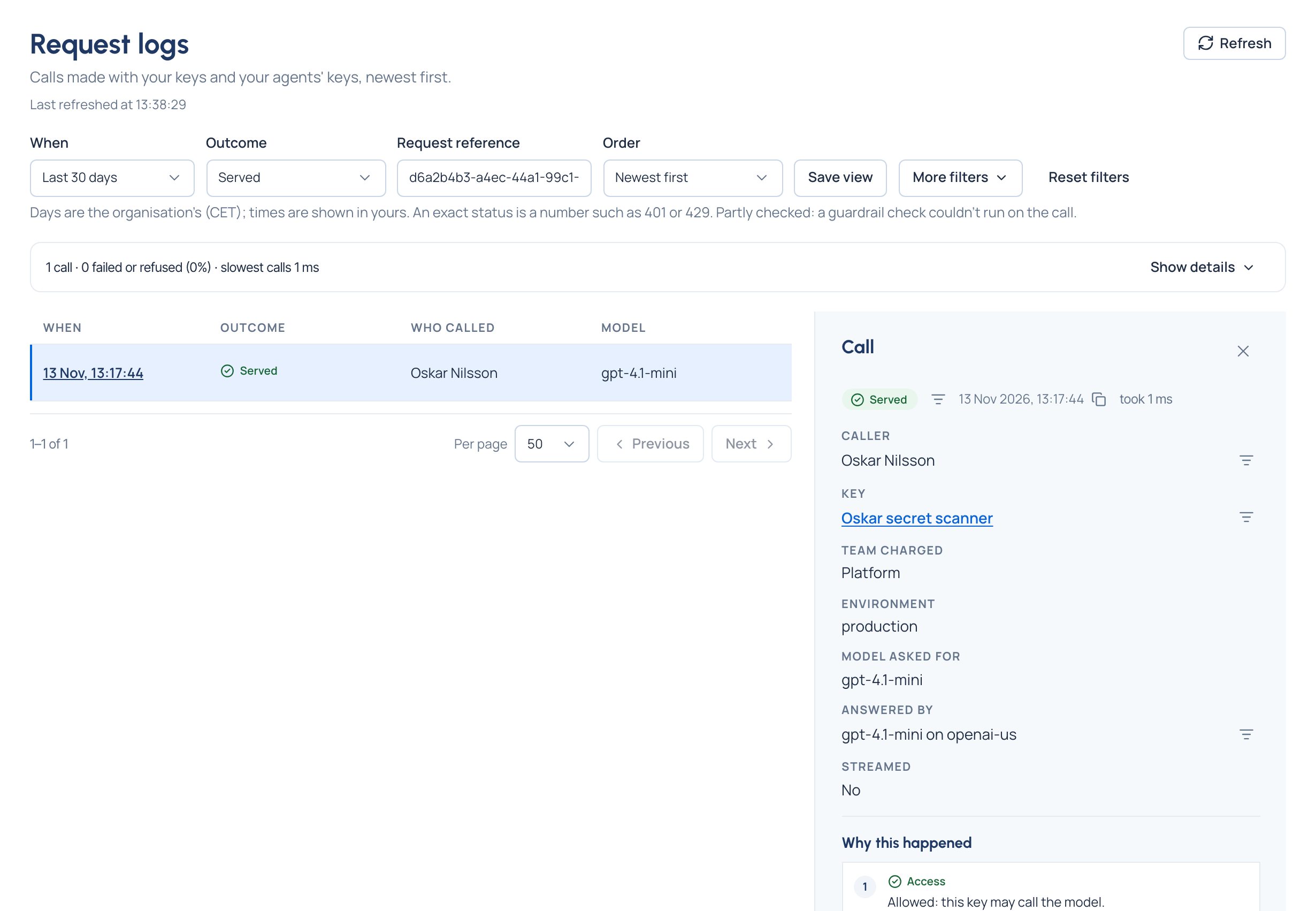
x-vidai-request-idheader is the gateway's reference for the call;x-vidai-modelnames the model that really answered. - In Request logs: open Request logs, or the agent's page and See its calls. The call appears within seconds, with the agent, its key, the model asked for and the one that answered, tokens, time and cost. Paste the request id into Request reference to find it at once.
If the call is refused
The gateway answers in your own SDK's error format, so your SDK raises its usual error, and every gateway refusal adds
an x-vidai-error-code header with a stable code to match on. The two you're most likely to meet first:
| What you see | What it means | What to do |
|---|---|---|
401, invalid_api_key |
The key isn't one the gateway knows: mistyped, revoked or expired | Check the secret; issue a new key if it was revoked |
404, model_not_found |
That model name doesn't exist on the gateway | List your models with GET /v1/models and use one of those names |
A refused call is in Request logs too, with the reason in words.
Next
- Run in staging and production with a key per environment: Give an agent a key.
- Group the agents that work together: Create an application.
- Change a key's secret without downtime: Rotate a key.
- Everything about calling the gateway: Call models through the gateway, Errors and refusals and your SDK's own page, such as OpenAI for Python.