Needs attention and notices
Most AI incidents start as something small nobody noticed: a key about to expire, a model with no price, a rule that never applies. Vidai looks for these itself and brings each one to the people who can fix it, on Home and behind the bell, with a button that goes straight to the fix.
Needs attention
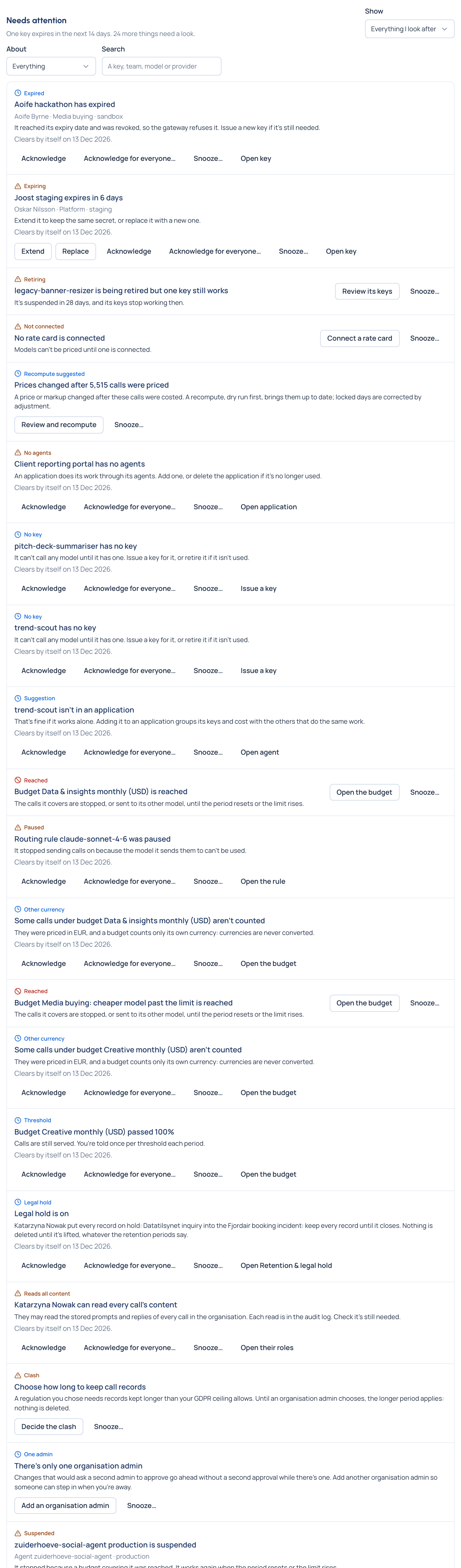
Home's Needs attention lists what needs someone, for each person: their own keys and agents, and, for admins, everything they look after. Each item is one of two kinds:
| Kind | Example | What you can do |
|---|---|---|
| Something to fix | A model with no price; a team with no models; a provider that needs to say where it runs | Its button opens where it's put right (Set its price, Choose models, Say where it runs…). It stays until it's fixed; you can Snooze it, not hide it for good |
| Something that happened | A key expired; an agent has no key; a budget passed a threshold | Acknowledge it (hidden for you until it happens again), or snooze it. It clears by itself after a set number of days, or sooner if its cause ends |
What it watches, among others:
- Keys: expiring soon, expired, suspended, unable to call any model, or with no guardrail reaching them.
- Teams, agents and applications: a team that allows no models, an agent with no key or no owner, an agent's keys unused for 30 days.
- Models and prices: models without a price, price changes held for a decision, the rate card out of date.
- Rules: a routing rule paused because its model can't be used, a rule that decides nothing because a stronger one always wins, a rule already in place through another, exemptions with no end date.
- The set-up itself: only one organisation admin, someone who may read every call's content, guardrails switched off, more people or agents than the licence allows.
- Money and evidence: calls with no price, calls that arrived for a locked period, a tamper-evidence check that needs confirming, deliveries to your BI tool that keep failing.
Organisation admins can snooze or acknowledge an item for everyone, with a reason that goes in the audit log. Tidy-up suggestions (an application with no agents, an agent in no application) sit apart in Tidy up, out of the way of what really needs fixing.
The bell
The bell in the top bar counts the same things on every page, plus changes waiting for your decision. Open it to see the first few, each linked to where it's put right.
Notices on every page
When something affects everyone, a notice appears under the top bar on every page, most serious first: AI traffic stopped, guardrails off or not being applied, VidaiGuard down, the gateway not answering, a licence about to expire. Each says what it means and what to do, and goes away by itself when the cause is fixed. Organisation admins and viewers also get a small guardrails marker in the top bar when guardrails need a look.
flowchart LR
    V["Vidai checks<br/>the installation"] --> NA["Needs attention<br/>(per person, with the fix)"]
    V --> BE["The bell<br/>(on every page)"]
    V --> NO["Notices<br/>(when it affects everyone)"]
    V --> EV["Event webhooks<br/>(your own systems)"]
Delivered where you already look
Budget warnings and key expiry reminders go by email to the people concerned. Needs attention items can also be sent as they appear and clear to your own webhook or SIEM Enterprise; what Enterprise includes depends on the features your licence includes. See Integrations.