Audit log
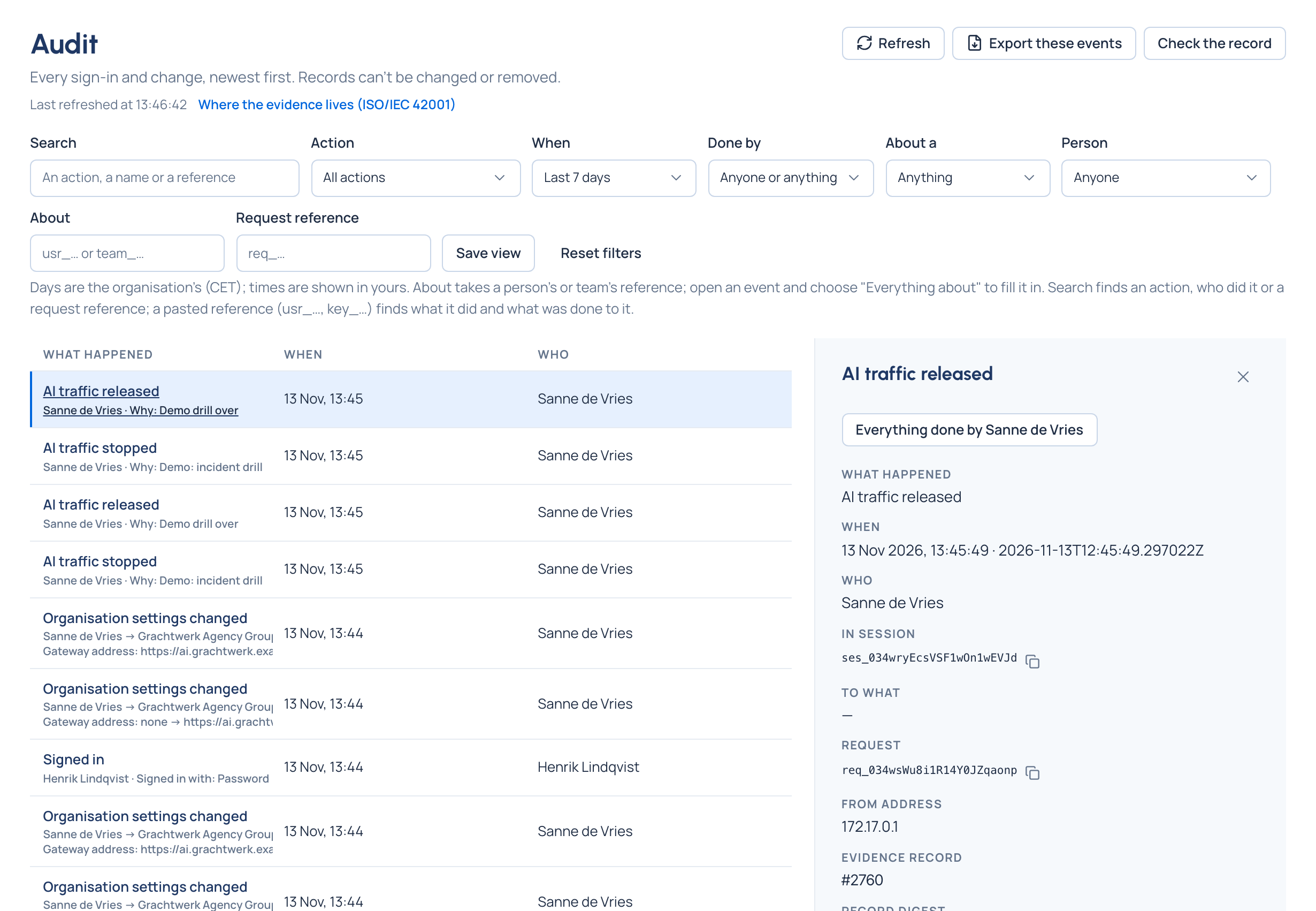
After an incident, the first question is "who changed this, and when?". Without one log, the answer is pieced together from chat history and memory. Vidai records every change and every sign-in, by people, agents, service accounts and Vidai itself, in one audit log. Each record is chained to the one before, so a change or a gap shows when you check it.
What is recorded
- Every change to people, teams, roles, keys, providers, models, prices, rules, policies and settings, with each field before → after.
- Every sign-in, including failed ones, with why in words (Wrong password, No account with that email).
- Reads of call content: Read a call's content when content was shown, Was refused a call's content when it wasn't. The record names the call, never what it said.
- Sensitive moments: a key's secret shown again, an export downloaded, a billing lock moved, Stop AI traffic used, an override started and who approved it.
- The reasons people typed, as they wrote them.
- Who, and how: a session or an API token, so a script's change is as accountable as a person's.
Records can't be changed or removed through Vidai, and the audit log is kept for good: erasing someone removes their details, never the record.
Check that nothing was altered
Check the record walks the whole chain and says what it found:
| Result | Meaning |
|---|---|
| Verified | Every record is intact and in order |
| Altered | The listed records no longer match their digest. Treat this as an incident |
| Records missing | The listed numbers are missing from the sequence |
| Nothing to check yet | No records have been written |
The chain is checked the same way in every edition. Sealing records with a signature, so an auditor can check them without trusting you, is tamper evidence.
flowchart LR
  R1[Record 1<br/>digest] --> R2[Record 2<br/>digest of 2 + 1]
  R2 --> R3[Record 3<br/>digest of 3 + 2]
  R3 --> Head[Chain head<br/>in every report]
Finding your way
Search any word, an action (key. finds every key event), a name, or a reference (usr_…, key_…). Filter by
Action, When, Done by (a person, an agent, a service account, or Vidai itself), About a and Person.
Everything done by … and Everything about … on an event follow a thread; a person's or team's Activity tab
opens their history. Rules, budgets, keys, models and policies link back with Open in the audit log. Saved views
follow you to any device, and organisation admins and Compliance officers can export what the list shows.
Who sees it: organisation admins, organisation viewers and Compliance officers see the whole log; group admins the events about their teams and the people, agents and applications in them.
Related
- Tamper evidence: signed seals an auditor can check alone
- Request logs: content reads link to the call
- Retention, legal hold and subject requests
- Service accounts and API tokens: scripts that leave their own trail