Try Vidai in 15 minutes
See for yourself what every call through Vidai gains, without setting up an organisation in full: one provider, one key, one call, priced, recorded and checked against a rule, then counted on the dashboard. Everything you make here is kept; the full setup carries on from where this ends.
For: anyone evaluating Vidai. You need: a Vidai installation, its Control room address and the installation's administrator account (from whoever installed it), the address your machine reaches the gateway at, and an API key for one AI provider you already use.
flowchart LR
  A[Sign in<br/>2 min] --> B[A provider<br/>and a price<br/>4 min]
  B --> C[A rule that<br/>observes<br/>2 min]
  C --> D[A key and<br/>a call<br/>4 min]
  D --> E[Request logs<br/>and Dashboard<br/>3 min]
1. Sign in (2 minutes)
- Open the Control room's address and sign in with the installation's administrator account.
- On Set up your administrator account, enter the Organisation name, Your name, your own Email and a Password (at least 12 characters) twice, then choose Complete setup.
You land on Home as the organisation's first admin. Setup has made the first team, the Org group, with you in it and every model open to it, and a default environment ready for keys. Nothing else needs creating before a call.
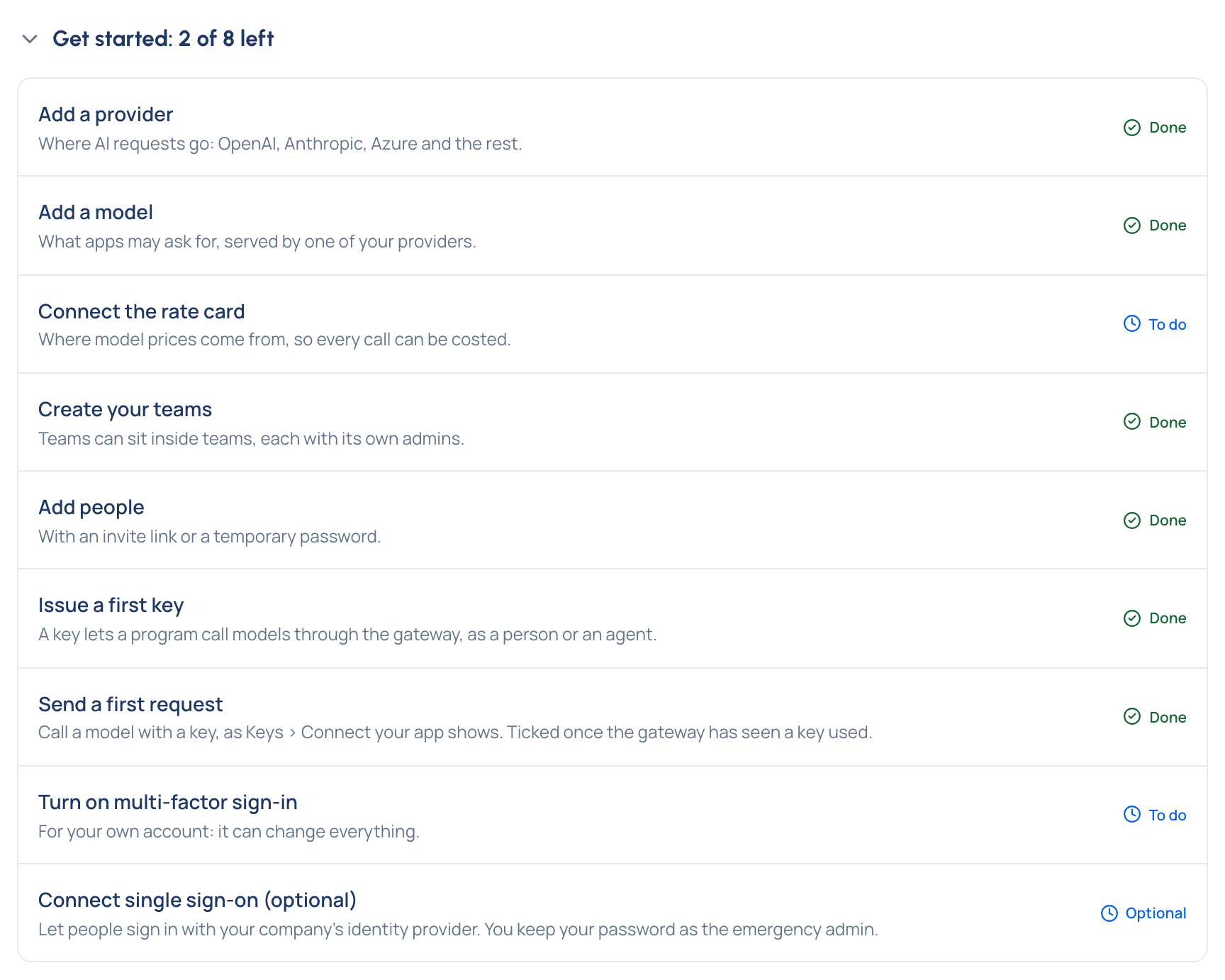
Home offers Turn on multi-factor sign-in; do it before you invite anyone. The details are in Set up your organisation.
2. Connect a provider and give it a price (4 minutes)
- Open Providers and choose Add provider. Pick yours from the list: Vidai fills in the kind of API, the address and a name.
- Paste the provider's API key and choose Test connection. It says in words whether it worked.
- Leave Find models now ticked and add the provider. In Review the models found, switch on the one or two models you want to try.
A call is priced from the rate card. If you have its address and key, connect it on Settings › Rate card (Connect the rate card). If not, price the model you'll call by hand: open Money › Prices, choose Manual prices, then Add a manual price, enter its rates per 1M tokens and choose Add price (Add a manual price). Either way, every call from now on carries its cost. A model with no price still works; its calls show as waiting for a price, never as free.
3. Put a rule on the traffic (2 minutes)
A call through the gateway is governed: checked against your rules before any provider sees it. Give it something to check with a ready-made recipe that only watches.
- Open Policies › Policies and choose Start from a template….
- Choose Use… on Keep card numbers out.
- Under Where it applies, add the Org group. Keep the name it suggests.
- Choose Check what it changes: the parts it would make and how many keys they reach. Then choose Create the policy.
The policy starts Observing: it records what it finds and stops nothing. More about recipes: Apply a recipe.
4. Issue a key and make a call (4 minutes)
- Open Keys and choose Issue a key, for Myself. Name it ("Evaluation"), leave the environment on default, and choose Issue key.
- Copy the secret. It's shown only this once.
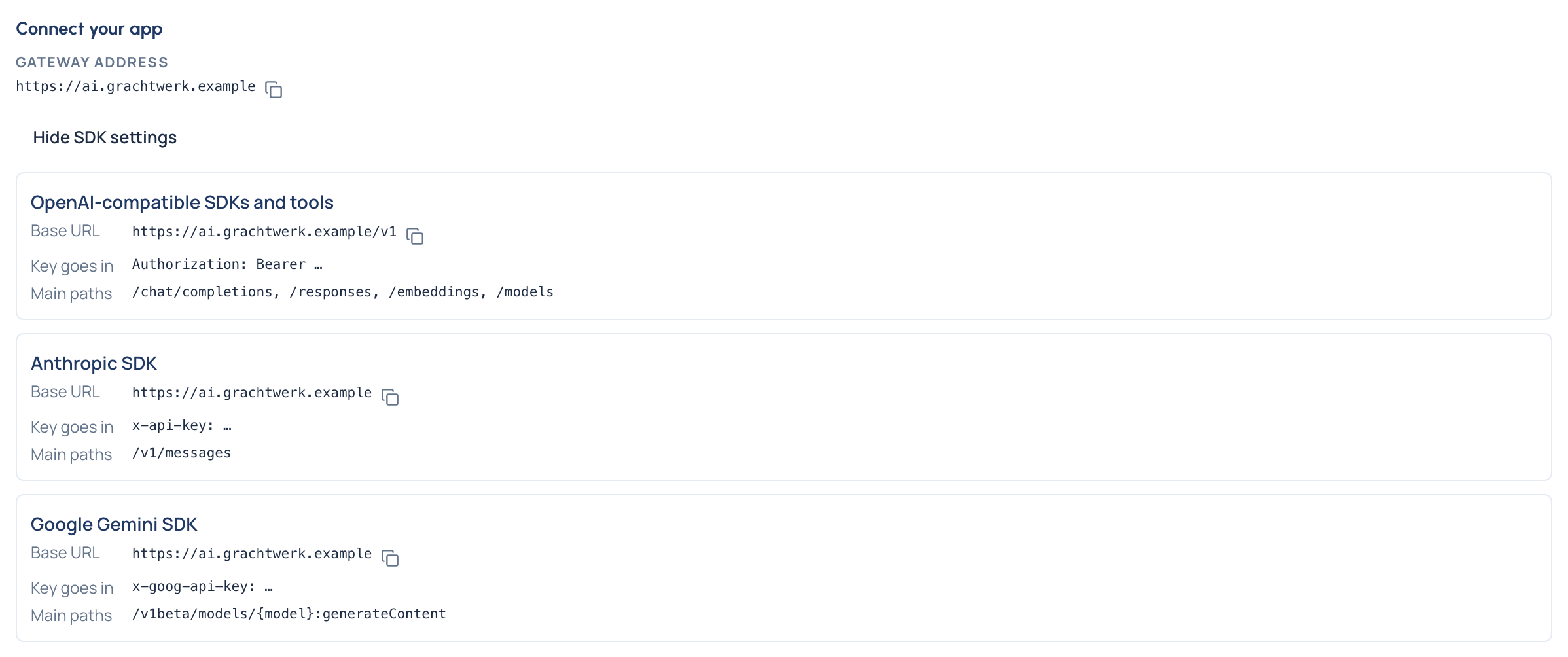
- Tell Vidai where apps reach the gateway: open System › Settings › Gateway, enter the Gateway address under Address apps use and choose Save (Set the gateway address).
- Back on Keys, Connect your app now shows the address; Show SDK settings gives the base URL for each SDK, ready to copy.
Make two calls: an ordinary one, and one with a test card number in it.
export VIDAI_KEY="vk_..."          # the secret you just copied
curl https://<your-gateway>/v1/models -H "Authorization: Bearer $VIDAI_KEY"

curl https://<your-gateway>/v1/chat/completions -i \
  -H "Authorization: Bearer $VIDAI_KEY" \
  -H "Content-Type: application/json" \
  -d '{"model": "<a model from the list>", "messages": [{"role": "user", "content": "Say hello in Dutch."}]}'

curl https://<your-gateway>/v1/chat/completions -i \
  -H "Authorization: Bearer $VIDAI_KEY" \
  -H "Content-Type: application/json" \
  -d '{"model": "<a model from the list>", "messages": [{"role": "user", "content": "Is 4111 1111 1111 1111 a valid card number?"}]}'
from openai import OpenAI

client = OpenAI(base_url="https://<your-gateway>/v1", api_key="vk_...")
print([m.id for m in client.models.list()])

for prompt in ["Say hello in Dutch.", "Is 4111 1111 1111 1111 a valid card number?"]:
    raw = client.chat.completions.with_raw_response.create(
        model="<a model from the list>",
        messages=[{"role": "user", "content": prompt}],
    )
    print(raw.headers.get("x-vidai-request-id"), raw.parse().choices[0].message.content)
Both are answered: the policy is only observing. Each answer carries an x-vidai-request-id header, the gateway's
reference for the call. Your program changed in two places only, the base URL and the key; no provider key is in it.
5. See what happened (3 minutes)
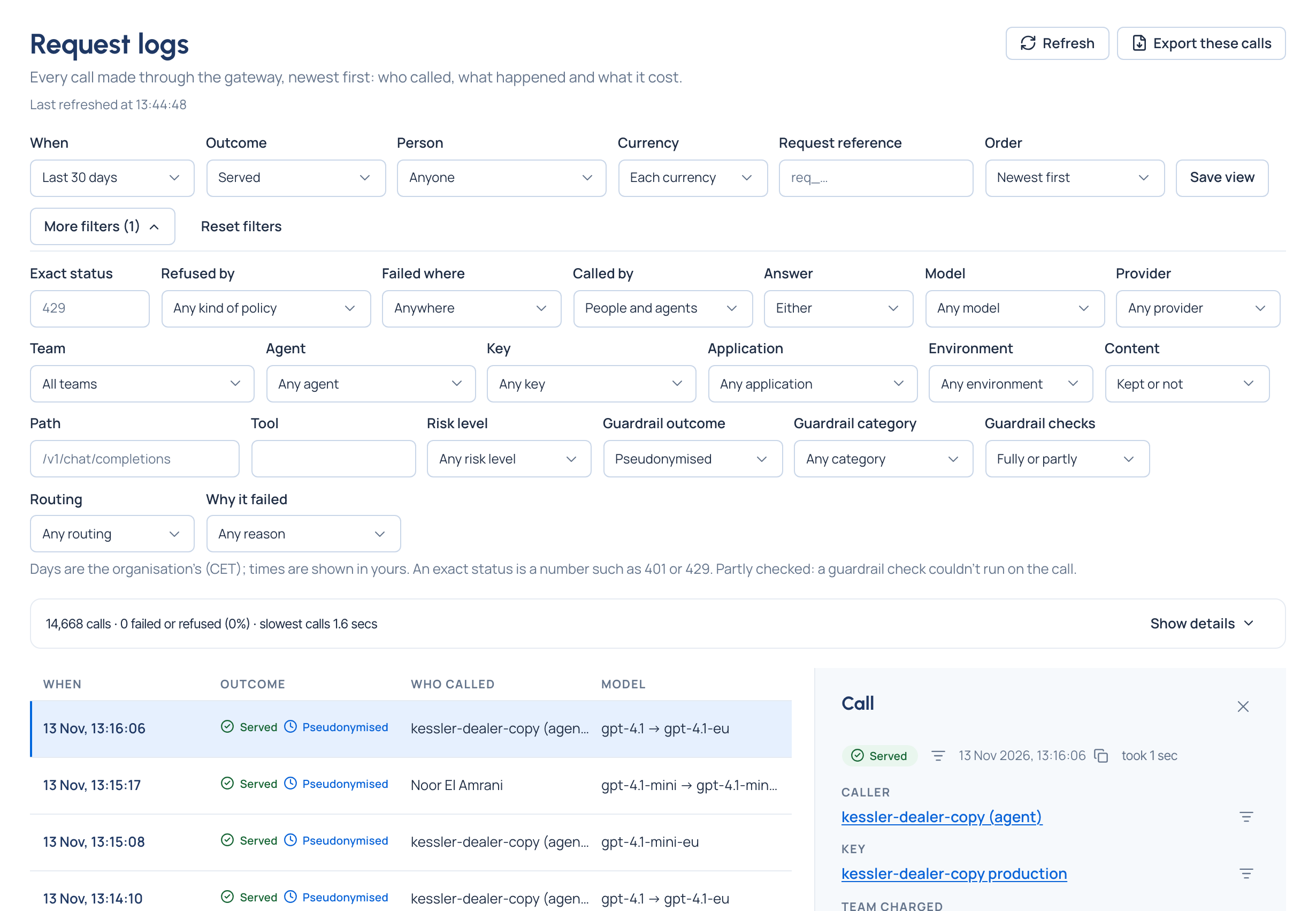
In Request logs. Open Request logs. Your calls appear within seconds. Open the second one:
- who made it and with which key, the model asked for and the one that answered, tokens and time;
- Why this happened: each rule that acted, with its purpose and level;
- Guardrails: the card number found, Logged only, and the policy that decided it;
- Usage and cost: the cost in its own currency, and How it was priced.
Paste a request id into Request reference to find a call at once.
On the policy. Open the policy on Policies › Policies: What enforcing would have done shows the finding by category and what would have been done. Start enforcing… would refuse the next such call; leave it observing for now.
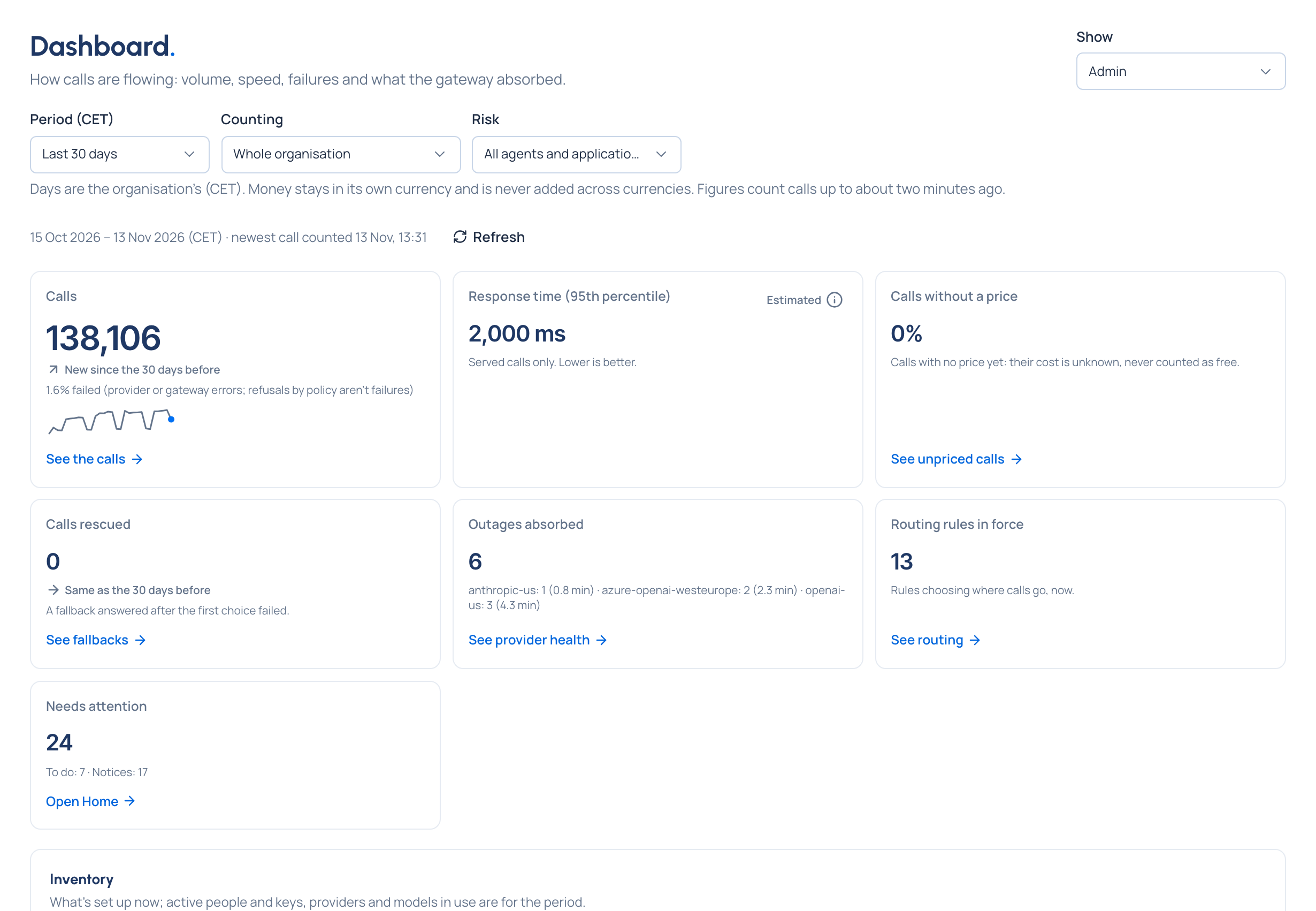
On the dashboard. Open Dashboard. The Admin view counts your calls, their response time, the share that's unpriced and what needs attention; figures count calls up to about two minutes ago. Choose Today in Period to see only yours.
What you've seen
- One base URL and one key put a program under your organisation's rules, with no provider key in the code.
- Every call is recorded with who made it, what decided its route, what was found in it and what it cost.
- A rule can watch real traffic before it stops anything, and tells you what it would have done.
- The figures behind the dashboard are the calls themselves, a couple of minutes behind.
Where to go next
- Finish the setup, with teams, people and multi-factor sign-in: Set up your organisation.
- Put a limit on spend: Set your first budget.
- Turn a regulation into rules and proof: Your first compliance policy.
- Point a real program at the gateway: Connect your first program.
- The whole picture: How Vidai works.
Good to know
- Keep card numbers out is a pattern check, so it works in both editions. On Enterprise, once VidaiGuard is set up, recipes such as Personal data stays out also use VidaiGuard checks.
- To try without the policy, choose Delete… on its page; the calls it observed keep their record.