Move a team
When the organisation changes, move a team and everything inside it in one step. Before you confirm, Vidai shows exactly what the move changes: which keys gain or lose models, and which rules from above the team stops or starts getting.
Before you start
- You're an admin of the team, and of where it goes. If you don't run both places, the other team's admin is asked first.
- A team can't move under itself or one of its own teams.
Steps
- Open Teams and choose the team.
- Choose Move.
- Choose where it goes, or The top level.
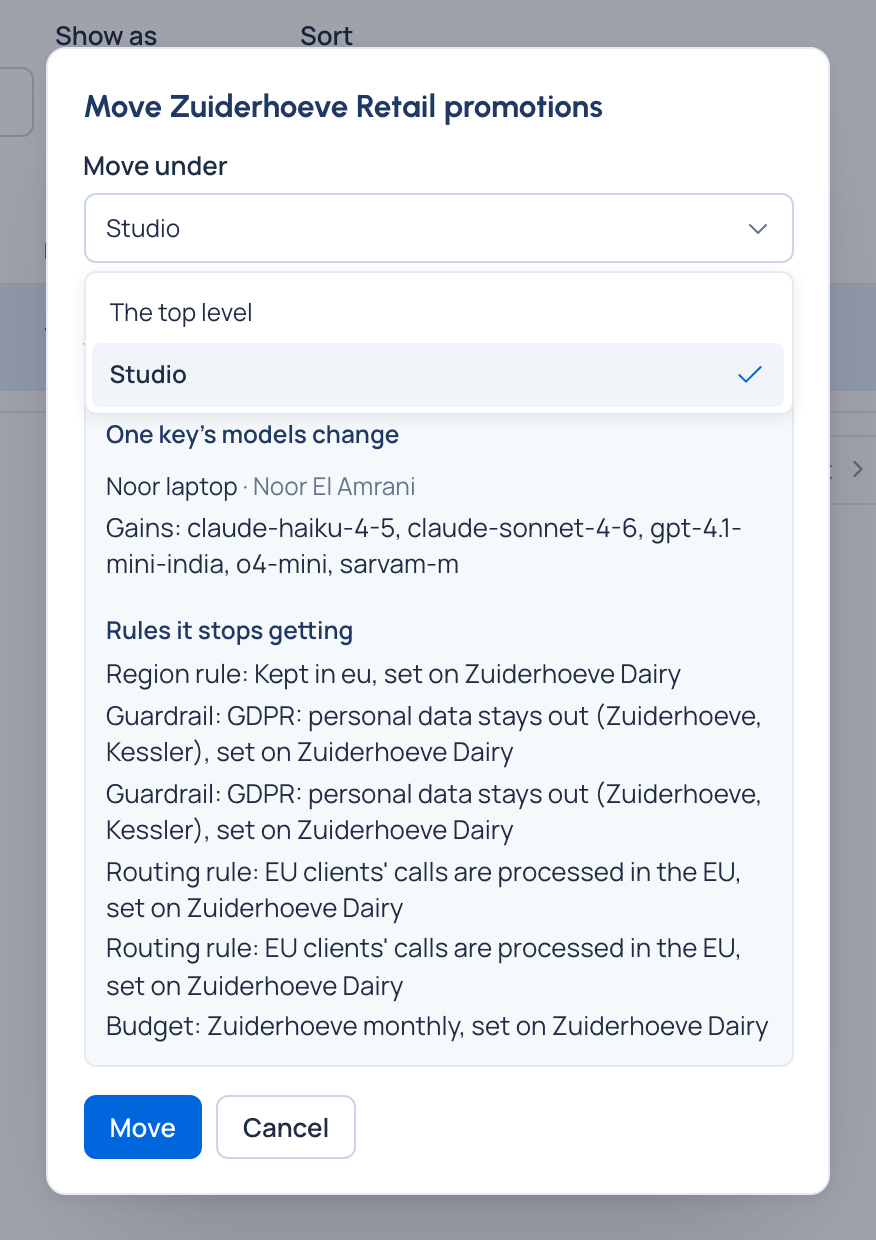
- Read what the move changes:
- each key whose models change: Gains, Loses, and Stops working when it has no model left (the first 20, then how many more);
- the rules set on teams above it that it stops getting or starts getting (guardrails, routing rules, region rules, budgets), each with the team it's set on. When nothing changes, it says so in one line.
- Move it.
Check it worked
The team is at its new place, with everything inside it. If the other side's admin must agree, the team shows Waiting for a second admin until they decide in Approvals.
Good to know
- Calls already made stay charged to the team as it stood when they were made: moving a team never moves past cost.
- If the preview can't be worked out, it says so and you can still move the team.
- Moving or renaming a team into a name its new neighbours already use is refused with "Something here already has this name".