Your AI bill, explained
The question: "What did AI cost us last month, and who spent it?"
The problem
The invoices arrive at month end: one from each provider, in their own currencies, each a single line for a whole account. Nobody owns any line. Someone exports usage from each provider's console, matches API keys to projects in a spreadsheet, guesses at the shared keys, and splits the rest evenly. By the time the numbers are agreed, the next month has already happened, and nobody could have stopped the agent that ran all weekend.
Why it stays that way
Provider bills are built for the provider's customer, which is your whole organisation. They don't know your teams, your clients or your applications. Prices change, sometimes by the hour, sometimes backdated, and a spreadsheet can't tell which price applied to which call. So cost is reconstructed after the fact, once a month, and it's never quite final.
How Vidai handles it
Every AI call your organisation makes goes through the gateway, with a Vidai key. A key always belongs to someone: a person, or an agent inside an application, in a team. So every call already knows who made it.
flowchart LR
  A[A call through the gateway] --> B[Priced within minutes<br/>at the price in force then]
  B --> C[Owned by a team, application,<br/>agent and person]
  C --> D[Cost, budgets, dashboards]
C --> E[Billing lock and exports]- Priced within minutes. About two minutes after a call, it has a cost, from your prices: the rate card Vidai keeps in step with, plus any prices you negotiated yourself. Where prices come from
- At the price in force when it was made. A price that changes tomorrow doesn't rewrite yesterday. Every price version is kept.
- Owned. A call is charged to the team that pays for it, and is also shown under the person or agent, the application and the environment. Who spent what
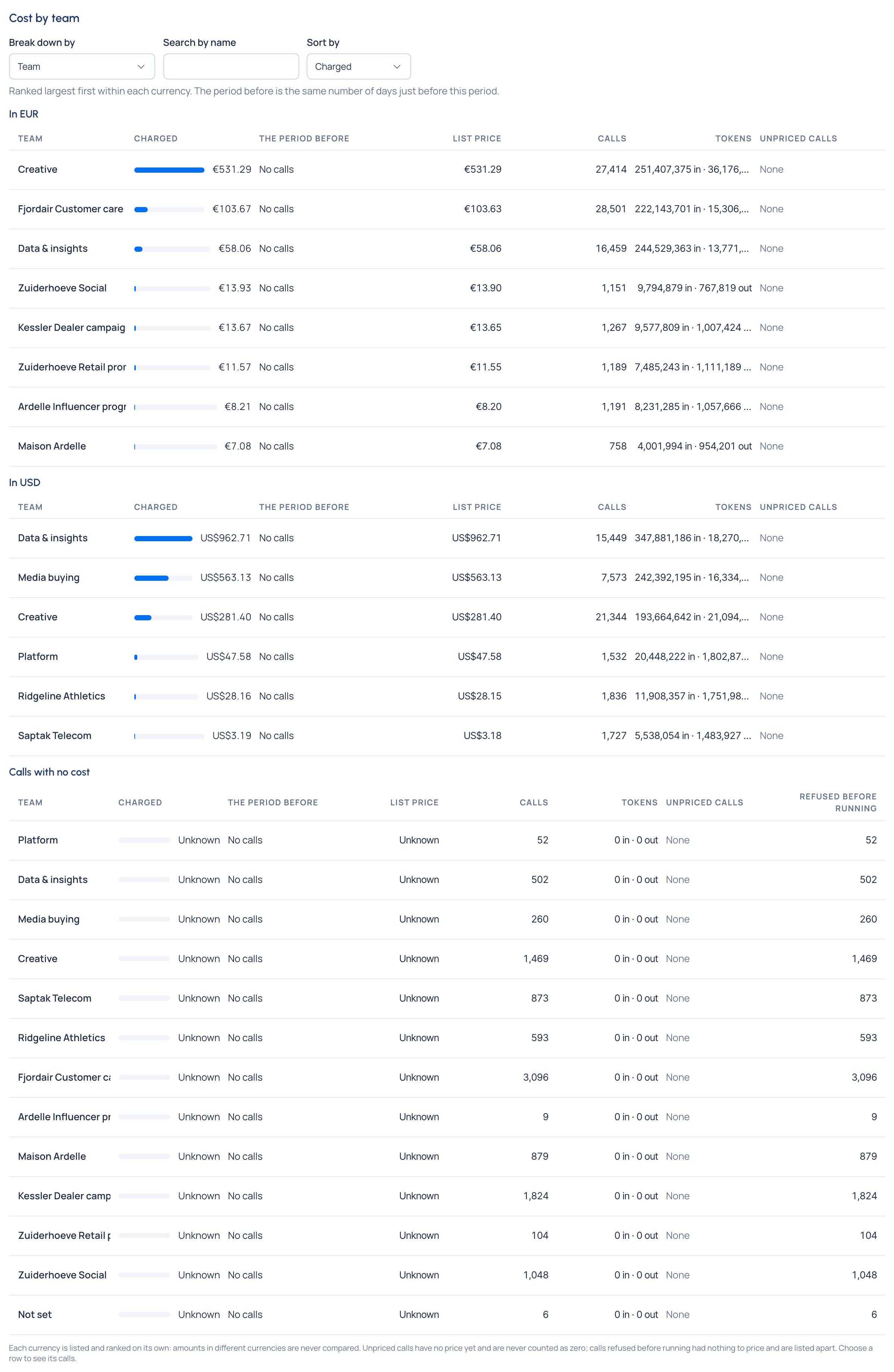
- One figure per currency. Your European contracts in euros, your US ones in dollars: shown side by side, never converted, never added. "€410.27 · US$1,530.00" is an honest total; a single converted figure isn't.
- Nothing unknown shown as zero. A call with no price is counted apart as unpriced, with a link to price it. Only a real zero reads Free.
- Budgets that act. A budget warns, stops calls, or sends them to a cheaper model when it's reached, within a few minutes of the call that crossed it. Budgets that act
- A period you can close. Lock last month for billing; a call that arrives late or a correction that reaches a locked day is counted on the first open day, as an adjustment. Cost you can rely on
What you need from IT, once
- A provider, connected by an organisation admin, so calls go somewhere.
- Prices. An organisation admin connects the rate card in Settings › Rate card; you add any negotiated prices yourself as manual prices. Connect prices before traffic starts: on Community, calls made before a model has a price stay unpriced.
- The Finance role, given to you by an organisation admin. It covers the whole organisation's cost, prices and budgets, without admin rights over people, keys or providers. What Finance can do
After that, you run it alone: budgets, markups, prices, locks, exports and what-if.
What changes for you
- "What did AI cost us last month, by team?" is one page: Money › Cost, period Last month, Break down by Team.
- A team approaching its limit is told at 50%, 80% and 100%, and you are too.
- The month closes on a day you choose, and the figures you invoiced never move.
- Your client invoices carry a handling fee you set once, as a markup.
- When a provider corrects a price, you see exactly which calls it would change before anything changes.
Next: A month with Vidai follows one month from start to close.