Agents in production
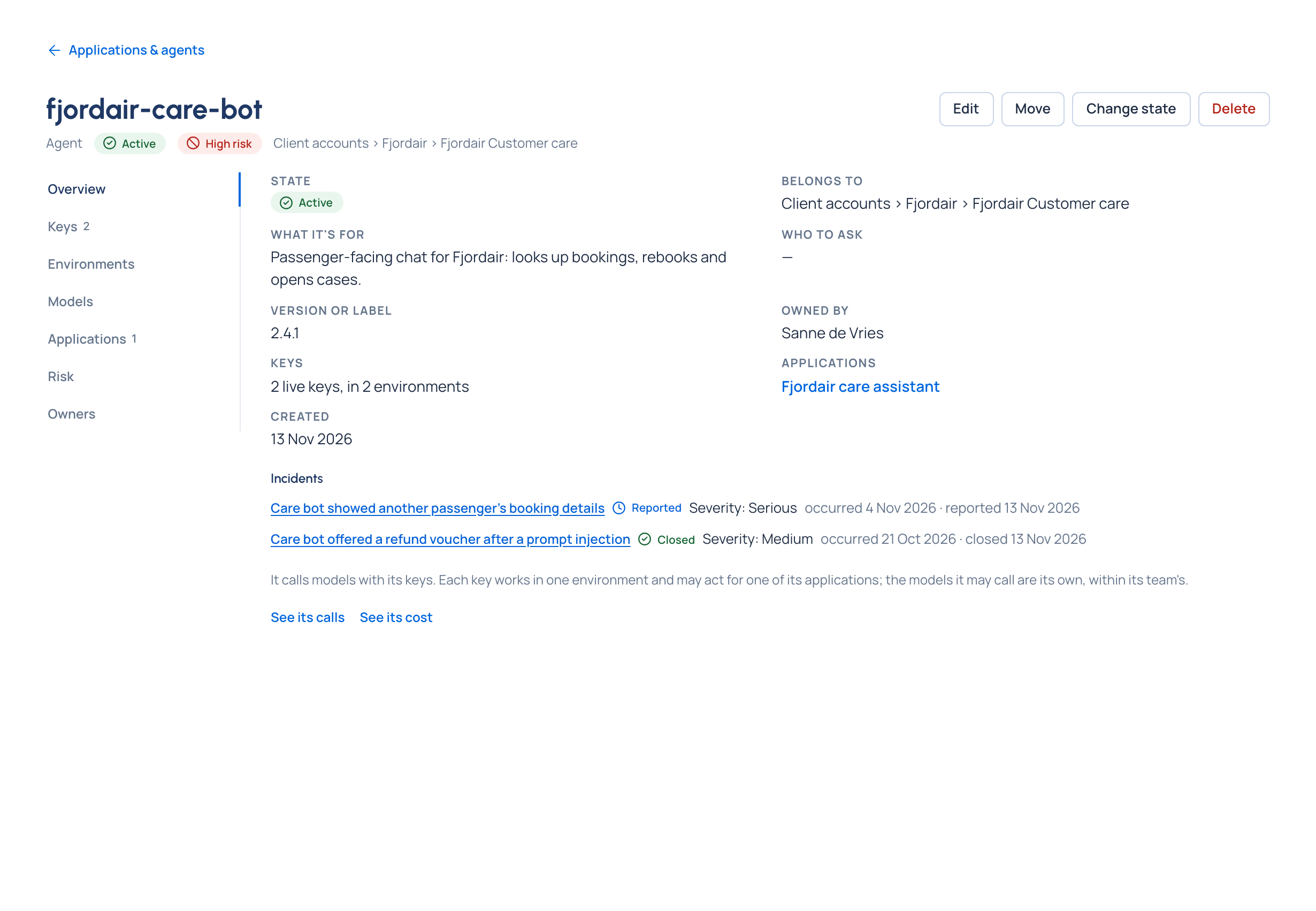
Purpose: an application made of several agents is hard to run when they share one provider key: nobody can say which agent spent the money, made the odd call or leaked the secret. In Vidai each agent has its own keys, so every call it makes is traced to it, priced to the right team, and held to its own budget, Guardrails and models. Stopping one agent never stops the others.
One application, many agents
Vidai knows your system the way you built it:
- An agent is one program that calls models on its own: a summariser, a router, a reviewer.
- An application groups the agents that work together, such as Fjordair care assistant, and keeps their history.
- Each agent calls models with its keys, one per environment it runs in.
flowchart LR
  subgraph app["Application: Fjordair care assistant"]
    a1["Agent: care-bot"]
    a2["Agent: triage"]
  end
  a1 -- "key (production)" --> gw["Vidai gateway"]
  a1 -. "key (staging)" .-> gw
  a2 -- "key (production)" --> gw
  gw --> rl["Request logs, Cost, budgets<br/>per agent, application and key"]
Add an agent under Applications & agents › New agent, or make the application and its agents together with New application (Add an agent, Create an application). An agent's key may act for one of its applications: that decides who pays (the application's team), never what it may call.
A key per agent, per environment
- Never share a key between agents. The key is how Vidai knows which agent made a call. One key each means one line per agent in Request logs and Cost, and a leak stops one agent, not the application.
- One key per environment. Each key works in one environment (for example staging and production), whose rules say who may issue keys there and for how long. To promote an agent, issue it a key in the next environment (Give an agent a key).
- Agents' keys outlive people. They don't stop when the person who set them up moves on, which is what a production service needs. Keep person's keys for people's own tools.
- Narrow a key when it helps: Only some models of the agent's, a Rate limit, requests a minute, an expiry.
Keep the secret safe, and rotate it without downtime
- Read the key from an environment variable or your secrets store, never from code.
- Replace secret on the agent's key gives a new secret while the old one keeps working for the time you choose, up to 7 days. Deploy the new secret, then choose Stop old secret now. The key's models, limits and rules stay with the key, so nothing else changes (Rotate a key).
- After a leak, choose Replace secret with No time: the old secret is refused at once.
- An owner can Show key again; that's recorded.
Trace an agent's calls
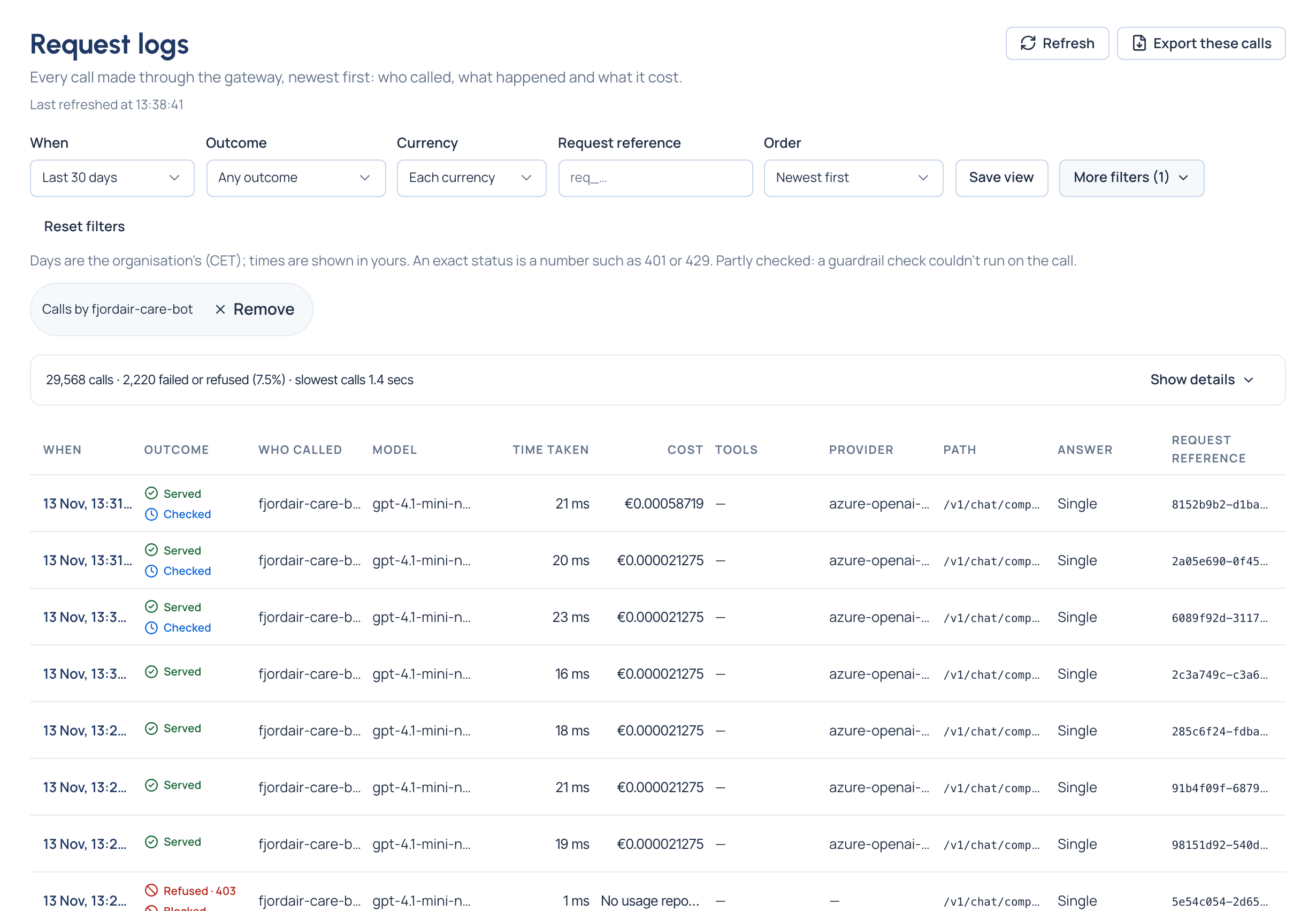
Every call an agent's keys make is in Daily › Request logs within seconds; Cost totals and dashboards count it within about two minutes.
- See its calls on the agent's page opens Request logs on that agent.
- Under More filters, Agent, Application, Key and Environment narrow the list to one agent, one application, one key or one environment; Called by › agents shows all agents' calls apart from people's.
- Tool finds the calls that offered a model a tool, or called it, by the tool's name.
- Each call shows the model asked for and the one that answered, what the Guardrails did, how long it took and what it cost.
To join a run in your own system to the calls it made, send your own id with each call:
response = client.chat.completions.create(
    model="gpt-4.1-mini",
    messages=messages,
    extra_headers={"x-request-id": f"{run_id}.{step}"},
)
const response = await client.chat.completions.create(
  { model: "gpt-4.1-mini", messages },
  { headers: { "x-request-id": `${runId}.${step}` } },
);
x-request-id (up to 128 letters, digits and . _ : -) is kept with the call and sent on to the provider unchanged.
Log the answer's x-vidai-request-id too: it finds the call in Request logs › Request reference
(Request ids). Add x-trace: true to keep one call's content in Request logs while you debug.
The gateway reads no user, session or tag header: an agent is told apart by its key, a run by your x-request-id.
Budgets, Guardrails and models at the agent level
Rules set on an agent act on every key it holds; rules set on an application act on the keys that act for it.
| What | Set on the agent (or application) | What the agent's code sees |
|---|---|---|
| Models | The agent's own list, within its team's (Choose models for a team or agent) | GET /v1/models lists exactly what its key may call; anything else is 403 model_not_allowed |
| Budget | A budget on the agent, its application or one key (Set a budget) | At the limit, Stop calls at the limit gives 403 api_key_disabled with error.reason budget_exceeded; Send calls to another model at the limit answers from the cheaper model (x-vidai-model names it) |
| Guardrails | A rule at the agent's or application's level (Set a guardrail); a level can only tighten what's above it | A block is 403 content_guardrail_blocked; a pseudonymised answer carries x-vidai-pseudonymised: 1 |
| Region Enterprise | Keep calls in a region on the agent or application | Only models placed in that area are callable; others are 403 model_not_allowed |
| Routing and fallback | Routing rules and compliance routes on the agent or application; fallback chains on the agent | x-vidai-requested-model, x-vidai-routing-rule and the fallback headers say what changed (Fallback and retries) |
What Enterprise includes depends on the features your licence includes. An agent's calls also count against its team's budgets and follow its team's rules: every budget that covers a call counts it, and any one reached acts.
On the agent's page, Could call now lists every model a key of the agent's could call, and why each other one is out, before the agent sends a single call.
When an agent is stopped
| What happened | What the agent's calls get |
|---|---|
| The agent is Suspended | 403 api_key_disabled, error.reason agent_suspended |
| The agent is Deprecated | It keeps working until the day chosen, then it's suspended; it gets no new keys |
| One key is suspended, revoked or expired | 403 api_key_disabled while suspended; 401 invalid_api_key once revoked or expired |
| A budget covering it is reached (set to stop) | 403 api_key_disabled, error.reason budget_exceeded |
Don't retry these: log them with x-vidai-request-id and tell whoever looks after the agent
(Errors and refusals). Keep the framework's own retries few for everything else
(Fallback and retries).
Check it worked
- Run the agent once with its own key.
- On the agent's page, choose See its calls: the call is at the top, under the agent's name, with the model that answered and its cost.
Related
- Applications and agents: the concept
- Keys and API tokens
- Agent frameworks: connecting LangChain, CrewAI, the OpenAI Agents SDK and more
- Suspend, deprecate or move an agent
Good to know
- A replaced secret keeps working for at most 7 days.
- Each call keeps who paid when it was made: moving an agent or an application later doesn't move past calls.
- Deleting an agent revokes its keys for good; what it did stays in the audit log.