Estimate a cost with the price calculator
Purpose: answer "what would this cost?" before anyone builds it: a new use case, a quote for a client, or two models compared for the same workload.
Before you start
Anyone who can open Money › Cost can use it. Have a rough figure for the tokens: input, output, and how much of the input is cached.
Steps
- Open Money › Cost and choose What-if. Scroll to Price calculator.
- In the price calculator, choose a Model.
- Optionally, choose a second model in Compare with (optional): it offers models of the same kind as the first.
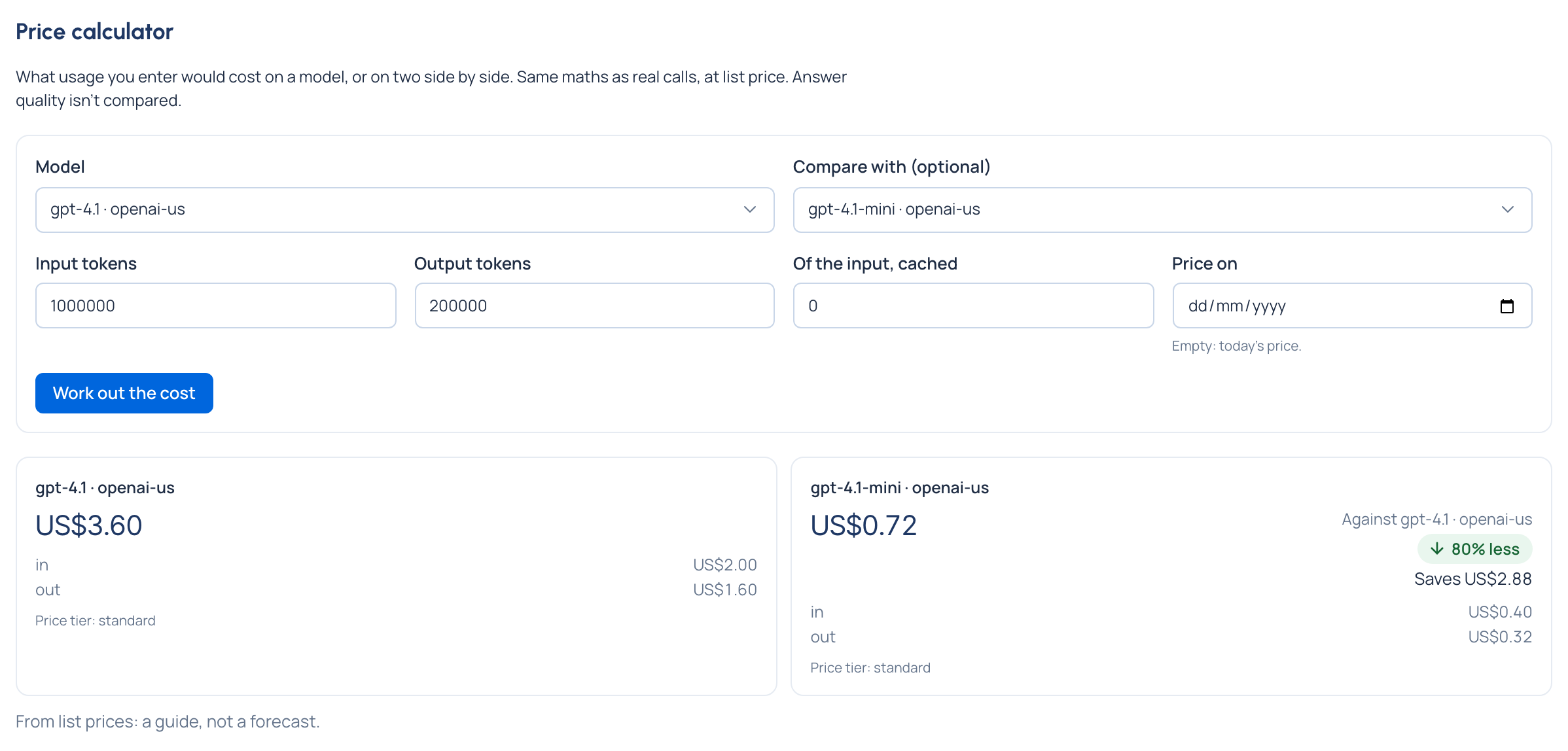
- Enter Input tokens, Output tokens and Of the input, cached (whole numbers, 0 or more).
- Optionally, choose a day in Price on. Empty means today's price.
- Choose Work out the cost.
Check it worked
The answer shows the model's cost and the price tier it used. With two models, the second shows how it compares with the first ("Against …"): an arrow, the percentage less or more, and the amount saved or extra.
Good to know
- Same maths as real calls, at list price: a guide, not a forecast. Answer quality isn't compared.
- A difference is shown only when both models are priced in the same currency: "No difference is shown: one isn't priced, or they're priced in different currencies, which are never compared."
- A model with no price says so: "No price: this model's cost is unknown".
Related
- Compare models on your past calls: the same question, answered from real calls.