Get new recovery codes
Recovery codes are how you sign in if your phone is lost. Used a few, misplaced the list, or think someone saw it? Get a fresh set in a minute: the old codes stop working at once, so a list someone else holds is worth nothing.
Before you start
You use multi-factor sign-in, and you have your authenticator app to hand.
Steps
- Open the menu under your name and choose Your account. Stay on Profile.
- Under Signing in, beside Multi-factor sign-in (it says On), choose New recovery codes.
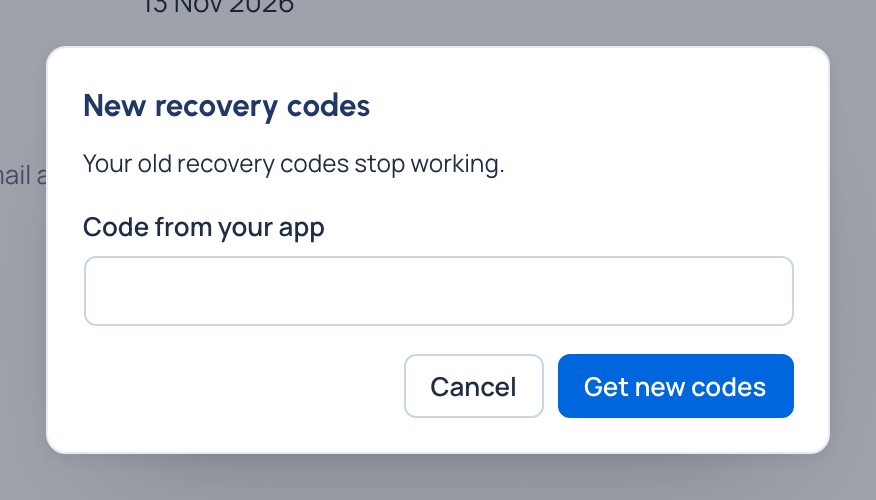
- Type the code your app shows in Code from your app and choose Get new codes.
- Keep the new Recovery codes: use Copy and store them somewhere safe, such as your password manager. Each signs you in once, and they're shown only now. Choose Done.
Check it worked
Your old recovery codes no longer sign you in. At sign-in, Use a recovery code instead takes one of the new ones.
If something goes wrong
- Your phone is gone, so you can't type a code from it. Sign in with one of your remaining recovery codes, then turn multi-factor sign-in off and on again with a new phone (see Turn on multi-factor sign-in). New codes come with it. While your organisation requires multi-factor sign-in you can't turn it off: ask an organisation admin to reset it instead.
- No phone and no codes left? Ask an organisation admin to reset your multi-factor sign-in.
Related
- Turn on multi-factor sign-in
- Sign in
- Reset someone's password or multi-factor sign-in: the admin's side.