Who spent what
The question: "What did AI cost us last month, by team? And which agent is driving it?"
What you gain: the answer on one page, within minutes of the calls, without a spreadsheet. Every call already knows who made it, so attribution is never a guess.
Who pays for a call
- A person's key charges the team it acts for.
- An agent's key charges its application's team, or, if the agent isn't in an application, the agent's own team.
- Every call is also shown under the person or agent, the application, the environment and the key.
- Who pays is kept as it was then. Moving a key, agent, application or team later doesn't move past calls, so last month's figures still read the way you invoiced them. (A recompute can move them on purpose, with Charge to who pays today.)
- Names stay after a delete. A team, model or key deleted after it spent keeps its name in every list and export.
Seven ways to slice it
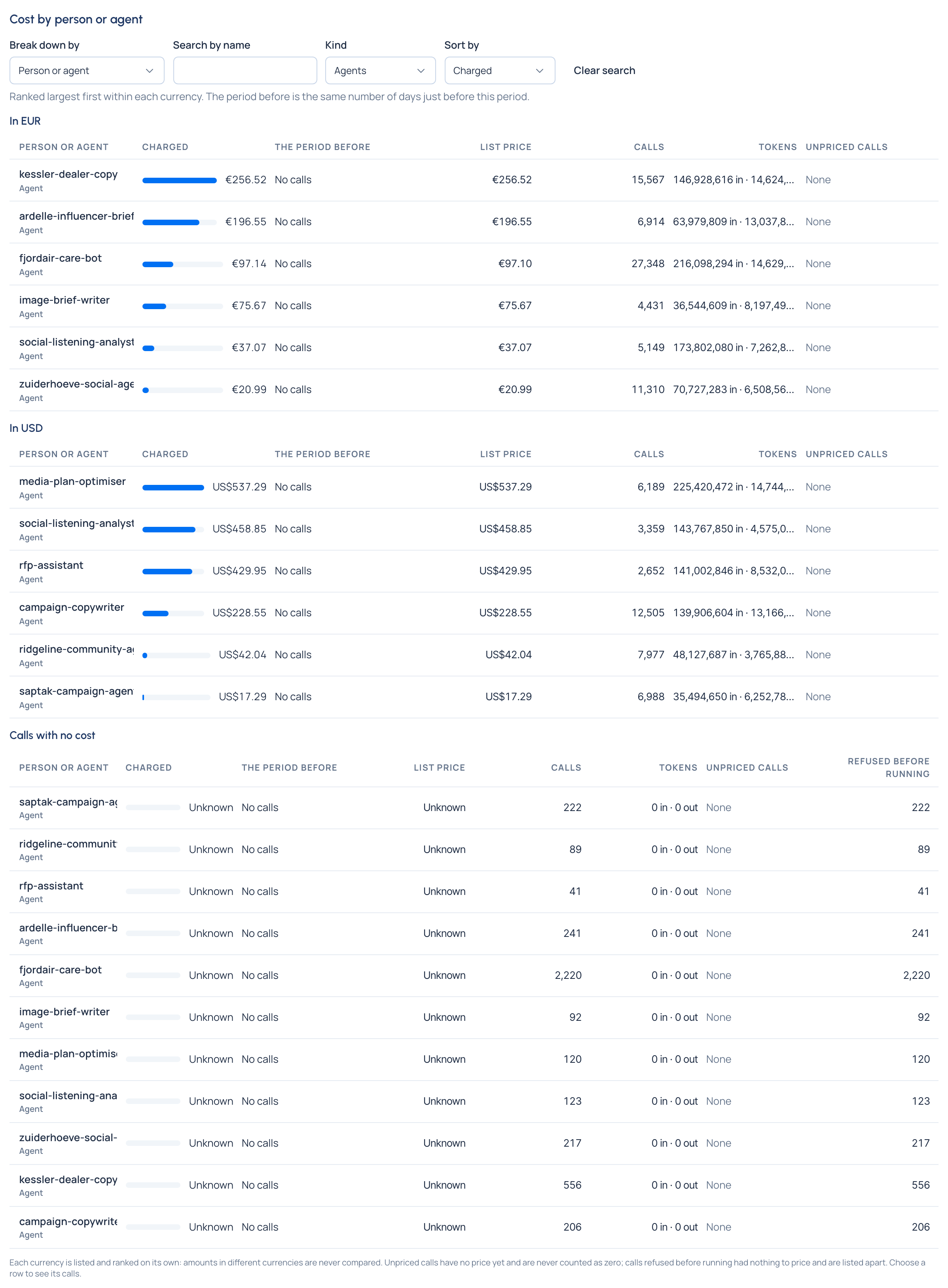
Money › Cost › Overview breaks the period down by Team, Person or agent, Application, Environment, Key, Provider or Model (Break down by). For each row:
- what was charged (list price plus any markup) and the list price;
- the number of calls and the tokens they used, in and out;
- the period before: the same number of days just before, and the change;
- unpriced calls and calls refused before running, counted apart.
Search by name, Kind (people, agents or both) and Sort by (charged, calls, list price or tokens) narrow and rank the list. They stay in the page's address, so a link opens exactly the list you saw. Choose a row to see the calls behind it.
One currency per view, never mixed
The Grachtwerk demo organisation buys its European models in euros and its US models in dollars. Its Overview reads "€… · US$…", and each breakdown has one list per currency, ranked on its own. Vidai has no exchange rates: amounts in different currencies are never converted, added, compared or ranked against each other.
When more than one currency is in use, a Currency picker shows one at a time: totals, counts and lists are then that currency's calls only. Each currency shows them side by side again.
Spend now, and the run rate
At the top of Overview, Spend now gives today, month to date and the last 30 days, with an estimate of this month at the current rate, one per currency, and the biggest spenders this month.
Narrow by risk
Organisation readers and group admins can narrow cost to the calls made by agents and applications at one risk level (High, Limited, Minimal, Not in scope), as each carried it when the call was made. Useful when someone asks what the high-risk systems cost.
Who sees what
| Role | What they see on Cost |
|---|---|
| Organisation admin, organisation viewer, Finance | The whole organisation |
| Group admin | The calls charged to their teams and the teams under them |
| Everyone else | The cost of their own keys' calls |
Related
- See where the money goes: the steps.
- Find what a call cost
- The FinOps dashboard: the same figures as charts.