Saving money
The question: "Would a cheaper model have done the job, and how much would we have saved?"
What you gain: the saving worked out from your own calls, not a price list. Pick a model your teams use; Vidai re-prices every one of those calls, with its real usage, on every model they could have used, cheapest first.
What-if on your past calls
On Money › Cost › What-if, choose the model the calls asked for, a period and whose calls (the whole organisation, a team, an application or a key). The answer comes first, for example:
Cheapest: gpt-4.1-mini, US$79.40 instead. ↓ 80% less, Saves US$317.59
or "None of the models compared would have cost less." Then each model at a glance, cheapest first: what the calls would have cost, the average per call, an arrow with the percentage less or more and the amount saved or extra, and a bar with a mark where today's cost sits.
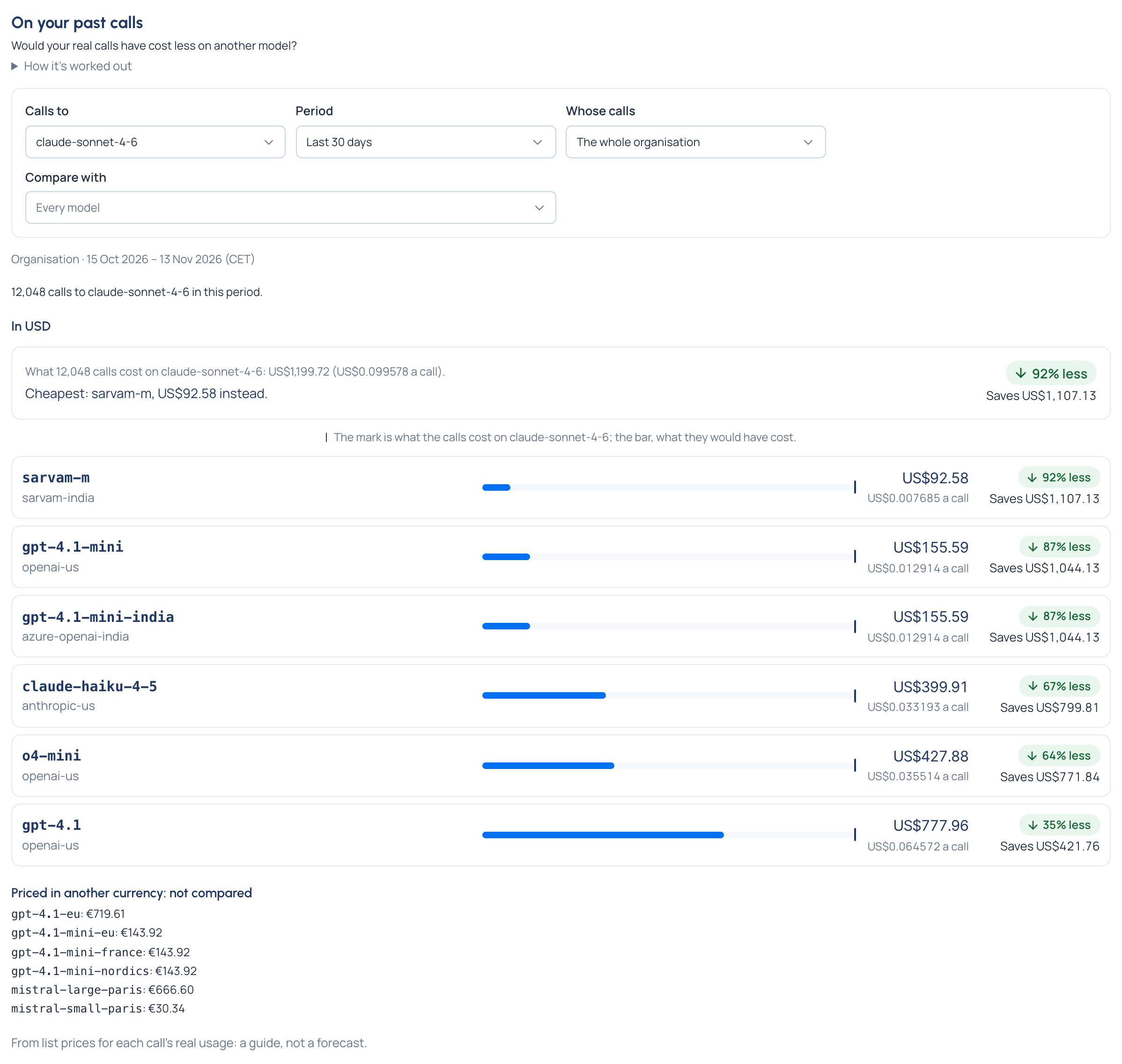
- Only models the calls could really have used are compared. Models that can't take the same kind of call, are switched off, aren't allowed for those keys, sit outside a region rule or have no price are listed apart under Models not compared, with why.
- One comparison per currency. Models priced in another currency are listed apart with their own figure, never compared.
- Calls with no price aren't compared and are counted apart, never as zero.
It's from list prices: a guide, not a forecast, and answer quality isn't compared. Try the cheaper model on a share of traffic before switching everyone. Compare models on your past calls
An estimate for a use you type in
The Price calculator, on the same tab, works out what an amount of use (input, output and cached tokens) would cost on a model, at today's price or a chosen day's, or on two models side by side with the difference. Estimate a cost with the price calculator
From the saving to a rule
When the what-if shows a cheaper model that will do, an organisation admin or group admin turns it into traffic on Models & routing › Routing:
- A routing rule sends calls for one model to another. Each rule shows what it saved in the last 30 days, one line per currency, and the extra cost when the target costs more.
- An A/B experiment sends a share of calls to each model, so you can compare before you commit.
- A route budget switches to the cheaper model only once a limit is reached. Budgets at several levels, and route budgets
The FinOps dashboard and the impact report show Saved by routing for any period, marked Estimated: it's worked out against the price of the model first asked for.
Fallback chains and what they cost
A fallback chain tries the next model when a provider fails, so a call is answered instead of refused. A provider may still charge for an attempt that failed before the fallback answered.