Reset someone's password or multi-factor sign-in
A colleague forgot their password or lost their phone. Get them back in without a help-desk ticket, and without you ever knowing their new password. Every reset is recorded in the audit log.
Before you start
- Reset password: organisation admins, and group admins for people in their teams when an organisation admin has allowed it (Settings › Sign-in & security › Group admins can reset passwords).
- Reset multi-factor and Sign out everywhere: organisation admins.
- A group admin can't change someone whose reach is wider than theirs (someone with an organisation role, say). Their page says an organisation admin must do it.
Reset a password
- Open People and choose the person.
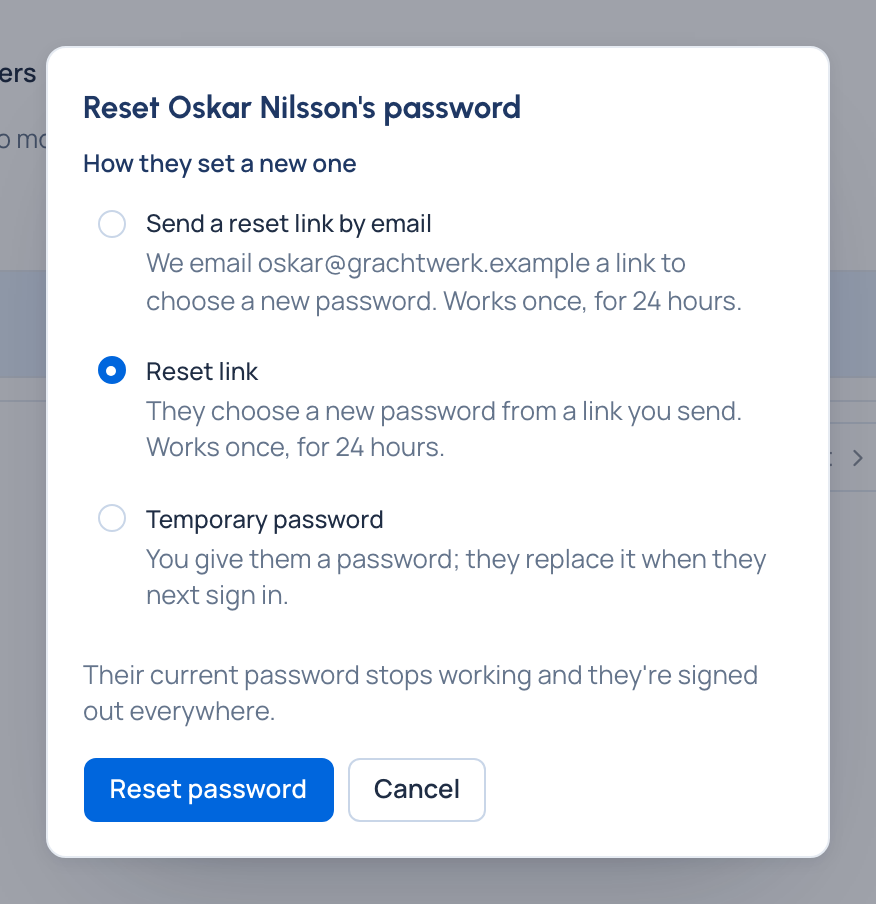
- Choose Reset password, then how:
- Send a reset link by email (with email set up): the link goes to their address; you never see it.
- Reset link or Temporary password, shown once, for you to give them somewhere private.
- Confirm. Their old password stops working and they're signed out everywhere. With email set up, they're also told by email who reset it.
Reset multi-factor sign-in
For someone who lost their authenticator app and their recovery codes.
- Open the person and choose Reset multi-factor.
- Confirm. They're signed out and sign in with their password alone until they set it up again. If your organisation requires multi-factor sign-in, they're asked to set it up at their next sign-in.
Sign someone out everywhere
Choose Sign out everywhere on their page: every session they have ends at once, and they can sign in again straight away. Use it after a lost laptop, together with a password reset.
Check it worked
Their page shows the change; the audit log records it with your name. They can sign in with the new password, or with their password alone after a multi-factor reset.
Good to know
- None of these is offered on your own account. To change your own password, use Your account.
- While single sign-on is Required (Enterprise), only the emergency admin and password exceptions may have a password. Reset password says so and offers Allow them a password: give a reason, they become a password exception, then reset as usual.
Related
- Reset a forgotten password: what they can do themselves.
- Require multi-factor sign-in and set password rules
- Disable or delete someone