Stop following a regulation
Purpose: when a regulation no longer applies to you, stop following it without losing records or policies by accident. Vidai says what happens before anything changes, and removes nothing for you.
Before you start
- You're an organisation admin or a Compliance officer Enterprise. On Community, an organisation admin does this.
Steps
- Open Policies › Regulations and choose Stop following… on the regulation's card. (Removing its chip on Proof › Retention & legal hold does the same.)
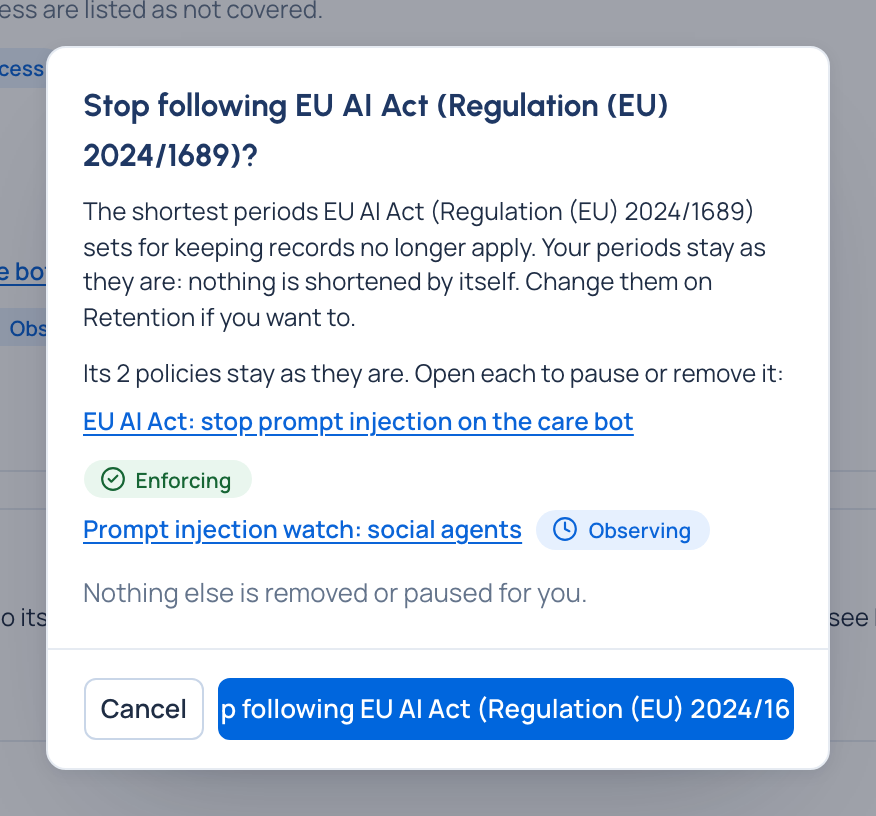
- Read the dialog:
- the shortest periods it set for keeping records no longer apply, and your periods stay as they are;
- its policies stay: each one tagged with it, including those made from its recipes, is listed and linked.
- Choose Stop following ….
Check it worked
- The regulation is one line under Not followed again, with Follow ….
- Its chip is gone from Retention; each period reads as before.
Next
- To shorten a period, change it on Retention: see Set how long records are kept.
- To retire a policy, open it from the dialog's list and pause or remove it.