Add a compliance route Enterprise
Purpose: your developers ask for gpt-4.1; your EU clients' data must be processed in the EU. A compliance
route sends calls for a model to a compliant deployment (its EU twin, say), always. It beats every other rule, no
key can be exempted from it, and it never falls back: if the target can't be used, the call is refused rather than
sent somewhere it shouldn't go.
In the demo world, calls from Zuiderhoeve Dairy and Kessler Autohaus for gpt-4.1 go to gpt-4.1-eu on
azure-openai-westeurope, and the Image brief writer application does the same for its agents.
Compliance routes come with the Enterprise edition; what Enterprise includes depends on the features your licence includes.
Before you start
- You're an organisation admin (group admins can set region rules on their teams, but not compliance routes).
- The compliant model exists and is switched on (often a copy of the provider in another region: Add it in another region).
- The keys at that level may call both the model asked for and the target.
Steps
- Open Policies › Policies and choose Keep calls in a region… › New compliance route (or New routing… › Route to a compliant deployment on Models & routing › Routing).
- Applies to: the level and which one, for example Application › Image brief writer.
- Calls to: the provider and the model asked for (
openai-us,gpt-4.1). - Go to: the compliant model (
azure-openai-westeurope,gpt-4.1-eu). - Why is required: "Image briefs carry clients' unreleased products: the large model's EU deployment". The purpose starts at Compliance.
- Check what it changes, then Save.
Check it worked
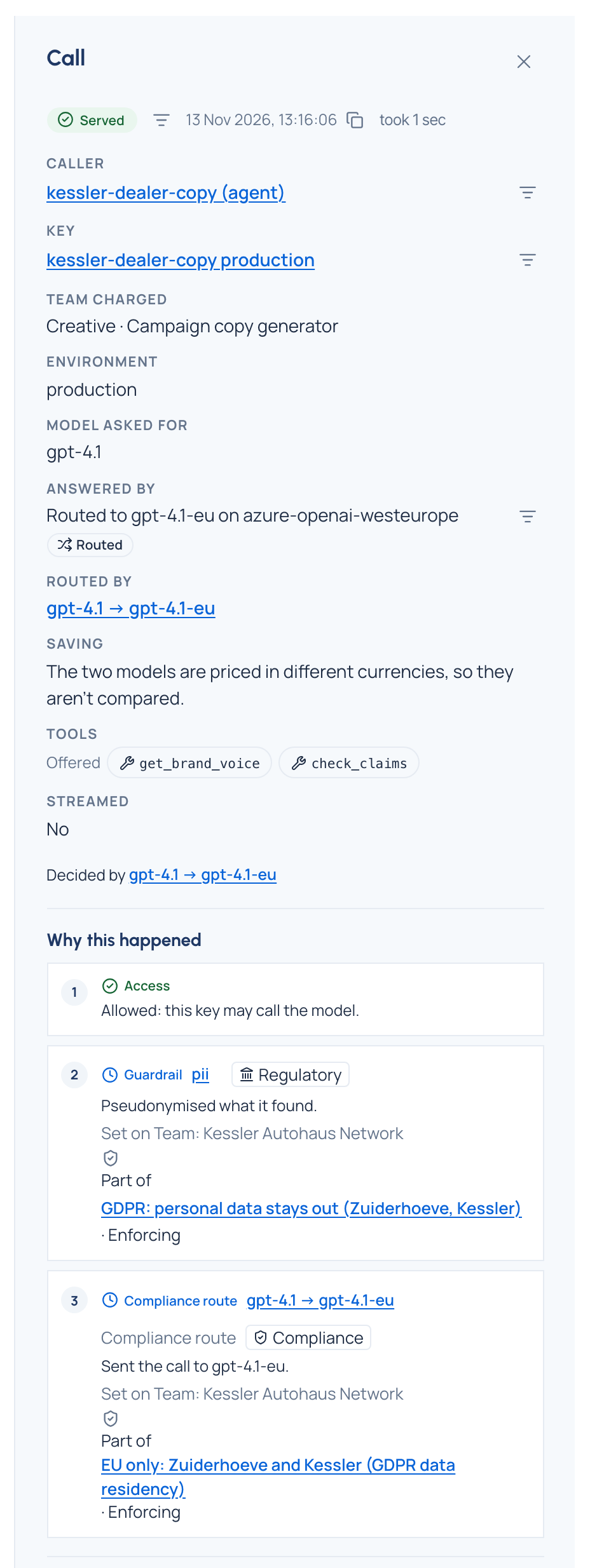
In Request logs, a call from that level for gpt-4.1 reads "Routed to gpt-4.1-eu on azure-openai-westeurope" under
Model asked for: gpt-4.1, and Why this happened names the Compliance route and where it's set.
Let a customer use their own provider key
For a client who pays the provider directly, with their own key:
- Copy the provider with Add in another region, with an Ending for model names such as
-acme, and say where it runs. Put the customer's key on the copy (Upstream keys). Its models (gpt-4.1-acme) start switched off: switch them on. - Give the customer's agents (or their team) the suffixed models, and keep the original model in their list as well: a compliance route applies to a model the key may call.
- Add a compliance route on their agents or team:
gpt-4.1→gpt-4.1-acme. Use a compliance route, never an ordinary routing rule: a routing rule can pause, and calls would then go to the model asked for, on your key. - Their calls show under the copied provider in Request logs and Cost, so you see exactly what ran on their key.
Related
- Keep calls in a region
- See which routing rule wins: a compliance route is always first.
Good to know
- An emergency override never lifts a compliance route.
- If a key can't use the target (switched off, say), its calls are refused, never sent elsewhere.
- A compliance route that belongs to a named policy says Part of that policy on its card.