Budgets that act
The question: "How do we stop a runaway agent before Monday, not after the invoice?"
What you gain: a limit that does something. A budget tells the right people as it fills and, if you choose, stops the calls it covers or sends them to a cheaper model once it's reached. Before you save one, Vidai replays last week to show what it would have done.
What a budget is
An amount in one currency for a period: Each day, Each month or For all time. Days and months start at midnight in the organisation's time zone. A budget counts what every call below it cost, from your prices.
It can be set on:
| Level | It counts |
|---|---|
| Organisation | Every call |
| Environment | Every key issued in it (production, staging…), in addition to each team's budget |
| Team | Every key in the team and its sub-teams; an agent's calls count against the team it works for |
| Application | Its agents' keys |
| Person or agent | Their keys |
| Key | One key |
Three things it can do when reached
| On screen | What happens |
|---|---|
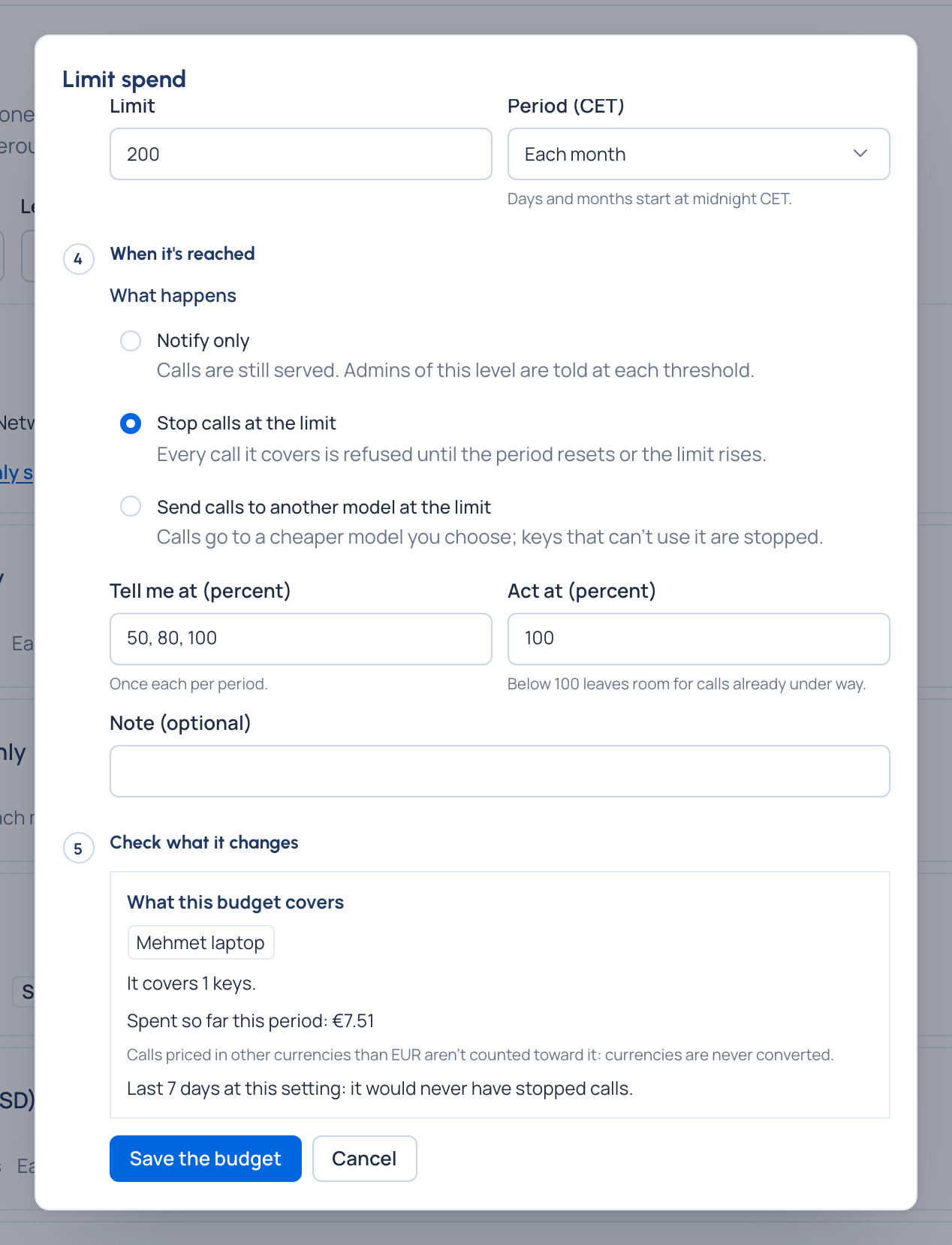
| Notify only | Calls are still served. The people the budget tells are told at each threshold (50%, 80% and 100% unless you choose others), once each per period |
| Stop calls at the limit | Every call it covers is refused until the period resets, the limit rises above the spend, or the budget is deleted |
| Send calls to another model at the limit | Calls go to a cheaper model you choose. Keys that can't use that model are stopped, never left to spend |
A stopped caller gets the gateway's usual "this API key has been disabled" answer in its own SDK's format, with the
reason budget_exceeded; never the amount. The key shows A budget covering it was reached.
Who is told
You don't keep a mailing list. Vidai tells the organisation's admins and Finance, whoever set the budget up, the admins of the teams above it, and the owners of its agent or application. Each threshold is sent once a period: on Home's Needs attention and the bell, and by email once an organisation admin has set up email.
Check before you save
Check what it changes shows, before anything is saved:
- the keys it covers and the spend so far this period;
- models with no price, which can't be counted (under a stop or route budget, the keys it covers can't call them);
- spend in other currencies that won't count ("€4.50 won't count");
- a warning when it can never be reached first, because a budget above already covers every key with a lower limit;
- a replay of last week: "Last 7 days at this setting: it would have stopped calls on 3 days, first on 5 Nov", or that it never would have, and the day each threshold was first met.
Every budget counts
A call under a team budget and a key budget counts in both; any one reached acts. Budgets are set from above: organisation admins and Finance anywhere, group admins on their teams and the people, agents and keys in them, never on themselves. Everyone sees the budgets that cover their own keys, read-only.
Lifting one for a day
An organisation admin can Lift it for up to 24 hours… from the budget's page; it starts at once. A group admin can Ask to lift for up to 24 hours…, which waits on Approvals until an organisation admin or Finance approves it.
It acts a little late, by design
Calls are priced about two minutes after they're made, and budgets are checked about every 30 seconds, so spend can go slightly over the limit before calls stop. Act at below 100% leaves room for calls already under way.