Switch VidaiGuard checks on Enterprise
Purpose: patterns find what has a shape: a card number, an IBAN, an email address. They can't find "my colleague Pieter mentioned his diagnosis" or an injection attempt written in plain words. VidaiGuard is Vidai's own set of models that check content. It runs beside your gateway, so your data never leaves your infrastructure, and its VidaiGuard checks sit beside the pattern checks in every guardrail.
Guardrails, packs, policies and regulations are complete on pattern checks alone. VidaiGuard adds what a pattern can't find. On Enterprise it's either set up or not set up, and both are normal: until it's set up, every pattern check acts as usual and nothing waits on it. On Community, guardrails are pattern checks, and no screen names VidaiGuard.
Set up or not set up
System › Settings › VidaiGuard says which, under VidaiGuard's state:
| It says | What it means |
|---|---|
| i Not set up | The gateway has no VidaiGuard address ("Rules run on patterns. Set an address to use VidaiGuard."; under VidaiGuard's address, In force reads "None: VidaiGuard isn't set up. Rules run on patterns."), or no VidaiGuard model is chosen ("Rules run on patterns. Choose at least one VidaiGuard model that VidaiGuard offers, above, to use VidaiGuard.") |
| ✓ Answering | Set up, checks on, and VidaiGuard answers |
| ! Not answering | Set up, checks on, but VidaiGuard isn't answering: calls follow Strict when a check can't run (below) |
| Checks are off. | Set up, with VidaiGuard checks on switched off; the line says whether VidaiGuard is still reachable |
| i Not known yet | Set up, with no recent read of VidaiGuard |
While it's not set up, Test a sample isn't shown and Strict when a check can't run isn't offered: with nothing to check, there's nothing to refuse. On Policies › Guardrails › Rules, one calm line stands for the VidaiGuard part instead of a row per category.
Before you start
- You're an organisation admin (organisation viewers and Compliance officers read these settings).
- VidaiGuard runs beside your gateway, and you know its address (whoever runs your installation has it).
Steps
- Open System › Settings and choose VidaiGuard.
- If it says Not set up and there's no address: under VidaiGuard's address, choose Set the address…, give VidaiGuard's address and when it takes over (see Move VidaiGuard to a new address). Where the page says the gateway takes VidaiGuard's address only from its own configuration file, whoever runs your installation sets it there.
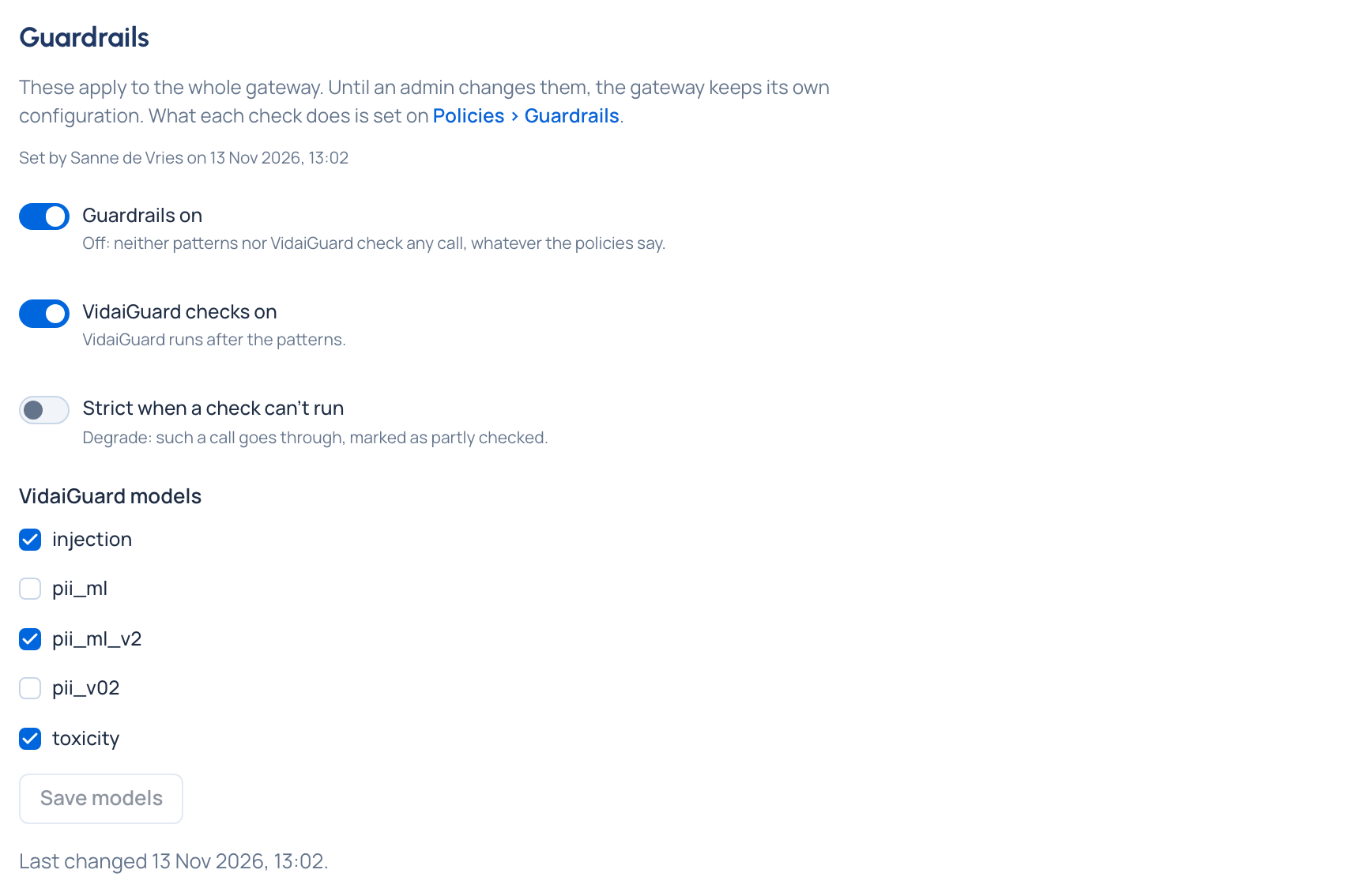
- Under VidaiGuard models, tick the models to run (in the demo world,
pii_ml_v2for personal data) and choose Save models. A change of models reaches the gateway by itself. With an address and a model, VidaiGuard is set up. - Switch on VidaiGuard checks on. VidaiGuard runs after the patterns.
- Decide what happens when a check can't run. It's one switch, Strict when a check can't run, and the line under it says what it does now:
- Leave it off (the default) and calls carry on: "Degrade: such a call goes through, marked as partly checked."
- Switch it on and calls are refused: "Strict: a call that needed a check that couldn't run is refused." First, Switch to strict? says how many keys with VidaiGuard checks would have their calls refused while VidaiGuard is down; choose Switch to strict to confirm. Switching it off again takes effect at once.
Then use them in a guardrail
VidaiGuard checks act only through a rule at a level, like patterns:
- On Policies › Guardrails › Rules, the VidaiGuard checks section has a row per AI category (for example Personal data (AI)), each naming the models that find it ("Found by pii_ml_v2") and Checking or Not checking. Choose the action on the row.
- Advanced: AI finding types lists every finding type VidaiGuard knows (email, person, injection, …), with a threshold where its answer is a probability.
- In New policy, tick Also use VidaiGuard for a kind of data or a ready-made set; on a pack rule, switch Also use VidaiGuard on for its own VidaiGuard checks to join its patterns (off by default); a recipe or a regulation's recommended policies ask the same.
Check it worked
VidaiGuard's state reads Answering, and the VidaiGuard rows you use say Checking. System › Status shows the VidaiGuard row as Connected. In Request logs, calls it found something in list findings under VidaiGuard in their Guardrails section.
Test it on a sample
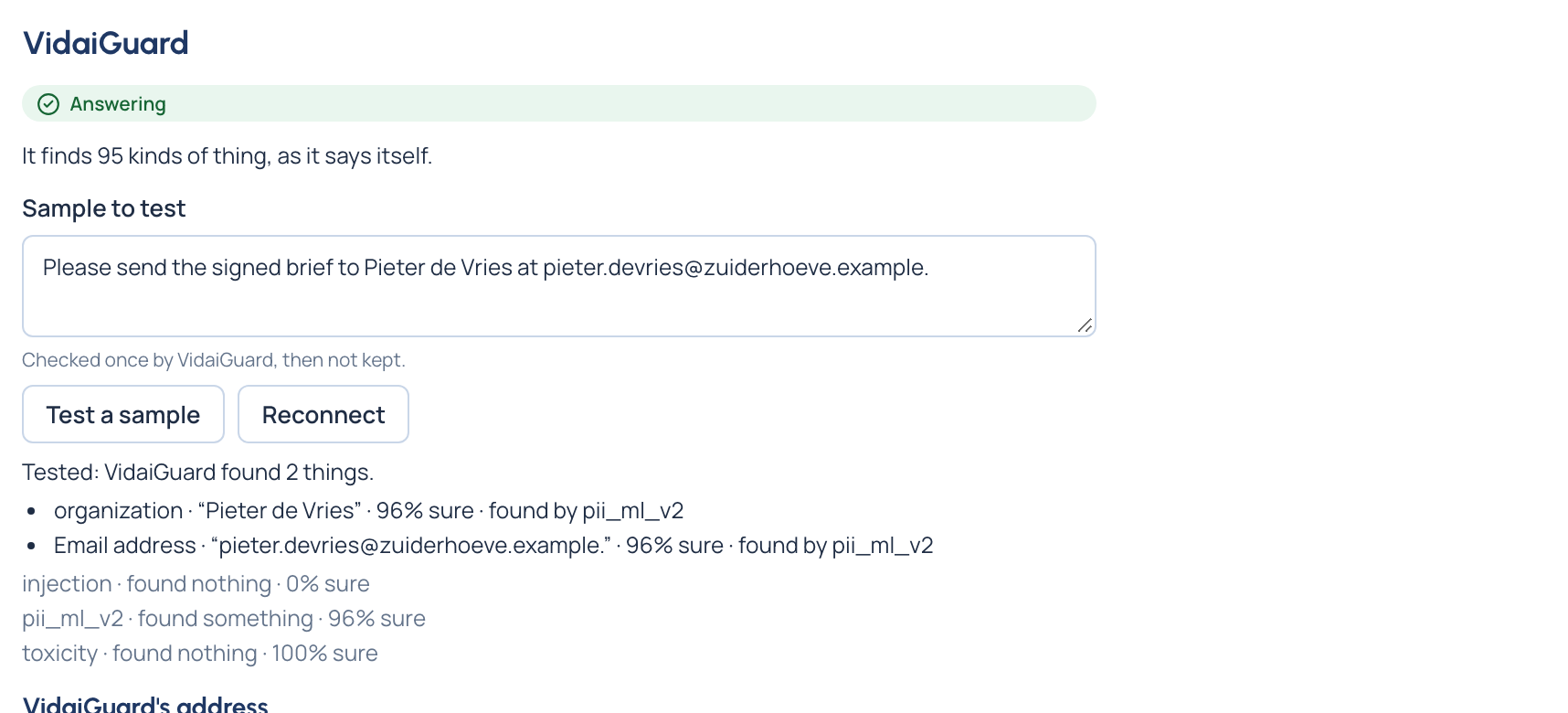
Before you rely on a model, see what it finds in text like yours. Under VidaiGuard, type a short made-up text in Sample to test and choose Test a sample (checks on, with at least one model chosen).
The answer lists what VidaiGuard found: each thing in words, the words it found in your sample, how sure the model is and which model found it, for example "Email address · “[email protected]” · 96% sure · found by pii_ml_v2". Then each chosen model's verdict on the whole sample ("pii_ml_v2 · found something · 96% sure"), or that it found nothing. A model that didn't answer is named.
A test applies no rule, so it shows no action, and the sample isn't kept once checked.
Move VidaiGuard to a new address
When VidaiGuard moves (a new host, a new version beside the old):
- Under VidaiGuard's address, choose Change the address…: one address per line, when it takes over and why.
- The new address is staged and tested while the current VidaiGuard keeps serving. The page shows Restart pending and, for each address, whether it answered, its version, how fast, its models, and any model you use that it doesn't serve.
- It takes over when the gateway restarts: At the gateway's next restart (the default), Now, if its test passes, or Apply now… once its test passed. Applying restarts the gateway: calls in flight finish, then for a few seconds no call is served.
Cancel the new address… keeps the address in force.
Remove VidaiGuard
When VidaiGuard isn't wanted any more (not used here, or being retired):
- Under VidaiGuard's address, choose Remove VidaiGuard….
- Choose when: At the gateway's next restart (the default; VidaiGuard keeps checking until then) or Now (the gateway restarts: calls in flight finish, then for a few seconds no call is served). Say why, as for any change.
- Choose Remove VidaiGuard. Waiting for a restart, the page shows Restart pending: "VidaiGuard is removed when the gateway restarts." Remove now… restarts the gateway without it; Keep VidaiGuard… cancels the removal.
Afterwards VidaiGuard reads Not set up: rules run on patterns, and a rule that uses VidaiGuard checks its calls by patterns, never refusing one. To bring it back, Set the address… the same way.
Related
Good to know
- Switching VidaiGuard checks on with no model chosen is refused, in words: choose models first. While checks are off, the models stay offered, and the page says whether VidaiGuard is still reachable ("Checks are off. VidaiGuard is reachable.").
- A sample test with checks off, or with no model chosen, says to switch checks on with a model first.
- Switching only VidaiGuard checks off leaves pattern checks running on every call.
- A VidaiGuard rule saved before any chosen model finds it is kept, and says Not checking until one does.
- Each check is decided on its own; a block from either refuses the call. Where two VidaiGuard findings overlap, the longer one decides.
- VidaiGuard rules and packs can be saved while it's not set up, switched off or not answering: their pattern checks act at once, their VidaiGuard checks once it runs. Each pack says what runs for it in one badge: see Add a pack to a level.
- A call whose rule uses VidaiGuard while it's off or not set up is checked by patterns and says so in Request logs: "Checked by patterns only: VidaiGuard is off" (or "…wasn't answering" when it was on but didn't answer).
- Strict that was already on stays shown while VidaiGuard isn't set up, so it can be switched off.
- After a move to Community, existing VidaiGuard rules still show under List every rule, where they can be deleted.