Apply a recipe
Purpose: go from "card numbers must never reach a model" to a working policy in a minute. A recipe asks a few questions, shows what it would make and whom it reaches, then makes the policy and every part in one change: all of them or none.
Built-in recipes
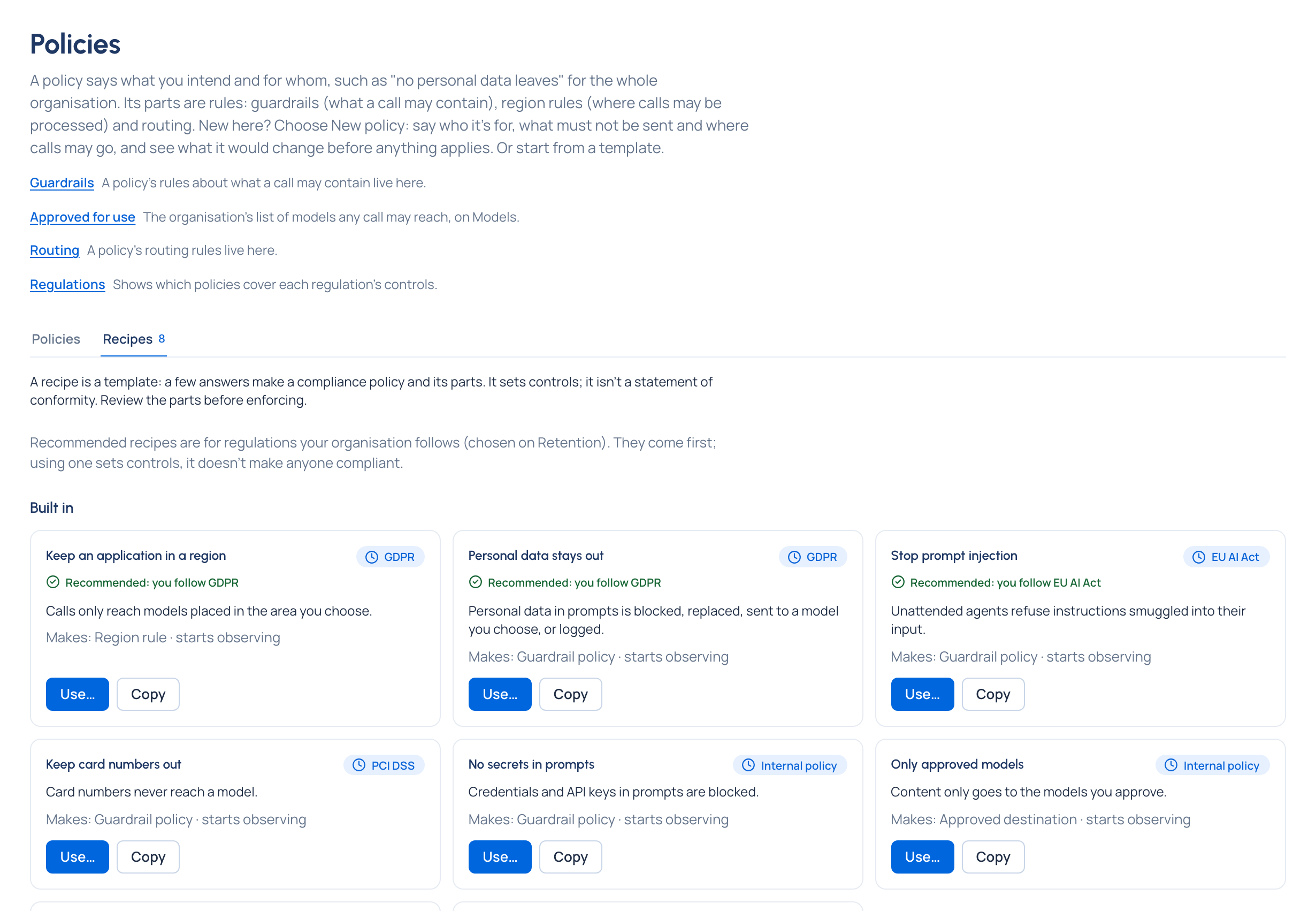
| Recipe | Regulation | What it makes |
|---|---|---|
| Keep an application in a region | GDPR | A region rule at each level you choose Enterprise |
| Personal data stays out | GDPR | The GDPR pack, and a VidaiGuard check for personal data with Also use VidaiGuard on |
| Protect health data | HIPAA | The HIPAA pack |
| Keep card numbers out | PCI DSS | The PCI pack |
| No secrets in prompts | Internal | The credentials pack, blocking |
| Stop prompt injection | EU AI Act | The agent-safety pack, and a VidaiGuard check with Also use VidaiGuard on |
| Only approved models | Internal | Approved destinations |
| Spend limit | Internal | A budget |
Recipes for a regulation your organisation follows come first, marked Recommended: you follow ….
Before you start
- You're an organisation admin, a Compliance officer Enterprise, or a group admin (on the teams you run).
- Region rules, and VidaiGuard parts, are Enterprise. What Enterprise includes depends on the features your licence includes; on Community a recipe leaves out what your edition doesn't have and says so. Every recipe is complete on its patterns. On Enterprise, a recipe with a pack or VidaiGuard part asks Also use VidaiGuard (off by default, offered while VidaiGuard isn't set up too); on Community it isn't asked. The check step shows its pack's badge (such as Patterns only, or VidaiGuard not set up once it's on), so what runs is plain before it's made.
Steps
- Open Policies › Policies and choose Start from a template… (the Recipes tab).
- Choose Use… on the recipe, for example Keep card numbers out.
- Answer its questions. Where it applies: add one or more teams, applications or agents. Then whatever else it asks: what to do when something is found, the area, the models, a content pack (your own copies are offered too, marked (yours)).
- Name the policy. It starts as the recipe says: built-in recipes start Observing, so nothing is stopped yet.
- Choose Check what it changes: each part it would make, where, what it acts on and how many keys it reaches now, and any part left out and why. Nothing is made yet. With Also use VidaiGuard off, its VidaiGuard part is listed calmly under Not made, as you chose ("a VidaiGuard check, made only with Also use VidaiGuard on. The patterns act without it."); a part your installation can't make is under Left out.
- Choose Create the policy.
Add a second recipe to the same policy
One intent is one policy: "GDPR for the booking assistant" can hold both Personal data stays out and Keep an application in a region.
- Choose Use… on the second recipe.
- Under Its parts go into, choose An existing policy, then the Policy.
- Answer its questions. Leave Where it applies empty to use the policy's own.
- Check what it changes: the parts it adds, and the parts already in the policy.
- Choose Add to the policy. Its Made from then lists each recipe in the order it was run.
Check it worked
- The policy opens, Observing, with Made from naming the recipe and its version.
- After a few calls, What enforcing would have done shows findings by category and what would have been done.
- When you're ready, Start enforcing…: the confirmation shows what it reaches before anything changes.
Related
- Named compliance policies
- Follow a regulation
- Watch first, then enforce
- Make a policy with New policy
- Add a pack to a level
Good to know
- If a part would be refused (for example a region rule that doesn't sit within its team's), the recipe says which part and why, links to what's there now, and makes nothing.
- A recipe sets controls; it doesn't make anyone compliant. Review the parts before enforcing.
- Recipes are added to a policy one at a time.
- Built-in recipes can't be changed: Copy one to make your organisation's own, then change its words, regulation and suggested state.
- Group admins run recipes on their own teams, and add to a policy only when every team it covers is theirs.