Make a policy with New policy
Purpose: "Fjordair's customer care must never send an email address to a model" is one intention. New policy turns it into the rules that enforce it, under one name, in one step. As you answer, the policy reads itself back as a sentence, so what you save is what you meant; and a check shows every key it reaches before anything is saved.
Before you start
- You're an organisation admin or a Compliance officer Enterprise, or a group admin for the teams you administer.
- Know the level it's for: the whole organisation, an environment, a team, an application, a person, an agent or one key.
Steps
- Open Policies › Policies and choose New policy. Every question is optional: answer the ones you need.
- Who is it for? Choose the level and which one, for example Team › Fjordair Customer care.
- What must not be sent? Choose Kinds of data (grouped: personal data, secrets, prompt injection, …) or A ready-made set (a pack).
- For each kind of data, How it's found lists its patterns, all ticked; untick any you don't want.
- Add your own pattern… writes one on the spot: name it, write it, Try it on sample text, then Add it (organisation admins).
- Also use VidaiGuard Enterprise adds VidaiGuard where it has a name for that data, with Checking or Not checking beside it, and how sure it must be to act. While VidaiGuard's checks are off or it isn't answering, it stays offered, with a line on what runs now. While VidaiGuard isn't set up, it isn't offered: kinds of data come from patterns, with one calm line saying so. A ready-made set shows its pack's badge, and, for a set with VidaiGuard checks of its own, Also use VidaiGuard (off by default, offered while VidaiGuard isn't set up too): off, the set is its patterns (Patterns only); on, its VidaiGuard checks join them.
- What happens when it's found? Watch only, Mask, Pseudonymise, Redirect or Block, one for everything in the policy. Redirect asks for the provider, then a model every key the policy reaches may call.
- Where may calls go? Optionally Keep calls in a region Enterprise.
- Give it a Policy name and, if you like, Tag with a regulation (a label for finding it later).
- Read the sentence at the top, for example: "For Fjordair Customer care, when a request contains Email address, mask it before any model sees it."
- Choose Watching (guardrails only record what they find) or Enforcing, then Check what it changes: each part, the keys it reaches and what changes for each.
- Choose Save and watch first (or Save and enforce now).
Check it worked
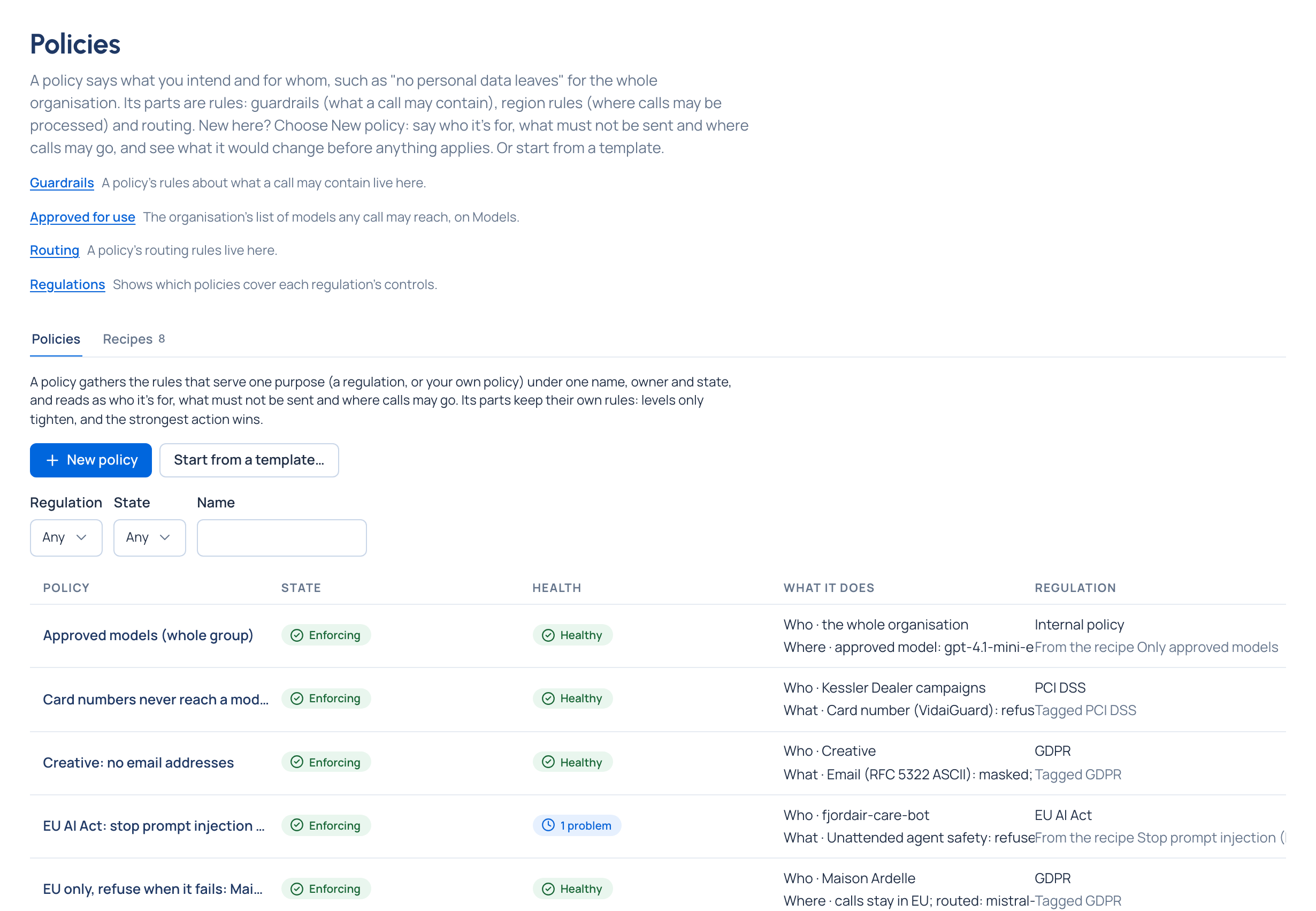
Choose Open the policy. It's listed on Policies as Observing (or Enforcing), with sentences for who it's for and what it does: "Email address: masked (watching)". Its parts are ordinary guardrails, visible on Guardrails › Rules with Part of the policy beside them.
If something goes wrong
- Saving makes all the parts or none. A refused part is named, with why ("Pattern: Email Address can't be made, so nothing was saved"), or "You may not make this part" when it needs an organisation admin.
- Before saving, a part may say This would be shadowed by a stronger rule (named, linked), or Already in place through another rule: saving it would change nothing.
Related
- Watch first, then enforce
- Apply a recipe: start from a template instead (Start from a template…).
- Set a guardrail at a level
Good to know
- Pseudonymise is greyed when a chosen pattern's data has no stand-in (card numbers, your own data types): mask it instead.
- Choosing every pattern in a category makes one rule on the category, so patterns added to it later count too.
- A region rule already on that level is replaced, and the page says so.
- Region rules have no watching mode: while the policy watches, its region part isn't in force.
- Routing rules (a refusing fallback) and budgets are added from Routing and Budgets, then Adopt existing parts… on the policy.
- On Community, kinds of data come from patterns only, and nothing offers VidaiGuard.
- A policy governs AI calls sent through the gateway only.