Keys and API tokens
Purpose: one credential for each job, so a leaked secret can only do that one job, and every call or change is traced to who made it. Keys call models through the gateway; API tokens manage Vidai from scripts. Nobody ever shares a provider's own key again.
| Key | API token | |
|---|---|---|
| For | Calling models: apps, agents, scripts, coding tools | Automating Vidai: issuing keys, onboarding teams, reading cost and Request logs |
| Sent to | The gateway | The Control room's API |
| Starts with | vk_ |
vat_ |
| Acts for | A person's team, or an agent (and optionally one of its applications) | A person, or a service account |
| Issued on | Daily › Keys | Your account › Personal access tokens; a service account's Tokens tab |
| Can call a model | Yes | Never |
| Can change Vidai | Never | Yes, within its owner's rights and its scopes |
Keys: for calling models
A key belongs to a person or an agent, and what it acts for decides who pays and which models it may call:
- A person's key acts for one of their teams. Its calls are charged to that team, and it may call that team's models.
- An agent's key acts for the agent, and optionally one of its applications. Its calls are charged to the application's team, or to the agent's own team. Use agents' keys for anything that runs unattended: production services, agents, pipelines. They keep working when the person who set them up moves on.
Each key may be narrowed to some of those models, given its own rate limit in requests a minute, and an expiry. Each key also lives in an environment (for example production), whose rules decide who may issue keys there and for how long.
Get a key
- Open Daily › Keys and choose Issue a key.
- Choose who it's for: Myself, A person or An agent (only those you may issue for are offered).
- Name it after what uses it, so you can tell keys apart later.
- Choose what it Acts for (a team, or an agent's Application) and the Environment.
- Optionally: Expires on, Rate limit, requests a minute, and Only some models.
- Choose Issue key. Copy the secret: it's shown only once. Choose Done.
Connect your app, shown beside the new key, gives the gateway's address and the SDK settings to paste it into (Find the gateway's address).
Keep keys safe
- One key per program and environment. A leak then stops one thing, and Request logs shows which.
- Keep the secret out of code. Read it from an environment variable or your secrets store.
- Rotate without downtime. Replace secret on a key gives a new secret while the old one keeps working for a grace period you choose (up to 7 days, or what your organisation allows). Deploy the new secret, then choose Stop old secret now. The key's models, limits, routing and Guardrails stay with the key, not the secret.
- After a leak, choose Replace secret with No time: the old secret is refused at once.
- Suspend stops a key at once; Resume brings it back with the same secret. Revoke stops it for good.
The gateway takes a change to a key within seconds.
Let a service rotate its own key
A service that runs unattended can renew its own key on a schedule, with no person signing in and no admin token in its configuration: it presents the key's current secret and gets a new one. The old secret keeps working for a short grace period, so calls already in flight never fail, and both secrets are the same key: its models, limits, routing, Guardrails and budgets don't change.
Turn it on first. Whoever manages the key (its holder, an agent's owner, or an admin over it) opens the key on Daily › Keys and turns on Let this key rotate its own secret; it can also be chosen when issuing an agent's key. It's off for every key until then, and never allowed on an organisation admin's key: rotate those signed in.
Rotate. Send the current secret as a bearer token to the Control room's API (not the gateway):
curl -X POST "https://<your-control-room>/api/v1/keys/self/rotate" \
  -H "Authorization: Bearer $VIDAI_KEY" \
  -H "Content-Type: application/json" \
  -d '{"grace_hours": 1, "reason": "Nightly renewal"}'
import os, httpx

r = httpx.post(
    "https://<your-control-room>/api/v1/keys/self/rotate",
    headers={"Authorization": f"Bearer {os.environ['VIDAI_KEY']}"},
    json={"grace_hours": 1, "reason": "Nightly renewal"},
)
r.raise_for_status()
rotated = r.json()
# Store rotated["secret"] in your secrets store, then start using it.
const res = await fetch("https://<your-control-room>/api/v1/keys/self/rotate", {
  method: "POST",
  headers: {
    Authorization: `Bearer ${process.env.VIDAI_KEY}`,
    "Content-Type": "application/json",
  },
  body: JSON.stringify({ grace_hours: 1, reason: "Nightly renewal" }),
});
if (!res.ok) throw new Error(`rotation refused: ${res.status}`);
const rotated = await res.json();
// Store rotated.secret in your secrets store, then start using it.
The body is optional:
| Field | What it does |
|---|---|
grace_hours |
How long the old secret keeps working, in hours. Default 1. At most your organisation's longest grace after a replacement (7 days unless an admin set another) |
reason |
Kept with the rotation in the audit log |
The answer:
| Field | What it is |
|---|---|
secret |
The new secret. It's shown only here: store it before you use it |
old_secret_until |
When the old secret stops working |
next_self_rotation_at |
The earliest the key may rotate itself again |
key_id, hint |
The same key as before, and how its new secret starts |
Store the new secret, switch to it, and let the old one run out. The key's managers and its holder see on Home that it rotated itself, with when and until when the old secret works, and the audit log records it as done by the key.
When it's refused, nothing changes and the current secret keeps working:
| Status | Why |
|---|---|
| 401 | The secret isn't a working key's: wrong, unknown, or an old secret past its grace. Nothing more is said |
| 403 | Rotating itself isn't switched on for this key, or it's an organisation admin's key (error.code says which: self_rotation_off or not_for_admin_keys) |
| 409 | The key is suspended, revoked or expired |
| 422 | grace_hours is longer than your organisation allows |
| 429 | It already rotated itself in the last hour. Retry-After says when it may again |
Rotate on a schedule well apart from the hour limit (nightly, say), and retry a 429 only after Retry-After.
API tokens: for automating Vidai
An API token lets a script, a pipeline or an infrastructure tool use the Control room's API: issue keys from your deployment pipeline, onboard a team, export cost each night. A token can do no more than its owner, and you can narrow it further with scopes:
| Scope (on screen) | Lets the token |
|---|---|
| Read | See what its owner can see |
| Change people and teams | Add, change and remove people and teams |
| Change roles | Give and remove roles |
| Change keys | Issue and revoke keys |
| Change rules | Change rules and Guardrails |
| Change organisation settings | Change the catalogue and organisation settings |
Choose no scope and the token may do everything its owner may.
A personal access token: for your own scripts
- Open Your account (the menu under your name) and choose Personal access tokens.
- Choose New personal access token and name it after what uses it.
- Choose what it may do, and when it expires: 7, 30 or 90 days (the default), or 1 year at most.
- Choose Make token and copy it. It's shown only now.
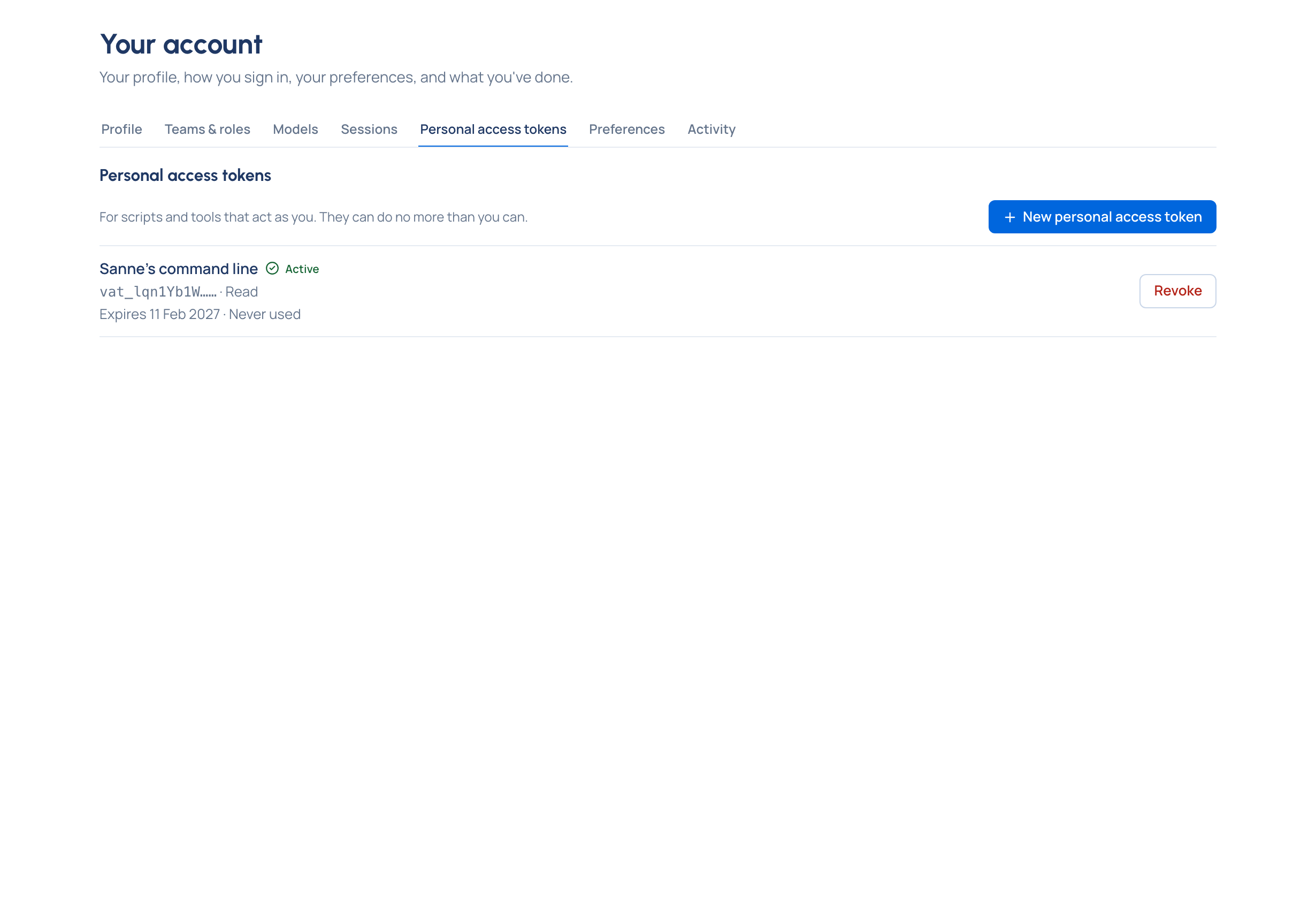
It acts as you: when you leave, or lose a role, it loses that too.
A service account: for systems Enterprise
A service account is an account for one of your systems, such as a nightly cost export or a sync job, so it never borrows a person's sign-in. What Enterprise includes depends on the features your licence includes; service accounts need a licence that includes them. On Community, use a personal access token from a dedicated person's account instead.
- Open Who › Service accounts and choose New service account. Name it, and choose where it Belongs to: the whole organisation, or a team.
- Give it a role under Roles › Give a role (group admin of a team, organisation viewer or organisation admin). A second admin approves it. Without a role, its tokens can read what any signed-in person can, and change nothing.
- On its Tokens tab, choose New token, choose What it may do and how long it Lasts (a year at most), then Make token. Copy it: it's shown only now.
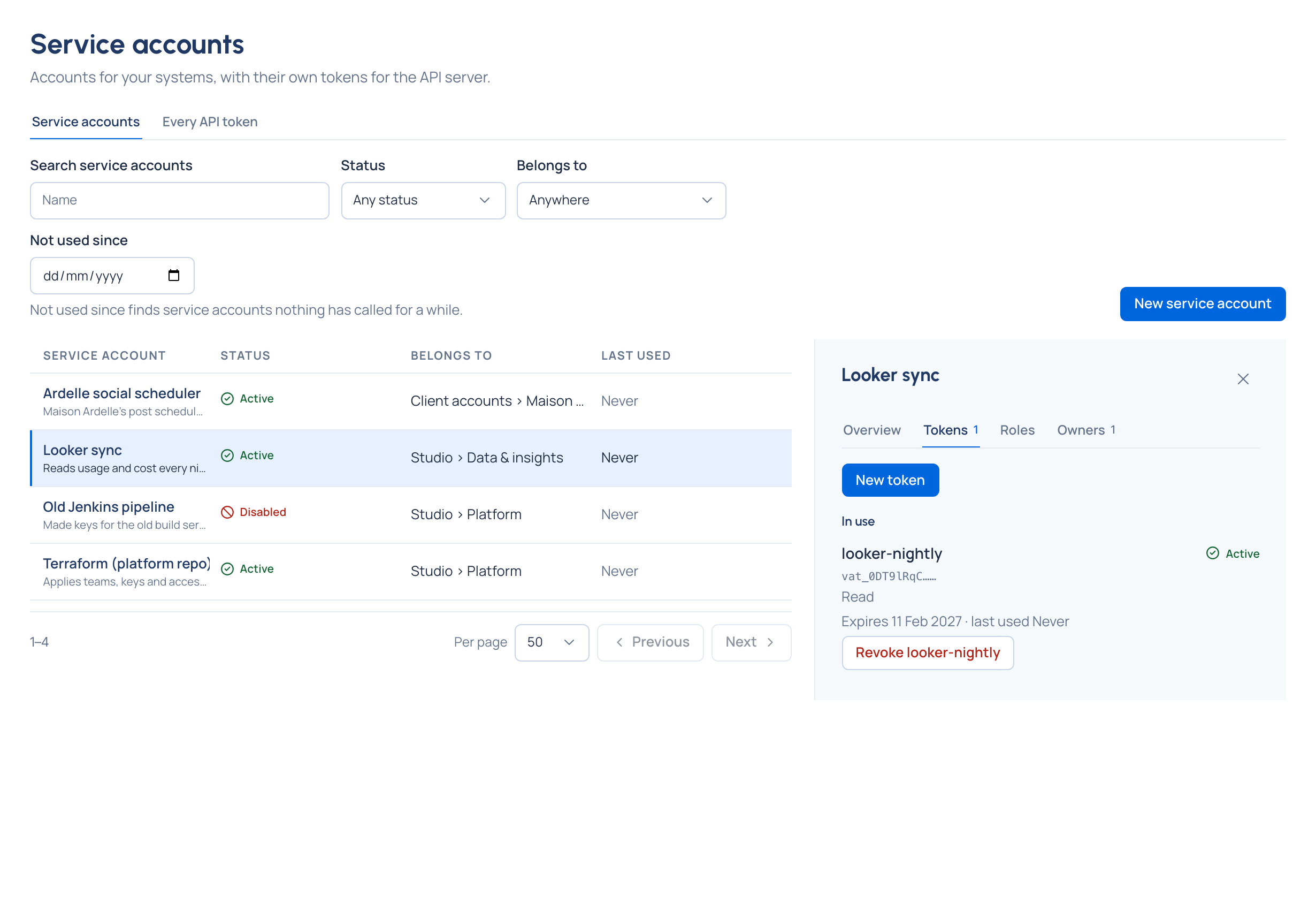
A service account never holds a key, so it never calls models. Everything it changes is in the audit log under its own name. Disable revokes all its tokens at once; organisation admins see every token in the organisation on Every API token.
Use a token
Send it as a bearer token to the Control room's API, under /api/v1:
curl "https://<your-control-room>/api/v1/me" \
  -H "Authorization: Bearer $VIDAI_TOKEN"
import os, httpx

vidai = httpx.Client(
    base_url="https://<your-control-room>/api/v1",
    headers={"Authorization": f"Bearer {os.environ['VIDAI_TOKEN']}"},
)
print(vidai.get("/me").json())
const res = await fetch("https://<your-control-room>/api/v1/me", {
  headers: { Authorization: `Bearer ${process.env.VIDAI_TOKEN}` },
});
console.log(await res.json());
A token never needs a cookie or a sign-in. It can't make other tokens, change a password or set up multi-factor sign-in: those need a person signed in.
Never mix them
- A key sent to the Control room's API is refused: it isn't a token. The one exception is a key rotating its own secret (above).
- A token sent to the gateway is refused with 401
invalid_api_key: it isn't a key. - A provider's own key never goes in your app. The gateway holds the providers' keys and uses its own; it removes your key before anything reaches the provider.
Related
- Call models through the gateway
- Errors and refusals: what a turned-off key looks like to your app
- Request ids and Request logs: see every call a key made