Compare models on your past calls
Purpose: find out, from your own calls rather than a price list, whether a cheaper model would have done and how much it would have saved.
Before you start
- You're an organisation admin or Finance.
- Pick a model your teams call a lot: the bigger the spend, the more a comparison is worth.
Steps
- Open Money › Cost and choose What-if. Under On your past calls:
- Period: a preset, or Choose dates (From and To, both counted, in the organisation's days).
- Whose calls: the whole organisation, a team, an application or a key, and Which team, Which application or Which key.
- Calls to: choose the model the calls asked for (type to narrow the list). Only models with calls in that period and scope are offered, each with how many calls. With none, it says "No calls in this period and scope".
- Compare with: leave it on Every model, or Add a model to compare only with those you choose (up to 50; remove one with its ×). Only models of the same kind as the one chosen (text, image, audio, video or embedding) are offered.
- Read the answer. It appears as soon as the choices are complete, within a few seconds even for a busy month; the last answer stays on screen, dimmed, while a new one is worked out.
Reading the answer
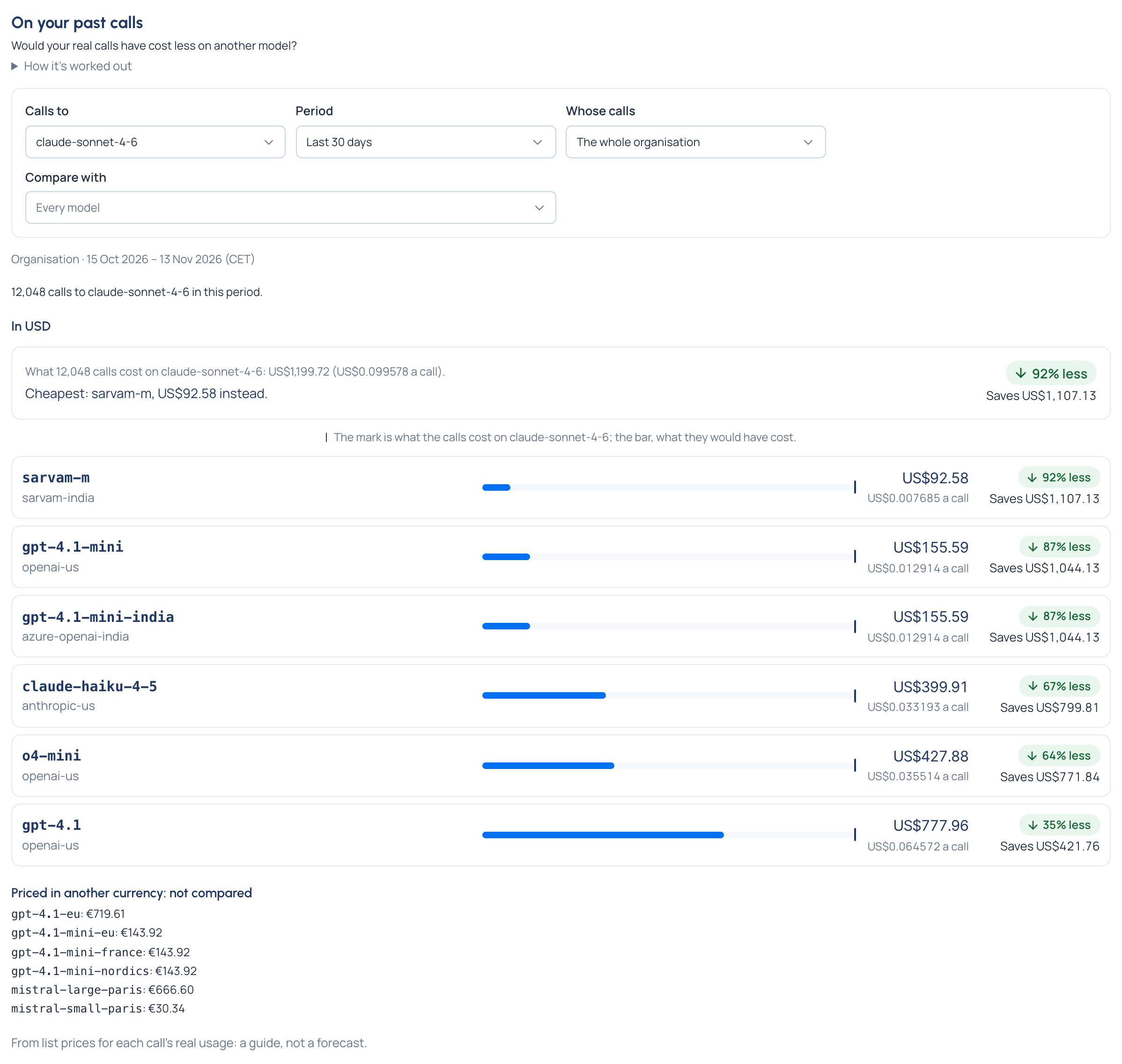
- The answer first, per currency: how many calls, what they cost, and the cheapest model they could have used: "Cheapest: gpt-4.1-mini, US$79.40 instead." with "↓ 80% less, Saves US$317.59". Or "None of the models compared would have cost less."
- Each model at a glance, cheapest first: what the calls would have cost and the average per call; an arrow with the percentage less or more and the amount saved or extra; and a bar to compare, with a mark where today's cost sits ("The mark is what the calls cost on … ; the bar, what they would have cost.").
- Next to a figure, when it applies: "12 calls compared at its default tier" (the model has no price at the calls' tier) and "3 calls' cached tokens priced at its input rate" (it has no cached-token price).
- Priced in another currency: models priced only in another currency are listed apart with their own figure, not compared.
- The models not compared, with why: can't take the same kind of calls (text, images, audio or embeddings), switched off, not usable by the keys in that scope, outside a region rule, on a provider that isn't placed, or no price.
Check it worked
The first line names the calls compared ("… calls to claude-sonnet-4-6 in this period. They cost …"). Calls with no price are counted apart ("4 of them had no price and aren't compared"), never as zero.
What to do with a saving
Turn it into traffic on Models & routing › Routing: a routing rule, or an A/B experiment to compare quality on a share of calls first. Or use a route budget to switch only past a limit. Saving money
Good to know
- It's from list prices for each call's real usage: a guide, not a forecast. Answer quality isn't compared.
- When there are too many calls in the period to compare them all, only the most recent are compared, and it says so.
- Currencies are never converted or compared with each other: each has its own list ("In USD").
- How it's worked out on the page explains the method.
- Change the period or whose calls after choosing a model, and a model with no calls there is cleared, with a note saying so: choose again from the models offered.