Add a pack to a level
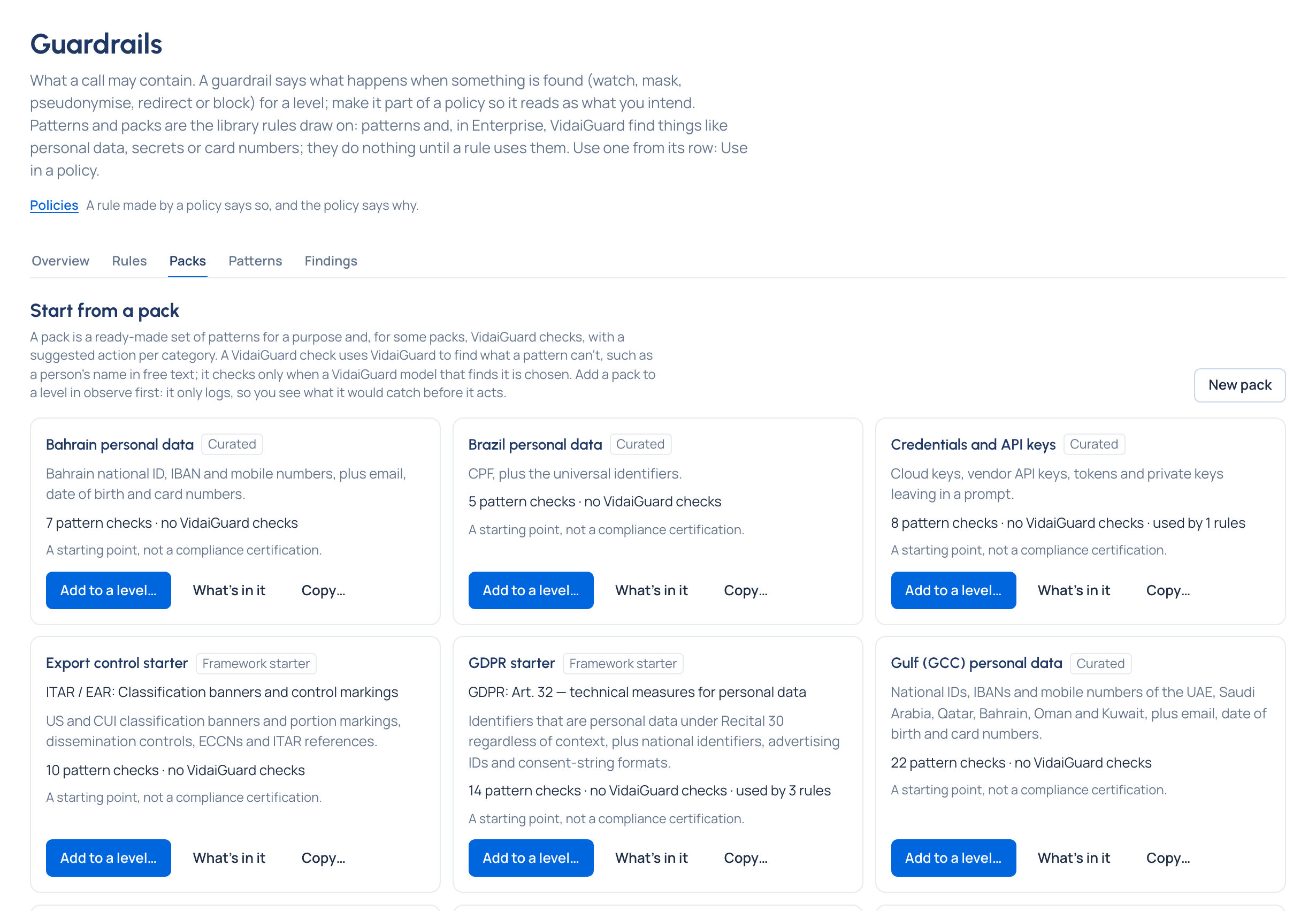
Purpose: writing the right patterns for card numbers or national IDs takes time and testing. A pack is a ready set of pattern checks for one purpose (GDPR, HIPAA, PCI DSS v4.0, credentials, agent safety, regional personal data for the UAE, Saudi Arabia, India and others). Add one to a level and its patterns act on every key below: a pack is complete on its patterns alone. On Enterprise, a pack with VidaiGuard checks of its own can also use them, for what patterns can't find, when you choose Also use VidaiGuard on its rule.
Before you start
- You're an organisation admin or Compliance officer Enterprise, or a group admin for your own teams.
Steps: add a pack
- Open Policies › Guardrails and the Packs tab. Each card shows the framework and its basis (for example "PCI-DSS v4.0: Req. 3"), what it brings ("2 pattern checks · 2 VidaiGuard checks") and what it's for.
- Read What's in it for what each pack covers and doesn't.
- Choose Add to a level… on the card.
- Choose the level (and which team, application, person, agent or key).
- Leave Observe chosen, or choose Enforce to act on calls straight away.
- Check the action per category (the pack's suggestion is filled in) and the purpose.
- On Enterprise, a pack with VidaiGuard checks of its own offers Also use VidaiGuard, off by default: off, the rule is its patterns alone, which is complete. Switched on, its VidaiGuard checks join its patterns: where VidaiGuard is set up and on, VidaiGuard checks it brings lists each one with the action it will get, and a note says if some won't check anything now. While VidaiGuard isn't set up or its checks are off, a note says its pattern checks act and its VidaiGuard checks start once VidaiGuard runs; while it isn't answering, a warning says what happens to calls meanwhile. You can save either way; saved while VidaiGuard can't find anything yet, the confirmation says its pattern checks act now and its VidaiGuard checks start once VidaiGuard is set up and on. Tick Add VidaiGuard checks for personal data too where offered.
- Check what it changes (how many keys it reaches and, per key, before → after), then Save.
Steps: make your own copy
To drop a pattern a pack has, or add one it doesn't:
- Choose Copy… on the pack (organisation admins), name the copy, and it opens. Its card says Copy of ….
- Choose Change…: tick or untick patterns (search to add more from the library), tick or untick VidaiGuard checks (Enterprise; offered even while they don't run, with a line saying what runs now), and change the action per category.
- Give each difference a reason under Why it differs (optional): it's kept with the difference and in the audit log.
Rules that use your copy get its checks at once. When a release changes the original, your copy is never changed for you: its card says Original changed, Home's Needs attention says so, and you take what you want with Change…, then Mark reviewed.
In the demo world, "Gulf personal data (Al Noor Hospitality)" is a copy of the UAE pack, with its differences and reasons listed under How it differs from ….
Check it worked
On Rules at that level, the pack has its own row with its action and "Detected by N pattern checks". On Enterprise, the pack says what runs for it in one badge, on its card, in What's in it and on its rule:
| Badge | What runs |
|---|---|
| Patterns only | The pack has pattern checks only, or its rule doesn't use VidaiGuard ("VidaiGuard isn't used here, so its pattern checks act on their own.") |
| VidaiGuard not set up | Its pattern checks act; its VidaiGuard checks start once VidaiGuard is set up |
| VidaiGuard checks off | Its pattern checks act; its VidaiGuard checks start once VidaiGuard checks are switched on |
| VidaiGuard on | Pattern and VidaiGuard checks both act |
| Partly by patterns | Some of what it names has no chosen VidaiGuard model that finds it: patterns cover those alone |
| Patterns only: no VidaiGuard model | No chosen VidaiGuard model finds what it names, so only its pattern checks act |
| VidaiGuard unavailable: patterns only | VidaiGuard isn't answering: only its pattern checks act until it's back, and calls are still served |
| Refused while VidaiGuard is unavailable | VidaiGuard isn't answering and strict is on: calls from keys this pack checks are refused until it's back |
On a rule, every badge but Patterns only is for a rule that uses VidaiGuard; on the card and in What's in it, the badge says what its VidaiGuard checks do wherever a rule uses them. Where it helps, a line says why and links to Settings › VidaiGuard. With VidaiGuard set up, its VidaiGuard checks on the rule say Checking, or Not checking with the reason.
To change whether a pack rule uses VidaiGuard, open it under Rules › List every rule, switch Also use VidaiGuard on or off, Check what it changes, then Save actions. A pack rule added on Rules below one that uses VidaiGuard uses it too.
Related
- Apply a recipe: recipes add packs as named policies.
- Write your own pattern
- Switch VidaiGuard checks on Enterprise
Good to know
- Framework packs are a starting point, not a compliance certification: What's in it says what each one doesn't cover.
- Built-in packs can't be changed; copy one instead. Your own packs can be deleted while no rule uses them.
- Gulf packs' patterns also match Arabic-Indic digits.
- New pack builds a pack from library patterns, from scratch.
- On Community a pack is its patterns only, and no screen names VidaiGuard.