Disable or delete someone
When someone shouldn't have access any more, take it away in one step: their sign-in, their keys and their API tokens stop together. Disable is reversible; Delete is for good, and shows first everything that goes with them.
Before you start
- Disable: organisation admins, and group admins for people in their teams.
- Delete: organisation admins only.
- Vidai never lets the last organisation admin be disabled or deleted, and neither is offered on your own account.
Disable someone
- Open People and choose the person.
- Choose Disable and confirm.
What happens: they're signed out everywhere and can't sign in. Their keys stop working until they're enabled again, and their API tokens are revoked for good. Their teams and roles stay. Enable brings them and their keys back, unless something else stops a key.
Delete someone
- Open the person and choose Delete.
- Read What goes with them: each live key (and whether you may hand it over first), how many roles end, the agents, applications and service accounts they own, and the rules set on them.
- Hand over the keys you need first, and give each thing they own a new owner. See When someone leaves.
- Type their email to turn Delete on, and choose Delete.
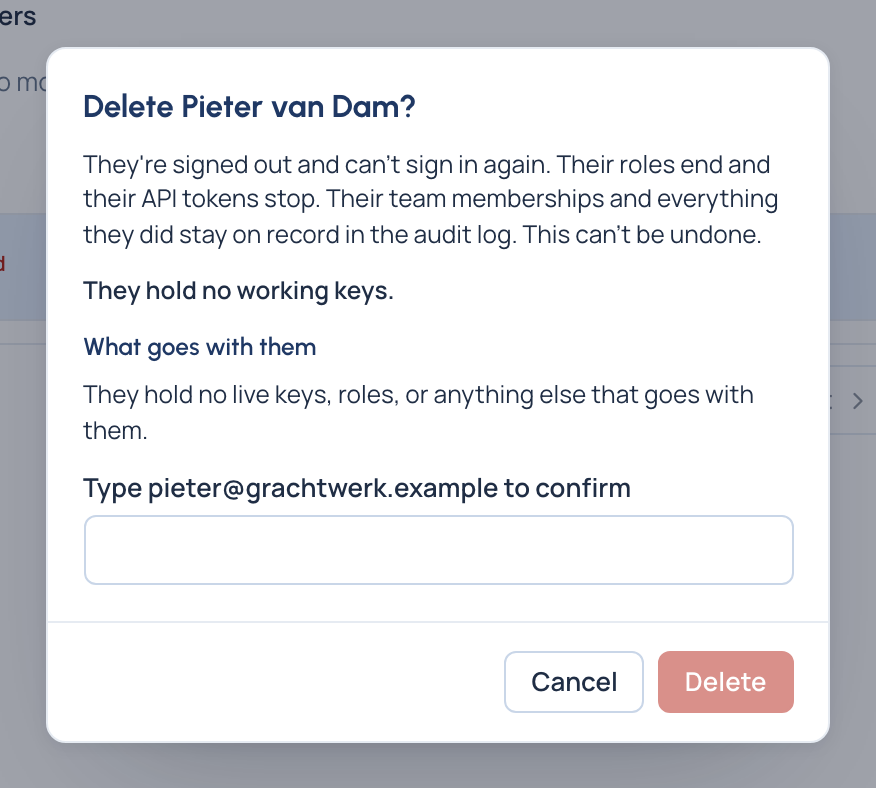
What happens: they can't sign in again, their roles end and their API tokens stop. Every working key they hold is suspended at once and stays suspended until someone revokes it or hands it over. What they did stays in the audit log. This can't be undone.
Check it worked
- Disabled: their status reads Disabled; their keys show Its person is disabled.
- Deleted: they're gone from People; their keys show Holder deleted: hand over or revoke.
Good to know
- To let a deleted person back, invite them again: they return as a new person. With single sign-on on, signing in at your identity provider doesn't bring them back.
- The emergency admin for single sign-on can't be disabled or deleted, and loses no organisation role, until you choose another emergency admin.
- The key count on Delete counts up to 200 keys; beyond that it says "at least".
Related
- When someone leaves: keep what runs on their keys.
- Change several people at once: disable or enable many.
- Turn a key off and on