Read Home at a glance
Purpose: see this month's headline figures the moment you sign in, and your own usage, without opening a dashboard.
Before you start
Everyone has Home. What it shows depends on your role.
Steps
- Sign in. Home opens.
- Read This month at a glance (organisation admins and viewers; group admins see Your teams this month): spend, saved by routing, the share of calls guardrails checked and calls refused by policy. Open the impact report goes to the full report.
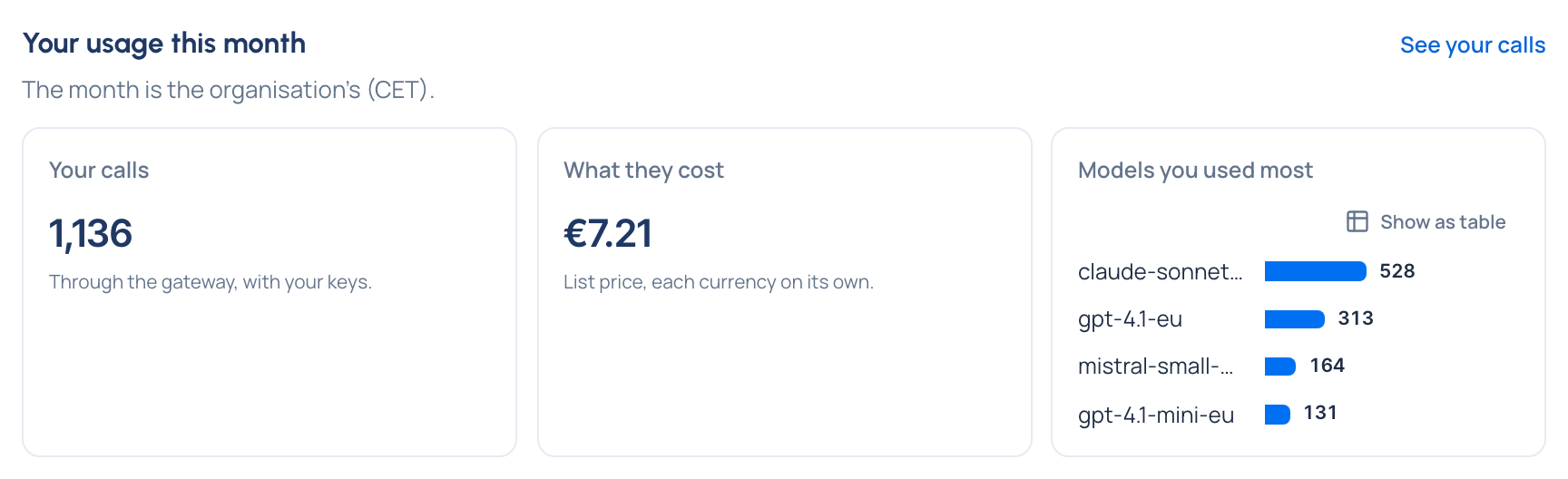
- Read Your usage this month (everyone): your calls through the gateway, what they cost per currency, and the models you used most. See your calls lists them.
- Read Needs attention for money items (below).

Money in Needs attention
For organisation admins and Finance:
- calls with no price (See unpriced calls);
- prices changed after calls were priced (Review and recompute) Enterprise;
- calls that arrived for locked days (See late calls);
- cost that's running behind or couldn't be worked out;
- for organisation admins, the rate card: not connected, out of date, can't be reached, prices no longer published, or price changes held for a decision.
For everyone a budget tells: Budget … passed 80%, Budget … is reached and Some calls under budget … aren't counted. And "Your export of … is ready" when a file you asked for can be downloaded.
Check it worked
Both cards say under their heading that the month is the organisation's, in its time zone, the same as the clock in the top bar.
Related
- Share the impact report with leadership
- When a budget is reached
- Work with Home and Needs attention: every card on Home, snoozing and acknowledging