Request ids and Request logs
Purpose: when a call goes wrong, or simply surprises you, one id is enough to find it. You quote it; you, your admin or support open the call in Request logs and see who made it, the model asked for and the one that answered, every rule that acted on it, what it cost, and, for those allowed, what was said.
The ids on a call
| Id | Who makes it | Where it is |
|---|---|---|
x-vidai-request-id |
The gateway, on every answer and almost every refusal | A response header; in Request logs as the Request reference |
x-request-id (you send it) |
You: your own trace or job id | Kept with the call's record, beside the gateway's id |
x-request-id (on the answer) |
The provider, when it sends one | Passed through unchanged; it's the provider's id, not Vidai's |
Quote x-vidai-request-id. It's the one Vidai finds the call by.
Your own x-request-id also goes on to the provider unchanged, so it can appear in the provider's records too.
Send your own id
Join Vidai's record with your own by sending your trace or job id in x-request-id: up to 128 characters, letters,
digits and . _ : -. A value outside that is ignored; the call still goes through.
curl "$VIDAI_GATEWAY/v1/chat/completions" \
  -H "Authorization: Bearer $VIDAI_KEY" \
  -H "x-request-id: order-4711.summary" \
  -H "Content-Type: application/json" \
  -d '{"model": "gpt-4o-mini", "messages": [{"role": "user", "content": "Hi"}]}'
raw = client.chat.completions.with_raw_response.create(
    model="gpt-4o-mini",
    messages=[{"role": "user", "content": "Hi"}],
    extra_headers={"x-request-id": "order-4711.summary"},
)
log.info("vidai call %s", raw.headers.get("x-vidai-request-id"))
const { response } = await client.chat.completions
  .create(
    { model: "gpt-4o-mini", messages: [{ role: "user", content: "Hi" }] },
    { headers: { "x-request-id": "order-4711.summary" } },
  )
  .withResponse();
console.info("vidai call", response.headers.get("x-vidai-request-id"));
Log x-vidai-request-id beside your own id, every time, errors included (almost every refusal carries one). It
costs one line and saves an investigation.
Find a call in Request logs
- Open Daily › Request logs. You see your own calls and your agents'; admins see more.
- Type the id into Request reference. The list narrows to that one call.
- Choose the call to open it beside the list.
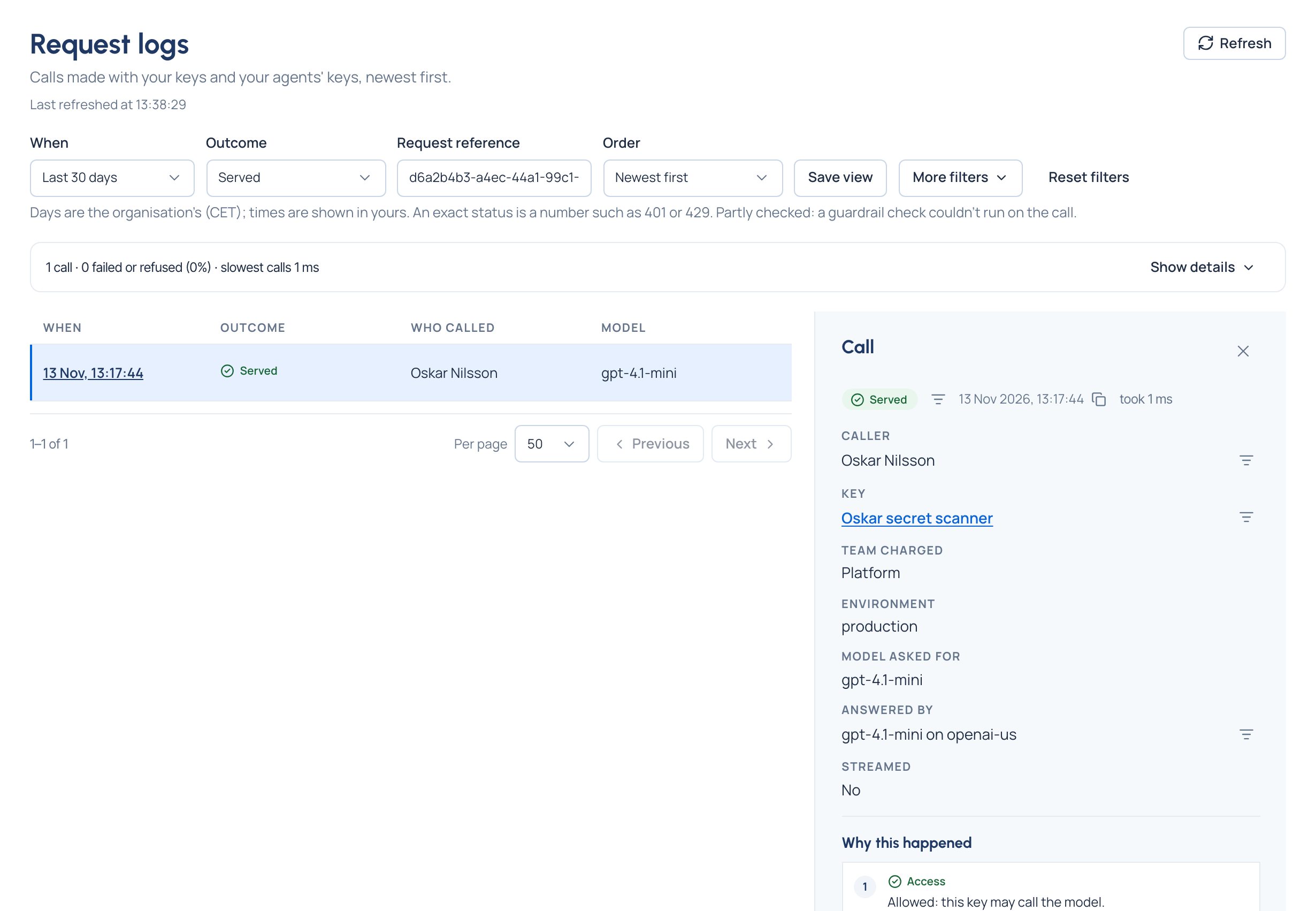
What the call shows:
- What happened, as a word (Served, Refused, Limited, Failed), when, and how long it took. A call that didn't succeed adds one sentence, such as "At the gateway. The key may not call this model, or the model isn't offered."
- Caller, Key, Team charged, Environment.
- Model asked for and Answered by, with Routed or Fallback when another model answered.
- Upload, for a call that uploaded a file (a batch, fine-tuning or assistants file): what it was for, its type and its size, for example "A file · For batch · application/jsonl · 2.5 MB". The file's name isn't shown, since a name can carry personal data; the provider's reference for the file is under Technical details.
- Why this happened: every rule that acted on the call, in the order the gateway weighed them (access, budget, guardrail, routing, compliance route, fallback), each named and linked.
- Guardrails: what was found, in words (an email address, a card number), what was done (a redirect names the model the call was sent to) and which policy decided it.
- Usage and cost: tokens in and out, and the cost (the answer itself never carries cost).
- Technical details (open it): the Request reference with a copy button, the status number, the gateway's and the provider's codes and message, and the address called.
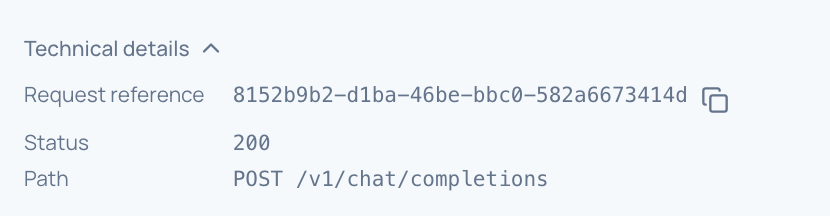
The prompt and the reply stay hidden. Reading them needs the Content reader role, and every attempt is recorded in the audit log.
Force a call into the log
Request logging may keep only some calls' content. To make sure one call's record and content are kept, for example
while you debug, send x-trace: true:
curl "$VIDAI_GATEWAY/v1/chat/completions" \
  -H "Authorization: Bearer $VIDAI_KEY" \
  -H "x-trace: true" \
  -H "Content-Type: application/json" \
  -d '{"model": "gpt-4o-mini", "messages": [{"role": "user", "content": "Hi"}]}'
Every call is listed in Request logs either way, with its outcome, tokens and cost. You can't turn logging down for a call.