Call models through the gateway
Purpose: keep your code and your SDK; change the base address and the key. From then on every call is checked, routed, protected, priced and recorded, and the answer tells you which model served it.
Before you start
- A key. Issue one on Daily › Keys › Issue a key, or ask whoever looks after your agent's keys (Keys and API tokens). Copy it when it's shown: it's shown only once.
- The gateway's address, from Connect your app on Daily › Keys (Find the gateway's address).
- A model your key may call.
GET /v1/modelslists them (Model names and aliases).
Keep the key out of your code: the samples read it from an environment variable.
export VIDAI_KEY="vk_…"                       # your key
export VIDAI_GATEWAY="https://<your-gateway>"  # from Connect your app
Make a call
Any of the three SDK formats works, and each can reach any model your key may call, whichever provider serves it (Any SDK to any provider).
OpenAI format
curl "$VIDAI_GATEWAY/v1/chat/completions" \
  -H "Authorization: Bearer $VIDAI_KEY" \
  -H "Content-Type: application/json" \
  -d '{
    "model": "gpt-4o-mini",
    "messages": [{"role": "user", "content": "Say hello in Dutch."}]
  }'
import os
from openai import OpenAI

client = OpenAI(
    base_url=os.environ["VIDAI_GATEWAY"] + "/v1",
    api_key=os.environ["VIDAI_KEY"],
)
reply = client.chat.completions.create(
    model="gpt-4o-mini",
    messages=[{"role": "user", "content": "Say hello in Dutch."}],
)
print(reply.choices[0].message.content)
import OpenAI from "openai";

const client = new OpenAI({
  baseURL: `${process.env.VIDAI_GATEWAY}/v1`,
  apiKey: process.env.VIDAI_KEY,
});
const reply = await client.chat.completions.create({
  model: "gpt-4o-mini",
  messages: [{ role: "user", content: "Say hello in Dutch." }],
});
console.log(reply.choices[0].message.content);
Anthropic format
The Anthropic SDK takes the gateway's address without /v1, and sends the key in x-api-key.
curl "$VIDAI_GATEWAY/v1/messages" \
  -H "x-api-key: $VIDAI_KEY" \
  -H "anthropic-version: 2023-06-01" \
  -H "Content-Type: application/json" \
  -d '{
    "model": "claude-haiku-4-5",
    "max_tokens": 256,
    "messages": [{"role": "user", "content": "Say hello in Dutch."}]
  }'
import os
from anthropic import Anthropic

client = Anthropic(
    base_url=os.environ["VIDAI_GATEWAY"],
    api_key=os.environ["VIDAI_KEY"],
)
reply = client.messages.create(
    model="claude-haiku-4-5",
    max_tokens=256,
    messages=[{"role": "user", "content": "Say hello in Dutch."}],
)
print(reply.content[0].text)
import Anthropic from "@anthropic-ai/sdk";

const client = new Anthropic({
  baseURL: process.env.VIDAI_GATEWAY,
  apiKey: process.env.VIDAI_KEY,
});
const reply = await client.messages.create({
  model: "claude-haiku-4-5",
  max_tokens: 256,
  messages: [{ role: "user", content: "Say hello in Dutch." }],
});
console.log(reply.content[0].type === "text" ? reply.content[0].text : "");
Gemini format
The Google Gen AI SDK takes the gateway's address without a path, and sends the key in x-goog-api-key.
curl "$VIDAI_GATEWAY/v1beta/models/gemini-2.5-flash:generateContent" \
  -H "x-goog-api-key: $VIDAI_KEY" \
  -H "Content-Type: application/json" \
  -d '{"contents": [{"role": "user", "parts": [{"text": "Say hello in Dutch."}]}]}'
import os
from google import genai
from google.genai import types

client = genai.Client(
    api_key=os.environ["VIDAI_KEY"],
    http_options=types.HttpOptions(base_url=os.environ["VIDAI_GATEWAY"]),
)
reply = client.models.generate_content(
    model="gemini-2.5-flash",
    contents="Say hello in Dutch.",
)
print(reply.text)
import { GoogleGenAI } from "@google/genai";

const client = new GoogleGenAI({
  apiKey: process.env.VIDAI_KEY,
  httpOptions: { baseUrl: process.env.VIDAI_GATEWAY },
});
const reply = await client.models.generateContent({
  model: "gemini-2.5-flash",
  contents: "Say hello in Dutch.",
});
console.log(reply.text);
The model names above are examples: use the names GET /v1/models gives your key.
Stream the answer
Streaming works as your SDK documents it, in every format, including when the model sits behind another provider: you get your own SDK's events.
curl -N "$VIDAI_GATEWAY/v1/chat/completions" \
  -H "Authorization: Bearer $VIDAI_KEY" \
  -H "Content-Type: application/json" \
  -d '{
    "model": "gpt-4o-mini",
    "stream": true,
    "stream_options": {"include_usage": true},
    "messages": [{"role": "user", "content": "Write a haiku about canals."}]
  }'
stream = client.chat.completions.create(
    model="gpt-4o-mini",
    messages=[{"role": "user", "content": "Write a haiku about canals."}],
    stream=True,
    stream_options={"include_usage": True},
)
for chunk in stream:
    if chunk.choices and chunk.choices[0].delta.content:
        print(chunk.choices[0].delta.content, end="", flush=True)
const stream = await client.chat.completions.create({
  model: "gpt-4o-mini",
  messages: [{ role: "user", content: "Write a haiku about canals." }],
  stream: true,
  stream_options: { include_usage: true },
});
for await (const chunk of stream) {
  process.stdout.write(chunk.choices[0]?.delta?.content ?? "");
}
You don't need include_usage for Vidai's sake: the gateway counts the tokens and prices the call either way. Ask
for it only if your code wants the usage chunk. More in Streaming.
Read what the gateway did
Every answer carries headers that say what happened: the id to quote, the model that really answered, the routing rule that sent it there, and anything adapted on the way. Most SDKs hand you the raw response on request:
curl -sS -D - -o /dev/null "$VIDAI_GATEWAY/v1/chat/completions" \
  -H "Authorization: Bearer $VIDAI_KEY" \
  -H "Content-Type: application/json" \
  -d '{"model": "gpt-4o-mini", "messages": [{"role": "user", "content": "Hi"}]}' \
  | grep -i '^x-vidai-'
raw = client.chat.completions.with_raw_response.create(
    model="gpt-4o-mini",
    messages=[{"role": "user", "content": "Hi"}],
)
print(raw.headers.get("x-vidai-request-id"))  # quote this one
print(raw.headers.get("x-vidai-model"))       # the model that answered
reply = raw.parse()                           # the usual reply object
const { data: reply, response } = await client.chat.completions
  .create({ model: "gpt-4o-mini", messages: [{ role: "user", content: "Hi" }] })
  .withResponse();
console.log(response.headers.get("x-vidai-request-id")); // quote this one
console.log(response.headers.get("x-vidai-model"));      // the model that answered
The Anthropic SDKs work the same way (client.messages.with_raw_response.create(…) in Python, .withResponse() in
TypeScript). Every header is listed in Response headers. The answer never carries
the call's cost: the call is in Request logs within seconds, and Cost totals and dashboards count it
within about two minutes.
Check it worked
- Make a call and note its
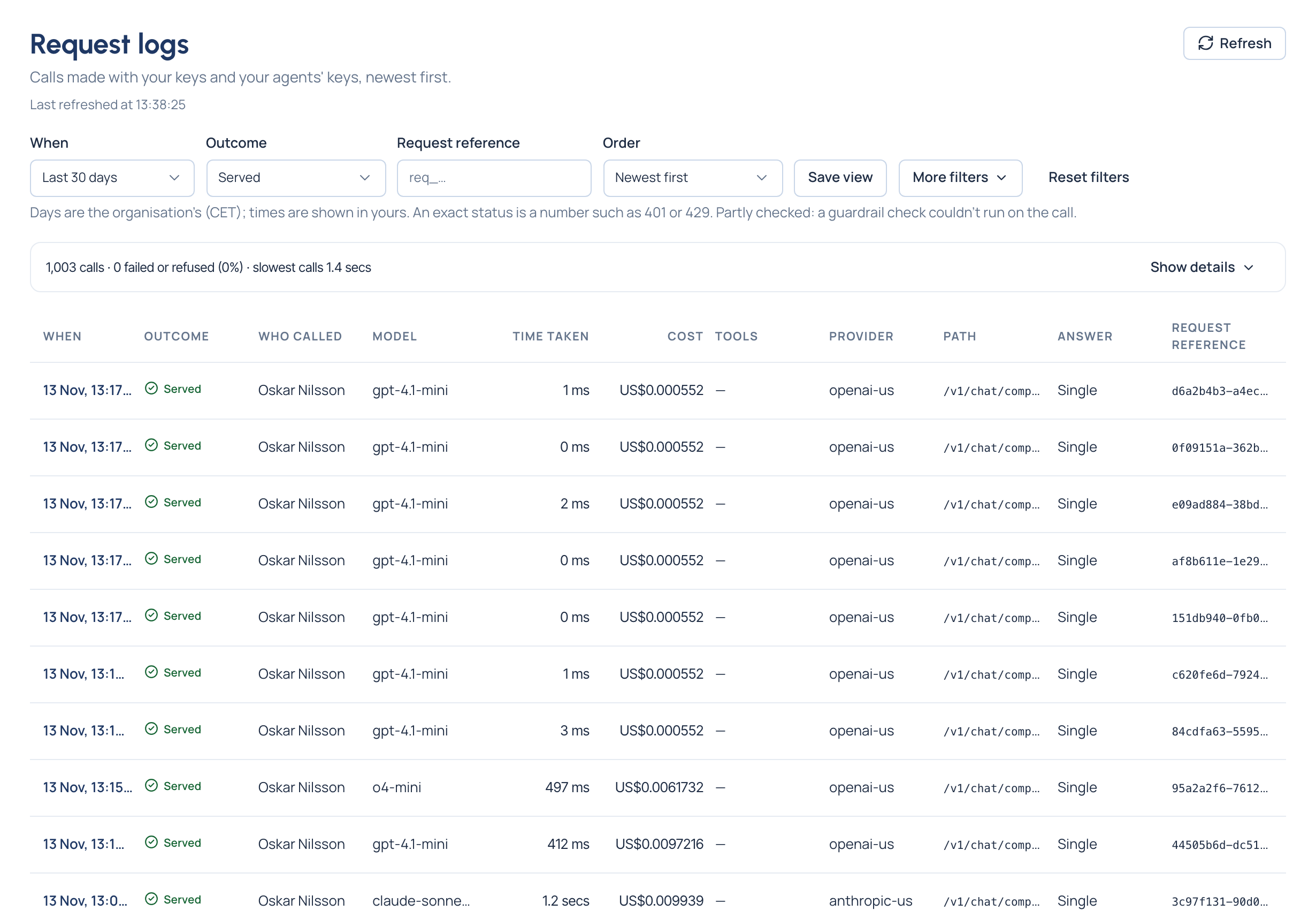
x-vidai-request-id. - Open Daily › Request logs in the Control room. Your call is there within seconds: who called, with which key, the model asked for and the one that answered, how long it took and what it cost.
- To find exactly that call, type the id into Request reference (Request ids and Request logs).
Related
- Any SDK to any provider
- Errors and refusals
- Integrations: a page for each SDK, framework and tool
- Endpoints