Investigate a call in Request logs
Purpose: when a complaint, an incident or a finding points at an AI call, read its full story from the record: who made it, what each rule did and why, which model answered, what configuration it ran under, and who has read its content. In every edition.
Before you start
- Organisation admins, organisation viewers, Finance and Compliance officers Enterprise see every call; group admins see their teams' calls; users see their own. What Enterprise includes depends on the features your licence includes.
- To read what the call sent and got back, you need Content reader on its team, application or agent, or on the whole organisation. An organisation admin gives it under Who › Roles & access.
Steps
- Open Daily › Request logs.
- Find the call:
- by Request reference, if you have the one the app was given;
- or narrow by When, Outcome (for example refused by a policy), Person, and under More filters Refused by, Guardrail outcome (blocked, masked, pseudonymised, redirected, logged), Guardrail category, Agent, Key or Application.
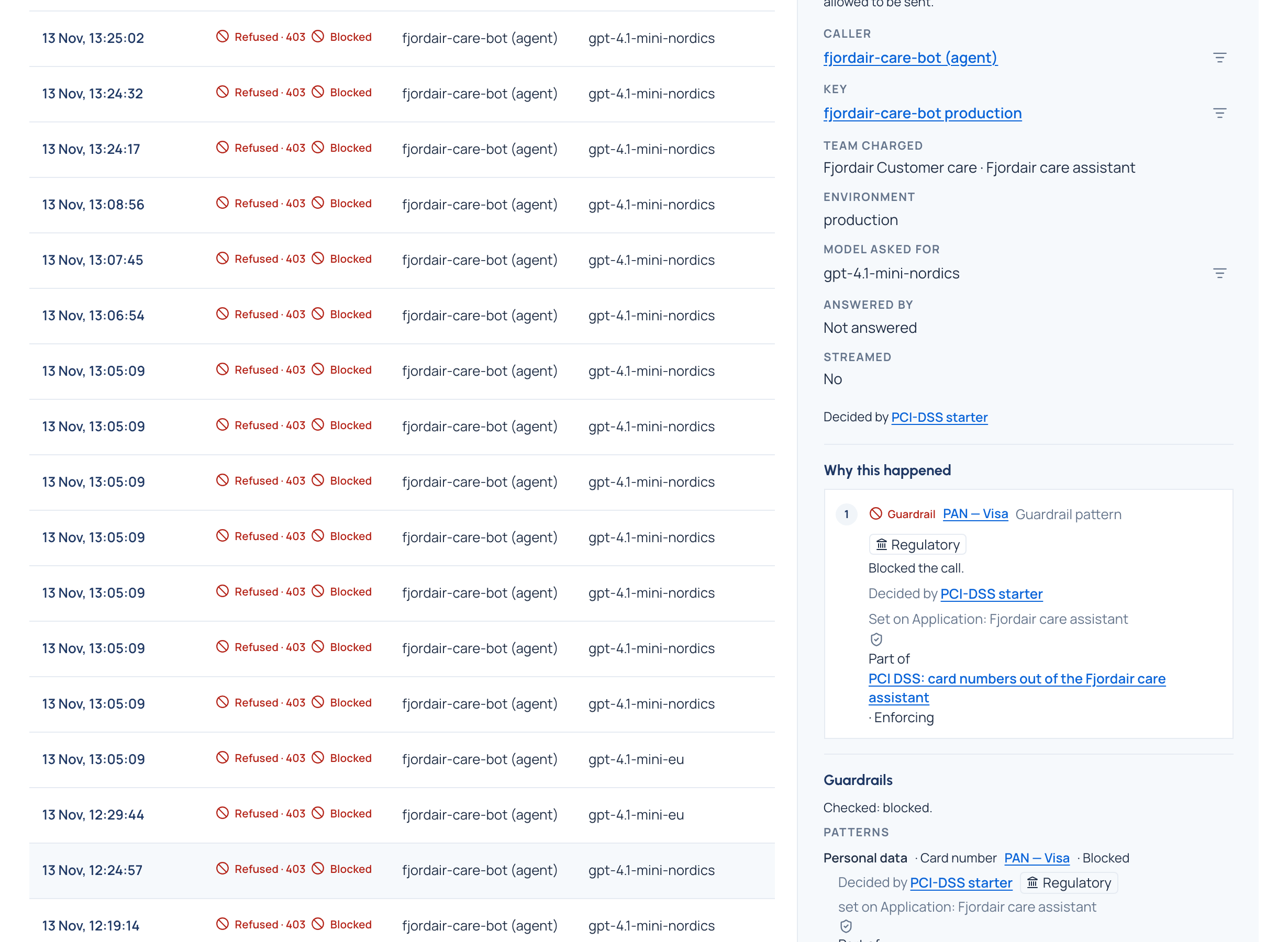
- Choose the call. At the top: what happened (Served, Refused, Limited, Failed), when, and how long it took.
- Read Why this happened: every rule that acted, in the order the gateway weighed them (access, budget, guardrail, routing, compliance route, fallback). Each names the rule, its level and its named policy, and says what it did.
- Read Guardrails: each finding with its category, what was found in words (an email address, a person's name), the pattern or VidaiGuard check, what was done (a redirect names the model the call was sent to), and Decided by the policy that decided it, VidaiGuard's findings included.
- With tamper evidence on Enterprise, read Configuration: the key's settings the call ran under, who set them and when, and Fingerprints sealed into its record.
- If you may, choose Show content to read the request as a conversation and the reply.
Check it worked
- Every read of content is in the audit log as Read a call's content, naming the call and never what it said. A refused attempt is recorded too.
- Who read this content (for admins) opens the audit log narrowed to this call: every read and every refusal.
Good to know
- Request logs show a call within seconds of it being made. Cost totals and the dashboards count calls up to about two minutes old.
- If the gateway didn't keep the call's content, the call says so; its outcome, tokens and cost are still listed.
- A call whose content was erased at someone's request reads Erased; its record stays.
- A Compliance officer sees what someone else's call used (its tokens, part by part) but not what it cost: the call says so in words, never as $0.
- A rule, budget or named policy deleted since keeps its name in the call's explanation; a deleted named policy is marked Deleted.