Webhooks
🔒 Enterprise edition. Webhook delivery is part of the Enterprise tier. Community deployments see this page as a locked-card stub. See Licensing & tiers for the full feature breakdown.
Webhooks push VIDAI Control Plane events to URLs you specify: your on-call's Slack channel, your SIEM, your PagerDuty queue, your own application's webhook endpoint, anything that accepts HTTP POSTs. Each delivery is HMAC-signed so receivers can verify it really came from the control plane.
This is the push-based ops surface. Pulling data instead? BI Tables is for periodic batch pulls.
When you'd open this page
- A new on-call rotation needs paging when a provider's circuit breaker trips: set up a PagerDuty webhook for the relevant event class.
- Your team wants every guardrail block to land in a Slack channel for spot-review.
- Your SIEM (Splunk, Datadog, Elastic) needs to ingest control plane events as they happen.
- Finance wants a notification when a key crosses a spend threshold.
- A compliance system needs immediate notification of every deny-rule firing.
When to use Webhooks vs other live-ops surfaces
| Need | Right surface |
|---|---|
| Real-time push to an external system | Webhooks (this page). |
| Periodic pull into a data warehouse | BI Tables. |
| Interactive dashboard / live metrics | The control plane exposes a Prometheus scrape endpoint: see Observability (Prometheus). |
| Browser-side notification ("hey admin, look at this") | The notification bell: see Console navigation. |
The four surfaces don't compete; they answer different questions. Webhooks is the right tool when another system needs the event, immediately, and reliably.
The page at a glance
The page has two tabs:
- Destinations: the URLs you've configured + their delivery state.
- Deliveries: the recent delivery attempts to those URLs, with retry status and response codes.
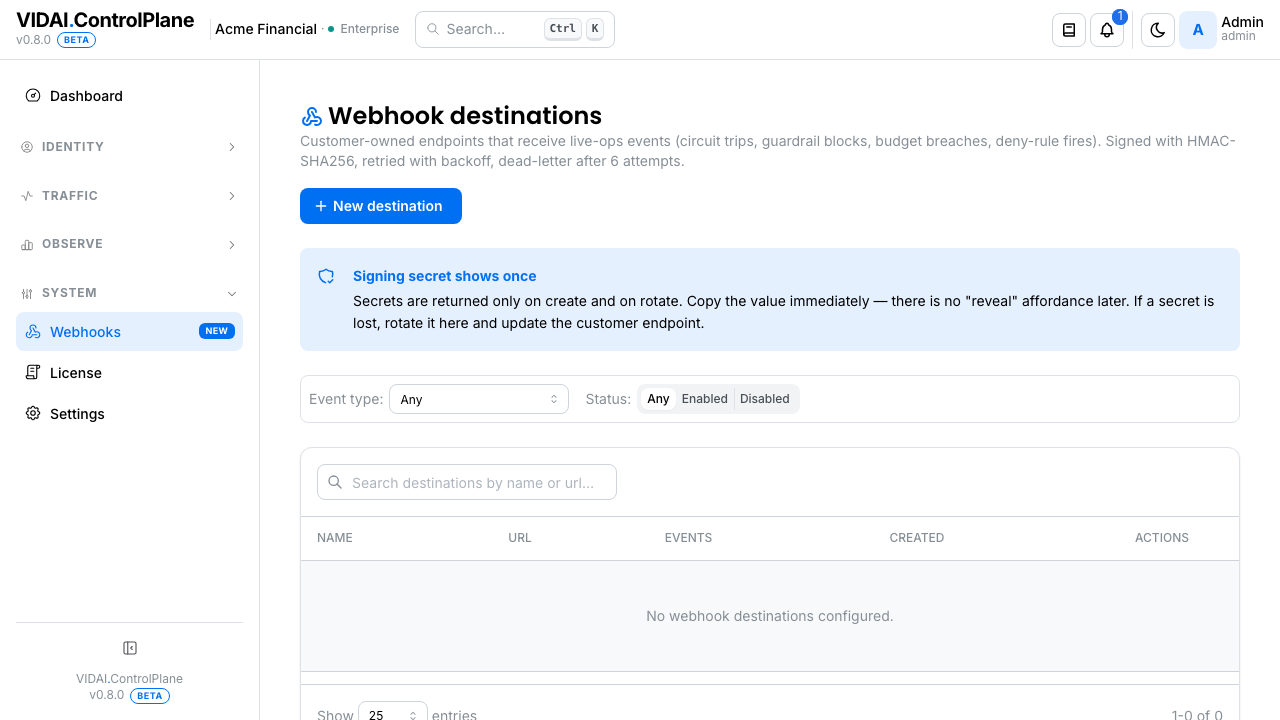
The Destinations list columns:
| Column | What it shows |
|---|---|
| Name | Friendly label. |
| URL | Where deliveries POST. |
| Events | Which event types trigger this destination. |
| Status | Active / Disabled. |
| Last delivery | Status code of the most recent attempt. |
| Last delivery at | When that attempt happened. |
Each row has actions for Edit, Test (send a synthetic test delivery), Rotate secret, Delete.
📌 Worth knowing. The Webhook dispatcher is off by default in fresh deployments. Configuring a destination doesn't automatically start delivering; the dispatcher has to be enabled. The page surfaces the dispatcher state at the top.
What you do on this page
Add a new destination
Goal: deliver every guardrail block to your Slack ops channel via Slack's incoming-webhook URL.
- Click Add Destination.
- Fill in:
- Name:
slack-ops-guardrails. The friendly label. - URL: your Slack incoming-webhook URL.
- Event filters: pick the event types this
destination cares about. For Slack ops, choose
guardrail.blockedandguardrail.masked. - Custom headers (optional): any HTTP headers the receiver wants. Slack doesn't need any; some receivers want auth.
- Save.
The destination is created with a brand-new HMAC signing secret. The secret is shown to you exactly once on the success modal.
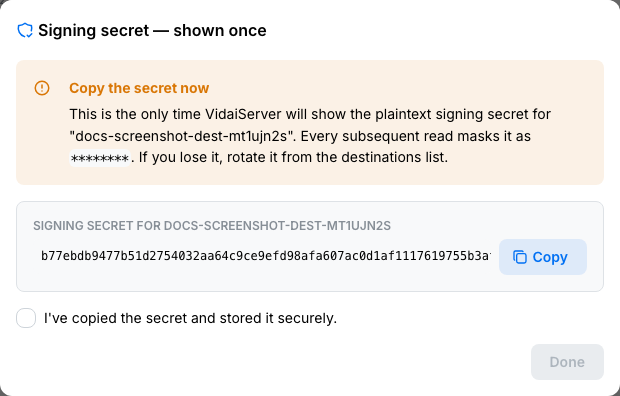
⚠️ Watch out. Copy the signing secret now. Like API keys, the control plane never reveals it again. Lost secret = rotate (which generates a fresh one and invalidates the old one).
📌 Worth knowing. The destination doesn't start delivering immediately if the dispatcher is off. Check the dispatcher status at the top of the page; if it's off, your configured destinations are queueing but not sending. Contact your VIDAI support contact to enable the dispatcher.
Test a destination
Click Test on the row. The control plane sends a synthetic event to the URL with proper signing.
The Deliveries tab updates with the test attempt, including the response status, body (truncated), and any retry attempts. This confirms three things:
- Your URL is reachable from the control plane's network.
- The receiver's auth (if any) accepts your custom headers.
- The HMAC signature computation on your receiver side produces the same digest the control plane sent.
If the test fails, the failure shape on the Deliveries tab tells you what went wrong (network unreachable / auth rejected / signature mismatch).
💡 Pro tip. Always test before relying on a destination for production paging. The control plane's retries are forgiving but not infinite; a misconfigured destination eventually goes silent.
Verify the signature on the receiving side
Every delivery includes:
- HTTP method
POST. - Header
Content-Type: application/json. - Header
X-VIDAI-Webhook-Signature: <hmac-sha256-hex>. - Header
X-VIDAI-Webhook-Timestamp: <unix-ms>. - Header
X-VIDAI-Webhook-Event: <event_type>. - Header
X-VIDAI-Webhook-Delivery: <delivery-id>. - Body: the event payload as JSON.
To verify on your end:
- Concatenate
<timestamp>.<body>(note the literal.). - Compute
HMAC-SHA-256over that string using the destination's signing secret. - Compare the hex-encoded result against the
X-VIDAI-Webhook-Signatureheader. Use a constant- time comparison.
If signatures match, the delivery is authentic and tampering hasn't occurred since signing. If they don't, reject.
⚠️ Watch out. Also check the timestamp is recent (within 5 minutes of now). A stale signature could be a replay attack. Reject deliveries with old timestamps.
Rotate a signing secret
Two reasons to rotate:
- The secret leaked (hardcoded in a repo, pasted in a Slack thread, etc.): rotate immediately.
-
Quarterly rotation policy.
-
Click the row's Rotate secret action.
- Confirm.
- The new secret is shown once on the modal. Copy + update your receiver.
The old secret is invalidated immediately: any in-flight delivery using the old secret will fail signature verification on your receiver. Plan the rotation to align with a low-traffic window if you can't tolerate any failed deliveries.
💡 Pro tip. For zero-downtime rotation, configure your receiver to accept either the old or new secret for the duration of the rotation, then drop the old one after the control plane has confirmed all deliveries on the new secret are succeeding.
Disable a destination temporarily
Inline toggle on the row. Disabled destinations don't receive deliveries; the queued deliveries are dropped (not retained for re-delivery on re-enable). Use disable for a maintenance window on the receiver, or while investigating a misbehaving destination.
If you need persistent retention while paused, disable on the receiver side (return 200 but discard) rather than disabling here.
Inspect recent deliveries
Today, the control plane doesn't surface a per-delivery view inside the console. The destinations list shows the destination's last-attempt status (delivered / failed / disabled), and the Send test delivery button confirms reachability with a one-shot.
For richer delivery diagnostics (payload, headers, response body, retry trail) read the receiver's own access logs. The control plane POSTs each event with a stable signature; correlating deliveries on the receiver side is the canonical path (there is no console-side deliveries view).
💡 Pro tip. When you need to debug a specific delivery, use Send test delivery in the destinations list. The control plane enqueues an event you can correlate with your receiver's logs by timestamp + the
Webhook-Delivery-IDheader value.
Why some URLs are rejected
When you save a destination URL, the control plane rejects URLs pointing at non-routable addresses:
- Loopback:
http://localhost/...,http://127.0.0.1/...,http://[::1]/.... Webhooks pointing at the control plane's own host wouldn't add value (you'd be sending events to the same process that produced them) and create an SSRF surface. - Cloud metadata endpoints:
http://169.254.169.254/...(AWS / GCP / Azure metadata). Allowing this lets a compromised admin token exfiltrate cloud-instance credentials. - Private (RFC1918) ranges:
10.x.x.x,172.16-31.x.x,192.168.x.x. These are private networks; webhooks reaching into the control plane operator's internal infrastructure are rarely intended and create an internal-network reconnaissance vector. - Link-local, multicast, reserved: same posture; not a realistic webhook destination.
If your URL is rejected, the form shows a typed error ("webhook URL host '...' resolves to a non-routable address"). Use a public hostname instead.
📌 Worth knowing. This validation runs at create and update only. If an existing destination was created on a private URL before this hardening landed, it stays as-is (deliveries will still attempt to it). Edit + save the destination to trigger re-validation, or delete + recreate if you want the new posture applied.
⚠️ Watch out. If you genuinely need to deliver webhooks to an internal-network endpoint (e.g. an on-prem SIEM), you can't use the control plane's webhook destinations directly. Forward through a public-facing reverse proxy or a SaaS webhook relay. This is by design; the control plane's webhook subsystem doesn't have a per- destination allowlist for private targets.
Customise event filters
Different destinations care about different events. The event-filter list on each destination scopes what they receive. Common filter shapes:
| Goal | Filter |
|---|---|
| Page on circuit-breaker trips | provider.circuit_open |
| Track guardrail enforcement | guardrail.blocked, guardrail.masked |
| Spend-circuit firings | routing.budget_breaker.tripped |
| Compliance evidence stream | every event tagged compliance |
| All errors | request.error |
Edit the filter list on a destination to narrow or widen.
Reference
Permissions
| Role | Sees Webhooks page | What |
|---|---|---|
| admin | Yes | Create / edit / delete / rotate destinations. View deliveries. Test. |
| bi_read_only | No | Page hidden. |
| user | No | Page hidden. |
Destination field reference
| Field | Effect |
|---|---|
| Name | Friendly label. |
| URL | Where deliveries POST. Must be HTTPS in production deployments. |
| Event filters | List of event types this destination receives. Empty list = all events. |
| Custom headers | Free-form HTTP headers added to every delivery. Useful for auth tokens the receiver expects. |
| Status | Active / Disabled. |
Headers on every delivery
| Header | Value |
|---|---|
X-VIDAI-Webhook-Signature |
Hex-encoded HMAC-SHA-256 over <timestamp>.<body>, using the destination's signing secret. |
X-VIDAI-Webhook-Timestamp |
Unix milliseconds at signing time. |
X-VIDAI-Webhook-Event |
The event type (e.g. guardrail.blocked). |
X-VIDAI-Webhook-Delivery |
Unique delivery id. Useful for log correlation and idempotent receivers. |
Retry policy
The dispatcher retries failed deliveries with exponential backoff:
| Attempt | Delay before next |
|---|---|
| Initial | 0 (immediate) |
| 2nd | ~30s |
| 3rd | ~2min |
| 4th | ~10min |
| 5th | ~30min |
| 6th and final | ~2h |
After 6 failed attempts, the delivery is marked failed
and abandoned. The next event will start a fresh delivery.
A delivery is considered successful when the receiver returns any 2xx status code.
📌 Worth knowing. The receiver should be idempotent. The
X-VIDAI-Webhook-Deliveryid is stable across retries; receivers can dedupe on it to handle "we already processed this delivery" cases.
Audit log records
- Create destination: actor, name, URL, event filters (signing secret redacted from the audit body).
- Edit destination: actor, before/after of every changed field.
- Rotate secret: actor, destination id.
- Delete destination: actor, full snapshot.
- Trigger test delivery: actor, destination id.
Audit Log shows these.
Deployment / network notes
For self-hosted deployments, the control plane needs outbound HTTPS access to the destination URLs. If your network has egress restrictions, the control plane's egress IPs need to be allowlisted at your firewall.
Common gotchas:
- Internal URLs only. If your destination is inside your VPC and the control plane is too, internal hostnames work. If the control plane is outside the VPC, the destination needs a public-routable URL.
- HTTPS only in production. HTTP is allowed in development deployments only; production rejects.
- Self-signed certs. The control plane validates TLS certificates by default. For self-signed dev endpoints, contact your VIDAI support contact about the cert-trust configuration option.
Limitations
- No replay of past events. When a destination is configured, it starts receiving events from that point forward. There's no "send me the last 24 hours of events I missed" capability today.
- No selective payload reduction. Each event type has a fixed payload shape. You can't ask "send me only the rule_id, not the full event body" today.
- Dispatcher off by default. Fresh deployments have the webhook dispatcher disabled to prevent accidental fan-out. Contact your VIDAI support contact to enable.
- Event types are control-plane-defined. You can filter which events your destination receives, but you can't define new event types yourself: the catalogue comes from the control plane.
Common questions
My destination is configured but isn't receiving deliveries.
Three usual suspects: - The dispatcher is off (page header tells you). - The destination is disabled (toggle on the row). - The destination's event filter doesn't match any events the control plane is producing right now. Click Test to send a synthetic delivery and verify end-to-end.
A delivery shows "failed" but my receiver got the request.
The receiver returned a non-2xx status code. The delivery detail shows the response body the receiver returned. Common causes: receiver returned 500 because of a transient bug, or returned 4xx because the signature didn't verify. Check the response body for the receiver's stated reason.
Two of my receivers got the same delivery's notification on retries: duplicate processing.
Make your receiver idempotent on the
X-VIDAI-Webhook-Deliveryheader. Track delivery ids server-side; reject duplicates with 200 (so the control plane doesn't retry).The signing secret leaked. What do I do?
Click Rotate secret on the row. The old secret invalidates immediately. Update your receiver with the new secret. There's no "reveal the old secret to dump it as evidence"; the rotation is one-way.
My destination URL needs custom auth (Bearer token) in addition to the signature.
Add the header in the destination's Custom headers field. The header is added to every delivery on top of the signature headers.
Can I send the same event to multiple destinations?
Yes: configure multiple destinations with the same event filter. Each delivery fan-outs to all matching destinations independently. Failures on one don't affect others.
What about retries from my receiver's side: should I send 5xx if I'm temporarily down?
Yes. The control plane interprets non-2xx as "retry per backoff schedule." If your receiver is genuinely down, return 503; the control plane will retry and eventually succeed when you recover. Returning 4xx would be interpreted as "permanent failure" and may result in fewer retries.
A delivery's been retrying for 2 hours: when do I intervene?
Look at the per-attempt log to see the receiver's error. If it's persistent (auth, signature mismatch, URL gone), the receiver-side fix is your problem. If it's transient (intermittent 503), let it retry: the backoff covers ~3 hours of attempts before giving up.
Where to go next
- Audit Log: every webhook config change is recorded.
- BI Tables: for batch / pull rather than push.
- Dashboard → Actionable Signals → Policy activity: same events that fire webhooks surface here for in-console review.
- Request Logs: per-event detail if you need to see what triggered a webhook.