Providers
Providers are the upstream LLM services the VIDAI Control Plane proxies requests to: OpenAI, Anthropic, Google Gemini, AWS Bedrock, Azure, Vertex AI, and more. Every model in the registry is served by exactly one provider; every API call ends up reaching one provider's endpoint with one provider's credentials. This page is where you register them, manage their credentials, and set how they're discovered.
You typically set up providers once at deployment time, then revisit when keys rotate, new providers are added, or a vendor publishes new models.
💡 For the "what do I put in this field?" answer. Provider catalogue lists every preset on the picker (OpenAI, Anthropic, Gemini, Bedrock, Vertex, Azure, Ollama, all the OpenAI-compatible aggregators) with the exact endpoint, model-name prefixes, and a direct link to the provider's portal where you grab the API key.
When you'd open this page
- Initial deployment. Register the providers your applications will actually use.
- A provider's API key has been rotated. Update the key without redeploying any applications.
- You want to add a redundant key for the same provider. Multi-key support pools rate limits and gives you failover.
- A new vendor has published models you want to register. Add the provider, then run discovery (or add models manually).
- An outage on one provider is hurting traffic. Flip the provider off temporarily; routing rules and fallback chains pick up the slack.
- A model name pattern needs to start matching a different provider. Adjust model prefixes.
The page at a glance
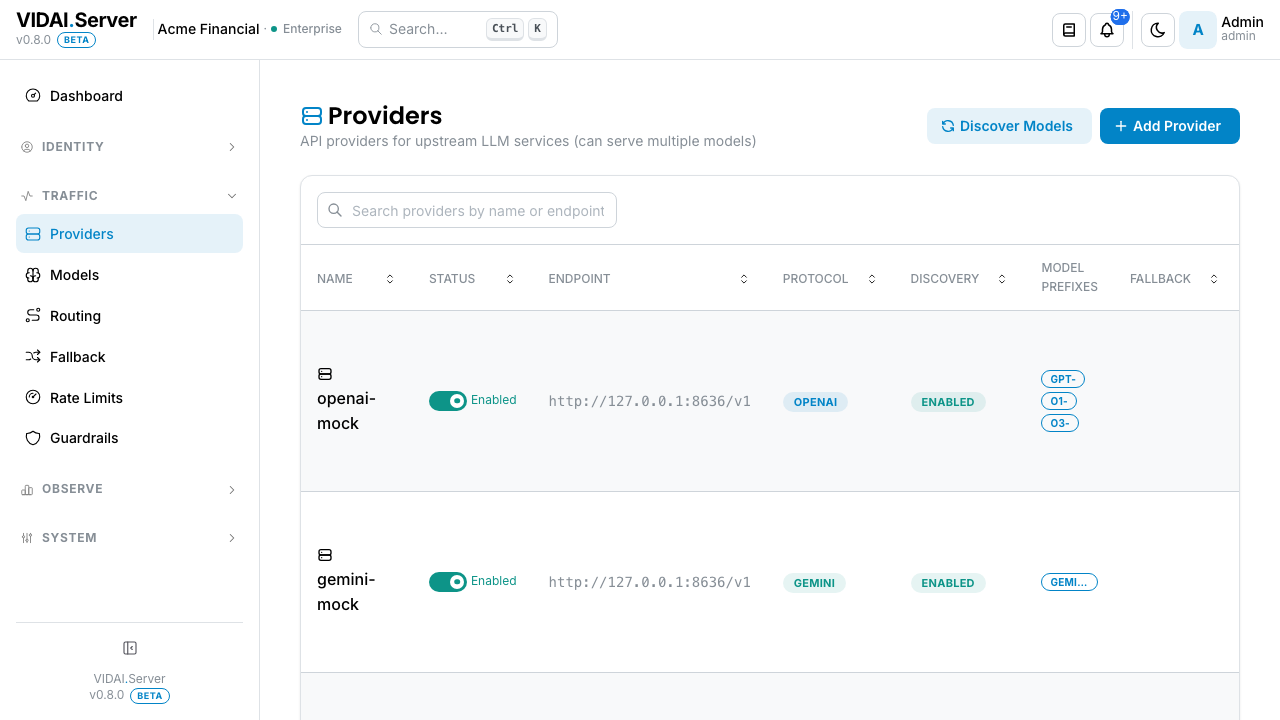
The list shows every registered provider:
| Column | What it shows |
|---|---|
| Name | The friendly name you gave the provider (openai, anthropic-prod, azure-east-us). Used everywhere downstream: model rows, audit logs, cost attribution. |
| Endpoint | The URL the control plane sends traffic to. Usually a vendor-published default; can be a private endpoint for self-hosted or VPC-private deployments. |
| Protocol | The wire format the upstream speaks: openai, anthropic, gemini, azure, bedrock, vertex. |
| Discovery | A toggle. ON means the control plane can auto-detect available models from this provider via its /models endpoint. |
| Models | How many models are registered against this provider. Click-throughs to a filtered Models view. |
| Status | The health-state badge: Active or Disabled. |
Each row has an action menu with Edit, Manage API Keys (for multi-key providers), Discover Models (when discovery is on), View Models, and Delete.
Above the list:
- Search box: narrows by
nameorendpoint. GitHub-style multi-word AND search. - Column sort: click a column header to sort. Newest-first by default.
- Pagination: pick 10 / 25 / 50 / 100 entries. Default 20.
💡 Pro tip. Name your providers after the role they play, not just the vendor.
openai-prodandopenai-dev-quotaages better than two providers both calledopenai.
What you do on this page
Add a new provider
Click Add Provider. Pick the vendor from the preset picker, then fill in a single configure form.
Pick the provider type
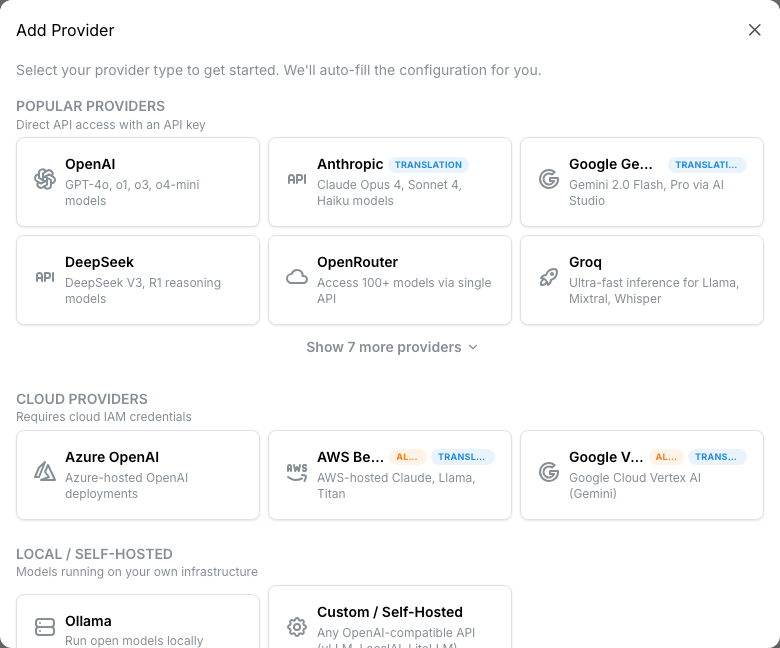
Presets are grouped three ways:
| Category | Examples | How auth works |
|---|---|---|
| Popular Providers | OpenAI, Anthropic, Google Gemini, DeepSeek, OpenRouter, Groq, Mistral, xAI, Fireworks, Perplexity, Together, Anyscale, Qwen | API key |
| Cloud Providers | Azure OpenAI, AWS Bedrock, Google Vertex AI | Cloud IAM credentials (service account JSON / IAM role / SigV4) |
| Local / Self-Hosted | Ollama, Custom | Endpoint URL; API key optional |
Click Show N more providers to expand the popular list.
Each preset pre-fills the endpoint, protocol, and usage parser. You just provide a name and the credentials.
📌 Worth knowing. Bedrock and Vertex AI are marked alpha. They've been tested end-to-end but have known gaps. Read the setup-help alert that appears on the create form for each one.
Configure the provider
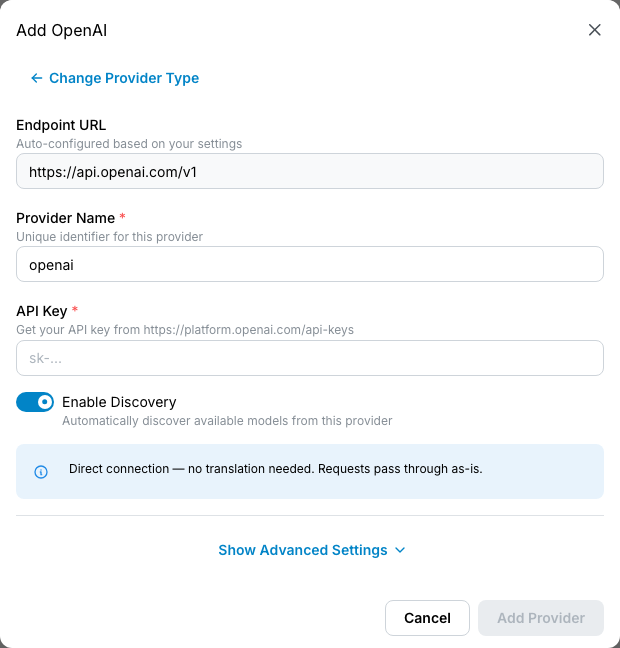
For API-key providers (most popular vendors), the form is two fields:
- Name: what this provider is called everywhere downstream. Pick something stable.
- API key: paste from the vendor's dashboard. The control plane stores this securely and uses it on every upstream call.
For cloud providers, additional fields appear:
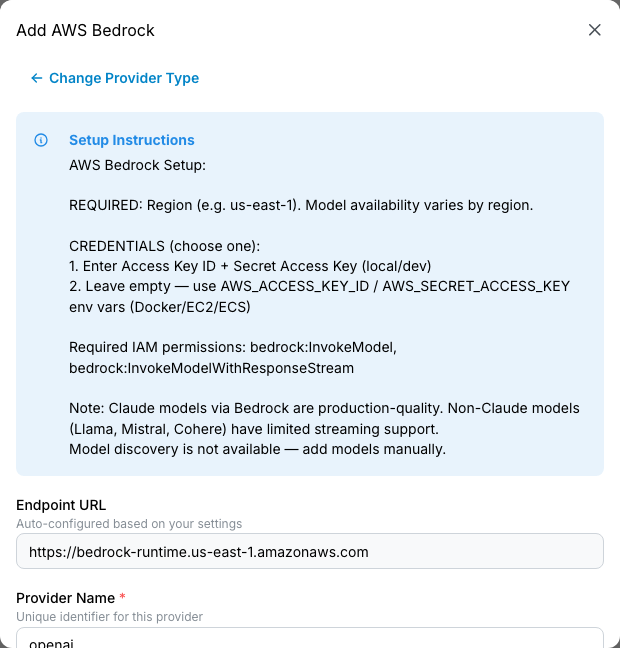
- Bedrock: AWS region + IAM role / access key + secret.
- Azure OpenAI: deployment endpoint + API key + API version.
- Vertex AI: GCP project id + location + service account JSON.
Each provider type shows a setup help alert with step-by-step instructions specific to that vendor: where to find credentials, what IAM permissions are required, what endpoint format is expected.
Advanced settings (optional)
Click Show Advanced Settings below the credentials to reveal extra options:
- Endpoint URL: pre-filled by the preset; override only when you're pointing at a non-default deployment.
- Discovery: auto-detect models by hitting the provider's model-list endpoint. ON by default for OpenAI-family and Gemini.
- Model prefixes: fallback routing patterns. See Configure model prefixes below.
- Additional API keys: paste up to N extra keys for the same provider. The form auto-flips to a multi-key selection strategy when a second key is filled in. See Add multiple keys for the same provider for what each strategy does.
The common case (one key, default endpoint, default discovery) needs nothing in Advanced. The section is there when you need it.
Click Add Provider. The provider appears on the list immediately.
⚠️ Watch out. Credentials pasted into the create form are sent to the control plane and stored. Treat the create form like any production-secret entry: paste, verify the provider works, and clear your terminal / clipboard buffer afterward.
Rotate an API key
Vendors publish new keys; old keys leak; quarterly rotation schedules require fresh credentials.
The simplest path is edit-in-place:
- Find the provider on the list.
- Click Edit.
- Replace the API key field with the new value.
- Save.
The next request goes through the new key. The old key isn't sent anywhere again.
The fancier path is multi-key with overlap:
- Click Manage API Keys on the provider's row.
- Click Add Key with the new credential.
- Set the new key's enabled toggle to ON.
- Wait a beat (verify both keys are working; the control plane distributes load across enabled keys).
- Disable the old key.
- After confirming no failures on the new key alone, delete the old key.
The fancier path lets you roll back instantly if the new key turns out to be wrong.
Add multiple keys for the same provider
Multi-key support is on every API-key provider (not on cloud providers; they have their own credential lifecycle).
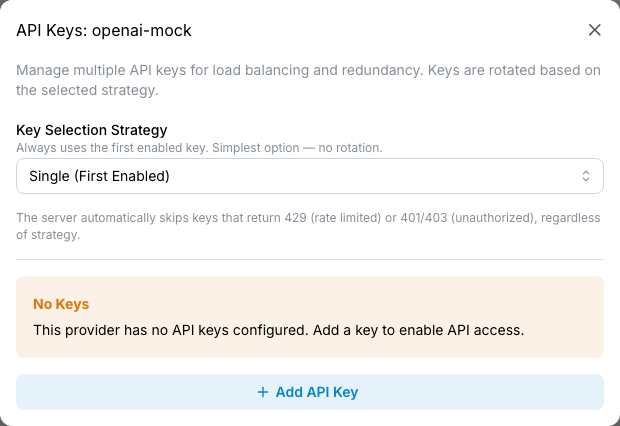
Click Manage API Keys on the provider's row.
Why use multiple keys?
| Reason | What it gets you |
|---|---|
| Rate-limit pooling | Spread load across keys to get higher aggregate throughput than a single key allows. |
| Key rotation with no downtime | Add the new key, enable, verify, then disable the old one (see scenario B above). |
| Failover | If a key gets 429 or 401 from the upstream, the control plane automatically skips it for the next request. |
Picking a key-selection strategy
| Strategy | Behaviour | When to use |
|---|---|---|
| Single | Always uses the first enabled key. | Default. Simplest. |
| Round Robin | Cycles through enabled keys in order. | Even load distribution; keys with equal rate limits. |
| Random | Random selection per request. | Same as round-robin but avoids bursty patterns. |
| Weighted | Selects proportional to per-key weight (1–10000). | Keys with different rate-limit caps; give the bigger one a higher weight. |
| Sticky | Same inbound API key always maps to the same upstream provider key. | Cache-affinity, consistent routing. Useful when an upstream caches per-key. |
The strategy selector saves immediately on change.
Naming keys
Each key has an id (e.g. production, backup,
pool-2). Pick something meaningful: the id appears in audit
logs and (when key health monitoring lands) in failure-attribution
columns.
Automatic failover
Regardless of strategy, the control plane skips keys that return:
429: rate limited; marked temporarily unavailable for ~30 minutes.401/403: credentials rejected; marked unavailable until an admin re-enables.
5xx errors do not mark a key unavailable; those are
Fallback's job, not key health.
📌 Worth knowing. When a key is automatically marked unavailable, the only signal today is that traffic shifts to the other keys. Detailed key-health metrics (which key got skipped, why, when) are roadmap.
Configure model prefixes
Model prefixes control fallback routing: when a request asks for a model name that isn't explicitly registered, the control plane checks which provider's prefixes match.
A provider with prefixes ['gpt-', 'o1-', 'o3-', 'o4-']
catches a request for gpt-4o-turbo (not in the model
registry) and routes it to that provider. Useful when a
vendor's model-name pattern is predictable and you don't want
to manually register every variant.
Edit the provider; the prefixes field is a tags-input. Add or remove prefixes; save.
📌 Worth knowing. Every preset ships with no prefixes by default. That keeps fresh installs predictable: every request goes through the explicit model registry until you deliberately add a prefix. Add prefixes only when you've decided the catch-all behaviour is what you want.
Conflict rules
- Explicit model registrations always win. If
gpt-4ois in the registry pointing at provider A, prefix matching for provider B'sgpt-never fires for that exact name. - Longest prefix wins when multiple providers have
overlapping prefixes. Provider A has
gpt-, provider B hasgpt-4o. A request forgpt-4o-minigoes to provider B (more specific). - Identical duplicates are rejected with a 400 error.
If provider A already has
claude-and you try to addclaude-to provider B, the save is blocked. - Overlapping (non-identical) prefixes produce a warning but are allowed. The create form shows a real-time conflict alert as you type.
⚠️ Watch out. Empty prefixes is the right answer for aggregator providers (OpenRouter, Together) that route internally by model name. Don't put
*or wildcard-y prefixes; the field is a literal-prefix match, not a regex.
Run discovery on a provider
Discovery is the control plane's automatic detection of which models a provider currently serves. It hits the provider's own model-list endpoint and registers every model it finds.
Click Discover Models on the provider's row. A modal opens showing what was found:
- New models: never seen before; will be created.
- Existing models: already in the registry; no change.
- Removed: models that were registered before but the provider no longer lists. (These are NOT auto-removed from the registry; discovery surfaces them so you can decide; a missing model from a vendor's list usually means the vendor deprecated it.)
Click Apply to register the new models.
Which providers support discovery
| Provider type | Discovery |
|---|---|
| OpenAI-compatible (OpenAI, DeepSeek, OpenRouter, Groq, Mistral, etc.) | ✅ via /v1/models |
| Google Gemini | ✅ via Gemini's models endpoint |
| Anthropic | ❌ (they don't expose a model-list endpoint) |
| Azure OpenAI | ❌ (one deployment per provider entry; no discovery) |
| AWS Bedrock | ❌ (no list endpoint) |
| Google Vertex AI | ❌ (no list endpoint) |
For providers that don't support discovery, register models manually on Models.
Discovery naming conflicts
When two providers offer the same model name during
discovery, the first provider keeps the original name.
Subsequent providers get a prefixed alias
(e.g. groq_whisper-large-v3). Both map to the correct
upstream model name; the alias is only how the control plane's
registry distinguishes them.
How translation works (you don't need to configure it)
When a client calls the control plane, the URL path tells the control plane which SDK format the client is using:
| Client URL | Client SDK |
|---|---|
/v1/chat/completions |
OpenAI SDK |
/v1/messages |
Anthropic SDK |
/v1beta/models/X:generate |
Google GenAI SDK / ADK |
The provider's protocol tells the control plane what format the upstream speaks. If the two differ, translation fires automatically.
| Provider protocol | What translation does |
|---|---|
openai |
Requests pass through as-is. Anthropic SDK requests are translated to OpenAI format. |
anthropic |
OpenAI SDK requests translated to Anthropic format. Anthropic SDK requests pass through. |
gemini |
OpenAI SDK requests translated to Gemini format. Anthropic SDK requests translated via OpenAI pivot. Gemini SDK requests pass through. |
azure |
URL rewrite + auth swap. Body translation as for openai. |
bedrock |
SigV4 signing + format translation. Anthropic SDK → Bedrock-Claude uses native passthrough; Anthropic SDK → other Bedrock model families isn't supported. |
vertex |
OAuth/JWT + format translation. |
📌 Worth knowing. You never need two provider entries for the same upstream just because two SDKs are calling it. A single Gemini provider handles both OpenAI SDK clients (translated) and Gemini SDK clients (passthrough). One provider, every SDK.
Client integrations has the SDK × upstream support matrix from the application developer's perspective.
Edit or delete a provider
Click the pencil icon on the row. The edit modal shows every configurable field: endpoint, API key, discovery toggle, model prefixes, fallback flag, advanced options.
The provider name is fixed once created. To "rename" a provider, you'd register a new one with the right name and migrate models over (delete the old after verifying).
Deletion is on the action menu. Confirm by typing the provider's name in the dialog. Deletion is permanent:
- The provider's row disappears.
- All models registered against this provider are deleted (cascade).
- All API keys on the provider are deleted.
- Audit-log history is preserved.
- Calls referencing the deleted provider's models start
failing with
503 upstream_unavailable.
⚠️ Watch out. Provider delete cascades to models. If you have routing rules or fallback chains pointing at those models, those rules and chains break the moment the provider goes away. Audit Routing and Fallback before deleting; or, safer, disable the provider first to verify nothing breaks before committing to delete.
Misconfig signals from the dashboard
The dashboard's Actionable Signals panel surfaces one cause that lands you here:
Provider has no recent traffic. A configured provider hasn't seen traffic in the analyser's window. Either it's misconfigured (auth not working, network unreachable, models mis-prefixed) or genuinely unused.
Click-through lands on the provider's detail page. Verify the auth + endpoint config; confirm the control plane can probe the provider's models. If the provider is genuinely unused and you don't expect traffic on it, disable it (cleaner inventory) or delete it once you've checked Routing and Fallback for references.
The misconfig clears on the next analyser run after traffic arrives or after the provider is disabled / removed.
Reference
Permissions
| Role | Sees Providers page | Can do |
|---|---|---|
| admin | Yes | Create, edit, delete any provider. Manage keys. Run discovery. |
| bi_read_only | No | Page hidden. |
| user | No | Page hidden. |
Field reference
| Field | Effect |
|---|---|
| Name | Friendly name. Fixed at creation. |
| Endpoint | URL the control plane sends traffic to. |
| Protocol | Wire format the upstream speaks: openai / anthropic / gemini / azure / bedrock / vertex. Drives auto-translation. |
| API key (or cloud credentials) | What the control plane sends to the upstream for auth. Replaces inbound Authorization headers; clients never see this. |
| Model prefixes | List of literal-prefix strings used for fallback routing when a model name isn't explicitly registered. |
| Discovery | Toggle. ON: the control plane can call the provider's model-list endpoint to auto-register models. |
| Fallback | Toggle. ON: this provider catches every model that doesn't match an explicit registration or prefix. Only one provider can be the fallback at a time. |
| Usage parser | Which parser the cost engine uses to read this provider's response shape. Pre-filled by the preset; only change if you know what you're doing. |
Multi-key strategies
| Strategy | Behaviour |
|---|---|
| Single | Always picks the first enabled key. |
| Round Robin | Cycles through enabled keys in order. |
| Random | Random per request. |
| Weighted | Probability proportional to per-key weight. |
| Sticky | Same inbound key → same upstream key (cache-affinity). |
Audit log records
- Create provider: actor, name, protocol, endpoint (credentials redacted from the audit body).
- Edit provider: actor, before/after of every changed field (credentials still redacted).
- Add / remove key: actor, key id, strategy.
- Toggle discovery / fallback: actor, new state.
- Delete provider: actor, full snapshot, list of cascaded model + key deletions.
Audit Log shows these.
Common questions
Why doesn't translation have a toggle? I want it off for this provider.
Translation fires when the client's SDK and the provider's protocol disagree. There's no on/off because the control plane can't forward a wire-format mismatch without translating; turning it "off" would just mean the upstream returns 400. The right tool to "force a specific path" is a routing rule that pins the source model to a specific upstream.
I configured Azure but my requests fail with
404.Azure OpenAI uses one deployment per endpoint URL. The endpoint you registered is for one deployment; if your request asks for a model that lives in a different deployment, you need a separate provider entry for that deployment. (This is Azure's API shape, not a control plane limitation.)
My multi-key provider keeps using the same key.
Probably the strategy is set to Single. Open the Manage API Keys modal and switch to Round Robin, Random, or Weighted.
A discovery run found 200 models I don't want.
Discovery finds everything the upstream lists, even deprecated, internal, or obscure models. Apply only the models you actually use; the rest stay unregistered (and the prefix-fallback path can still reach them ad-hoc if a request asks for one).
The "Fallback" toggle won't let me turn it on.
Only one provider can be the fallback at a time. Find the existing fallback provider (the one with the toggle currently on), turn it off, then turn the new one on. The toggle is exclusive.
An OpenRouter / Together provider has empty model prefixes: should I add
*?No. Empty prefixes are correct for aggregator providers. They route internally by model name. The prefix field is a literal-prefix match for the control plane's fallback-routing logic, not for the provider itself.
Can I move models from one provider to another?
Not as a single operation today. The workaround is: register the new provider, manually re-register the models against the new provider, verify routing, then delete the models attached to the old provider. Routing rules and fallback chains pointing at model names automatically pick up the new registration (model name → registered provider is a runtime lookup).
A provider's API has changed and the control plane is sending the wrong format. What do I do?
Update the control plane. The translation layer is built against vendor-published API specs at release time; when a vendor changes their wire format, the control plane needs an update to match. Contact your VIDAI support contact with the upstream's error so we can verify.
Where to go next
- Provider catalogue: per-preset reference for endpoint, prefixes, where to grab the API key, and gotchas. Read this first when adding a provider you haven't set up before.
- Models: the registry of model names. Each model points at a provider; this is where the routing starts.
- Routing: rules that send traffic to specific providers / models based on conditions.
- Fallback: what happens when a provider fails. The composition with this page matters.
- Client integrations: the application-developer's view of which SDKs work against which providers.
- Cost Engine: pricing and cost attribution per provider / per model / per key.
- Audit Log: every change you make on this page is recorded.