Applications
Applications are containers for related agents. A team building a customer-support bot creates one application; an integration that wires several services together creates one application that holds the agents for each service. The application owns the policy (allowed models, guardrail rules, deployment environment) and every agent inside the application inherits that policy by default.
If you've used Groups, this page will feel familiar; they're the same shape underneath. The split exists so the human-team universe (Groups) and the automated-app universe (Applications) stay visually distinct in the sidebar.
This page is the application registry. The agents that live inside applications are managed on Agents.
When you'd open this page
- A new automated workload is going live. Register the application as the container, then create its agents.
- A team finishes a project and the application is going away. Delete it (its agents come along for the ride; see the cascade rules below).
- An auditor asks "which applications run in production right now?" Filter by deployment environment.
- Something is misconfigured for an entire application. Set the policy once on the application and every member agent inherits the change within seconds.
- The dashboard's Lifecycle hygiene panel flagged "empty applications." Open this page and see which applications have no agents, then either populate or retire them.
The page at a glance
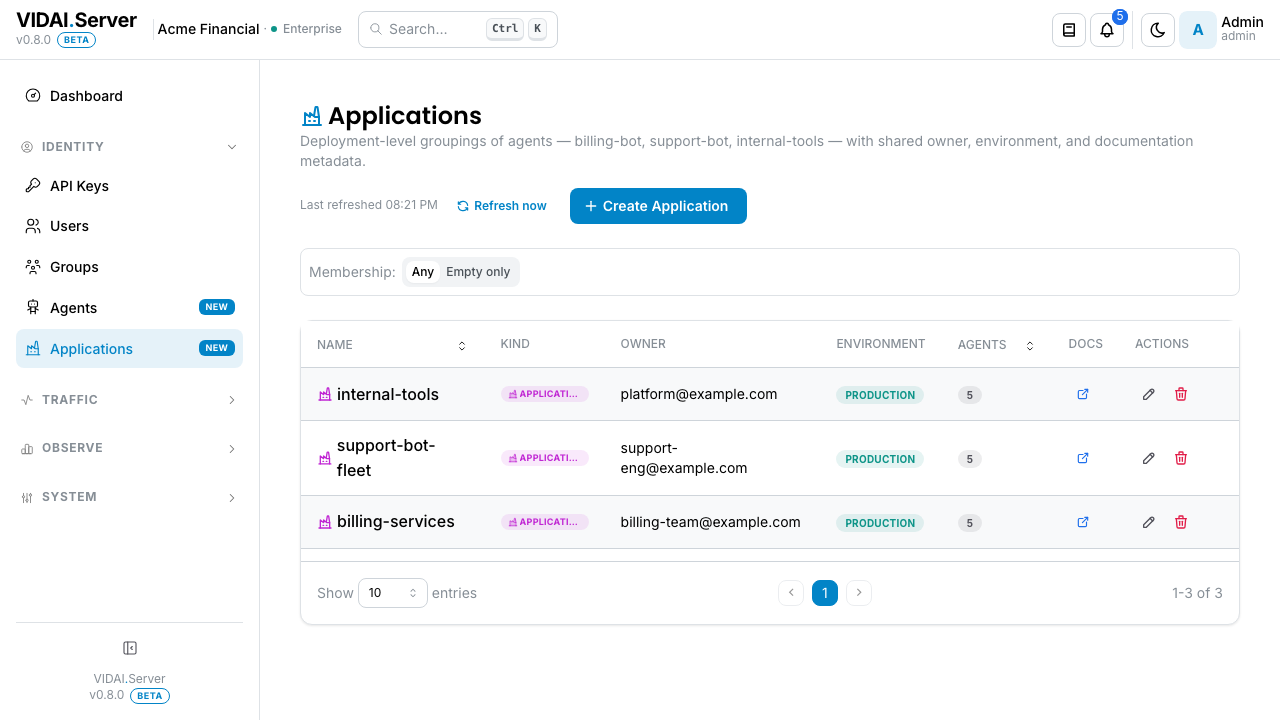
The list columns:
| Column | What it shows |
|---|---|
| Name | The application's name. Edit by opening the row. |
| Owner email | The point-of-contact for this application. The person you'd email when the app misbehaves; not necessarily an admin or a member of the application. |
| Environment | A badge: production, staging, development, or whatever your team uses. Free-text, but consistent values get colour-coded. |
| Agents | How many agents the application contains. Click-throughs to a filtered Agents view. |
| Documentation | If a URL was set, an external-link icon. Hover for the URL. |
If the deployment is brand-new and there are no applications yet, the page shows an empty-state hero with two CTAs: Create application and Read about applications first.
💡 Pro tip. The agent-count column is the easiest way to spot empty applications (count = 0). The dashboard surfaces these too, but this page lets you bulk-clean.
What you do on this page
Create a new application (and its first agent + key)
The create flow is a wizard for the same reason the agent- create flow is: the success step shows the agent's first API key in plaintext exactly once. The application + its first agent + the key all create in one connected operation.
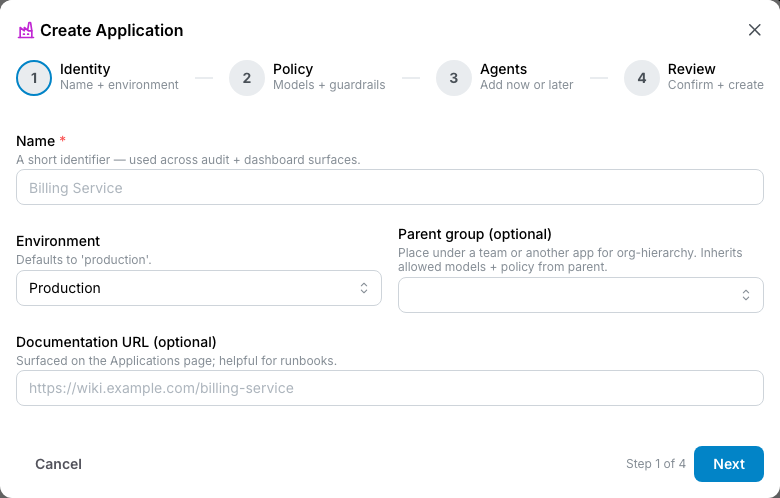
Step 1: Identity
- Name: must be unique. The audit log refers to the application by id, but the name is what humans read.
- Owner email: the point-of-contact. Often a team's shared inbox or an on-call alias rather than an individual.
- Environment: typical values are
production,staging,development,qa,dr. Pick one your team's runbooks already use. - Documentation URL: optional. Where admins investigating the application can find the runbook or README. Surfaced as an external-link icon on the list.
- Description: optional, free-text.
Click Next.
Step 2: Policy
- Allowed models: leave empty for "no application- level restriction" (agents inside this app can call anything else they're allowed to). Pick a list to lock the application down.
- Guardrail policy: same override-toggle pattern as every other override surface. Toggle off to inherit system default; toggle on to set application-specific policy.
Click Next.
Step 3: First agent (optional but recommended)
The wizard offers to create the application's first agent in the same operation. Pick from:
- None: create the application empty. (The dashboard's "empty applications" hygiene tile will flag it until you add an agent.)
- One agent: the wizard creates an agent inside the application, then mints the first API key for that agent and shows the key plaintext at the end.
If you pick One agent, the wizard asks for:
- The agent's name and description.
- Optional version and deployment_state.
Click Create application.
Success step
If a key was minted, the success step shows it plaintext with a prominent Copy affordance. Same rules as everywhere else on the control plane: copy now or mint a fresh one later.
💡 Pro tip. Almost every real application has at least one agent, so the default flow (creating the first agent in the same wizard) saves a click and avoids an empty-state warning. Pick None only when the application is genuinely a placeholder and you'll populate it later.
Edit an application
Click the pencil icon on the row. The edit modal opens: a plain form, not a wizard.
You can change:
- Name (must remain unique).
- Owner email.
- Environment.
- Documentation URL.
- Description.
- Allowed models override.
- Guardrail policy override.
Saving propagates the policy changes to every agent in the application within seconds, and from there to every key those agents own.
📌 Worth knowing. The application's id is fixed at creation. Renaming the application doesn't break any agent links or audit-log references.
Manage which agents belong to an application
Agents and applications have a many-to-many relationship. Most agents belong to exactly one application, but you can multi-attach for shared utility agents.
The membership is edited from the Manage Agents modal on the application's row (people-with-bot icon).
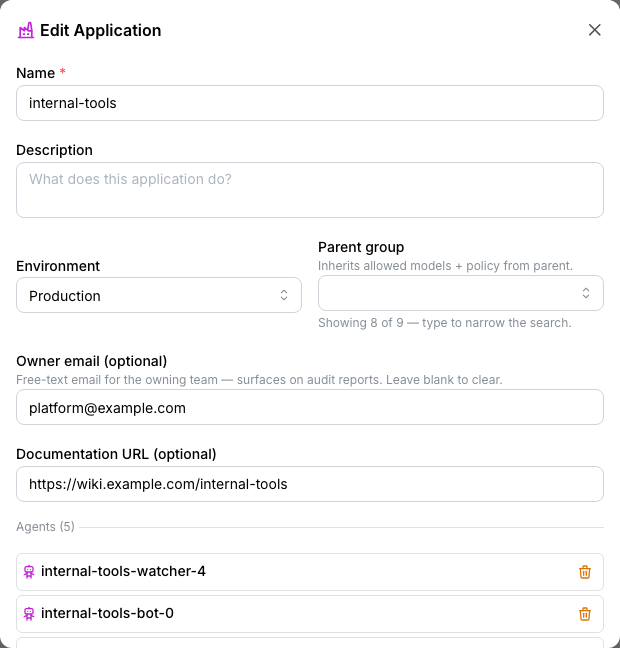
- Add an agent: searchable picker; pick any agent not already a member.
- Remove an agent: trash icon on the agent's row in the list.
When you add an agent:
- The agent's effective
allowed_modelsrecomputes (intersected with this application's allowed list). - The agent's effective
guardrail_configrecomputes. - Both push to every key the agent owns within seconds.
Removal does the reverse. If the agent ends up in no applications after removal, it becomes "unaffiliated" and the dashboard's Lifecycle hygiene panel flags it.
Delete an application
Click the trash icon on the row. A confirmation dialog spells out the cascade:
What disappears:
- The application's row.
- The membership records linking agents to this app.
What survives:
- Every agent: they keep their own row on Agents.
- Every key: they keep their owner agent.
- Audit-log history of everything done to or through this application.
What recomputes:
- Every former-member agent's effective policy recalculates without this application's contribution. If the agent is still in another application, that one's policy applies. If not, the agent is now unaffiliated and the dashboard flags it.
- All the agents' keys re-sync with the new effective policy within seconds.
⚠️ Watch out. Deleting an application is not the same as decommissioning the agents inside it. If you want the agents gone too, delete them on Agents first or alongside. Just deleting the application leaves the agents floating with no parent and the same keys still active.
Misconfig signals from the dashboard
The dashboard's Actionable Signals panel surfaces one cause that lands you here:
Application has no member agents. An application is a deployment boundary; with no member agents it does nothing. Could be a placeholder you haven't filled in yet, could be stale.
Click-through lands on this page filtered to empty applications. Add a member agent (or delete the application if it's no longer planned). The misconfig clears on the next analyser run.
The dashboard's Lifecycle Hygiene panel surfaces the same count as a tile (Empty applications) for periodic-sweep visibility.
Reference
Permissions
| Role | Sees Applications page | Can do |
|---|---|---|
| admin | Yes | Create, edit, delete any application. Manage members. Set policy. |
| bi_read_only | No | Page hidden. |
| user | No | Page hidden. |
Field reference
| Field | Type | Editable | Effect |
|---|---|---|---|
| Name | String, ≤ 100 chars | Yes | Display label. Unique. |
| Owner email | String, optional | Yes | Free-text contact email. Not validated against the user table; can be a shared mailbox. |
| Environment | String, free-text | Yes | Display label, badge. Common values get colour-coded. |
| Documentation URL | String, optional | Yes | External link surfaced as an icon. |
| Description | String, free-text | Yes | Optional context. |
| Allowed models | List of model names | Yes | Empty = no application-level restriction. Otherwise, narrows the agents' inherited intersection further. |
| Guardrail policy | Object | Yes | Override-toggle pattern. Wholesale-replace per top-level field when override on. |
Composition
The application participates in the same multi-group merge as teams. An agent in two applications gets:
- Allowed models: set-intersection across all member applications. Then intersected further with any agent-level override. Then intersected with each key's allowed list.
- Guardrail config: per-top-level-field merge across applications, with higher-id winning on conflicts. Then agent-level override wholesale-replaces the merged result. Then key-level override wholesale-replaces what the agent's effective config produced.
Same rules as Groups: applications are groups under the hood.
Action menu
| Action | Effect |
|---|---|
| Edit | Opens the edit modal. |
| Manage Agents | Opens the agents-membership modal. |
| Delete | Permanent. Cascade-removes memberships; agents and keys survive. |
Audit log records
- Create application: actor, name, owner email, environment, initial policy, whether a first-agent was created in the same operation.
- Edit application: actor, before/after of every changed field.
- Add / remove agent: actor, agent, application.
- Delete application: actor, full snapshot, list of removed memberships.
Audit Log shows these.
Common questions
What's the difference between an application and a team?
They're the same shape underneath, but they hold different things. Teams (Groups) contain humans: admins, engineers, analysts. They set policy for what people can do. Applications contain agents: bots, scheduled jobs, services. They set policy for what automated callers can do. The split keeps the two universes from visually mixing in the sidebar.
Can an agent belong to no application?
Yes; they're called unaffiliated. The dashboard's Lifecycle hygiene panel flags them because the typical case is "this agent should belong to something" rather than "this agent is genuinely independent." If you have a deliberate use-case for an unaffiliated agent, the flag is informational, not blocking.
Can an application contain other applications?
No. Application nesting isn't supported: the hierarchy is one level deep (application → agents → keys). If you need a deeper structure, model it via shared agents or via coordinated allowed-models / guardrail policies across multiple applications.
My application's "agent count" is wrong / stale.
The count is computed live, not cached. If you just added an agent and the count says 0, refresh the page. The agent-add and the count read share the same request cycle, but the page caches the list briefly. If a refresh doesn't show it, the agent-add probably failed silently. Check the agent's row to confirm the membership took.
The wizard's step 3 says "create the first agent" but I want to add three agents at once.
The wizard creates one agent inline. For batch creation, finish the wizard with one agent (or none), then go to Agents → Create Agent and attach each new agent to the application via the Applications picker. Bulk-import isn't on the console today.
My application has agents in multiple environments (some staging, some prod). What environment do I set?
If the agents legitimately span environments, two applications is the cleaner model:
myapp-stagingandmyapp-prod, each with the right agents. The environment field is per-application, not per-agent; mixing breaks the runbook story.Is the owner email used for anything other than display?
No automated emails are sent today. The field is a contact pointer for humans investigating the application. If you want event-based notifications, Webhooks is the right surface: they push to URLs (Slack, PagerDuty, your own webhook handler) per event.
Where to go next
- Agents: the rows that live inside applications. Most lifecycle work happens there.
- API Keys: agents own keys; keys inherit policy through the agent-application chain.
- Groups: the parallel page for human teams.
- Routing: application-scoped routing rules let you apply policy that targets a whole application's traffic.
- Dashboard: Lifecycle hygiene tracks empty applications, unaffiliated agents, deprecated- active agents.
- Audit Log: every change on this page lands there.