Routing
Routing rules transparently change which model a request actually
ends up calling. A client asks for gpt-4o, but a routing rule
redirects to gpt-4o-mini for cost reasons. A client asks for
claude-haiku-4, but an A/B rule sends 25% of that traffic to a
candidate for comparison. A client asks for a model their team
isn't allowed to use, and a deny rule blocks the call with a
clear reason. No client code change required.
This page is the rule-shop: five rule intents (Redirect, A/B Test, Deny, Spend Circuit, Custom) plus an All Rules unified view and a Preview simulator for testing changes before they affect production traffic.
📌 Worth knowing. Routing changes the target model every request, based on conditions you define. Fallback changes the target only when an upstream is unhealthy. Both compose: a routing rule rewrites first, a fallback chain is then looked up against the rewritten model. Knowing where in that chain a behaviour comes from is the first step in any routing diagnosis.
When you'd open this page
- Dev teams are spending too much on
gpt-4ofor non-prod traffic. Set up a Redirect to silently route them togpt-4o-mini. - You want to evaluate two models side-by-side. Set up an A/B Test that splits traffic between them.
- A specific team / agent / key shouldn't be calling expensive models. Deny rule with a scoped exemption.
- A model has a hard monthly spend ceiling. Spend Circuit trips on threshold and routes to a cheaper alternative until the next budget window resets.
- A request is doing something unexpected. Open Preview and simulate; it tells you exactly which rule fires, and which rules were eliminated and why.
- A rule isn't firing as expected. Open All Rules and read the priority + scope ordering across intents.
How routing evaluates: five rules to internalise
These five behaviours decide what happens to every routed request. The rest of the page makes more sense once they're in your head.
- Exact-match source. A rule on
gpt-4odoes not catchgpt-4o-mini. There's no prefix matching, no wildcards, no globs. Different model names need different rules. - Higher priority fires first. Rules compete by numeric priority: the highest-priority enabled rule whose source matches wins. Each intent has its own priority band (see the reference below); the control plane picks sensible defaults so most rules don't need explicit priorities.
- Scope precedence within the same priority: Key > User / Agent > Team / Application > Global. A rule scoped to a specific key wins over one scoped to a team that key belongs to.
- No chaining. If a rule rewrites A → B, the resulting B request is not re-evaluated. A rule like B → C doesn't fire as a side-effect of A → B. To get a cascade, write a single rule from A directly to C.
- Permissions re-check after rewrite. When a rule
rewrites the target, the control plane verifies the target is in
the calling key's allowed-models list. Rules cannot
escalate access: if the rule redirects a client to a model
the key isn't allowed to call, the request is denied with
403 model_not_allowedand the rewrite is logged.
The tip alert at the top of each intent tab restates rules 1-3 for quick reference. The All Rules tab is the honest end-to-end view across all intents.
The page at a glance
The page has seven tabs:
| Tab | What it holds |
|---|---|
| Redirect | Transparent rewrites (the cost-saver pattern). Source A becomes target B for the matched scope. |
| A/B Test | Weighted splits between two models. N% of traffic goes to variant B; the rest stays on variant A. |
| Deny | Hard blocks. Calls return a configured error message instead of reaching an upstream. Optional exempt-keys list lets you carve out exceptions. |
| Spend Circuit | Auto-tripping redirects keyed off monthly spend. Stays in standby until the threshold is crossed; then routes to a cheaper alternative until the next budget window resets. |
| Custom | Full-form rule editor for edge cases. Other intents are pre-shaped wizards on top of the same primitive. |
| All Rules | Unified list across every intent in actual evaluation order. Intent tabs are filters; this is the whole set. |
| Preview | Pick a model and a key, see which rule would fire (and why others didn't). |
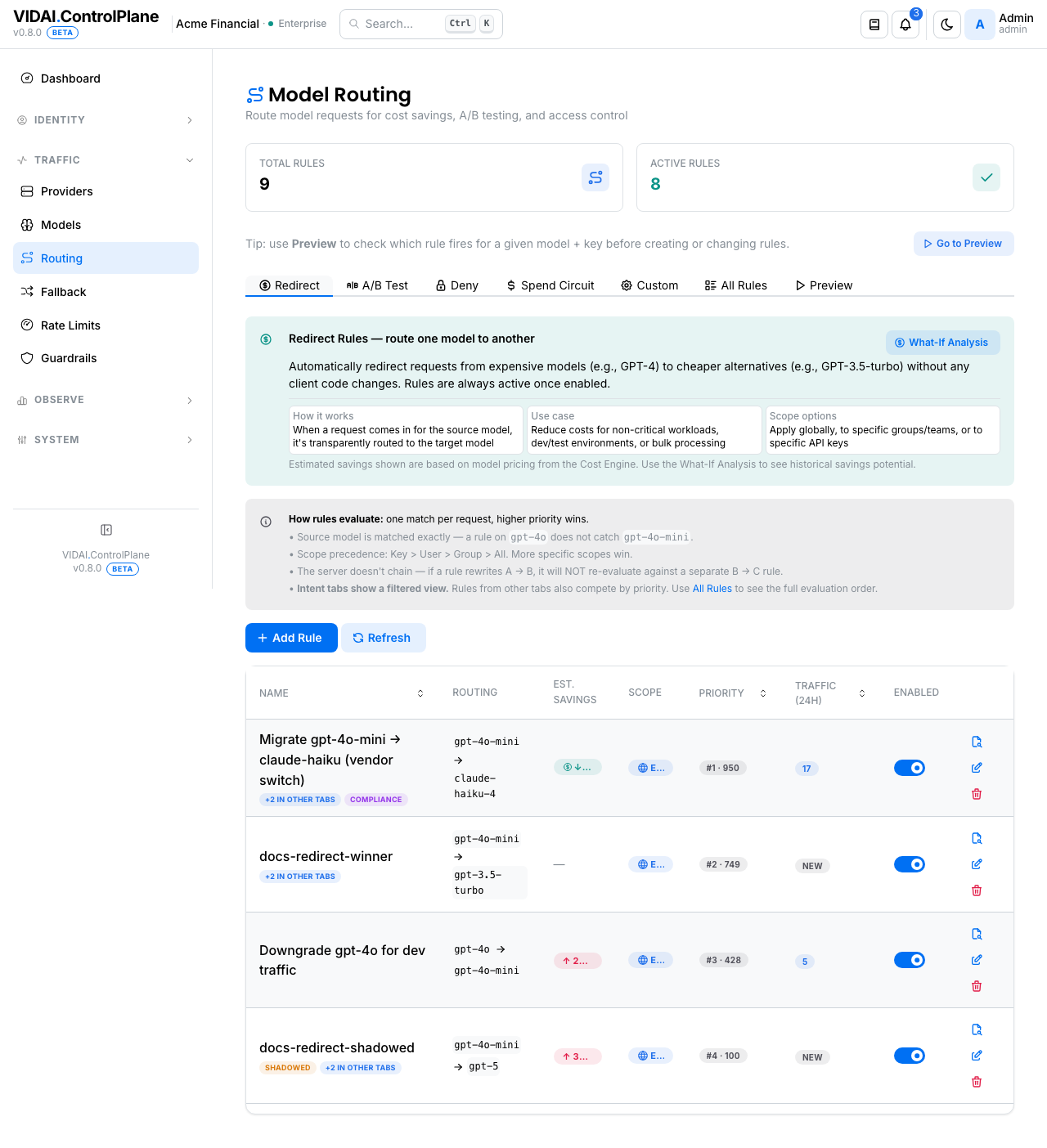
The list columns (same shape on every intent tab):
| Column | What it shows |
|---|---|
| Name | The rule's display name + small badges: Disabled, Shadowed (a higher-priority peer covers the same source+scope, this rule is unreachable), +N in other tabs (cross-intent chip). |
| Routing | The source → target pair. Deny rules show a red "Denied" indicator instead. |
| Est. Savings | Rough percentage savings when the target is cheaper. Pulled from the cost engine's rate cards; — when both rates aren't priced. |
| Scope | Globe / Team / User / Agent / Key badge: at a glance, who this rule applies to. |
| Priority | #N · raw-value. N is the rule's rank among enabled rules on the current tab; raw value (1–999) is the absolute priority. Higher fires first. |
| Last fired | Most recent time the rule actually matched a request. Helps spot dead rules. |
💡 Pro tip. A Shadowed badge means a peer rule with the same source + scope at higher priority always fires first; this rule is unreachable. Hover the badge for the shadower's name. Either disable / delete the shadowed rule, or raise its priority above the shadower if it was supposed to win.
Search + filters on the All Rules tab
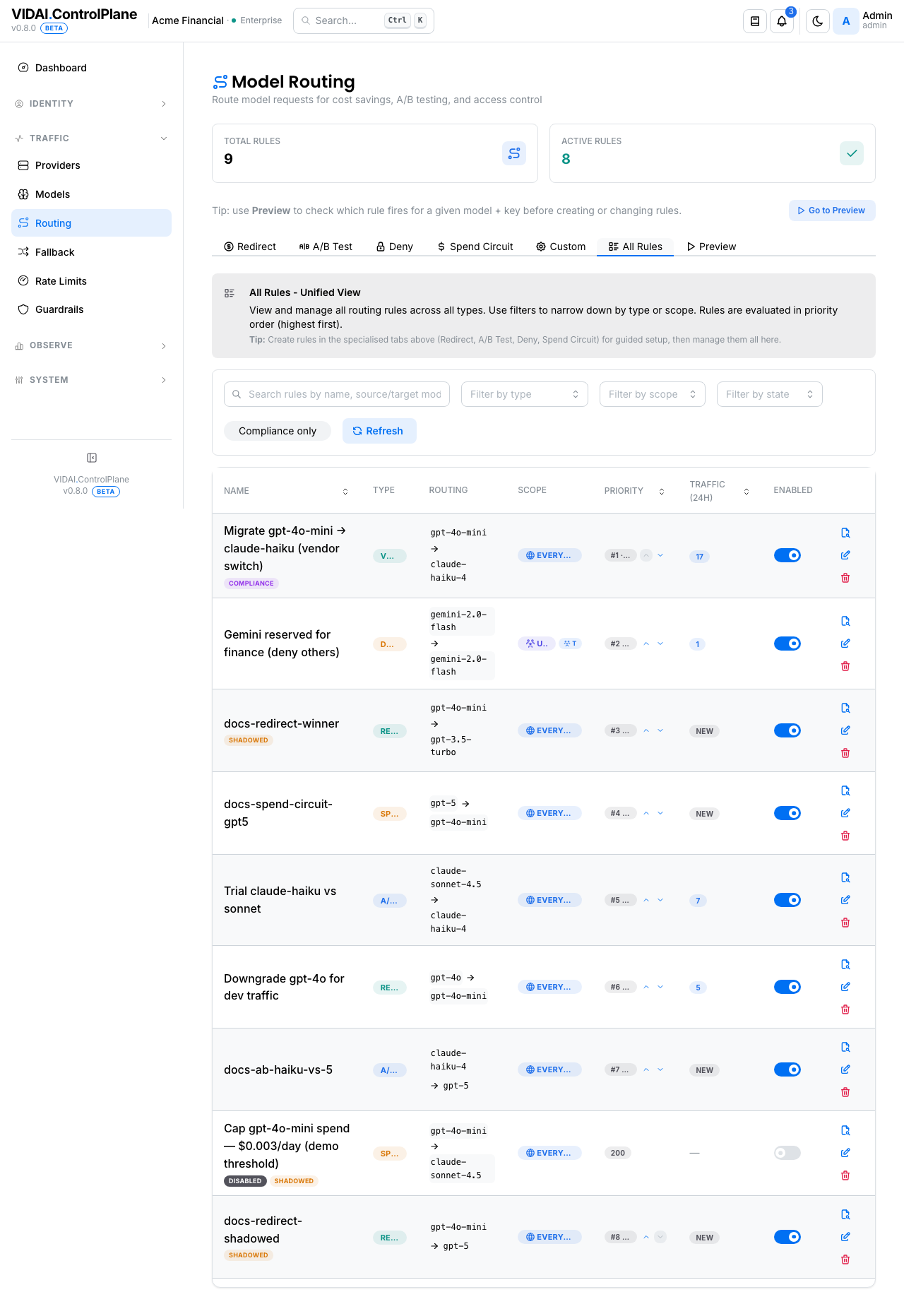
The All Rules tab adds a free-text search box that
narrows by name, source_model, target_model, or rule
id. GitHub-style: multiple words AND together. Combine
with the Filter by type and Filter by scope
dropdowns to drill in. The Compliance only chip + the
Compliance entry in the type dropdown are Enterprise-only;
both are hidden on Community deployments. Other tabs
(Redirect, A/B Test, Deny, Spend Circuit, Custom) are
intent-filtered slices of the same data; their lists are
typically small enough that visual scanning is faster than
a search box.
What you do on this page
Redirect: quietly downgrade a model
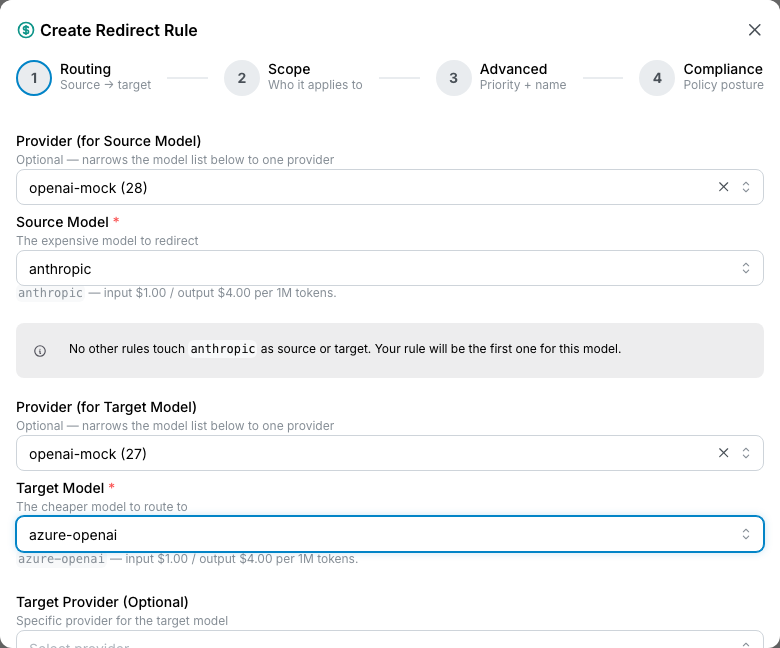
Goal: dev traffic to gpt-4o should silently use gpt-4o-mini.
- Click the Redirect tab → Add Rule. The wizard opens. On Community deployments it has 3 steps (Routing / Scope / Advanced); on Enterprise a 4th Compliance step appears at the end.
Step 1: Routing
- Source Model:
gpt-4o. - Target Model:
gpt-4o-mini. - Target Provider: leave blank to use the model's registered provider; set explicitly to pin the rewrite to a specific provider's instance of the target.
A cost delta hint shows what this rewrite would save based on the cost engine's rate cards (when both rates are priced).
Step 2: Scope
Pick who this rule applies to via the scope-picker cards:
- Global: every key on the control plane.
- Team: every key whose owner is in the named team(s).
- Application: every agent inside the named application(s).
- User: specific user(s).
- Agent: specific agent(s).
- Key: specific key(s).
For the dev-cost example, scope to your Dev team.
Step 3: Advanced
- Priority: leave blank for the per-intent default. Or set explicitly (1–999), higher fires first. The control plane clamps to the intent's priority band silently if you exceed it.
- Rule Name: friendly name for the audit log.
- Description: optional context.
A conflict banner at the bottom shows shadowing or cycle warnings: non-blocking, but worth reading.
Step 4: Compliance (Enterprise)
🔒 Enterprise edition. The Compliance step only appears on Enterprise. Community wizards omit it entirely; existing compliance-tagged rules stay live and apply at request time, but they can't be edited on Community.
The compliance step asks whether this rule is policy-driven
("use cheaper models for sensitive data") or purely
operational ("save money in dev"). Pick the appropriate
compliance label or leave as none. Compliance-tagged
rules surface separately on the
Compliance panel of the dashboard.
Click Create rule. The rule appears on the Redirect
tab; calls from Dev keys to gpt-4o start routing to
gpt-4o-mini immediately.
💡 Pro tip. Model-name-only rewrites preserve the rest of the request shape (system prompts, tools, token limits, streaming settings). The client doesn't notice anything except cost (and possibly latency / quality). Audit dev-team perception before locking in production rewrites.
A/B Test: split traffic between two models
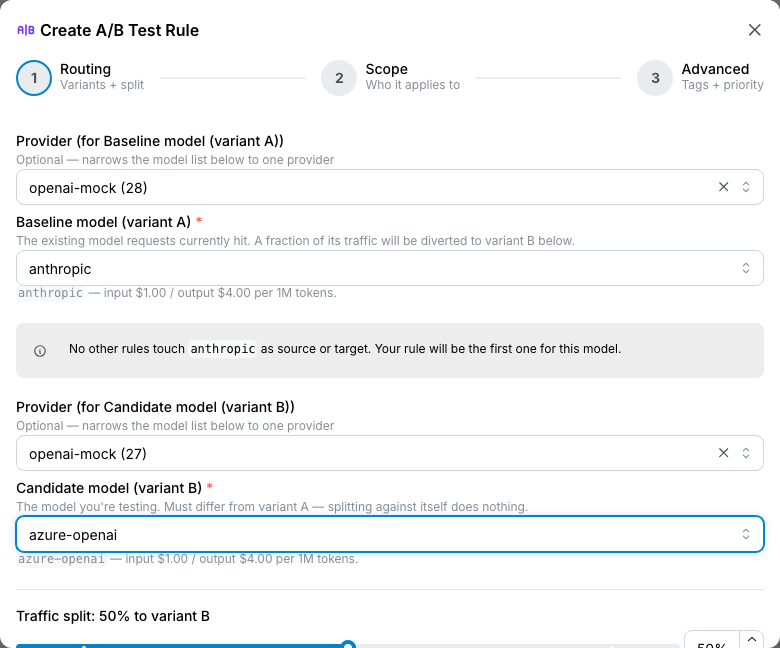
Goal: 25% of claude-haiku-4 calls go to claude-sonnet-4 for
a quality comparison.
A/B Test has three steps (no Compliance step: A/B rules are operational rather than policy-driven).
- A/B Test tab → Add A/B Test.
Step 1: Routing
- Baseline (variant A):
claude-haiku-4. The model most traffic continues to use. - Candidate (variant B):
claude-sonnet-4. The model the split fraction goes to. - Traffic split: slider or quick-pick chips (10% / 25% / 50% / 75% / 90%) for the percent that goes to the candidate.
Step 2: Scope
Same scope-picker as Redirect.
Step 3: Advanced
Priority + name + description + tags. Tags are A/B-only:
free-text labels for the experiment
(new-model-rollout-q2, latency-comparison).
Click Create rule.
After traffic accrues, Cost Engine shows the per-model split, and Request Logs shows individual request attributions: both the requested model and the actual model are in every row.
📌 Worth knowing. The split is probabilistic, not strictly deterministic. Two consecutive identical calls from the same key might both land on A, both on B, or split. Over thousands of requests the observed ratio converges to the configured split, but small samples can drift. If you need deterministic per-key affinity (the same key always gets the same variant), use the Sticky multi-key strategy on the upstream instead.
Deny: block specific traffic with a clear message
Goal: the Marketing team should not call gpt-4o. Block their
calls and return a clear reason.
- Deny tab → Add Deny Rule. The wizard has 3 steps on Community; Enterprise adds a 4th Compliance step at the end.
Step 1: Routing
- Action: flip the radio from Redirect to Deny.
- Source Model:
gpt-4o. - Deny reason: a string that goes in the response
when the rule fires. Use
{model}to substitute the blocked model name. Example:"{model} is not approved for this team. See your platform team for the approved models.". - Exempt Keys: optional list of keys that bypass the deny. Use for "this team can't use it BUT the team lead's evaluation key can."
Step 2: Scope
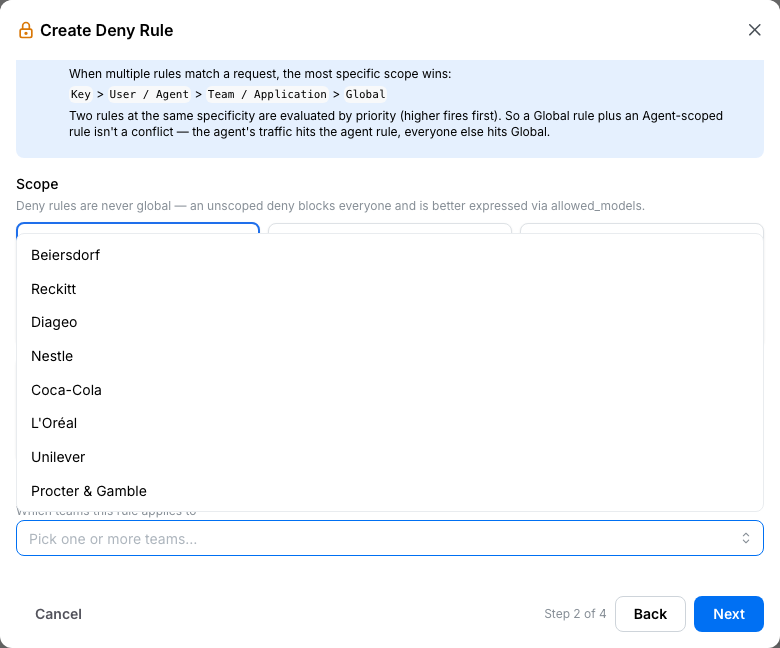
Deny rules can't be Global (an unscoped deny would block everyone, which is better expressed via allowed- models on the keys / users themselves). Pick a team / application / user / agent / key.
Step 3: Advanced
Priority + name + description.
Step 4: Compliance (Enterprise)
Enterprise-only. Tag if the rule is policy-driven
(e.g. policy_compliance). Hidden on Community.
Click Create rule. Marketing team's calls to gpt-4o
return the configured reason; their other models still work.
⚠️ Watch out. Exempt-keys is per-deny-rule. If you have several deny rules covering the same source, a key needs to be exempt on each one. Otherwise the first non-exempt match wins.
Spend Circuit: auto-trip on a budget threshold
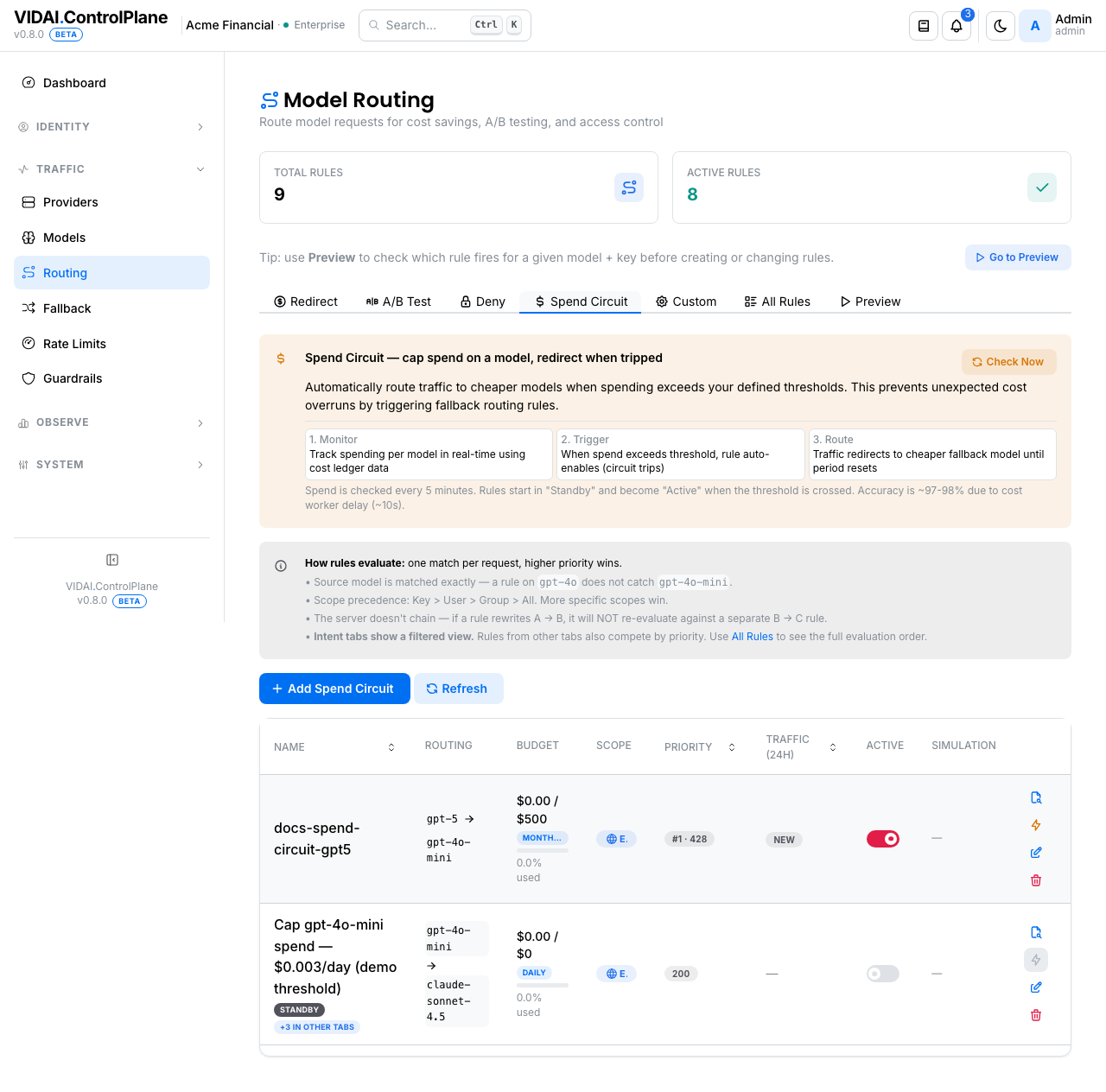
Goal: if gpt-5 spend exceeds $50 this month, redirect to
claude-haiku-4 for the rest of the month.
- Spend Circuit tab → Add Spend Circuit. The wizard has 3 steps on Community; Enterprise adds a 4th Compliance step at the end.
Step 1: Routing + budget
- Source Model:
gpt-5. - Target Model:
claude-haiku-4. - Threshold ($USD):
50. - Period:
monthly. (weeklyanddailyare also supported.) - Warning percent: at this fraction of the threshold (e.g. 80%), the dashboard surfaces a warning even though the rule hasn't tripped yet.
Step 2: Scope
Same scope-picker.
Step 3: Advanced
Priority + name + description.
Step 4: Compliance (Enterprise)
Optional Enterprise-only tag. Hidden on Community.
The rule starts in Standby: the redirect is not active. The rule auto-flips to Active when accumulated spend on the source crosses the threshold within the configured period. While Active, calls redirect to the target. At the start of the next period (next month for a monthly window), spend resets and the rule returns to Standby.
The list shows the current state on each rule's row: Standby, Active (tripped), with a progress indicator showing accumulated spend toward the threshold.
Smoke-test before a real budget event
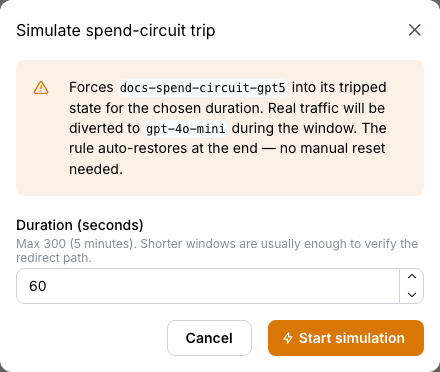
Use the Simulate Trip button on the row. The rule flips to Active for a configurable window (default 60 seconds, max 300) so you can verify the redirect actually fires, then auto-restores to Standby.
💡 Pro tip. Set the Warning percent at 80%. The dashboard alert fires before the trip, giving you time to investigate (is this a real spend spike, or a runaway loop?) before clients start seeing redirects.
⚠️ Watch out. Spend tracking has a propagation delay. The circuit checks accumulated spend every few minutes, not every request. A burst that spends past the threshold in seconds may briefly serve at the source rate before the circuit observes the breach and trips.
Custom: full-form rule editor
The Custom tab uses the same wizard but with no intent pre-shaping. Source / target / scope / priority / compliance all configurable. Use Custom when:
- You want a rule that's structurally a Redirect but with a compliance label that the Redirect-intent template doesn't expose.
- You're modelling something that's none of the other
intents (e.g. a
complianceintent that's specifically a hard enforcement of a policy decision).
The 4-step wizard is the same shape as the others.
Preview: what would fire?
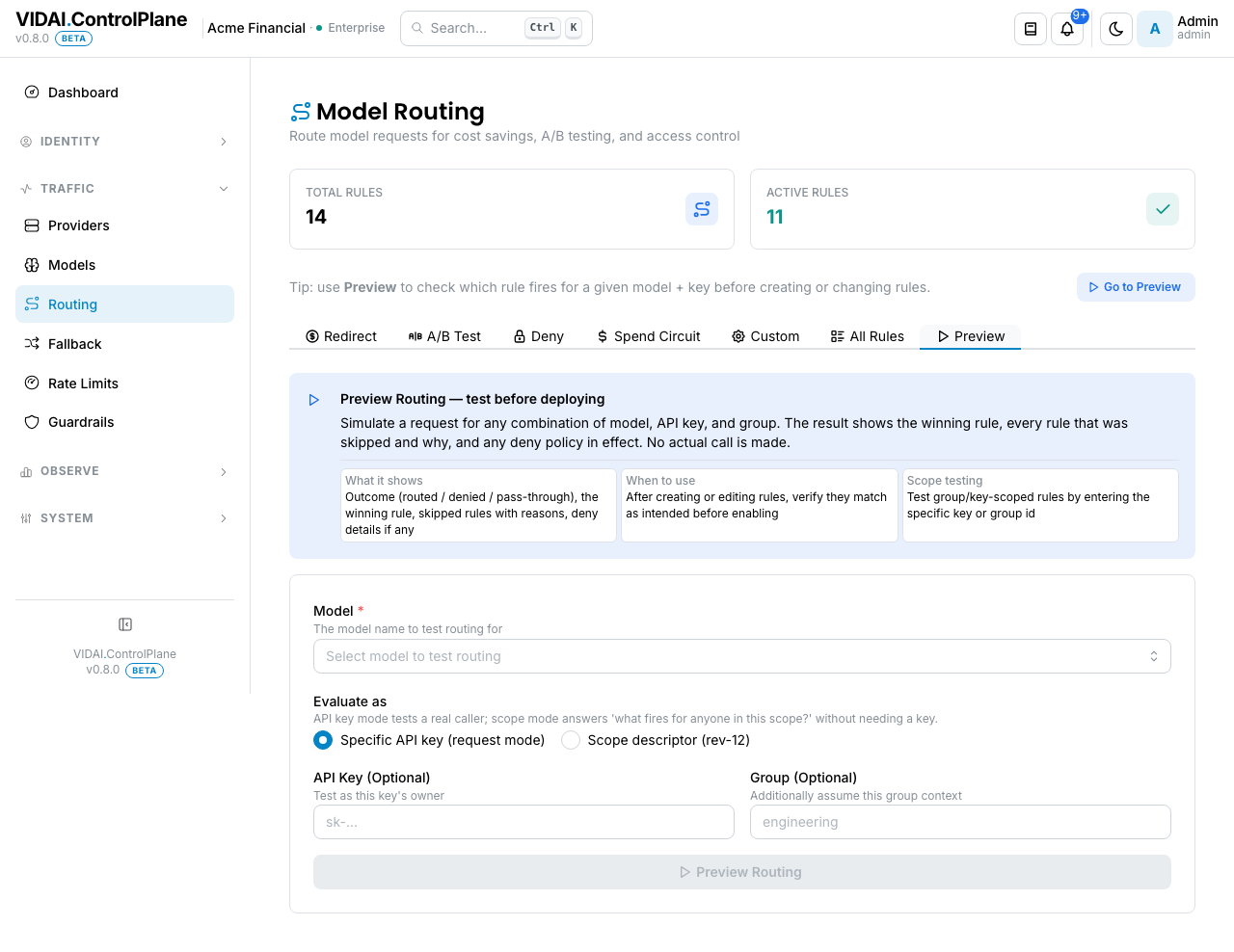
Click the Preview tab. Pick a model, an API key, and click Preview. The result tells you:
- Which rule (if any) is going to fire.
- The eliminated rules and why each was eliminated (priority, scope mismatch, source mismatch). This is the explainable view: admins know why the rule that fired won.
- The final routed model + provider.
Use Preview before any rule change that affects production traffic. If your test client says "calls to X go to Y" and Preview agrees, the rule is right.
📌 Worth knowing. Preview is read-only. It doesn't actually call the upstream; it runs the same routing evaluation that real traffic would and tells you the outcome.
Edit a rule
Click the rule's row. The edit modal opens: a flat form, not a wizard (intentional, only create needs the wizard's progressive disclosure; edit is for tweaks).
Edit lets you change every field except the rule's id and intent. You can't change a Redirect into an A/B Test: delete the rule and create a new one for that.
Saving propagates the change to live evaluation immediately. There's no key-resync step required (routing happens at request time, not at key-config time).
Disable or delete a rule
- Disable: inline toggle on the row. Disabled rules don't fire but stay on the list with their config preserved. Reversible.
- Delete: trash icon. Permanent. Audit-log retains the historic record; the rule itself is gone.
💡 Pro tip. Disable, don't delete, when you're iterating. Deletion is for "this rule is permanently retired."
Cross-intent chip + Shadowed badge
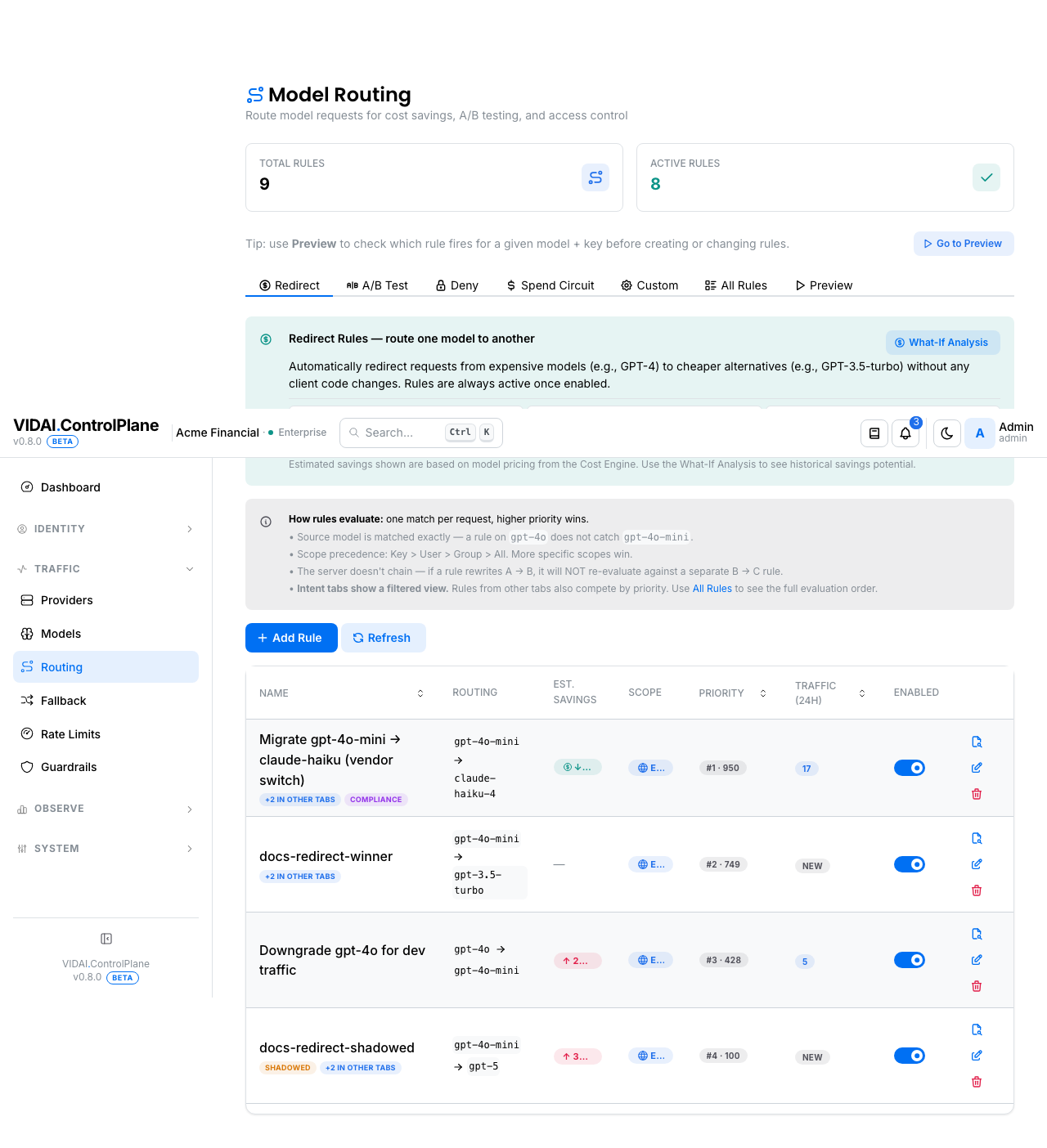
Two cross-cut signals show on the rules list:
+N in other tabs
When a rule's source model also has rules on other intent tabs, a small chip appears next to the name. Hover for the names. Useful when you're tweaking a Redirect rule and the source also has an A/B Test active: the two interact.
Shadowed
When two rules have the same source + scope + intent + target at different priorities, the lower-priority one is shadowed: it can never fire. The badge tells you so; hover for the shadower's name.
The All Rules tab is the right surface for spotting these cleanly because it shows the unified evaluation order across intents.
Misconfiguration causes: the full reference
Every routing rule in the control plane is continuously analysed for configuration health. The analyser assigns each rule at most one cause at any time: the rule is either fine, or it carries one classification telling you what's wrong.
When a cause fires, the rule shows a badge on this page (and on the dashboard's Actionable Signals panel). Clicking the badge takes you to the right surface to fix it.
There are 14 distinct causes, grouped three ways for daily use:
- Actionable: real config gaps to fix. Eligible for the notification bell.
- Standby: defensive posture (intentionally paused or armed). Not broken; not bell-eligible.
- Quiet: informational. Newly created, idle, or un-classifiable. Not bell-eligible.
The default Misconfigs view on the dashboard drawer filters to Actionable. Standby and Quiet are for periodic inventory sweeps.
Actionable causes (9)
| Badge | What's wrong | Click takes you to | What to do |
|---|---|---|---|
| Rule is shadowed | A higher-priority enabled rule's match conditions are a superset of this rule's. Every request this rule could match, the other one catches first; this rule never fires. | This rule on the right intent tab, with the rule highlighted. | Bump this rule's priority above the shadower's, or disable the shadower if it's no longer needed. |
| Target resolves to no model | A redirect rule has no targets defined, every defined target has weight 0, or the named target_model isn't a registered model. The control plane has nowhere to send matched traffic. | The rule's edit form. | Add a target_model with a non-zero weight. |
| Scope matches nothing | Scope is set to specific teams / users / keys, but the picker now resolves to an empty set: either nothing was ever picked, or the picked subjects have been deleted since. | The rule's edit form. | Add subjects to scope, change scope to "global", or delete the rule if it's no longer relevant. |
| Target model not in catalogue | The rule's target_model doesn't exist in the catalogue at all (not just unpriced, but missing). The rule can't fire because there's no model to redirect to. | Models → Add Static Model with the target name pre-filled. | Add the model (manually or via sync). Once it exists, the misconfig either clears or downgrades to "Target model is unpriced". |
| Source model is unpriced | The rule's match_model has no active rate card. Matching requests still route correctly, but cost evaluation skips: those rows price at $0 and won't show in chargeback. The badge shows the recent skip count. | Cost Engine → Rate Cards → Create-Rate-Card modal pre-filled with the offending model. | Save the card with the right prices. The misconfig drops on the next analyser run. |
| Target model is unpriced | The rule's target_model exists in the catalogue but has no active rate card. Redirected traffic prices at $0. | Same as "Source model is unpriced". | Same. Create-Rate-Card modal pre-filled. |
| Rule has no scoreable intent | Intent is unset, or set to "custom" / "unknown". The rule still fires, but the dashboard can't credit it for cost savings, vendor switches, etc.; it doesn't show up on its mechanism rail. | The rule's edit form. | Pick an intent that matches what the rule does (cost_saver / vendor_switch / access_control / budget_breaker / ab_test). |
| Compliance overlap (three subtypes) | A compliance-pinned rule overlaps with another rule (or a fallback chain) in a way the control plane flags. Subtypes: pin_conflict (two compliance pins disagree), fallback_overlap (a fallback chain can route this rule's traffic to a non-compliant target), costsaver_redirect_overlap (a cost-saver overlaps a compliance pin). The pin wins at runtime; the loser visibly does nothing for the overlap region. | This rule. | Narrow one of the rules' scopes so they no longer overlap, tighten the fallback chain, or remove the loser rule. See Compliance. |
| Rule references deprecated subject | The rule is scoped to an agent or team whose deployment_state is deprecated. The rule still fires today, but when the deprecated subject is removed, it'll fall back to "Scope matches nothing". |
The rule's edit form. | Update scope to the current (non-deprecated) replacement. |
Standby causes (2)
| Badge | What it means | What to do |
|---|---|---|
| Rule is disabled | Someone explicitly turned the rule off (enabled=false). It won't fire until re-enabled. |
Either re-enable, or delete if no longer needed. Disabled rules don't accumulate cost in attribution but do take up inventory space. |
| Budget rule armed (pre-trip) | A budget_breaker rule is wired correctly but hasn't crossed its threshold yet. Defensive posture: your intentional "lever to pull when spend hits N." | Usually nothing. Click through to see the current threshold progress. |
Quiet causes (3)
| Badge | What it means | What to do |
|---|---|---|
| Rule is settling in | Newly created within the settling period (typically 24h). No matching requests have arrived yet. | Wait for the first matching request. After the settling period, this auto-converts to either nothing (if the rule fires) or "Rule is idle" (if it doesn't). |
| Rule is idle | Structurally clean, enabled, older than the settling period, zero fires in 30 days. Either intentional standby (the source_model has no traffic right now) or stale config (the source_model / scope no longer matches real traffic). | If defensive, ignore. If stale, update scope, change source, or delete the rule. |
| Could not analyse | The analyser hit a case it can't classify structurally (a regex pattern it couldn't evaluate, a transient resolution failure, etc.). Surfaced rather than misclassified. | Usually nothing. If the same rule shows up here repeatedly across analyser runs, file a support ticket; that's a gap in the analyser. |
Where these badges show up
- This page: All Rules tab, per-rule badge column.
- Dashboard: Actionable Signals panel + drawer (Misconfigs tab); the bell shows the Actionable subset.
- Rule detail drawer: full description + action button.
The same cause is the same fix everywhere; clicking from the dashboard or from this page lands you at the same destination.
Effective Routing: drawers from related pages
Several pages link into a per-entity routing drawer:
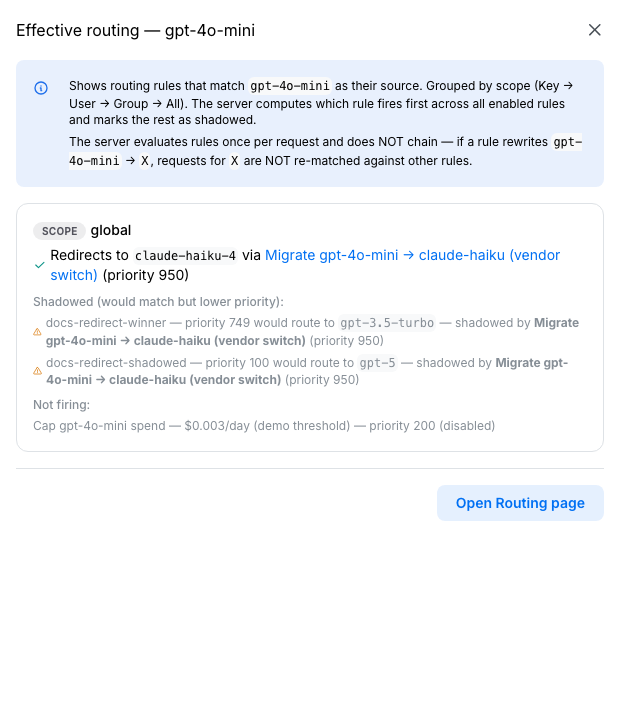
- Models → "View routing" on a row opens a drawer showing every rule with this model as source or target.
- Users and Agents: on each row, a small route-icon opens a drawer showing every rule scoped to this identity.
- API Keys: "View traffic" goes to Request Logs filtered to the key, and the firing rule is in every log row.
These cross-links exist so you can answer "what's happening to traffic for this thing?" without reading the whole rules list.
What you can see in the response
When a rule fires on a request, the control plane sets these HTTP response headers so callers and operators can verify:
| Header | What it says |
|---|---|
x-vidai-model |
The model that was actually called (post-rewrite). |
x-vidai-routing-rule |
The id of the rule that fired (only set when a rule actually rewrote the call). |
x-vidai-requested-model |
The model the client originally asked for, only when it differs from the actual model. |
Request Logs surfaces the same information in the in-console UI: every row shows requested-model, actual-model, and the rule id when a rule fired.
Reference
Permissions
| Role | Sees Routing page | Can do |
|---|---|---|
| admin | Yes | Create / edit / delete / disable rules. Run Preview. Simulate spend-circuit trips. |
| bi_read_only | No | Page hidden. |
| user | No | Page hidden. |
Intent reference
The Compliance step is Enterprise-only and is the last step in the wizard (it's absent entirely on Community). A "4-step" intent below is 4 steps on Enterprise, 3 on Community.
| Intent | Tab | Wizard steps | Compliance step? |
|---|---|---|---|
| cost_saver / vendor_switch | Redirect | Routing / Scope / Advanced (+ Compliance last, Enterprise) | Yes (Enterprise) |
| ab_test | A/B Test | Routing / Scope / Advanced (compliance lives quietly in Advanced) | No |
| access_control | Deny | Routing / Scope / Advanced (+ Compliance last, Enterprise) | Yes (Enterprise) |
| budget_breaker | Spend Circuit | Routing / Scope / Advanced (+ Compliance last, Enterprise) | Yes (Enterprise) |
| custom / compliance | Custom | Routing / Scope / Advanced (+ Compliance last, Enterprise) | Yes (Enterprise) |
Scope precedence
When two enabled rules at the same priority match the same request, the more-specific scope wins:
A key-scoped rule beats a team-scoped rule even if the team-scoped rule fires for thousands of other keys.
Priority bands
The control plane organises rules into priority bands by intent so different intent classes coexist without manual ordering. When you create a rule with an explicit priority, the control plane clamps to the intent's band silently.
| Band | Range | Default | Intents |
|---|---|---|---|
| Compliance pin | 950–999 | 975 | compliance |
| Deny | 850–949 | 900 | access_control with action=deny |
| Access redirect | 750–849 | 800 | access_control with action=redirect |
| General | 100–749 | 425 | cost_saver / vendor_switch / ab_test / budget_breaker / custom |
| Reserved | 1–99 | n/a | not for use today |
If you set priority 999 on a Redirect rule, the control plane
silently caps it at 749 (the General band ceiling). The
hint copy under the Priority field shows the effective
range as you edit.
Conflict / cycle warnings on save
The wizard's Advanced step shows a banner when:
- A rule with the same source + scope + intent + target already exists at a higher priority. The new rule would be Shadowed at create time.
- The new rule would close a cycle (A → B exists; this new rule is B → A).
Both are warnings, not blocks. Save anyway if the intersection is intentional.
Audit log records
Every rule action is logged with actor + before/after fields:
- Create: full rule snapshot, the priority band the rule landed in, any clamping that happened.
- Edit: before/after of every changed field.
- Enable / Disable: actor, new state.
- Delete: full final snapshot.
- Simulate Trip: actor, rule id, simulation duration. Audit log keeps a trail of who tripped a spend circuit on purpose vs a real trip.
Audit Log shows these.
Limitations
A few things routing does not do today:
- No regex / wildcards on model names. Source matching
is exact. Patterns like
gpt-*or*-miniaren't supported because they create surprise behaviour. If you want all gpt-family models to redirect somewhere, register the models you care about and create per-model rules. - No content-based routing. Routing keys off
(model,
  scope)
, not request content. Picking a model based on the request body is application-layer work: your application can pick a model name based on its own logic and call the appropriate one through the control plane. - No chained rewrites. A rule rewriting A → B does not re-trigger evaluation against B → C. Write a single A → C rule for the cascade you want.
- Rules cannot escalate access. A rule rewriting to a
model not in the calling key's allowed-models list is
rejected with
403 model_not_allowedat request time. - Verify a new scope=team rule with Preview. Team scope matches every key whose owner is a member of the team. If a key gets reassigned to a different owner, that membership recomputes on the next request; there's no cached scope per key. Preview is the fastest way to confirm "yes, this rule applies to that key right now" before flipping a critical rule on.
- Spend Circuit has propagation delay. Spend is checked every few minutes, not every request. A burst can briefly serve at the source rate before the circuit observes the breach.
- No content-based routing built into the routing page.
Routing keys off
(model, scope), not request content. For "redirect this request to a safer model when its content trips a guardrail," use a guardrail rule with actionredirect; that's its own surface. The routing page's intents (Redirect / A/B / Deny / Spend Circuit / Custom) all key off model name, not body content.
Common questions
My rule is enabled but isn't firing. Why?
Open Preview and simulate the call. The eliminated- rules block tells you what beat your rule and why (higher priority match, scope mismatch, source mismatch). If your rule isn't even in the eliminated list, the request didn't match its source model.
A redirect rule is rewriting
gpt-4otogpt-4o-mini, and another rule is rewritinggpt-4o-minitogpt-3.5-turbo. What does the control plane send?
gpt-4o-mini. The control plane does not chain rules. The first rule rewrites; the second rule isn't re-evaluated against the rewritten name. To get the cascade, set up a single rule fromgpt-4otogpt-3.5-turbodirectly.I changed an A/B split from 50% to 25% but the live traffic still looks 50/50.
The split is probabilistic per request. Over a small sample (a few hundred calls) the observed ratio can drift from the configured split. Look at the rate over thousands of calls (the Cost Engine page or the Dashboard's VIDAI Impact tile) to see the true ratio.
A spend-circuit rule is "Standby" but my dashboard shows the threshold has been crossed.
The circuit checks accumulated spend periodically (every few minutes). If the threshold was just crossed, give it a beat. If it's been an hour, check the rule's scope: if the keys actually spending aren't in the rule's scope, their spend doesn't count toward this rule's threshold.
A deny rule's exempt-keys list isn't bypassing the deny.
Two usual suspects: (1) the key isn't actually on the exempt list (a typo, or you exempted the key's hash instead of its id); (2) a different deny rule with no exemptions is at higher priority and matching first. Open Preview to see which rule is firing.
A rule was firing yesterday and isn't today, with no config change. Why?
Three usual suspects: (1) it's been silently shadowed by a new higher-priority rule someone added (check the Shadowed badge); (2) the rule was disabled inadvertently (audit log will show); (3) the source model is no longer getting traffic (Last fired column will show stale).
I set priority 999 on a Redirect rule and it's showing as 749. Why?
Priority bands. Redirect rules clamp to the General band's ceiling (749). The hint copy under the priority field shows the active range as you edit. To put a rule above the General band, use the Deny or Compliance intents; those have higher bands by design.
Can routing rules use regex / wildcards on the model name?
No, exact match only. Pattern-matching at this layer would create surprise behaviour. Register the models you care about and create per-model rules.
A rule shows "Last fired: 30 days ago." Should I delete it?
Maybe. The dashboard's Actionable Signals → Rule fires tile flags rules with no recent fires. Common reasons they survive: rare-traffic conditions (compliance circuit-breakers that should rarely fire), seasonal rules, or genuinely dead rules nobody cleaned up. Disable first if unsure; delete after a comfortable dwell time.
Where do I configure "if a request trips a guardrail, redirect it to a safer model"?
On the Guardrails page. Pick a rule's action as
redirectand set the target model. The redirect happens at the guardrail layer, ahead of routing-rule evaluation, so a guardrail-redirected request bypasses routing rules entirely. Routing here is for the cleaner "redirect by source-model name + scope" pattern; guardrail-redirect is for "redirect by request content."
Where to go next
- Fallback: what runs when an upstream fails. Composes downstream of routing.
- Models: the source / target catalogue routing rules pick from.
- Providers: the upstream side; routing decides which provider via the model.
- Cost Engine: measure the cost effect of routing decisions over time.
- Compliance: how compliance-tagged rules surface on the dashboard.
- Request Logs: every routed call is in there with both the requested and actual models, and the firing rule id.
- Dashboard: the VIDAI Impact panel rolls up routing's effect.
- Audit Log: every rule edit is logged.