Guardrails
Guardrails inspect every request that flows through the VIDAI Control Plane and decide what to do with it: let it through, mask sensitive parts, quietly log a flag, or block / redirect it entirely. They run in two layers: a fast regex tier that matches against the request body in microseconds, and an optional ML tier that runs trained models for prompt-injection, toxicity, PII, and intellectual- property detection. Together they give you content-policy enforcement that's fast on the happy path, sophisticated on the edge cases, and entirely server-side.
This page is where you author rules, manage which models the ML tier runs, and set system defaults. The composition with users / groups / keys (who gets which rules) lives on those pages; this page is the rule-shop.
When you'd open this page
- A new compliance rule comes in (e.g. "block credit-card numbers from being sent to upstreams"). Author the rule here, then attach it to the right teams / applications via their guardrail policy.
- A leaked-secrets scan should fire on every key. The
preset
secretscategory covers most of this; this page is where you add custom secret patterns specific to your org. - An admin reports a false positive. Find the firing rule,
adjust its pattern or move it from
blocktolog_onlywhile you investigate. - A new model is being added to the ML tier. Enable / disable it on the VidaiGuard tab and verify it's reachable.
- An audit asks "what content rules does the control plane enforce?". The rules list is the answer.
How guardrails fit with everything else
Guardrails run first in the request pipeline:
Two things to internalise:
- Guardrails see the original request body, before any routing rewrites. If a routing rule would have rewritten the call's model, the guardrail evaluation has already happened on the original model name.
- A guardrail outcome can short-circuit the rest of the
pipeline. A
blockreturns 403 immediately; aredirectrewrites the target model AND skips routing-rule evaluation; amaskrewrites the body and continues; alog_onlyrecords and continues unchanged.
📌 Worth knowing. Guardrails apply to the request body only. Response-side guardrails (inspecting the upstream's reply for sensitive content before returning it to the client) aren't supported today; if you need to filter what the control plane returns to clients, that has to happen at the application layer.
The page at a glance
The page has four tabs:
- Rules: the regex tier. Available on both Community and Enterprise. Author and manage individual pattern-based rules.
- VidaiGuard: Enterprise. The ML tier (injection / toxicity / PII detection via the VidaiGuard sidecar). On Community, this tab renders a locked-card stub.
- Key Overrides: per-key guardrail overrides: which keys set their own policy instead of inheriting from user/group/default. (You can also reach this from the API Keys page; it's surfaced here for review.)
- Settings: guardrail-wide toggles for the deployment.
See Licensing & tiers for the full feature breakdown.
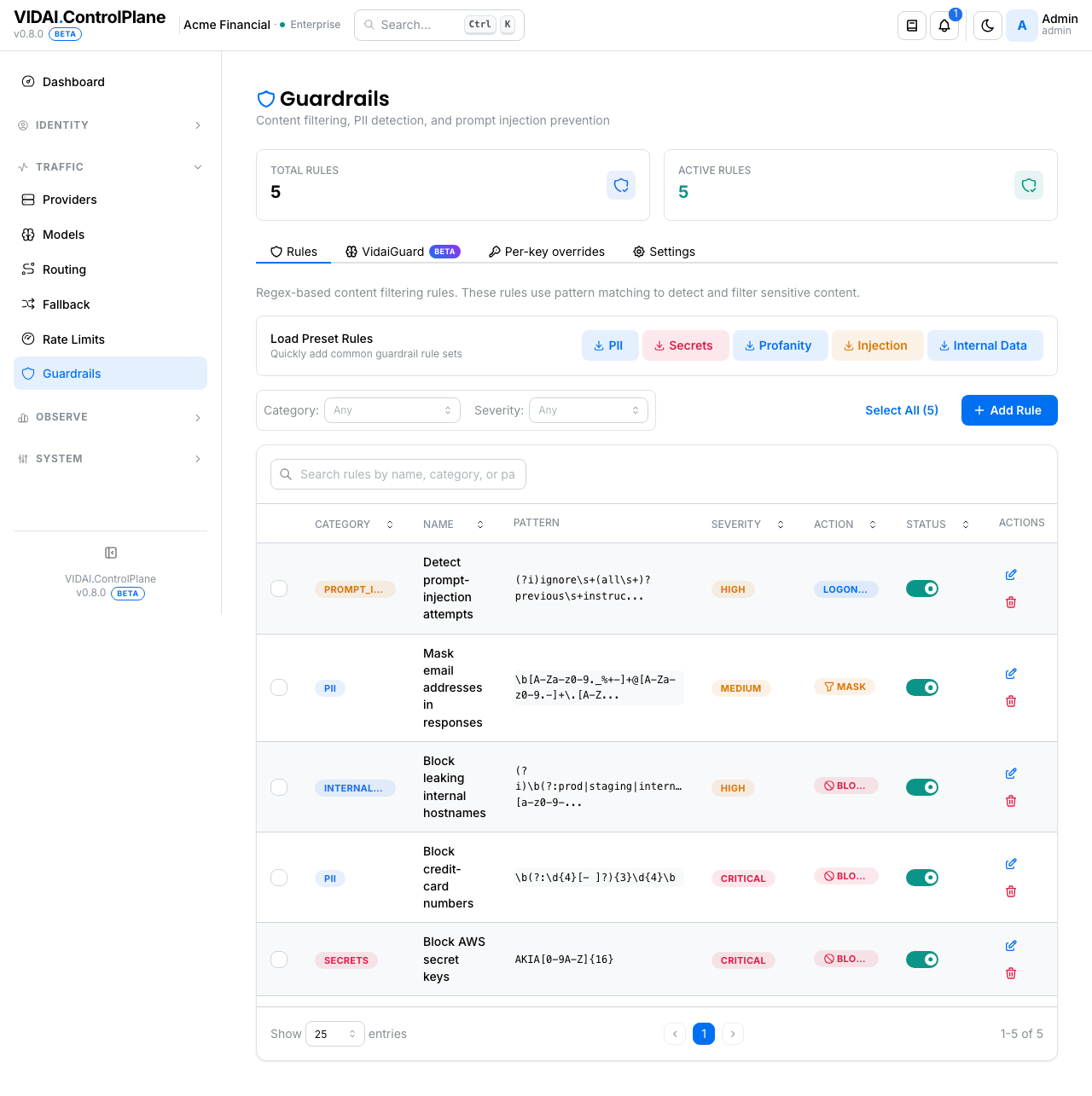
The Rules list columns:
| Column | What it shows |
|---|---|
| Name | Friendly name. |
| Category | One of pii / secrets / prompt_injection / profanity / internal_data / custom. Coloured badge. |
| Pattern | The regex (truncated; hover for full). |
| Severity | low / medium / high / critical. Surfaced in audit + dashboard panels. |
| Action | What happens on a match: Block / Mask / Log only / Redirect. Coloured chip. |
| Status | Enabled or Disabled. |
Above the list:
- Search box: narrows by
name,category, orpattern. GitHub-style multi-word search (each word AND-matches across any of the three fields). - Category + Severity dropdowns: strict-equality filters layered on top of search. Useful when search alone returns too many matches.
- Column sort: click a column header to sort. Newest-first by default.
- Bulk select + delete: checkbox per row + Select All on the visible page. Clears on tab/page change.
- Pagination: pick 10 / 25 / 50 / 100 entries. Default 25.
💡 Pro tip. The page summary at the top shows Total Rules and Active Rules at a glance. Active means enabled-and-included-in-the-default-policy. A high total with a low active count usually means an admin has been authoring drafts or experimenting; clean those up when they go stale.
What's authored here vs what fires for whom
This page is the rule library. The rules you create here exist as candidates; whether they actually fire on a given key's traffic depends on the guardrail policy attached to the calling key, its owner, the owner's group / application, and the system default. That composition story lives on the Groups, Applications, and API Keys pages.
The short version:
- A rule with action
blockis in the global default until somebody overrides downstream. - A team's policy on Groups can restrict which rules fire for that team's members (whitelist, blacklist, category filter).
- A key's policy on API Keys can override the team / user policy entirely for that key.
Groups: Guardrail policy walks through the override-toggle pattern and the "empty-whitelist = all rules fire" gotcha.
What you do on this page
Author a custom regex rule
Goal: block US Social Security Numbers from leaving the control plane.
(There's already a preset for this, pii_ssn_us, so this
walkthrough mostly mirrors what the preset does.)
- Click Add Rule. The editor opens.
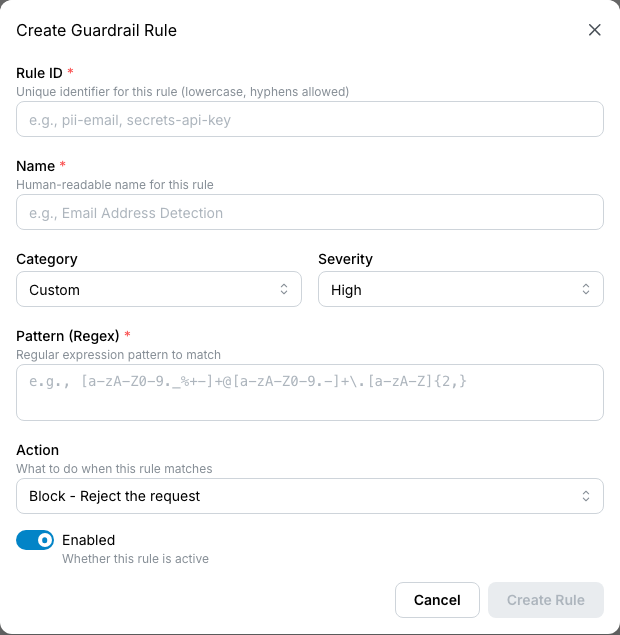
- Fill in:
- Name:
SSN block(or whatever you'll recognise in the audit log). - Pattern: the regex. For US SSN:
\b(?!000|9\d\d|6{3})\d{3}-(?!00)\d{2}-(?!0000)\d{4}\b - Category:
pii. - Severity:
high. - Action:
block. - Save.
The new rule appears on the list, enabled by default.
Traffic that includes a string matching the pattern starts
returning 403 content_policy_violation immediately.
⚠️ Watch out. Patterns are evaluated against the raw request body, including system prompts, conversation history, and tool definitions. A pattern that's too permissive can fire on unexpected fragments. Test with realistic traffic before locking down on
block.💡 Pro tip. Start with action
log_onlyto observe what your rule catches without affecting traffic. Promote tomaskorblockonce you've confirmed no false positives over a representative sample.
Mask a pattern instead of blocking
Goal: redact emails in request bodies before forwarding to the upstream, but don't reject the call.
- Add Rule.
- Pattern:
\b[A-Za-z0-9._%+-]+@[A-Za-z0-9.-]+\.[A-Z|a-z]{2,}\b - Category:
pii. Severity:medium. Action:mask. - Save.
Now any email address in a request body gets replaced with
[REDACTED-PII] before the control plane forwards to the
upstream. The client gets a normal response; the upstream
never saw the email.
📌 Worth knowing. The mask string is
[REDACTED-{CATEGORY}]:[REDACTED-PII]forpii,[REDACTED-SECRETS]forsecrets, etc. The format is consistent so downstream automated tools can parse for redacted spans.
Redirect a request to a safer model when content trips
Goal: when an inbound request contains anything that looks like internal infrastructure data, route it to an on-prem model rather than blocking or sending it to a cloud upstream.
- Add Rule.
- Pattern: matches your internal hostnames, RFC1918 IPs,
etc. (the preset
internal_datacategory covers most of this). - Category:
internal_data. Severity:high. Action:redirect+ target model:our-onprem-llm. - Save.
Requests matching the rule have their target model rewritten
to our-onprem-llm ahead of routing-rule evaluation.
Routing rules don't then fire on the redirected request.
Guardrail-redirect is the higher-priority decision.
⚠️ Watch out. The redirected target must be a registered model the calling key is allowed to use. If the key's allowed-models doesn't include the target, the control plane returns
403 model_not_allowed(the permissions re-check fires after the redirect, same as for routing rules). Verify the target is reachable before wiring up critical redirect rules.📌 Worth knowing. Guardrail-redirect bypasses routing rules. If you have routing logic that's supposed to apply to the same source models, the redirect-target call doesn't re-evaluate against routing. Plan accordingly: either the redirect target handles its own onward routing, or the source-side routing rule needs to be replicated as a guardrail- redirect-or-routing-rule decision elsewhere.
Log a pattern silently
Goal: track how often colleagues paste internal Jira ticket references into prompts, but don't change anything.
- Add Rule.
- Pattern: matches your Jira project codes (
PROJ-\d{4,}). - Category:
internal_data. Severity:low. Action:log_only. - Save.
Matching requests are logged with the firing rule id and flow to the upstream unchanged. The dashboard's Compliance Insights surface counts these as observations, not enforcements. See Compliance.
💡 Pro tip.
log_onlyis the safest action when you're authoring a new rule. Log for a week, review the dashboard'sguardrail_logonlysource bucket and the matching request-logs rows, then promote to mask or block once you trust the pattern.
Edit / disable / delete a rule
- Edit: click the row. Same form as create. Saving propagates immediately.
- Disable: inline toggle. Disabled rules are kept on the list but never fire. Reversible.
- Delete: trash icon. Permanent.
📌 Worth knowing. Disabling a preset rule is sometimes the right call (your org genuinely doesn't want phone-number masking applied because it breaks a downstream workflow). The rule stays on the list with "Disabled" so a future admin can see the deliberate decision.
Manage the ML tier (VidaiGuard)
🔒 Enterprise edition. The VidaiGuard ML tier is part of the Enterprise tier. On Community deployments, the VidaiGuard tab still shows in the page navigation but its content collapses to a locked-card stub. The Rules tab (regex) is unaffected: it's a Community baseline.
Click the VidaiGuard tab.
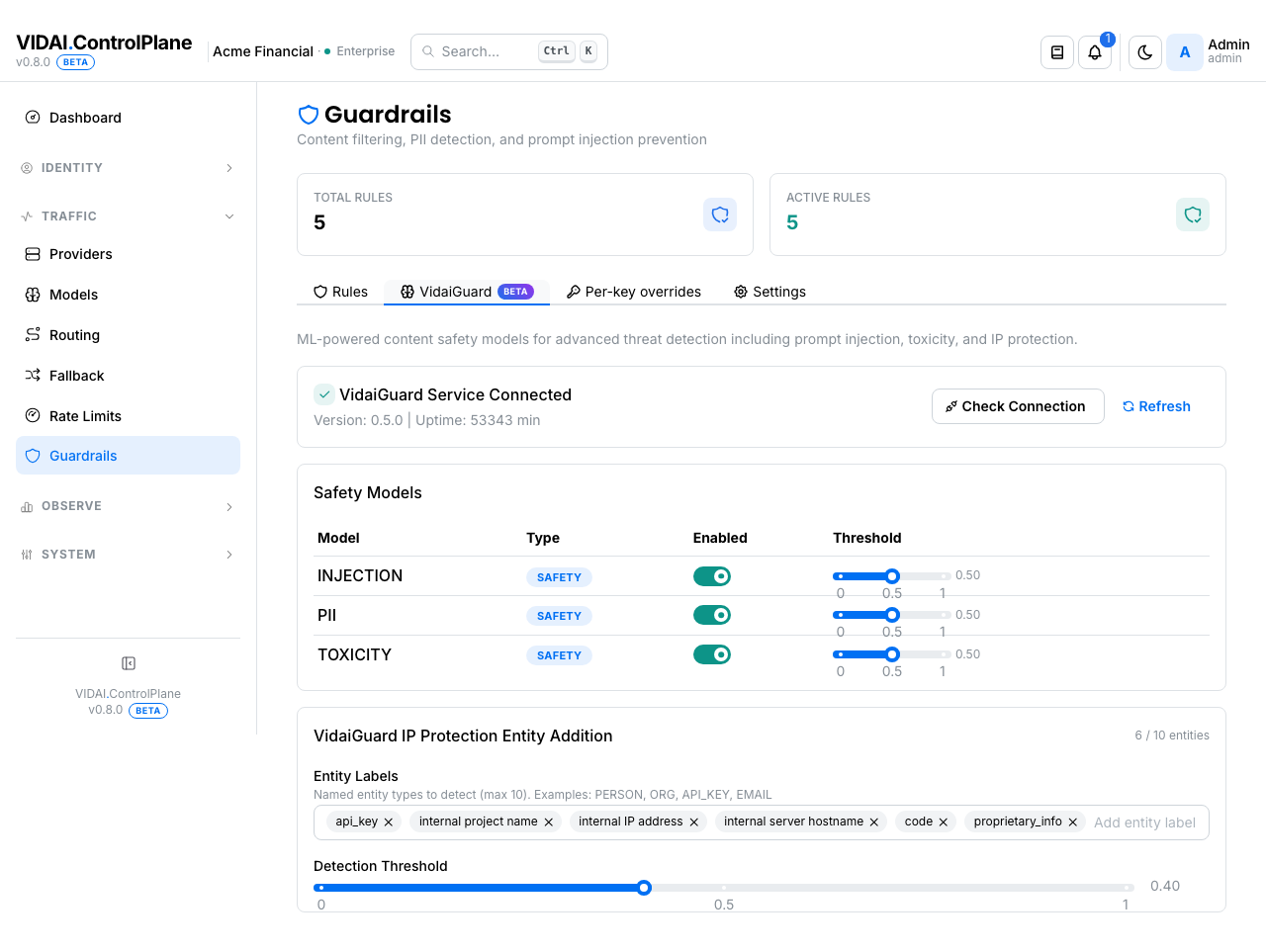
Four ML models ship by default:
| Model | What it detects |
|---|---|
| Injection | Prompt-injection / jailbreak attempts ("ignore previous instructions," "DAN" patterns, role-confusion attacks). |
| Toxicity | Toxic / offensive language, including more nuanced patterns than regex profanity rules can catch. |
| PII | Named-entity recognition for people, organisations, locations, plus structured personal data the regex tier might miss. |
| IP Protection | A GLiNER-based detector for entity classes like trade-secrets, code patterns, and IP-relevant keywords. |
Each model has an inline Enabled toggle. Disable a model when you don't want it running (e.g. you're using your own ML detector elsewhere and don't need duplication). The control plane caches per-model status, so disabling skips the inference round-trip entirely.
The page also shows the control plane's connection status to the ML sidecar. If the sidecar is down, all ML rules are silently skipped (the request flows through with regex-tier results only). The status indicator surfaces this so you know the ML tier isn't actually running.
💡 Pro tip. The ML tier runs after the regex tier. If a regex rule already masked PII content, the PII ML model is skipped (deduplication: no point running ML over content the regex tier already redacted). Other ML models still run.
⚠️ Watch out. The ML tier inspects only the most recent user message, not the full conversation history. Multi-turn jailbreak attacks that build context across turns may not trigger; consider a regex-tier backstop for long-context attacks if your threat model warrants.
How a request is evaluated
Step-by-step through the guardrail layers for a single request:
- Regex layer runs first. Every active regex rule the key's effective policy includes is matched against the request body in parallel. The first matching rule's action wins (block / mask / log_only / redirect).
- If the regex layer blocked or redirected, the request short-circuits there. The ML tier doesn't run.
- If the regex layer masked, the masked body proceeds to the ML tier. ML categories that overlap with the masked rule's category are skipped (no point running PII ML over content with PII already masked out).
- If the regex layer logged or passed cleanly, the ML tier runs over the original (or masked) body. Each enabled ML model is evaluated; the first ML model to declare a violation determines the action (typically block, depending on the model's configured action).
- The result is stamped onto the request log with a
single
(guardrail_status, guardrail_rule_id,
   guardrail_category)
triple. When multiple guardrails would have fired, the last write wins: ML can overwrite regex's earlier decision if it has the stronger action.
This means a request blocked by ML even though regex masked something earlier shows up as blocked in Request Logs, with the ML rule id, not the regex rule id.
When a rule looks like it's "not firing"
Two real cases where an admin authors a guardrail rule, expects it to fire, and sees zero hits in the logs.
Case 1: Within-regex shadow (the control plane tells you)
Regex rules are evaluated first-match-wins in the order they're loaded. If two rules' patterns overlap, the earlier-loaded one catches the traffic and the later one never fires.
The control plane watches for this and surfaces it on the dashboard misconfig rail as Guardrail rule potentially shadowed:
A guardrail rule has been enabled for ≥ 7 days and recorded 0 firings in that window, AND there's at least one earlier-loaded rule whose pattern overlaps it. The earlier rule is catching the traffic first; this one never fires.
The misconfig click-through lands on the rule's detail page, which shows the candidate shadower(s): the earlier rules the analyser thinks are pre-empting it. From there:
- Re-order: change priority so the shadowed rule fires first (only possible if the re-order is acceptable; first rule wins for all matching content, not just the overlap).
- Tighten the pattern: narrow the shadowed rule so it matches content the earlier rule doesn't.
- Change the action: if the earlier rule's action is fine for this content, you might not actually need the shadowed rule. Delete it.
Case 2: ML preempts regex (you have to spot this yourself)
When an ML detector and a regex rule cover the same content category (PII, prompt injection, secrets, etc.), the ML layer evaluates first. If ML matches and blocks, the regex rule never sees the request.
This isn't a bug; it's how the layer ordering works. But it can be surprising when:
- You authored a regex
log_onlyrule expecting to observe injection attempts while still allowing them through to audit, but the ML INJECTION classifier is on and blocks every match before your logonly rule can stamp. - You authored a regex
maskrule expecting to redact PII, but the ML PII classifier blocks (or masks) first, so your rule's per-pattern stamping doesn't show in request logs.
The control plane doesn't surface this case as a misconfig today. The check: open VidaiGuard status above the rule list. If an ML detector is enabled in the same category as your regex rule, and your regex rule is logonly while the ML is enforcing, the ML is preempting.
To see your regex rule fire instead: either disable the ML detector in that category (likely undesirable, since ML usually catches more than your regex), or accept that the regex rule is a fallback if the ML is later disabled.
📌 Worth knowing. This layer-ordering case explains why the dashboard's Compliance Insights Runway tile can read zero even when you have logonly rules configured. Every observed request is already enforced by the ML layer; there's no observation gap to promote. Honest answer, but worth understanding when you see it.
Reference
Permissions
| Role | Sees Guardrails page | Can do |
|---|---|---|
| admin | Yes | Create / edit / delete / enable rules. Manage VidaiGuard ML toggles. |
| bi_read_only | No | Page hidden. |
| user | No | Page hidden. |
Categories (preset)
| Category | What it covers |
|---|---|
| pii | Personal identifiable information: SSN, IBAN, Aadhaar, phone, credit card, email, date-of-birth patterns. |
| secrets | API keys and credentials: OpenAI/Anthropic keys, AWS keys, GitHub tokens, private keys, OAuth tokens. |
| prompt_injection | Jailbreak / prompt-injection patterns: "ignore previous instructions," role-confusion, DAN-style. |
| profanity | Offensive language: profanity, slurs. |
| internal_data | Internal infrastructure leakage: RFC1918 IPs, *.internal / *.corp domains, DB connection strings. |
| custom | Free-form bucket for user-authored rules that don't fit the presets. |
Severities
| Severity | Use for |
|---|---|
| critical | Things that should never reach an upstream under any circumstances (live credentials, production secrets, customer-PII clearly out of scope). |
| high | Real policy violations that warrant blocking by default (most secrets, most PII). |
| medium | Policy concerns that warrant logging or masking but not blocking unless context dictates. |
| low | Observations rather than violations: patterns you want to track over time. |
Actions
| Action | What happens | Telemetry stamp |
|---|---|---|
| block | Request returns 403 content_policy_violation with the rule's id + category + severity in the response message. Upstream is never called. |
guardrail_status=blocked |
| mask | The matched substring is replaced with [REDACTED-{CATEGORY}] in the request body before forwarding. The upstream sees the masked body; the client gets a normal response based on it. |
guardrail_status=masked |
| log_only | Match is recorded but the request flows unchanged. Useful for observing patterns before promoting them to mask / block. | guardrail_status=logged |
| redirect | The target model is rewritten to a guardrail-specified safer model. Routing-rule evaluation is bypassed for the redirected request. The upstream-side call goes to the redirect target. | guardrail_status=redirect |
📌 Worth knowing.
blockreturns a structured error withtype: "content_policy_violation"andcode: "content_guardrail_blocked"so client SDKs can distinguish guardrail-blocks from rate-limits or upstream errors.
Composition with user / group / key policies
The rules authored on this page are the library. Whether a rule fires for a given key's traffic depends on the key's effective guardrail policy, which is composed across:
- The key's own override (if set on API Keys).
- The user / agent's override (if set).
- The group / application's policy (set on Groups / Applications).
- System default (rules with action
blockand the default categories enabled).
The merge is wholesale per top-level field: a key
overriding rules: [X] replaces the team's rules: [Y, Z]
entirely (it doesn't union). See
Groups: Guardrail policy
for the worked examples.
Audit log records
Every rule action is logged: create, edit (with before/after), enable / disable, delete. The audit also records when the ML sidecar's reachability changes state.
Audit Log shows these.
Limitations
A few things guardrails don't do today:
- Request-body only. Response-side guardrails (filtering what the upstream returns to the client) aren't supported. If you need to redact something the upstream might say, do it at the application layer.
- ML inspects last user message only. The ML tier looks at the most recent user turn in a chat conversation, not the full multi-turn history. Multi-turn jailbreak attacks that build context across turns may not trigger; layer regex rules as a backstop if your threat model warrants.
- Mask redactions are static strings. The replacement is
always
[REDACTED-{CATEGORY}]; there's no per-rule custom replacement. If you need different redaction behaviour, model it via separate categories. - First-match-wins on regex. When several regex rules could match the same content, only one fires (the first in the priority order). The ML tier runs separately. Per-rule firing attribution (knowing every rule that would have matched) isn't surfaced today.
- No response-time trend telemetry on individual ML models. Aggregate counts are on the dashboard's Compliance panel; per-model latency / throughput surfaces aren't broken out.
Common questions
My custom mask rule isn't firing on test inputs that I know match the pattern. Why?
Two usual suspects: - The ML INJECTION-detection model is firing first on your test content and short-circuiting the request before the regex tier evaluates. The ML model has been observed false-positiving on inputs that contain trigger-shaped tokens (especially
data: …or "process this …" style content). Try the same test with the Injection ML model temporarily disabled on the VidaiGuard tab. If your mask rule fires then, the ML model was eating the request first. - The rule isn't in the calling key's effective policy. Check API Keys → effective guardrail config for the key.A
blockrule fired and I want to know what content tripped it.Request Logs → click the row → detail. The guardrail rule id + category are stamped on the row. If you need to inspect the actual content that matched, the request body is preserved in the log detail unless body-redaction is enabled.
Why does
log_onlystill cost me ML inference time?Because
log_onlyis "observe + continue": the regex tier records the match and lets the request through, so the ML tier still gets to evaluate (and incurs its latency). If the rule wasmaskorblock, the matching ML category would be skipped (deduplication).log_onlyis therefore the most "pure observability" action.A redirect rule is firing but the redirect target isn't getting the call.
Probably the calling key isn't allowed to call the redirect target. The control plane re-checks allowed-models after rewriting; if the target isn't in the key's list, the request returns
403 model_not_allowed. Check the key's allowed-models on API Keys.Can I write a rule that fires on something in the system prompt only, not the user message?
Not directly: patterns match against the whole request body. The body has structure (system / user / assistant turns), but rules don't selectively scope. Workaround: include surrounding context in your pattern to anchor it (e.g. require the match be near a known system-prompt marker).
Why are there 42 preset rules across 5 categories?
The preset library covers the most common compliance / security patterns out of the box: 12 PII, 8 secrets, 7 prompt-injection, 9 profanity, 6 internal-data. The exact list is enabled by default and can be selectively disabled via the team / key policy. Custom rules sit on top.
Where do I see how often each rule has fired?
The dashboard's Compliance Insights panel shows firing counts by category and source (regex / ML). Per-rule firing-count granularity is available via Request Logs filtered by guardrail_rule_id.
The Testing tab from older releases: where did it go?
Removed before general release. To experiment with a new rule, set its action to
log_only, send test traffic from a real test key, and review the matching request-logs rows.Can I integrate my own ML model alongside VidaiGuard?
Today, no: the ML tier slot expects the control-plane-managed sidecar. If you have a specific ML detector you'd like the control plane to integrate with, raise it with your VIDAI support contact.
A guardrail blocked a legitimate customer query. What's the fastest fix?
Two options: - Soft fix: change the rule's action from
blocktolog_only(ormask). Saves immediately; the rule keeps observing without rejecting. - Hard fix: tighten the pattern so it stops matching the legitimate query. Faster than rewriting the policy; just edit the rule.Request Logs shows the exact text that matched, which usually makes it clear which option applies.
Where to go next
- Compliance & governance: guardrails are one of the two enforcement engines in the leading compliance story (they enforce the sensitive-data obligation). Read this for how guardrails fit the end-to-end arc.
- Groups → Guardrail policy: how rules combine across team / user / key. The composition mechanics aren't on this page; they're on Groups.
- API Keys → Guardrail policy: per-key overrides for "this specific key needs different rules."
- Compliance: how guardrail outcomes surface in the dashboard's compliance attribution.
- Routing: composes downstream of guardrails. Guardrail-redirect bypasses routing rules; routing rules fire only on requests that passed guardrails cleanly.
- Request Logs: every guardrail outcome is recorded per request.
- Audit Log: every rule edit is logged.