Agents
Agents are non-human identities: bots, scheduled jobs, RAG services, integrations, anything that calls the VIDAI Control Plane without a person sitting behind the keyboard. They look a lot like Users but with three deliberate differences:
- No email. Agents are services, not people; there's nobody to email. The Email column on Users is empty for agent rows (which is why agents live on this page instead).
- No sign-in. Agents don't have passwords or password-change flows. They authenticate to the control plane via API keys, never via the console.
- They live inside applications. A solo agent floating with no parent application is allowed but unusual; the typical shape is "an Application groups several related agents that share policy and ownership."
This page is the agent registry: list, create, edit, retire. The application-level shape (the container) is on Applications.
When you'd open this page
- A new automated service is going live. Register the agent, attach it to its application, mint its API key.
- An existing service needs to be paused for incident response. Disable the agent and every key it owns goes inert.
- An audit asks "what's the deployment state of every agent calling our control plane?" The list shows it.
- A service has been deprecated but the keys are still live.
Flip its deployment_state to
deprecatedso the Dashboard's Lifecycle hygiene tile lights up. - An agent has versioned upgrades (v1 → v2 → v3). Record the current version on the agent so the audit log + cost attribution carries the version with it.
The page at a glance
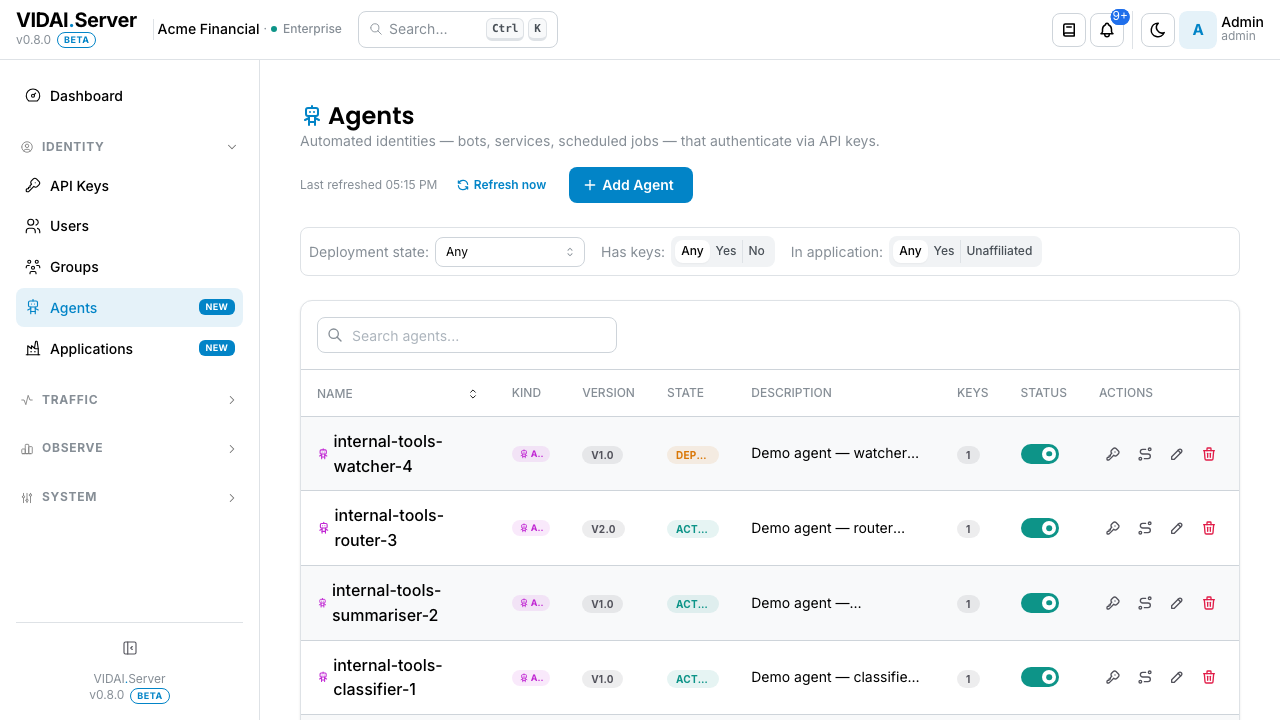
The list columns:
| Column | What it shows |
|---|---|
| Kind | Always Agent with a robot icon: the badge is here for visual symmetry with Users (where it would say Human). |
| Name / Owner | The agent's name, plus a fallback display when the agent has both a name and a separate description / version label. Email is intentionally absent. |
| Deployment state | One of active, production, staging, canary, deprecated. A coloured badge per state. |
| Version | Free-text version label the agent set on itself (e.g. v1.4.2). Optional. |
| Status | Inline toggle: disable the agent and every key it owns goes inert immediately. |
| Description | Free-text: what the agent is for. |
If the deployment is brand new and there are no agents yet, the page shows an empty-state hero with a Create your first agent call-to-action.
💡 Pro tip. The deployment-state column is the easiest way to spot agents that should be retired. Filter to
deprecatedand revisit anything still listed: the deprecated state is for "this exists but should not be getting calls." Investigate why it's there.
What you do on this page
Create a new agent (and its first API key)
The create flow is a three-step wizard because the last step shows the agent's first API key in plaintext exactly once. Treat the wizard like a high-stakes form: copy the key before closing.
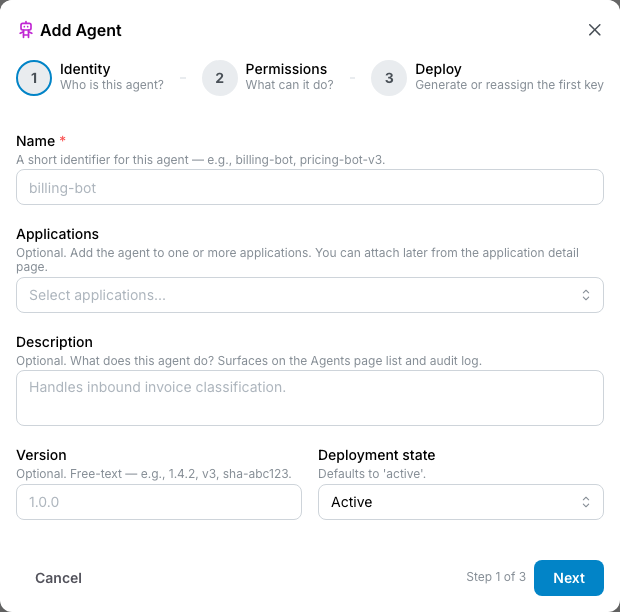
Step 1: Identity
- Name: what the audit log will refer to this agent as.
Make it specific (
nightly-summary-botbeatsbot1). - Applications: pick one or more applications this agent belongs to. The agent inherits the application's allowed- models and guardrail policy. Most agents belong to exactly one application; multi-application is for cases where a shared utility agent serves several teams.
- Description: a sentence about what this agent does. Read by future-you in three months when the name has lost its memory.
- Version: optional.
v1.0.0,2026-04-build-7, whatever your release engineering uses. Recorded on the agent and surfaced in the audit log. - Deployment state: pick one:
active: generic in-use state.production: load-bearing.staging: pre-prod test traffic.canary: partial rollout.deprecated: should not be receiving calls.
Click Next.
Step 2: Permissions
- Allowed models override: leave empty to inherit from the agent's application. Or pick a specific subset to lock this agent down further.
- Guardrail override: same override-toggle pattern you see on API Keys and Groups. Leave the toggle off to inherit; flip it on to set agent- specific policy.
Click Next.
Step 3: Deploy
A Generate first API key toggle is on by default. Leave it on for the typical case (the agent needs a key to start working immediately). Turn it off only if you'll mint the key later (e.g. you're pre-creating agents that go live in batches).
Click Create agent. The wizard does three things in sequence:
- Creates the agent row.
- (If toggle on) mints the first API key.
- (If application provided) attaches the agent to its application(s).
The success step shows the freshly-minted API key in plaintext, with a prominent Copy affordance.
⚠️ Watch out. Like every key on the control plane, the plaintext is shown once and never again. Copy it now into your secret manager. If you close the wizard without copying, mint a fresh key for this agent on the API Keys page and delete the un-copied one.
📌 Worth knowing. The wizard's final step has no Cancel button, only Done. The agent and key are already created at that point; backing out doesn't roll them back. Plan for this.
Edit an agent's metadata or permissions
Click the pencil icon on the row. The edit modal opens: a plain form, not a wizard (intentional design; only the create flow needs the wizard's plaintext-key reveal).
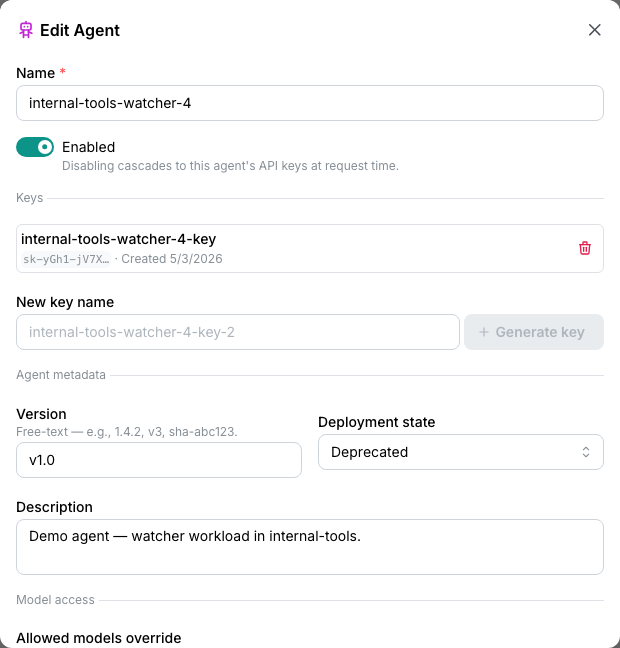
What you can edit:
- Name
- Description
- Version: bump when you ship a new version.
- Deployment state:
active↔production↔staging↔canary↔deprecated. The state controls which dashboard hygiene tiles flag this agent (adeprecatedagent with active keys lights up the "deprecated agents w/ keys" tile). - Status: Active / Disabled. Same as the inline toggle.
- Allowed models override: leave empty to inherit from applications, or set a tighter list.
- Guardrail policy: toggle override on/off, edit when on.
What you can't edit:
- Email: agents are designed without one; the field doesn't exist for them.
- Role: stays
agent_principalfor the agent's lifetime. - Subject kind: agent stays an agent. (To convert an agent back to a human, contact your VIDAI support contact; it's an admin-API surface, deliberately protected from the console.)
💡 Pro tip. Application memberships aren't edited from this modal. They live on Applications → Manage Members on the application's row. That keeps the "what's in this application" picture in one place.
Disable an agent for incident response
A service is misbehaving (calling models it shouldn't, or suspected of being compromised). Stop it fast.
- Find the agent's row (search by name).
- Flip the Status toggle off.
- Done.
Two things happen:
- Every key the agent owns is disabled within seconds. Any
caller using those keys gets
401 Unauthorizedfrom the next request onward. - The audit log records the change with you as the actor.
The action is reversible. To resume the agent, flip the toggle back on; its keys re-enable in the same beat.
💡 Pro tip. For a "service is misbehaving and we're investigating" case, disable is the right first move over delete. Disable preserves everything (the agent row, the keys, the audit history) so investigation isn't blocked by a missing breadcrumb.
Retire an agent permanently
When a service is decommissioned for good (the project ended, the integration was removed, the bot's job is over).
- Open the agent's edit modal.
- Set deployment_state to
deprecated. - (Optional) Disable the agent so its keys stop serving traffic.
- Investigate the agent's keys on API Keys. For any production-critical keys, reassign to a different owner before deletion. For keys that should die with the agent, they'll go away when you delete.
- Once you're confident no live service still uses the agent's keys, click the trash icon on the agent's row. Confirm.
What deletion removes:
- The agent's row.
- Every key the agent owned (cascade-delete).
- The agent's membership in any application.
What deletion preserves:
- Audit-log history (the agent's id is retained for historic attribution).
- Request-log history (calls are still attributed to the agent's id; the deleted agent's name shows on the request-logs row from the denormalised owner field at the time of the request).
⚠️ Watch out. Agent deletion cascades to keys immediately. If a production service is still using one of those keys at the moment of delete, that service starts getting
401 Unauthorizedimmediately. Always reassign or rotate first if there's any chance of an active dependency.
Migrate a personal account to an agent
Someone's personal user account ended up running an automated service. Convert the user to an agent so the audit trail matches the reality.
This flow lives on the Users page: open the user's edit modal, click Convert to Agent. The row disappears from /users and lands here. The conversion preserves keys, audit-log history, and group memberships (which become application memberships if the groups they were in have application equivalents). See Users → Convert to Agent for the full flow.
Misconfig signals from the dashboard
The dashboard's Actionable Signals panel surfaces one cause that lands you here:
Agent has no API key. An agent exists in the registry but has no key minted, so it can't authenticate. Either someone created the agent and forgot to mint, or the keys were rotated out and not replaced.
Click-through lands on the agent's detail page with the Mint Key action ready. After you mint, the misconfig clears on the next analyser run.
The dashboard's Lifecycle Hygiene panel surfaces several other agent-shaped tiles that aren't strictly "misconfigs" but are worth knowing about:
| Tile | What it counts | What to do |
|---|---|---|
| Agents without keys | Same as the misconfig above: agents with no key minted. The Lifecycle tile is the count surface; the misconfig is the per-agent click-through. | Mint a key, or delete the agent if it's a stub. |
| Deprecated agents w/ keys | Agents marked deprecated that still hold active keys. They can still authenticate. |
Disable the keys, or delete the agent (cascade). |
| Unaffiliated agents | Agents not attached to any application. They work, but lose application-level inheritance. | Attach to the right application, unless transient. |
Reference
Permissions
| Role | Sees Agents page | Can do |
|---|---|---|
| admin | Yes | Create, edit, delete any agent. Manage their applications, keys, policy. |
| bi_read_only | No | Page hidden from BI sidebar. |
| user | No | Page hidden from regular-user sidebar. |
| Agent itself | n/a | Agents don't sign into the console. |
Field reference
| Field | Type | Editable post-create | Effect |
|---|---|---|---|
| Name | String | Yes | Display label, audit-log identifier. |
| Description | String, free-text | Yes | What this agent is for. |
| Version | String, free-text | Yes | Tag the agent's current version (e.g. v1.4.2). Surfaced in audit log + request log attribution. |
| Deployment state | Enum: active / production / staging / canary / deprecated | Yes | Determines which dashboard hygiene tiles flag this agent. |
| Allowed models override | List of model names | Yes | Empty = inherit from application(s). Otherwise, narrows the inherited intersection further. |
| Guardrail config override | Object | Yes | Empty = inherit. Toggle on to set agent-specific policy (wholesale-replace per top-level field). |
| n/a | n/a | Doesn't exist on agents. | |
| Role | agent_principal |
No | Locked for the agent's lifetime. |
| Subject kind | agent_principal |
No | Locked. To convert an agent to a human, contact support. |
| Application memberships | List of applications | Edited on Applications, not here | Drives policy inheritance. |
Deployment-state semantics
| State | Meaning | Dashboard impact |
|---|---|---|
active |
Generic "in use": typical default. | Counted in active-agents inventory. |
production |
Load-bearing production service. | Counted in active-agents; treated specially in some Cost Insights surfaces. |
staging |
Pre-prod test traffic. | Counted in active-agents; tagged for staging-vs-prod differentiation in cost views. |
canary |
Partial rollout. | Counted in active-agents. |
deprecated |
Should not be receiving calls. | Lights up the "Deprecated agents w/ keys" Lifecycle hygiene tile if the agent still owns keys. |
Action menu
| Action | Effect |
|---|---|
| Edit | Opens the edit modal. |
| Disable / Enable (inline toggle) | Disables or enables the agent and cascades to its keys. Reversible. |
| Delete (trash icon) | Permanent. Cascade-deletes the agent's keys. Audit history preserved. |
| View routing scopes | Opens a drawer showing every routing rule scoped to this agent. Cross-link to Routing. |
| View this agent's keys | Opens API Keys filtered to this agent. |
Audit log records
- Create agent: actor, agent name, application(s), initial deployment_state, whether a key was minted.
- Edit agent: actor, before/after of every changed field.
- Toggle status: actor, new state, list of cascaded key changes.
- Delete agent: actor, agent's full snapshot at delete time, list of cascade-deleted keys.
Audit Log shows these.
Common questions
Why are agents on a separate page from users?
Two distinct mental models share the same underlying shape, but their lifecycles are different enough that mixing them creates noise. Humans get invited, sign in, change passwords, leave the company. Agents get deployed, versioned, deprecated, retired. Putting them on the same page meant either every column applied to half the rows (an Email column that's always empty for agents) or the columns swapped depending on row type (which was confusing). Splitting the pages keeps each view tight.
An agent is owned by my team but also serves another team's app. How do I model that?
Two options: - Multi-application membership: the agent belongs to both applications. Inherited policy is the intersection across all the apps. Use this when the agent is genuinely shared. - Two agents, one per app: clearer ownership, independent rollback / version cadence, separate audit attribution. Prefer this if the agents are doing meaningfully different work.
What happens when I delete an application that has agents inside it?
The agents survive; they just lose that application membership. If they belonged to no other application, they become unaffiliated agents (which lights up the Lifecycle hygiene "unaffiliated agents" tile on the dashboard). See Applications → Delete for the full cascade.
My agent's audit-log version is wrong. Where do I change it?
The agent's version is recorded on the agent row, not per-event. Edit the agent and update Version; future events carry the new version. Historic events still show whatever version was set at event time.
Can the same plaintext API key be used by multiple agents?
No. Every key has exactly one owner. If a key needs to be "shared" across agents, that's a sign the work belongs to a single agent that's being run from multiple deployments. Keep it as one agent and rotate the key between deployments using a secret manager.
The wizard step 1 is greyed out and I can't pick an application.
You haven't created any applications yet. Go to Applications → Create Application first, then come back here. The "agents must live in applications" model means at least one application needs to exist before agents do. (You can technically skip the application picker and create an unaffiliated agent, but the dashboard will flag it.)
An agent's
last_loginshows on Users, but they don't sign in.They don't show on Users. Agents live on this page; the "Last Login" column you might be seeing is the Users page filtered to humans only. If you want the agent's most-recent activity, look at the agent's keys' Last-Used column on API Keys.
Versioning: is this enforced anywhere or just a label?
Just a label. The version field is free-form and recorded on the agent row + the audit log. The control plane doesn't enforce version compatibility, route based on version, or cap version sprawl. It's a tag for human traceability.
Where to go next
- Applications: the container that holds related agents. Set the policy there once and every agent in the application picks it up.
- API Keys: every agent's keys.
- Users: the human side of identity. The Convert-to-Agent flow lives there.
- Dashboard: the Lifecycle hygiene panel surfaces deprecated-active agents, unaffiliated agents, agents-without-keys.
- Routing: agent-scoped rules let you apply policy to specific agents without touching application-wide settings.
- Audit Log: every agent action is recorded.