Cost Engine
The Cost Engine is where every dollar the control plane tracks lives. Rate cards (per-model, per-tier prices), the cost ledger (every priced request), historical healing (re-price old traffic against corrected cards), and chargeback (who-spent-what) all live on this page. Every cost number you see anywhere else in the console traces back to here.
You'll come here to answer four classes of question: how much did we spend?, why was a specific call priced the way it was?, a vendor changed prices, how do I make our history reflect that?, and who spent it?
When you'd open this page
- Finance asks "what was last month's spend, broken out by team?" The Chargeback tab answers it.
- A specific request shows up in Request Logs with no cost attached. Open Rate Cards and confirm the model+tier combination is priced.
- A vendor changes their pricing. The control plane picks it up on the next sync; the Recompute costs pill appears in the header. Click it to land on Cost Healing with the affected window pre-selected.
- The dashboard's Compliance / Cost panels link you here with a misconfig click-through (e.g. an unpriced source model on a routing rule). The create-rate-card modal opens pre-filled with the offending model.
- An audit asks "who changed this rate card and when?" The Rate Cards tab's row history modal shows every version.
The page at a glance
The tabs you see depend on your tier:
| Tab | Community | Enterprise | What it's for |
|---|---|---|---|
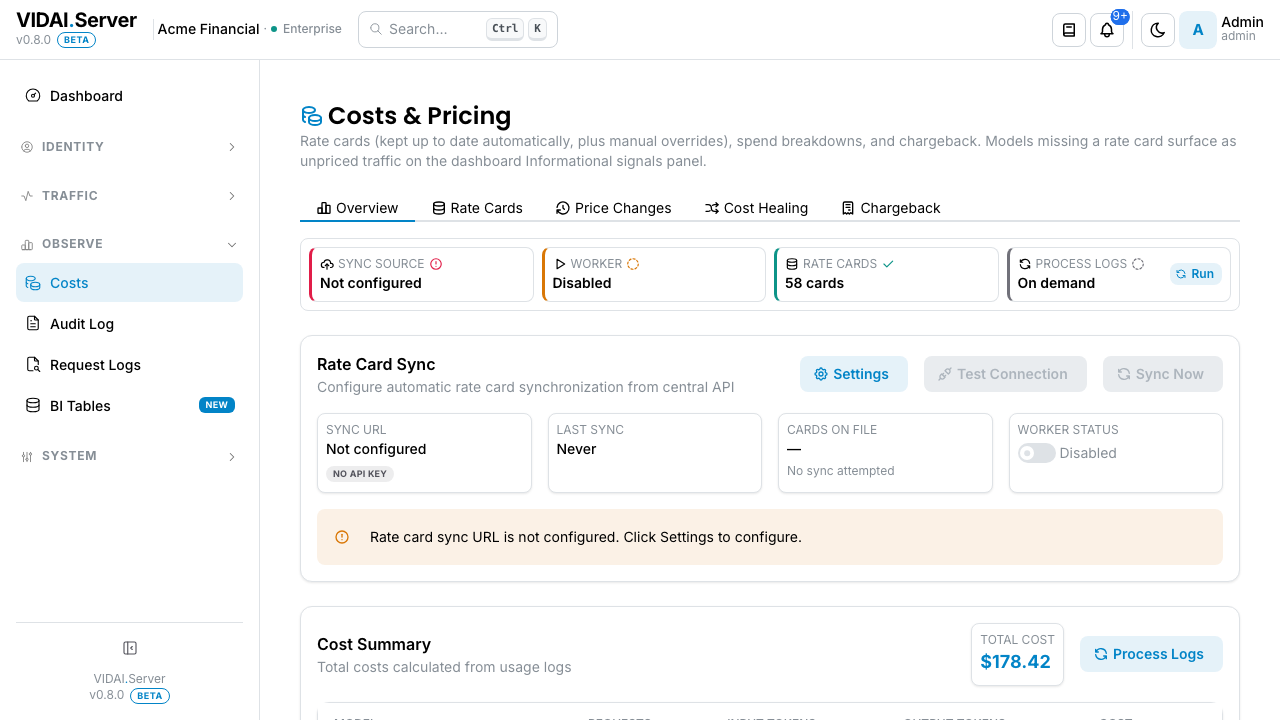
| Overview | ✓ | ✓ | Pipeline-health summary (rate-card sync status, ledger backlog, last heal), plus this window's cost summary. |
| Rate Cards | ✓ | ✓ | The registry of per-(provider, model, tier, modality) prices. Both auto-synced cards and admin-set manual overrides live here. |
| Price Changes | — | ✓ | Manual point-in-time pricing edits with SCD2 history. Enterprise feature. |
| Cost Healing / What-if | ✓ (partial) | ✓ | On Enterprise this tab is "Cost Healing" and surfaces both What-if analysis (Community baseline) and Ledger replay (Enterprise). On Community the tab is named "What-if" and the Ledger replay panel inside is locked. |
| Chargeback | ✓ | ✓ | "Who spent what": five kind-partitioned sections (Team, Application, Human traffic, Agent traffic, API key). Sort, search, paginate, export CSV per section. |
See Licensing & tiers for the full feature breakdown.
What you do on this page
Read the Overview

The header strip shows a high-level state for the cost engine and the totals for the selected window:
- Pipeline health: a status strip showing whether rate-card sync is running, whether the ledger has a backlog, and when the last healing run finished.
- Cost summary: total cost in window, cost-per-request average, cost split by source.
The window selector at the top of the dashboard governs both. Switch to "Last quarter" for a finance review; "Last 7 days" for day-to-day operations.
💡 Pro tip. Pipeline-health green across the board is your "it's safe to read these numbers" signal. A red indicator on rate-card sync means recent prices may be stale; a red indicator on ledger backlog means recent traffic hasn't been priced yet.
Browse Rate Cards
The Rate Cards tab lists every per-(provider, model, tier, modality) priced combination today.
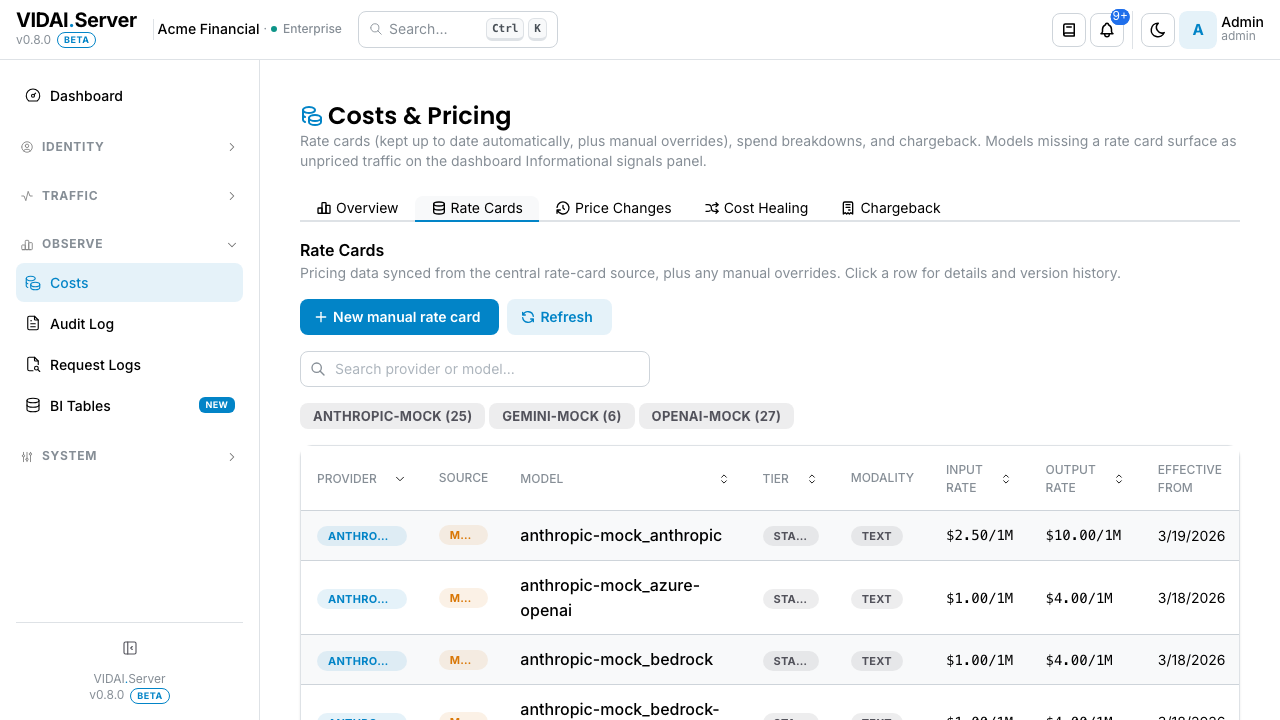
Columns:
| Column | What it shows |
|---|---|
| Provider + Model | Which model this card prices. |
| Tier | standard, flex, scale, batch, priority. Different vendors charge different rates per tier. |
| Modality | text, image, audio, video, embedding. |
| Input / Output / Cached / Reasoning | Per-1M-token rates for each. Some columns are blank when the model doesn't bill that way. |
| Source | synced (auto-pulled from the control plane's price catalogue) or manual (admin-entered override). When both exist for the same tuple, the manual one wins at lookup time. |
| Effective from / Effective to | The date range this card covers. Cards are time-versioned: when a rate changes, the old card is closed with effective_to=now and a new card opens with effective_from=now. |
Filters at the top: Provider, Model, Source. Source = manual is the most-asked filter; admins want to know what's been overridden vs synced.
Click any row to open the Rate-card detail drawer. The drawer shows the current card plus a Versions strip below it listing every prior version of this tuple, ordered newest first.
Add or change a manual override
You'd add a manual override when:
- A vendor gave you a custom enterprise rate that doesn't appear in the standard published prices.
- You want to track a specific tier/modality at a different price than the synced rate suggests.
- The synced rate is wrong and you need to override it until the next sync corrects.
From the Rate Cards list
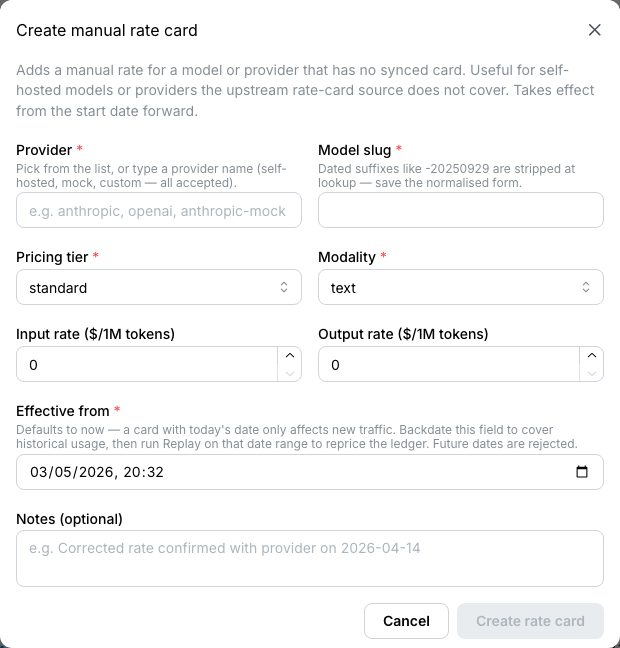
- Click Add Manual Card. The form opens.
- Fill in:
- Provider: which provider this card prices.
- Model slug: the registered model name. (When you arrived here from a dashboard misconfig click-through, this is pre-filled.)
- Tier + Modality: scope. Default
standard+textcovers most chat traffic. - Input / Output / Cached / Reasoning rates: per-1M tokens, in USD.
- Effective from: defaults to "now"; backdate if the rate has been in effect for a while and you want to re-price retroactively.
- Save.
The new card appears on the list with Source: manual. It
takes precedence over the synced card for that
(provider, model, tier, modality) tuple from effective_from
onward.
Editing an existing override
Click the row, then Edit in the drawer. The same form opens, pre-filled with the current values. Saving creates a new version of the manual card: the old version is closed and the new one becomes active. The version history is visible in the drawer's Versions strip.
After you save
When the save lands, the drawer shows a post-save panel:
Saved. Your override is active for new traffic from
onward. Want history to use this rate too? Click Recompute historical costs to open Cost Healing with the affected window pre-selected. Or close this and the Recompute costs pill in the header will remind you later.
The CTA isn't mandatory. You can dismiss the panel and the Recompute-costs pill catches the change for next time. But for admins who know they want history to reflect the new rate, the single-click flow lives here.
📌 Worth knowing. Adding a manual override here is equivalent to setting a per-model cost override on the Models page. Both write through to the same rate-cards table. Pick whichever surface is closer to your current task.
⚠️ Watch out. Manual overrides apply forward only from
effective_from. If you backdate theeffective_fromto reprice historical traffic, the retroactive change doesn't automatically re-cost the ledger; you also have to run a Cost Healing pass over the affected range. The post-save CTA + the Recompute-costs pill both walk you into that flow.
Delete a manual override
The Delete button in the rate-card drawer behaves differently depending on what would happen to the tuple after the override is gone. The console will never silently leave a priced tuple unpriced; that's the deal.
Three possible Delete states:
| What's there | Delete button | What it does |
|---|---|---|
| Override + an active sync card for the same tuple | Sync fallback available (enabled) | Deletes the override; the sync card takes over from now forward. |
| Override + a prior version of the same override (an earlier manual entry) | Restore previous override (enabled) | Deletes the current override version; the previous version becomes active. |
| Override only (no sync, no prior version) | Disabled with tooltip | Deleting would leave the tuple unpriced. The button is greyed out. The tooltip explains: "No fallback rate card exists. Edit the override instead, or add a sync rate for this model first." |
The Delete action is final from now forward, but it doesn't touch your past chargeback. Past traffic continues to use whatever rates were active when it was charged. If you want to re-price history against whatever rate Delete restored, that's Cost Healing; the post-save flow from Edit applies here too.
📌 Worth knowing. If you've genuinely got a tuple you want to leave unpriced (rare; usually means "this tuple shouldn't be supported anymore"), delete the rule that references it instead. That's a clearer expression of intent. The Cost Engine's job is to never silently drop a price; the rule's job is to express what's supported.
Investigate why a request priced a specific way
A request shows $0.12 and you want to know why.
- Open Request Logs, find the row, open the detail drawer.
- The detail shows the resolved rate card, the tier + modality, and the per-1M token rates that applied.
- Click the rate-card link → Cost Engine → Rate Cards filtered to that card.
- The card's effective range tells you whether this card was the active one at request time.
The cost-engine resolver tries cards in this order on every request, falling through if the prior step misses:
- Manual override at the call's tier + modality.
- Sync rate at the call's tier + modality.
- Sync rate at standard tier with the call's modality.
- Sync rate at the call's tier with text modality.
- Sync rate at standard tier + text modality.
- Unpriced: the call is recorded with no cost attached.
Steps 3–5 are the fallback chain: sync-only, never
manual. Manual overrides only fire at step 1; a manual override
on batch/image does not apply to standard/text traffic via
fallback. If you want a manual override to cover broad traffic,
set it on standard/text.
💡 Pro tip. When a request priced as unpriced, the resolver couldn't find any matching card. Most common cause: the model is registered but no rate card for it exists. The dashboard's misconfig rail typically catches this case via
unpriced_source/unpriced_targetif a routing rule references the model.
Run a Cost Healing pass
🔒 Enterprise edition. Ledger replay (the "re-price the past" engine) is part of the Enterprise tier. On Community, this tab is named What-if instead of Cost Healing, and only the What-if analysis below renders live; the Ledger replay panel is shown as a locked-card stub. The rest of the cost engine (rate cards, chargeback, pricing) is Community baseline.
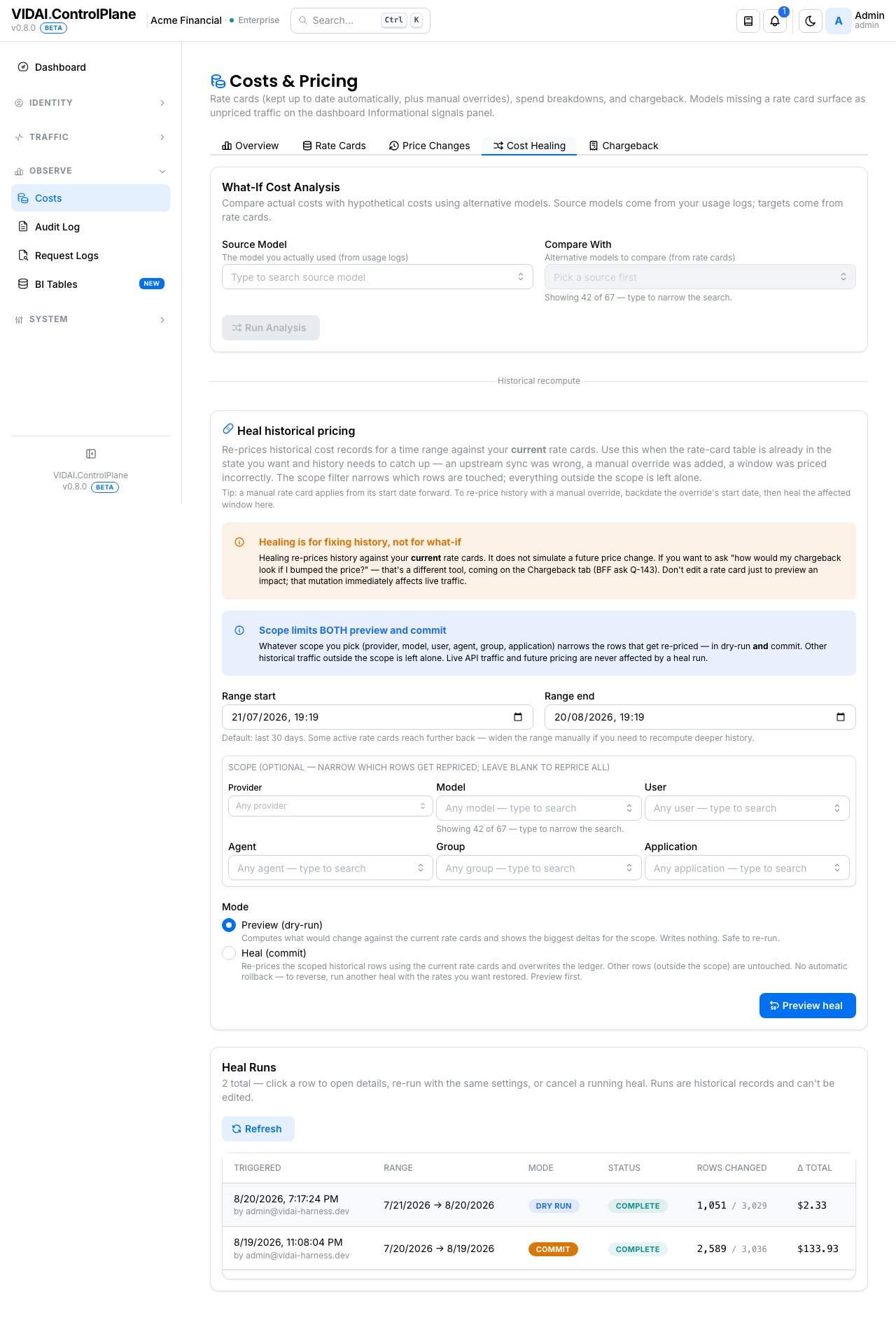
Cost Healing is the tab where you re-price historical traffic against the current rate cards. It used to live as "Replay & Analysis"; the new name reflects what it actually does: fix history (chargeback) when prices change.
Use it when:
- A vendor's prices moved and the sync picked up the change; history should now reflect those rates.
- You added or edited a manual override and want past traffic to use the new rate.
- The Recompute-costs pill in the header has appeared and you're acting on it.
The form
- Cost Healing tab.
- Trigger Healing.
- The form pre-fills based on context:
- Date range: defaults to a smart window covering all
currently-active rate cards, capped to 30 days. Override
by typing a different
since/until. - Scope (optional): restrict to specific providers, models, users, keys, or groups via comboboxes. Leave empty to heal all traffic in the window.
- Reason: free text, defaults to a sensible auto-fill ("Healing after rate-card sync" or "Healing after manual override edit"). Captured in the audit log.
- Dry run toggle: leave on for the first pass to confirm the math without modifying the ledger; flip off to commit.
- Click Run.
The healing runs as a background job. Progress shows in the
run list on the Cost Healing tab (the same tab you launched
it from); status flips from pending → running →
complete (or failed with a reason), updating live while it
runs.
What you see in the result
Selecting the run in that list opens its detail:
- The date range that was healed.
- Total rows processed.
- Total cost delta (sum of per-row before/after differences).
- Per-rule cost delta breakdown.
- Any rows that errored (parser couldn't extract usage, missing rate card, etc.).
- A Re-priced rows modal: drill in from the row detail to see exactly which historical requests changed cost, with their before / after values. Download CSV is available on this modal for finance reviews and spreadsheet reconciliation.
Use the per-rule breakdown to confirm the heal affected only the rules you intended.
⚠️ Watch out. Only one healing pass can run at a time. Concurrent attempts return an error with the active run id; wait for the running one to finish.
💡 Pro tip. Always dry-run first. The dry-run output shows per-row cost deltas before committing, letting you sanity-check that the new rates are producing reasonable numbers.
Recovering from a bad commit
If you ran a heal non-dry-run and the result is wrong:
- Identify the offending rate card on the Rate Cards list (almost always a manual override).
- Edit or delete the card so future calls (and a future heal) compute correctly.
- Run another heal over the same date range to overwrite the bad ledger rows with the corrected costs.
There's no "undo" for a heal; the way out is "heal again with the right inputs." Ledger rows are versioned internally so the most recent heal's view wins.
What about "what-if"?
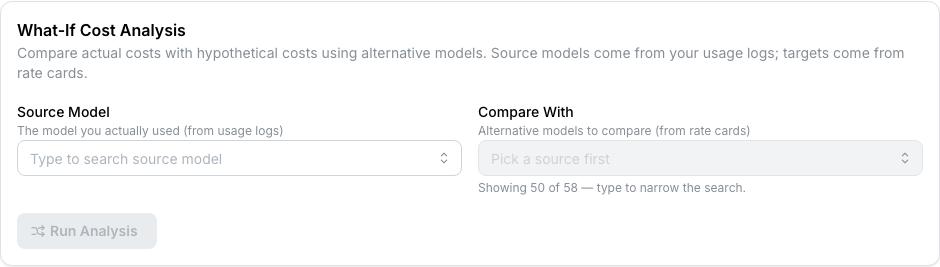
The same machinery (dry-run a heal with a different scope) can answer hypothetical "what if I switched this model?" questions. Pick a scope that isolates the source model, dry-run to see the cost delta against current rates, then decide.
The reason we don't ship a separate "what-if" tab anymore: it was the same operation with different intent, and admins kept running them in production-changing modes by mistake. Cost Healing is honest about what it does (modify the ledger when not dry-run); using dry-run for analysis is correct usage of the same tool.
Read the Chargeback tab
The Chargeback tab is the "who spent what" surface. Five sections, ordered top-to-bottom the way finance usually reads them:
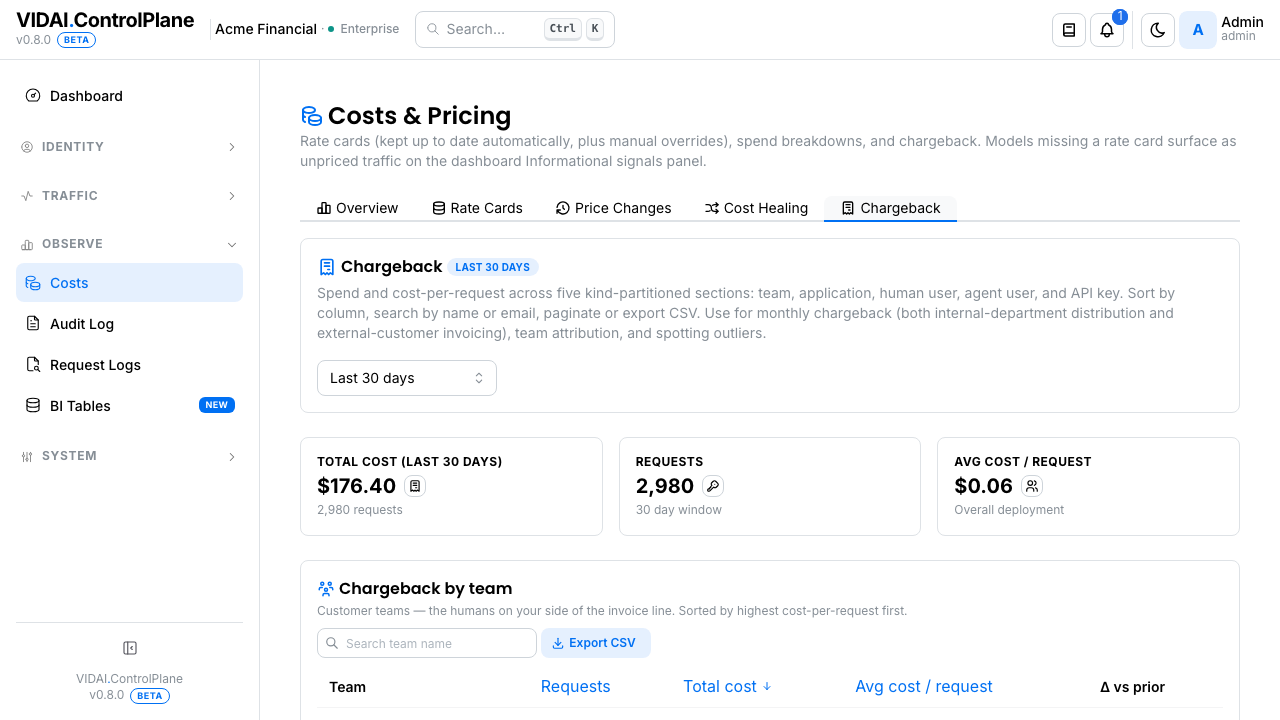
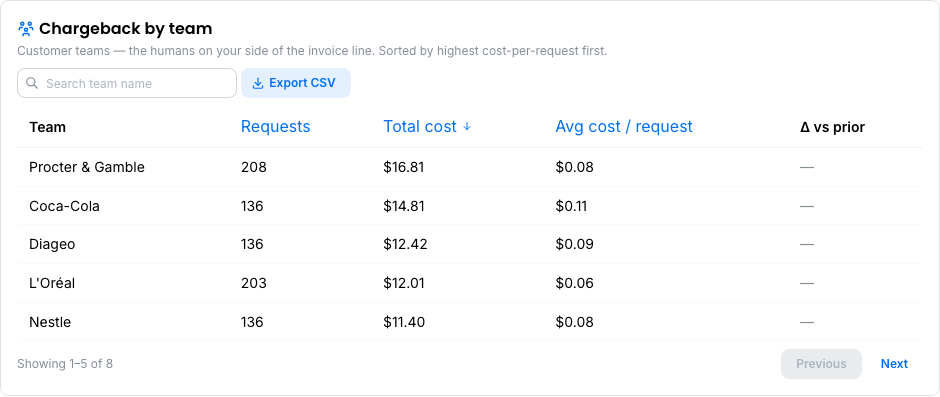
- Chargeback by team — customer teams (or internal departments; the choice is yours — see Groups → Team can mean two things). For agencies + healthtech + fintech deployments, this is the section your invoicing pulls from: Procter & Gamble, HSBC, NHS England. For enterprise deployments, it's the internal chargeback list: Engineering, Data Science, Marketing.
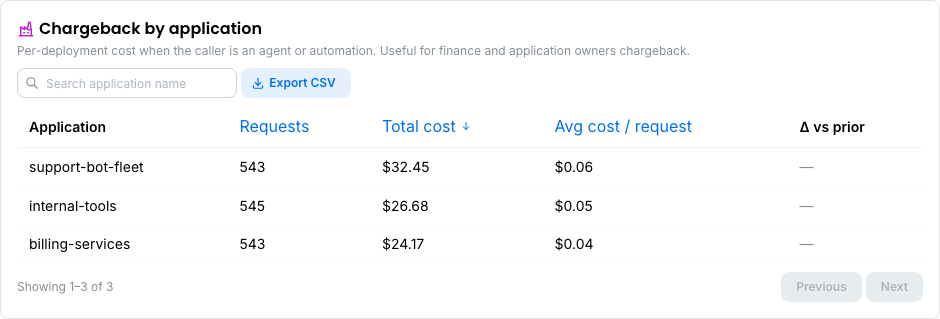
- Chargeback by application — per-deployment cost when the caller is an agent or automation. Application groups are the parallel structure for automated callers (see Applications); this section is what an application owner uses to reason about their bot fleet's spend.
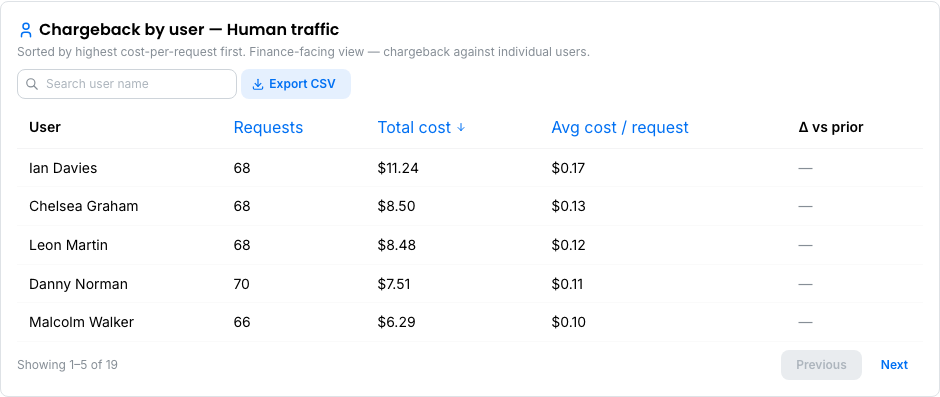
- Chargeback by user — Human traffic — humans, ranked by spend. Finance-facing view for chargeback against individual users. Trending cost-per-request on a person usually means prompt drift or context growth on their workflow.
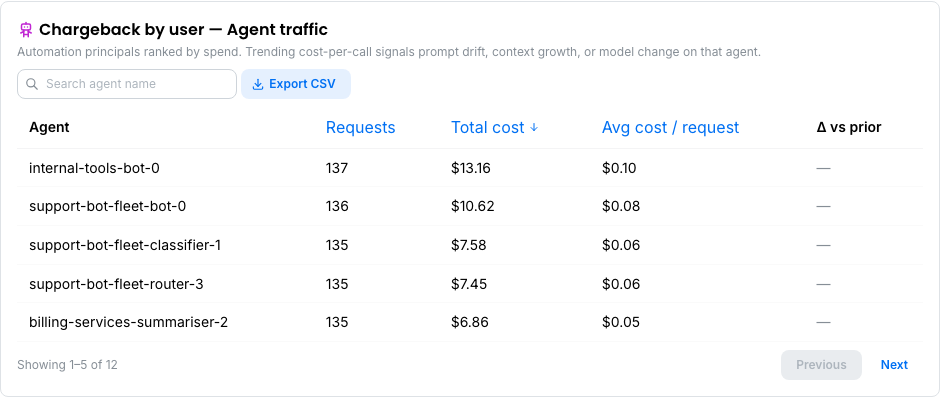
- Chargeback by user — Agent traffic — agent principals, ranked by spend. The "which of my bots is most expensive" list. Cost-per-call trending upward on an agent is early-warning that an integration is doing more work per call than it used to (context ballooned, a tool changed, a retry loop landed).
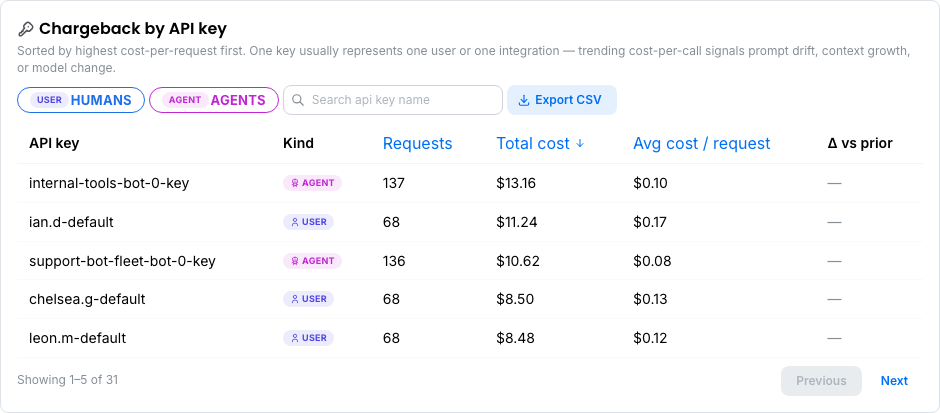
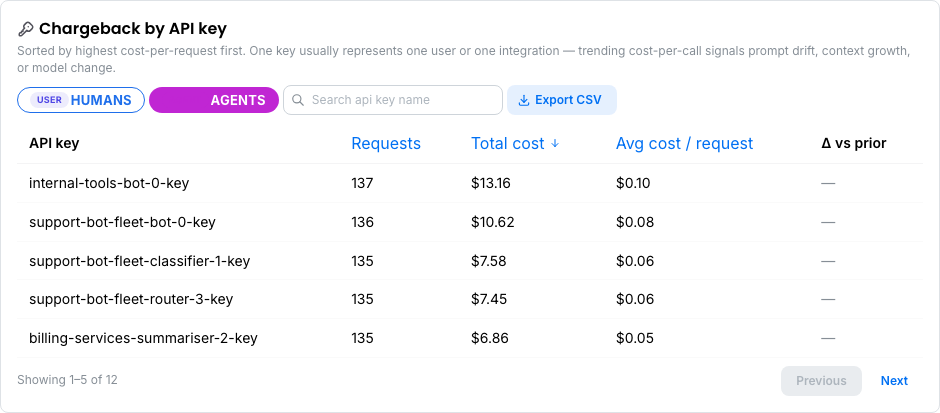
- Chargeback by API key — every key that carried traffic in the window. Use the Humans / Agents filter chips at the top of this section to narrow to just human-owned keys or just agent-owned keys. Unfiltered, the section shows both; the Kind column marks each row.
Click a filter chip and the Kind column collapses; the footer total drops to just that kind's row count (Q-180 server-side filter, so pagination math stays honest):
Each section has:
- Sortable columns — Requests / Total cost / Avg cost per request. Click a column header to sort.
- Search — narrows to matching names within the section (server-side; works across the full result set, not just the visible page).
- Pagination — 5 rows per page by default. The section
footer shows
Showing X–Y of Z; Z is the count within the current section's kind, not the mixed total, so the math stays honest per section. - Download CSV — drains every page in the current
section (kind + search filter applied) and downloads the
file. Filename includes the scope + kind + timestamp so
archived exports self-document (e.g.
chargeback-group-team-2026-08-20-14-32-01.csv,chargeback-user-human-2026-08-20-14-32-01.csv). The Kind column is included in every export so finance spreadsheets don't have to cross-reference.
💡 Pro tip. For a monthly invoicing run in the customer-of-a-service model, work through the top two sections in order: "Chargeback by team" gives you the customer-level invoice line ("Procter & Gamble owes us $X for August"); "Chargeback by application" gives you the "of which, application deployments accounted for $Y" sub-line if you break out automation as a separate invoiceable service. The API-key section is your paper trail — one row per credential — kept for audit.
📌 Worth knowing. Older console builds mixed teams with applications in one "Cost by group" list and humans with agents in one "Cost by user" list. That made customer-alongside-automation reading nonsensical ("Procter & Gamble" next to "billing-services" in the same list). The Chargeback tab now splits both axes so each row lands in the section it belongs to.
Adjacent chargeback surfaces:
- The dashboard's Cost Insights panel shows the same data in tile form (top-10 costly humans, top-10 costly agents, cost by team pie, cost by application pie). Faster glance, less detail.
- The BI Tables → Usage tab has the raw per-request rows the chargeback sections aggregate. When finance asks "prove this number", that's the drill-down.
What the misconfig rail tells you about pricing
The dashboard's Actionable Signals panel surfaces three rate-card-related causes that the cost engine cares about. Each one fires on a routing rule that references a model the cost engine can't fully price:
| Cause | What's wrong | Where the click-through lands you |
|---|---|---|
unpriced_source |
The rule's match model (the model the rule looks for in incoming traffic) has no active rate card. Matched requests price at $0. | Cost Engine → Rate Cards → Create-Rate-Card modal pre-filled with the offending model. |
unpriced_target |
The rule's target model (where redirected traffic goes) has no active rate card. Redirected traffic prices at $0. | Same as above. |
awaiting_dependency |
The rule's target model isn't in the catalogue at all (not just unpriced, but missing). The rule can't fire because there's no model to redirect to. | Models → Add Static Model. Once the model exists, the misconfig either clears or downgrades to unpriced_target. |
The fourth cause to know about, compliance_overlap,
sometimes lands here too when its subtype is fallback_overlap
(a fallback chain routes compliance-pinned traffic to a
non-compliant target). Most compliance_overlap cases land on
Routing instead.
Reference
Permissions
| Role | Sees Costs page | What |
|---|---|---|
| admin | Yes | Full access. Add manual cards, run heals, run dry-run analysis. |
| bi_read_only | Yes | Read-only: can view rate cards, healing history, chargeback; cannot add manual cards or trigger heals. |
| user | No | Page hidden. |
Field reference (rate cards)
| Field | Meaning |
|---|---|
| Provider | Which provider's pricing this card represents. |
| Model slug | The registered model name. |
| Pricing tier | standard / flex / scale / batch / priority. |
| Modality | text / image / audio / video / embedding. |
| Rate (input / output / cached / reasoning) | Per-1M tokens, in USD. Optional fields blank for vendors that don't bill that way. |
| Effective from / to | The date range this card is active. Time-versioned. |
| Source | synced (auto-pulled) or manual (admin override). |
Resolver fall-through order
When pricing a request, the cost engine tries these in order:
- Manual override at the call's tier + modality.
- Sync rate at the call's tier + modality.
- Sync rate at standard tier with the call's modality.
- Sync rate at the call's tier with text modality.
- Sync rate at standard text.
- Unpriced.
Manual overrides only fire at step 1; the fallback chain (steps 3-5) is sync-only.
Healing run states
| State | Meaning |
|---|---|
| pending | Created, not yet started. |
| running | In-flight. Only one run can be active at a time. |
| complete | Finished successfully. Ledger rows in the date range now reflect the latest cards. |
| failed | Errored. Reason in the run detail. |
Audit log records
- Add / edit / delete manual rate card: actor, before/after of every changed field.
- Trigger Cost Healing: actor, date range, scope, reason, dry-run flag, resulting run id.
- Healing completed: system actor (background job), outcome.
- Settings changed: sync cadence, retention, etc.
Audit Log shows these.
Limitations
A few things to know about the cost engine today:
- One healing pass at a time. Concurrent attempts are rejected. Useful for preventing accidental double-runs; awkward when you want to run multiple narrow heals in parallel. Wait for the previous to finish.
- No mid-heal cancel. Once a heal is running, it runs to completion. Plan windows accordingly: large ranges (90 days+) can take many minutes.
- No cost confidence interval. The number you see is authoritative based on the rate cards effective at request time. There's no "+/- range" on retroactive estimates; if you change cards and don't re-heal, the ledger keeps the old (now stale) numbers.
- Manual overrides don't fall back. A manual override on
batch/imagedoesn't apply tostandard/texttraffic. If you want broad coverage, set the override onstandard/text. The fallback chain is sync-only by design, to prevent narrow overrides from accidentally repricing unrelated traffic. - No misconfig signal for orphan unpriced models.
Today's misconfig rail catches unpriced models referenced
by routing rules. Models that get traffic but aren't
routed to (and aren't priced) silently produce $0 ledger
rows. Spot-check the ledger detail or filter Request Logs
by
cost = 0if you suspect orphan models.
Common questions
A request shows no cost. What's wrong?
The resolver couldn't find a matching rate card for the request's (provider, model, tier, modality). Add a manual card for the missing combination; the dashboard's misconfig rail typically surfaces the case if a routing rule references the unpriced model. After the card is added, run a Cost Healing pass over the affected window to re-price the historical $0 rows.
I added a manual override but yesterday's calls still show the old price.
Manual overrides apply forward only from
effective_from. To re-price historical traffic, seteffective_fromto the right point in the past and run a Cost Healing pass over the affected range. The post-save panel after Save offers the one-click path.A synced card has a wrong rate.
Add a manual override with the right rate and the appropriate
effective_from. The override takes precedence over the synced card. Then run Cost Healing if historical traffic needs re-pricing.Cost Healing dry-run shows the source cost as zero.
Either there's no traffic on the source model in the window, or the source model wasn't priced at request time (the actual cost was unpriced). Healing can only re-price rows where actual cost was known.
A heal finished but the cost summary didn't update.
The summary refreshes on the page's refresh cadence, not on healing completion. Click Refresh now at the top of the page after a heal to pull the new totals. The Recompute-costs pill in the header also clears once the heal commit covers the change that triggered the pill.
The pipeline health strip shows "ledger backlog growing". What do I do?
The ledger writer is falling behind incoming traffic. Usually self-corrects within minutes; if it persists for an hour, contact your VIDAI support contact.
Can I delete a manual override and have the traffic re-price against the synced card?
Yes, provided a synced card exists for the same tuple. The Delete button shows Sync fallback available in that state. Delete; the sync card takes over from now forward. Run Cost Healing if you also want past traffic re-priced against the sync rate.
If no sync card exists, the Delete button is disabled (the console refuses to leave the tuple unpriced). Edit the override to a different rate instead, or add a sync rate for the model first.
What happened to "What-if Analysis"?
Same machinery, different framing. What you used to do on a separate tab (pick a source, pick targets, get a cost projection) you can now do via Cost Healing dry-run with a scoped run. The new name is honest: this is the tool that fixes history; running it dry-run is the safe way to use it for analysis.
Where to go next
- Cost control: the flagship spend story this page is the engine of: act at request time → attribute → stable ledger → dashboard. Read this for the end-to-end arc.
- Models: per-model cost overrides feed the same rate-cards table.
- Routing: savings from routing rules show up in the Cost Insights panel and VIDAI Impact tile.
- Dashboard: the headline cost numbers and the Recompute-costs pill that links here.
- Request Logs: per-request cost attribution.
- BI Tables: pull cost data into external BI stacks via CSV.
- Audit Log: every cost-engine change is logged.