License¶
The License page is where you read what tier your deployment is on, how much of the eval-mode caps you've used (if any), what features the licence unlocks, when an Enterprise licence expires, and which versions of the control plane are running underneath. It's mostly a read-only page (licences are installed at deployment time, not via this page) but it's the first stop for tier verification, expiry sanity checks, and support escalations.
For the conceptual side (what's in each tier, the five banner states, downgrade behaviour, recovery mode), see Licensing & tiers. This page walks the console surface itself.
When you'd open this page¶
- A new admin starts and wants to know what edition you're running; the tier badge answers it.
- The notification bell carries a licence warning; open this page to read the full state.
- A feature you expected to find isn't visible; check the Capabilities section to confirm whether it's part of your tier.
- Support asks "what version are you on?"; the Deployment section has BFF / Server / Frontend versions.
- An auditor needs the licence + version provenance for a filing; the Download PDF button produces a single signed-off snapshot.
- Recovery mode is active and you want to know how close you are to the 25-key / 5-user caps.
The page at a glance¶
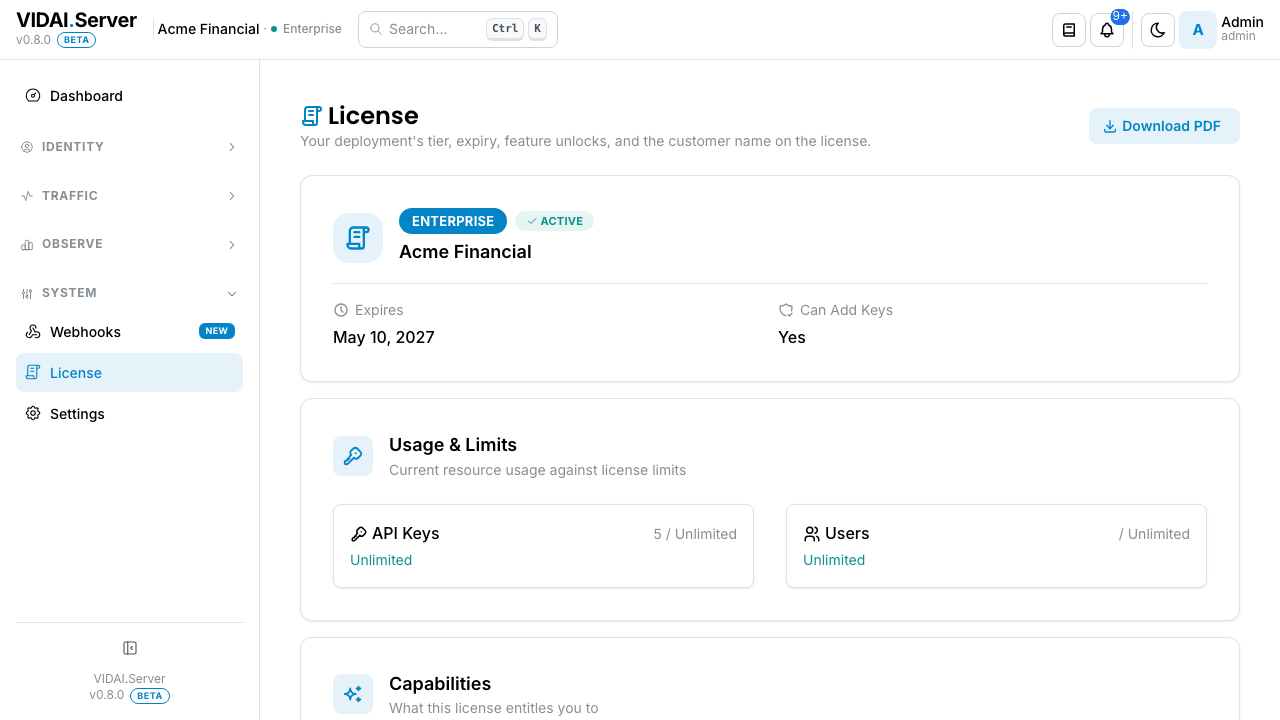
The page is one column with five blocks:
- Dev-deployment callout (only on Enterprise + dev customer IDs): a one-line banner up top reminding you not to ship from this build.
- Tier card: tier badge (Community / Enterprise), status badge (Active / In grace / Recovery mode / Running on cache / Expires in N days), the customer ID, expiry date, and "Can add keys" affordance.
- Status banner: only renders when something is off. One of five mutually exclusive states (per Licensing & tiers).
- Usage & Limits: current count vs cap for API Keys + Users. On Enterprise / Community both are "Unlimited"; in recovery mode they show N/25 + N/5 with progress bars.
- Capabilities: two subsections.
- Tier capabilities: the rows your tier unlocks. On Community, dimmed rows below show which Enterprise capabilities you'd get on upgrade.
- Optional unlocks: the rows from the licence JWT's
featuresarray (typically HA cluster, SSO). - Deployment: running versions for BFF, Server, and Frontend. Useful for support tickets.
Two affordances at the top of the page:
- Download PDF: generates a one-page certificate with all the above. Suitable for procurement, compliance, or audit filings.
- Refresh (browser refresh): re-pulls licence state. The page polls on a cycle, so this is rarely necessary; useful right after installing a new key.
What you do on this page¶
Check the deployment's tier¶
The tier badge at the top of the card is the answer. There are
two real possibilities: Community and Enterprise. A
third state shows in recovery mode: tier reads Community but
the status badge reads Recovery mode (banner B-3 or B-4
fires above the card).
The full feature breakdown for each tier is on Licensing & tiers.
📌 Worth knowing. When a feature is gated behind Enterprise and you're on Community, the nav item is still visible with an Enterprise pill (Webhooks, BI Tables). Clicking it lands on a locked-page card that explains what Enterprise adds. The page doesn't try to fetch the gated API.
Read the status banner¶
The status badge next to the tier badge tells you the current licence health in one phrase. Five possibilities, ranked by precedence (the banner fires the first one that matches):
| Status | What it means |
|---|---|
| Recovery mode · invalid key | The VIDAI_LICENSE_KEY env value couldn't be parsed AND no cache fallback applies. Eval caps active. Fix the env + restart. |
| Running on cache | The env value couldn't be parsed, but a recent valid licence is still cached. The deployment is running at the cached tier. Fix the env before the next restart. |
| Recovery mode · lapsed | The licence expired more than 30 days ago and the server has restarted. Renewal + restart restores full function. |
| In grace | Past expires_at, within the 30-day grace window. Enterprise features still work. Renew + restart inside this window to stay on Enterprise. |
| Expires in N days | Less than 30 days to expires_at. Renew + restart at any point in the window. |
| Active | None of the above. Nothing to do. |
Each non-Active state carries a banner above the tier card with the longer-form description + action. See Licensing & tiers § The five banner states for the full walkthrough.
Read the Usage & Limits tiles¶
Two tiles side by side: API Keys and Users.
- On Community + Enterprise: both tiles read "Unlimited". No caps apply.
- In recovery mode: both tiles show
N / 25(keys) andN / 5(users) with a progress bar and a "remaining" countdown. If you're above either cap, a cap-reached banner fires above the tiles too.
The "remaining" count is the control plane's view of how many more
keys / users you can create. New writes against either resource
return a cap_exceeded error once you're at the limit;
existing rows are never deleted or hidden.
Read the Capabilities section¶
The Capabilities section is a transparent statement of what your tier unlocks. Two subsections:
Tier capabilities: the rows your tier currently has. On Enterprise this is 7 rows (compliance routing, webhooks delivery, ledger replay, BI Tables, rate-card history, worker- flag admin, VidaiGuard ML guardrails); on Community this is 4 rows (AI control plane, regex guardrails, cost engine, teams + applications). Each row has a one-line description.
On Community, the Enterprise rows are listed too, dimmed, with
an Enterprise tag. That's deliberate: you see what an
upgrade would add without leaving the page.
Optional unlocks: these come from the licence JWT's
features array. Typically ha-cluster and sso. If the JWT
didn't include any, the section reads "No optional unlocks on
this licence."
Read the Deployment section¶
Three rows: BFF, Server, Frontend. Each carries a version string useful for matching against the changelog or opening a support ticket. The page mines these from the same licence response so you don't need a second fetch; copy / paste straight into the ticket.
💡 Pro tip. The Download PDF affordance bundles the licence + the deployment versions into one artefact. Use the PDF for audits where you need a single signed-off snapshot of "what was running when we said this."
Update the licence¶
Licences are installed at deployment time via the
VIDAI_LICENSE_KEY environment variable, not via this page.
To install or upgrade:
- Get the JWT from [email protected].
- Set
VIDAI_LICENSE_KEY=<the-jwt>in your deployment environment (the platform team typically owns this). - Restart the server so it re-reads the licence.
- Come back to this page → the tier badge + Capabilities should update.
If the new licence doesn't appear after restart, the control plane hasn't picked it up. Verify the env update was applied + the service restarted.
⚠️ Watch out. Tier changes only happen at startup. A licence renewal that lands mid-traffic doesn't take effect until the next restart. That's deliberate; see Licensing & tiers § How the licence works.
Reference¶
Permissions¶
| Role | Sees License page | What |
|---|---|---|
| admin | Yes | Full read access. Can refresh, export PDF. Licence-key updates require deployment-level access (out-of-band). |
| bi_read_only | No | Page hidden. |
| user | No | Page hidden. |
Field reference¶
| Field | Source | Updatable from this page? |
|---|---|---|
| Tier | Licence JWT (tier) |
No (set at install time). |
| Customer ID | Licence JWT (customer_id) |
No. |
| Expiry | Licence JWT (expires_at) |
No (renew via [email protected]). |
| Features | Licence JWT (features) |
No. |
| Limits | Computed server-side from tier | Recovery mode imposes 25/5; otherwise unlimited. |
| Key count | Live from the control plane | Refreshes on page load. |
| User count | Live from the control plane | Refreshes on page load. |
| Deployment versions | Live from the control plane | Refreshes on page load. |
What gets logged¶
Licence-related events that get audited:
- Licence loaded: system actor, on every server startup.
- Tier changed: system actor, before/after tier (fires on the restart that observes the change).
Audit Log is where these surface.
Limitations¶
- No in-console licence-key updates. Licence keys are installed via the deployment env, not via this page. Deliberate: licence install is a config step, not a console click.
- Tier changes require a restart. Once a new key is installed, the server has to restart to pick it up. Plan a maintenance window.
- Cached-licence fallback is bounded. The cache is good for at most 30 days; after that, an invalid env key drops the deployment to recovery mode at the next restart.
Common questions¶
My Enterprise licence expired but the page still shows Enterprise.
You're in the grace period (banner B-2). The licence is past
expires_atbut within the 30-day grace; the control plane keeps running Enterprise until the next restart. Renew + restart inside grace and you stay on Enterprise. Restart with no renewal after grace closes and the deployment tier-downs to Community / recovery mode at the next start. See Licensing & tiers § Downgrade behaviour for what happens to your data.Recovery mode says 37 of 25 keys. How is that possible?
The 25-key cap is write-time. Existing rows above the cap are never deleted or hidden. If you had 37 keys when the deployment dropped to recovery mode, all 37 keep working; you just can't create new ones until a real licence is installed.
The Customer ID looks like
cust_development.Customer IDs starting with
cust_dev*,cust_local*,cust_test*trigger a Development deployment callout at the top of the page. The header chip dot also goes red on Enterprise + dev customer IDs. It's a "don't ship from here" signal, nothing more.A capability listed as Enterprise isn't reachable in my console.
Two usual suspects: - Your tier is Community. The capability is in the dimmed "missing on this tier" rows. An Enterprise licence unlocks it. - The capability is in your tier but requires a deployment- level config switch (e.g. webhook dispatcher off by default). Check with the deployment team.
Where do I get a licence renewal quote?
[email protected] with your current customer ID and tier interest. They'll generate a new JWT for the renewal period.
Can I export a "licence validity statement" PDF for audit?
Yes; Download PDF at the top of the page. The PDF includes tier, customer, expiry, capabilities, limits, deployment versions, and the export timestamp. Suitable for compliance filings.
My deployment is multi-region. Does each region need its own licence?
Depends on the deployment topology. If each region runs an independent deployment, yes. If regions share one control plane, one licence covers all. Confirm with [email protected].
Where to go next¶
- Licensing & tiers: the conceptual side, covering what's in each tier, banner state mechanics, and downgrade behaviour.
- Settings: your own user profile + preferences. Distinct from the licence, which is deployment-wide.
- API Keys: if recovery-mode caps are biting, this is where you free room.
- Users: same, on the user side.
- Audit Log: licence-related events log here.