Fallback
Fallback chains keep traffic flowing when a provider is temporarily unhealthy. You configure a chain of backup targets for a source model; when the source's provider trips its circuit breaker, the VIDAI Control Plane tries the chain entries in order until it finds a healthy one and serves the request from there. The client never sees the failure.
This page has two tabs:
- Fallback Chains: configure which targets protect which source models, and under which scope.
- Provider Health: monitor circuit-breaker state per (provider, model) pair, and tune the thresholds that flip the breakers.
When you'd open this page
- A vendor is having a regional outage; you want control plane traffic to silently route around it.
- You want to plan for "if Anthropic is degraded, fall back to OpenAI for Claude-shaped traffic."
- A circuit has been Open for hours; you want to manually reset it to Closed because you've confirmed the upstream has recovered.
- You want to know whether circuits are tripping in production and why.
- You're tuning the failure thresholds because the defaults are too noisy or too patient for your workload.
How fallback composes with the rest of the stack
Fallback isn't standalone. A request flows through four stages before it reaches an upstream, each able to rewrite the target model:
Two consequences matter for admins:
-
Fallback keys off the rewritten model, not the original. If a routing rule rewrote
gpt-4otocheap-model, the fallback chain looked up whencheap-model's provider is unhealthy is the chain forcheap-model, not the chain forgpt-4o. The create form on this page warns you when the source you pick already has a routing rule that would rewrite it away. -
Fallback fires only when the source's provider is unhealthy. A request that reaches a healthy provider never touches fallback. A request that reaches an unhealthy provider is silently re-routed to the first healthy chain entry. The provider's health is decided by the circuit breaker on the Provider Health tab.
📌 Worth knowing. Fallback is an entirely server- side failover. Your application doesn't need to do anything; the control plane absorbs the upstream failure and serves a cached SDK-shaped response from the chain entry that worked.
The page at a glance
Fallback Chains tab
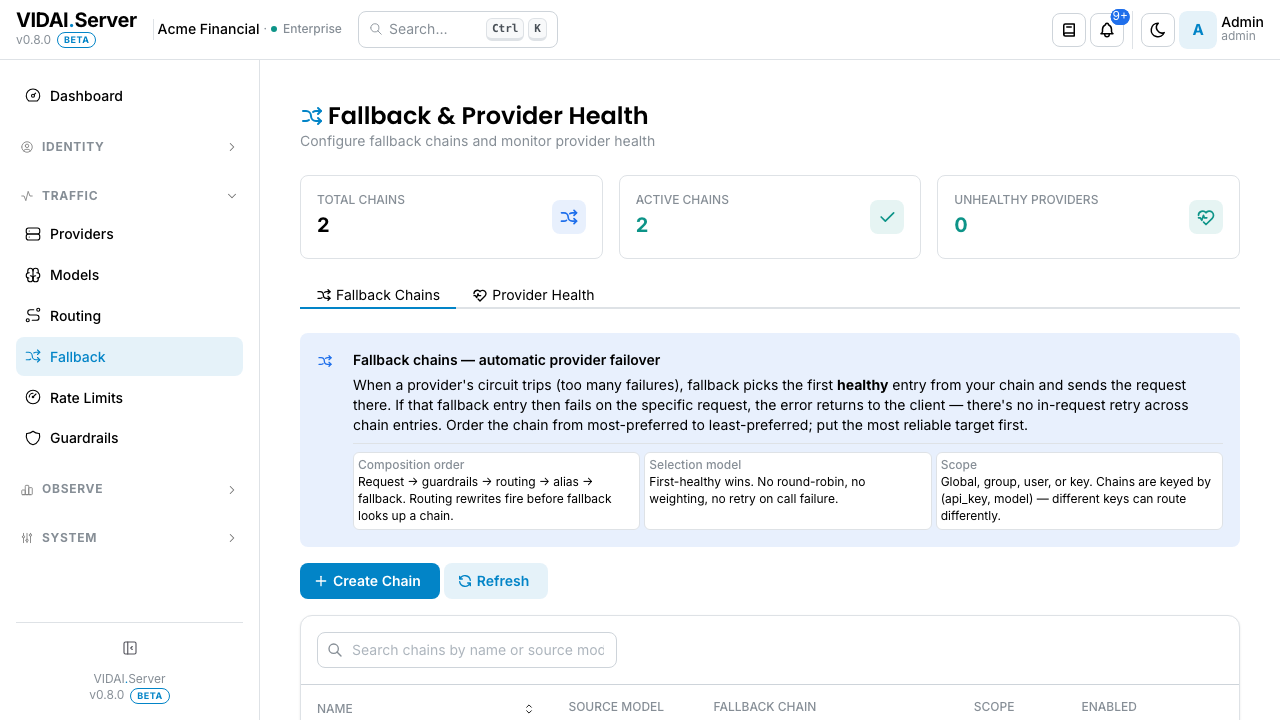
The list shows every chain configured today. Columns:
| Column | What it shows |
|---|---|
| Name | Friendly label for the chain. Free-form. |
| Source model | The model whose unhealthy traffic this chain catches. |
| Chain | The ordered list of fallback targets. Hover for the full chain. |
| Scope | Globe / Team / Application / User / Agent / Key: who this chain applies to. |
| Status | Active or Disabled. |
Above the list:
- Search box: narrows by
nameorsource_model. GitHub- style multi-word AND search. - Column sort: click a column header to sort. Newest-first by default.
- Pagination: pick 10 / 25 / 50 / 100 entries. Default 25.
The top-of-page Alert summarises the selection model, which surprises some admins. Read on:
How a chain is evaluated
When the source's provider is unhealthy, the control plane walks the chain in order:
- First healthy wins. The first chain entry whose provider has a closed (healthy) circuit is selected. Evaluation stops there.
- No round-robin. No weighting. No per-entry retry on call failure. If the picked fallback returns a 5xx on this specific request, the error is returned to the client; the control plane does not then try the next chain entry within the same request.
- Order most-reliable-first. Since there's no per-call retry, the order of the list is the order of preference. Put the target you most want to succeed first.
- Optimistic primary. If every entry in the chain also has an open circuit, the control plane falls back to trying the original primary anyway rather than failing the request outright. Better to try than to reject; the primary might have just recovered.
⚠️ Watch out. Chains are NOT "retry until success." They're "pick the first healthy target and use that." If you need retries on a specific call, the application needs to handle that itself; the control plane doesn't retry within a single request.
Provider Health tab
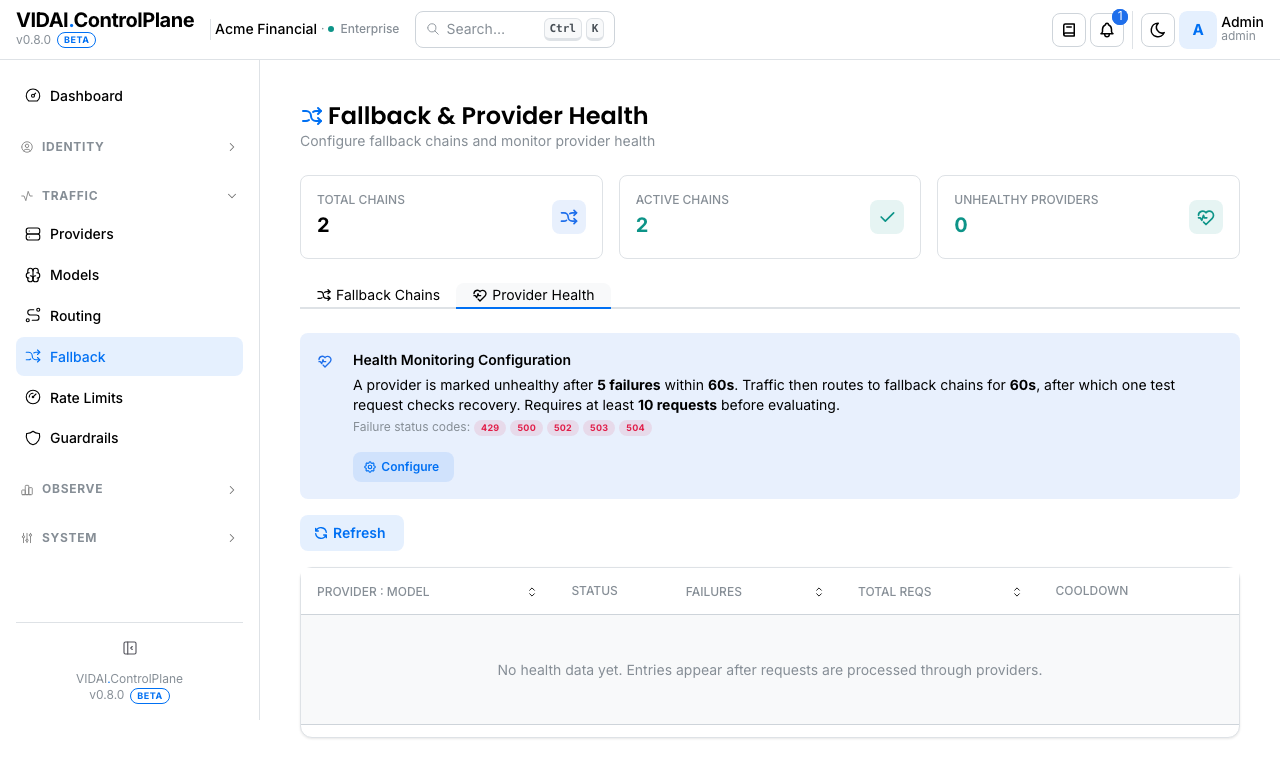
Lists every (provider, model) pair the control plane has tracked, with current circuit state and recent failure stats. Columns:
| Column | What it shows |
|---|---|
| Provider + Model | The pair this circuit tracks. Each combination has its own circuit. |
| State | Closed (healthy), Open (failing; fallback fires), HalfOpen (cooldown elapsed; one test request will be allowed through). |
| Failure count | Failures observed in the current sliding window. |
| Total requests | Total requests in the same window: relevant because the breaker doesn't open on low traffic regardless of failure rate. |
| Cooldown | When the circuit will move from Open → HalfOpen and try again. |
| Last failure | When the most recent failure happened, with the upstream status code. |
Above the list, a Configure button opens the threshold editor; a Reset button on each row force-flips a circuit back to Closed.
What you do on this page
Create a fallback chain
Goal: when gpt-4o is unhealthy, fall back to gpt-4o-mini,
and if that's also unhealthy, try claude-haiku-4.
- Click Add Chain. The wizard opens.
- Source Model:
gpt-4o. The model whose unhealthy traffic this chain protects. - Chain entries: add
gpt-4o-minifirst, thenclaude-haiku-4. The order is the order of preference. - Per-entry cost hint: as you pick each entry, the wizard shows what calling that model would cost vs the source. Useful when picking between two cheaper-but- different alternatives.
- Scope: pick who this chain applies to (Globe / Team / Application / User / Agent / Key).
- Save.
The chain is in effect immediately. Calls to gpt-4o go to
gpt-4o-mini whenever the control plane's circuit for gpt-4o's
provider is open; they go to claude-haiku-4 when both are
unhealthy.
💡 Pro tip. Pick fallback targets that are capability-equivalent or capability-supersets of the source. Falling a vision-capable model back to a text-only one will fail the call; the control plane warns you in the wizard if the chain's modality doesn't match the source's.
📌 Worth knowing. Chains compose with routing rules. If
gpt-4ois being rewritten by a routing rule toclaude-sonnet-4for the calling key's scope, the fallback chain looked up when things break is the chain forclaude-sonnet-4(the rewritten target), not the chain forgpt-4o. Plan chains for the model that traffic actually hits.
Edit a chain
Click the row to open the edit modal. Same form as create.
You can:
- Reorder chain entries (drag-handle).
- Add or remove entries.
- Change the source model (rare; usually you'd delete + re-create instead).
- Adjust scope.
- Toggle enabled.
Saving propagates immediately. There's no key-resync step; fallback is evaluated at request time.
Disable a chain temporarily
Inline toggle on the row. A disabled chain is ignored; calls to the source model that would have used it flow as if no chain existed (so they fail with the upstream's error if the provider is unhealthy).
Use disable when you're investigating chain misbehaviour without removing the configuration.
Manually reset an Open circuit
Sometimes you know an upstream has recovered before the cooldown expires (you've checked the vendor's status page, your support contact confirmed, etc.). Force the circuit back to Closed without waiting.
- Open the Provider Health tab.
- Find the (provider, model) row.
- Click Reset.
- Confirm.
The circuit flips to Closed immediately. The next request goes to the upstream as normal. If the upstream is still broken, the circuit will re-open on the next failure batch.
💡 Pro tip. Reset a circuit after you've manually verified the upstream is back. Resetting an actually-broken circuit just means the breaker has to learn the failure pattern from scratch: minor cost, but pointless.
Tune circuit-breaker thresholds
The defaults work for most deployments. Tune when:
- The breaker opens too eagerly (you're getting false positives during normal vendor latency spikes).
-
The breaker doesn't open fast enough (real upstream outages are taking too long to start serving fallback).
-
Provider Health tab → Configure.
- Adjust:
| Setting | Default | Effect |
|---|---|---|
| Failure threshold | 5 | How many failures within the window flip the circuit Open. |
| Failure window | 60s | The sliding window over which failures are counted. |
| Initial cooldown | 60s (min 30s) | How long the circuit stays Open before moving to HalfOpen. Doubles on consecutive failures, capped at 5 minutes. |
| Minimum requests | 10 | Total requests in the window required before failure rate is evaluated. Below this, the breaker stays Closed regardless of failure rate. Prevents a single failing request on a low-traffic circuit from tripping the breaker. |
| Failure status codes | 429, 500, 502, 503, 504 |
Which upstream status codes count as "failure." |
- Save. The new config applies immediately to every tracked circuit.
⚠️ Watch out. Tightening the thresholds can cause false-positive trips during normal vendor latency spikes. Default values are conservative; favour leaving them unless you have evidence of a specific tuning problem.
📌 Worth knowing. The Minimum requests gate prevents a single failing low-traffic call from flipping the breaker for a model nobody else is calling. Useful for "this model gets one request an hour and it timed out once" scenarios.
Read the response when fallback fires
When fallback fires, the control plane sets these HTTP response headers so callers and operators can verify:
| Header | What it says |
|---|---|
x-vidai-fallback |
true when fallback fired. |
x-vidai-fallback-from |
The original provider's name. |
x-vidai-model |
The model that was actually called (the chain entry that succeeded). |
x-vidai-requested-model |
The model originally requested (only when it differs). |
Request Logs surfaces the same data in the in-console UI on every row that had a fallback fire. The detail drawer shows the chain step that succeeded plus the upstream that ultimately served the response.
Reference
Permissions
| Role | Sees Fallback page | Can do |
|---|---|---|
| admin | Yes | Create / edit / delete / disable chains. Reset circuits. Tune breaker thresholds. |
| bi_read_only | No | Page hidden. |
| user | No | Page hidden. |
Chain field reference
| Field | Effect |
|---|---|
| Source Model | The model whose unhealthy traffic this chain protects. Exactly one source per chain. |
| Chain entries | Ordered list of (model, optional provider override). Order = preference. |
| Scope | Who the chain applies to. Same scope-picker as routing. Per-key beats per-team beats per-application beats global. |
| Enabled | Whether the chain is in effect. Disabled chains are ignored. |
Circuit breaker state machine
| State | Meaning | Transitions |
|---|---|---|
| Closed | Healthy. The provider is serving traffic. Failures count in the sliding window. | → Open when failure count ≥ threshold AND total requests ≥ minimum. |
| Open | Unhealthy. Calls go to the chain (or the optimistic primary if the chain is also unhealthy). | → HalfOpen after the cooldown elapses. |
| HalfOpen | Cooldown elapsed. Exactly one test request is allowed through. | Success → Closed. Failure → Open with cooldown doubled (capped at 5 minutes). |
The breaker is per-(provider, model) pair. Failures on
openai:gpt-4o don't open the circuit for openai:gpt-4o-mini
or for any other provider's gpt-4o.
The state is in-memory and resets on control plane restart: a fresh process starts optimistic and learns failure patterns fresh.
Per-call vs per-window failure semantics
The breaker counts failures as they happen and re-evaluates on every record. The sliding window is rolling; it doesn't have a fixed boundary. So a circuit that's seen 3 failures in 30 seconds + 2 failures in the next 30 seconds (5 total in 60s) opens; a circuit that's seen 3 failures spread across 90 seconds doesn't (only 3 failures in any 60s window).
Audit log records
- Create chain: actor, source, chain entries, scope.
- Edit chain: actor, before/after of every changed field.
- Toggle enabled: actor, new state.
- Delete chain: actor, full snapshot.
- Reset circuit: actor, provider, model, state at reset time.
- Edit breaker thresholds: actor, before/after of every changed setting.
Audit Log shows these.
Limitations
A few things fallback does not do today:
- No per-call retry within a chain. If the chosen fallback target returns a 5xx on the request, the client sees that error. The chain isn't a retry policy; it's a "pick the healthiest available target" policy.
- No latency-based health. The breaker counts failures (status codes), not latency. A provider that's slow but successful won't trip the breaker.
- No per-(provider, model) breaker config. The thresholds are global; every (provider, model) pair uses the same values. Per-pair tuning is on the roadmap.
- No automatic failback. When a provider recovers, traffic moves back as soon as the breaker closes. There's no "stay on the fallback for 10 more minutes after recovery" stickiness, which is useful for some workloads (e.g. avoiding session re-pinning) but not provided today.
Common questions
My chain has 3 entries but every call is going to the 2nd. Why?
The 1st entry's provider has an open circuit. Open the Provider Health tab and check the row for the 1st entry's
(provider, model); it'll be in Open or HalfOpen. When it's Closed again, traffic returns to the 1st.My chain has 3 entries and calls are still failing.
All three providers are unhealthy. The optimistic- primary path then tries the original source provider; if that's also broken, the call fails with the upstream's error. Open Provider Health to see the state of every circuit involved.
A circuit just opened. How do I know what triggered it?
Open the Provider Health row for the (provider, model) pair. The "Last failure" column shows the upstream status code. Request Logs filtered to that provider + model shows the recent calls and what each returned.
Why does my circuit say "10 / 10 in window" but it's still Closed?
The threshold is "failure count ≥ threshold" not "total ≥ threshold." Total in window = 10 just means there's been 10 calls; if only 3 of them failed, the failure count is 3 (under threshold), and the circuit stays Closed.
The chain works but I want to know which entry served a specific call.
Request Logs → click the row → detail drawer. The headers + telemetry show
fallback_triggered,fallback_from_provider,fallback_original_model, and the actual model + the chain step that succeeded.Cross-protocol fallback (OpenAI client falling back to Anthropic): does that work?
Yes. When the chain entry's protocol differs from the client's SDK, the control plane translates request and response transparently. The client sees an SDK-shaped response either way. Client integrations has the SDK × upstream support matrix.
A breaker is stuck Open and won't move to HalfOpen.
Most likely the cooldown was doubled by repeated failures and is now at the cap (5 minutes). Wait it out, or click Reset if you've manually verified the upstream is back.
I have two chains with the same source model, one globally scoped and one team-scoped. Which one fires?
The more-specific scope wins, same as routing. The team-scoped chain fires for that team's keys; the global chain fires for everyone else. Per-key beats per-team beats per-application beats global.
Do fallback chains apply to streaming responses?
Fallback applies to the initial request. Once a stream is in flight, the control plane can't fail it over without reconnecting from the start (which would lose SSE state). If the streaming connection itself drops, the client gets the partial stream plus an error; it's the client's responsibility to retry, and that retry goes through the fallback path normally.
Where to go next
- Routing: composes with fallback. Routing rewrites first; fallback handles the rewritten target.
- Providers: the upstream side. Provider health tracked here keys off the providers configured there.
- Models: chain entries are model names.
- Request Logs: every fallback fire is recorded.
- Dashboard: the Reliability surface rolls up fallback usage over time.
- Audit Log: every chain change + circuit reset is logged.