Audit Log
The Audit Log records every administrative action: every key created, every routing rule edited, every team membership change, every license tier flip. It's the page you open when somebody asks "who changed this, when, and what was it before?"
Every action in this admin console writes an audit row. The page is a chronological view of those rows with filters for actor, action, resource, and date range.
When you'd open this page
- An auditor asks "who created this rule?" Search by resource id.
- A configuration changed and nobody admits to it. Search by the affected resource and walk the timeline.
- An incident review needs the full timeline of admin actions during the affected window. Filter by date range.
- You want to know what your colleague did last week. Filter by actor.
- A specific kind of action needs review (every key delete in the past month). Filter by action.
- You're tracking down "this rule used to be A, now it's B, when did that change?" Filter by resource, look for the edit, read the before/after.
The page at a glance
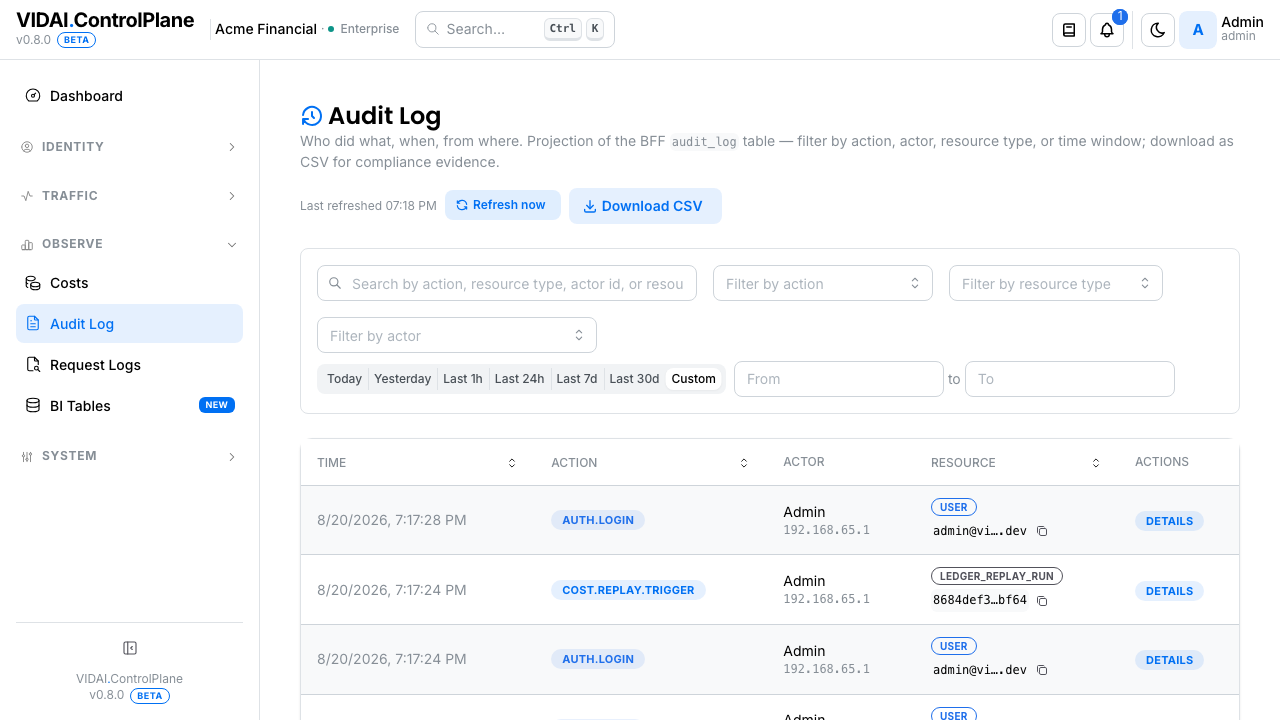
The list is reverse-chronological by default; newest events at the top. Each row shows:
| Column | What it shows |
|---|---|
| Time | When the event happened. Hover for full timestamp + timezone. |
| Actor | Who did it. Email for humans; agent name + an "agent" badge for agents. |
| Action | A standard action verb: key.create, rule.update, user.disable, etc. |
| Resource | What was acted on. Type + id (or denormalised label like a key name). |
| Details | A summary; for edits, the changed fields' before/after. Click for the full event detail. |
Filters at the top:
- Search: substring search across
action,resource_type,actor_id, andresource_id. GitHub-style multi-word AND. Use it when you have an ID from a misconfig click-through or a log line and want the audit row. - Actor: narrow to one person or agent.
- Action: narrow to one action type.
- Date range: start / end timestamps.
💡 Pro tip. Sort is reverse-chronological by default. When you're looking for "the most recent edit to this rule," that's already at the top of the list. To find "the original creator," sort ascending and scroll to the first event.
What you do on this page
Find who created a specific resource
Goal: rule cost_saver-79fa5ef0 exists; you want to know who
created it.
- Search for
cost_saver-79fa5ef0. - The list filters to events touching that resource.
- Sort ascending (oldest first).
- The first row is the create: actor + timestamp.
📌 Worth knowing. Searching by resource id matches across all events that touched the resource (create, edits, deletes). You'll see the full lifecycle on one filtered view.
Read an event's full detail
Click any row. The detail drawer shows:
- Action: the verb.
- Actor: the user or agent (with id) at event time.
- Resource: type + id.
- Before / After: for edits, every changed field with the old and new values.
- Context: additional metadata (the IP / user-agent of the request, when relevant).
For a create event, before is null and after shows the
full initial state of the resource. For a delete, after
is null and before is the final state at delete time.
💡 Pro tip. The before/after view is the "what exactly changed?" answer. Use it for every "this rule's behaviour shifted, when did that happen?" investigation. The diff is per-field, not per-rule, so you see exactly which field flipped.
Track a person's activity in a window
Goal: someone left the team last week; you want to know what they touched in their final two weeks.
- Actor filter → pick the person.
- Date range → set the window.
- The list is their activity in that period.
For a more thorough sweep, also check resources they own:
- API Keys → filter to their keys → per-key audit trail.
- Users → their own user row's audit.
- Routing → search by the action verb
rule.createfiltered to that actor.
Investigate a config drift
Goal: routing rule X used to redirect to model Y, now it redirects to model Z. Nobody admits to changing it. When did it change?
- Search for the rule's id.
- Action filter →
rule.update. - The list shows every edit. The newest one is the most recent change.
- Click → detail drawer shows the before/after.
- The actor is who made the change.
If the change was an automated process (a deploy script, an API integration), the actor will show as a system identity (typically a service-account agent rather than a human).
📌 Worth knowing. Actions taken by agents (via their API keys) are recorded with the agent as the actor. Useful when an automated process modifies state.
What's recorded
Every administrative action records an audit row. Specifically:
| Resource type | Recorded actions |
|---|---|
| API Keys | create, update (allowed_models, guardrail config, name), reassign, enable, disable, delete |
| Users | invite, update (role, name, allowed_models, memberships), enable, disable, convert-to-agent, delete |
| Agents | create, update, enable, disable, delete |
| Groups / Teams / Applications | create, update, add member, remove member, toggle-group-admin, delete |
| Routing rules | create, update, enable, disable, delete, simulate-trip |
| Fallback chains | create, update, enable, disable, delete |
| Circuit breakers | reset, threshold-edit |
| Guardrail rules | create, update, enable, disable, delete |
| Providers | create, update, key-add, key-remove, key-strategy-change, discovery-toggle, fallback-toggle, delete |
| Models | create-static, update, enable, disable, delete-static, sync |
| Cost engine | rate-card-create, rate-card-update, rate-card-delete, replay-trigger, replay-complete, settings-change |
| Rate limits | set, edit, delete |
| Webhooks | create, update, secret-rotate, delete, delivery-trigger |
| License | tier-change, key-update |
| System settings | configuration changes (worker flags, etc.) |
Reference
Permissions
| Role | Sees Audit Log | Can do |
|---|---|---|
| admin | Yes | Read every event. No mutations: the audit log is read-only. |
| bi_read_only | No | Page hidden. (BI Tables surfaces a audit_log projection for read-only export.) |
| user | No | Page hidden. |
Action verbs
Action verbs follow the pattern <resource>.<verb>:
| Pattern | Examples |
|---|---|
<resource>.create |
key.create, rule.create, user.invite |
<resource>.update |
key.update, rule.update, provider.update |
<resource>.enable / .disable |
key.disable, agent.enable |
<resource>.delete |
key.delete, rule.delete |
| Special verbs | key.reassign, user.convert_to_agent, replay.trigger, circuit.reset |
Filter behaviour
| Filter | Behaviour |
|---|---|
| Search | Substring match across action, resource_type, resource_id, actor email/name. |
| Actor | Exact match by user/agent id. |
| Action | Exact match: pick from the dropdown of seen action types. |
| Date range | Inclusive on both ends. |
Retention
Audit-log rows are retained for the control plane's configured retention window (typically 1+ years for enterprise tiers). Beyond the retention window, rows are pruned. The retention window is set on the control plane's configuration; if you need it adjusted (longer for compliance reasons, shorter for storage reasons), contact your VIDAI support contact.
📌 Worth knowing. Audit log rows are append-only within retention. The control plane never edits or deletes rows in-place; the only "change" to historical events is the natural pruning at the retention boundary.
CSV export
The download icon at the top of the page exports the current filtered view as a CSV. Useful for forensic reviews where you need a snapshot to share or archive.
Limitations
- Pre-ticked rule-fire counts aren't audit events. The audit log records configuration changes (admin actions) and control plane lifecycle events (replays, circuit resets). It does NOT record per-request rule-firings; that's in Request Logs.
- No per-field deletion history. When you edit a rule and then delete it, the audit shows the create, the edits, and the delete (with the final snapshot). The intermediate states are reachable by reading the edit events; there's no "show me the rule as it was at time T" replay tool.
- Pre-deployment events not retained. Events from before the control plane was deployed (or from a previous install) aren't in the log. The audit is per-deployment.
Common questions
An action I just took doesn't show up.
The audit log refreshes on the page's poll cadence, not instantly. Click Refresh now at the top of the page; the row should appear within a minute.
Why does the actor say "system" on some rows?
System-actor rows are events generated by the control plane itself: replay-completion events (the background job that fired the replay finishes; the audit row credits "system"), circuit auto-recovery events. They're real events; the actor field correctly reflects "no human initiated this directly."
The before/after shows the same value for both. What happened?
A no-op edit. Some surfaces save without checking whether the field actually changed (e.g. saving a rule after reconfirming its existing config). The audit dutifully records the event as an edit even though nothing changed. Common but harmless.
An agent's key was used to create a rule. Who do I hold accountable?
The actor is the agent. To find a human accountable, trace the agent's owning application and that application's owning admin via Applications. Or look at when / where the agent's key was used: Request Logs shows the IP / user-agent of recent calls.
My deployment was migrated from another control plane. Is the prior history available?
Audit history doesn't migrate across deployments. The audit log is per-install. The previous control plane's retained audit lives wherever it was deployed.
Can I export to a SIEM (Splunk, Datadog, Elastic)?
Two options: - CSV export → manual or scripted upload. - BI Tables → audit projection → pull from the BI surface. There is no native SIEM push; use one of the two paths above.
Some rows have a
resource_typebut noresource_id. Why?System-level events (worker-flag changes, license tier changes) aren't tied to a specific resource id; they apply to the whole deployment. The resource_type identifies what kind of thing was changed; resource_id is null because there's no per-row id for "the deployment."
Who looked at this customer's prompts?
Request + response bodies on a request log are redacted by default; an admin has to click Reveal bodies on the detail drawer to see them. Each reveal records a
request_log.body_readaudit row with the admin's identity and the request log id. To answer "who saw this?", filter the audit log by action =request_log.body_readand search the request log id; the actors on the matching rows are the people who have viewed that body. Filter by an actor instead to answer the inverse: "what bodies did this admin look at?"
Where to go next
- Request Logs: per-request log, separate from the audit log. Audit is "admin actions"; Request Logs is "user/agent traffic."
- BI Tables:
audit_logis one of the projections available there for CSV export to BI stacks. - Every other page in this guide. Audit-log records are described per-page in their "Audit log records" reference sections.