Models
The Models page is the registry that maps a client-facing
model name to a provider and (optionally) a different name
on the upstream wire. When an application asks for gpt-4o,
the VIDAI Control Plane looks here to decide which provider serves
it, what to call it on the way out, and whether the model is
currently enabled.
You'll spend less time on this page than you might expect. Most models arrive automatically via discovery from the Providers page. Where this page earns its keep is aliasing (rename a model on the wire), manual registration (for upstreams that don't expose a discovery endpoint), and per-model cost overrides.
When you'd open this page
- A new vendor's models need registering. Run Sync Models to pick them up automatically.
- An upstream changed its model naming convention but you don't want to break clients. Alias the old client-facing name to the new upstream name.
- An Azure / Bedrock / Vertex deployment serves a model that can't be discovered. Register it manually with Add Static Model.
- A specific model needs different pricing for cost attribution (the upstream gave you a custom rate, or the discovered rate is wrong). Set a per-model cost override.
- A model is being retired. Disable it so callers get a clear error instead of silent failures.
- An auditor asks "which models are reachable through the control plane?". The list is the answer.
The page at a glance
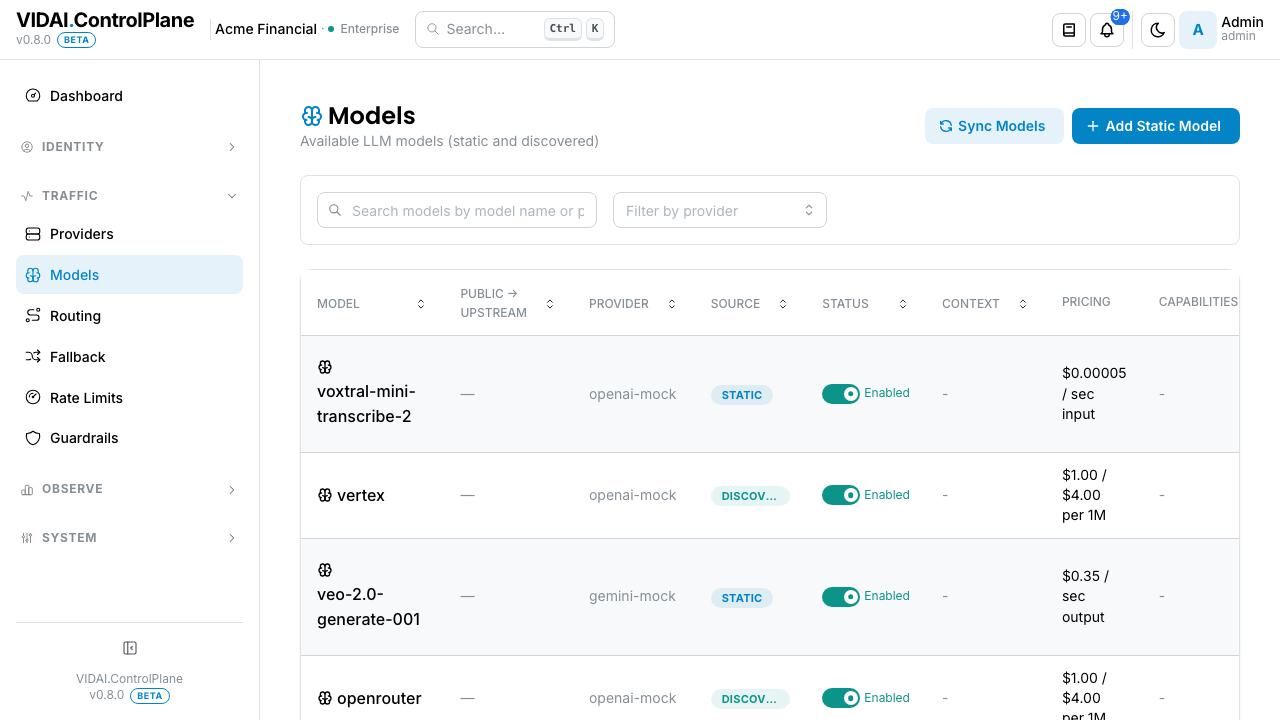
The columns:
| Column | What it shows |
|---|---|
| Model | The client-facing name + an optional friendly display name. This is what your applications put in the model field of their requests. |
| Public → Upstream | The aliasing column. Shows what the control plane receives (name) versus what it sends upstream (upstream_name). A dash means the two are identical (no aliasing). |
| Provider | Which upstream provider serves this model. Click-throughs to Providers. |
| Source | discovered (auto-registered via the provider's model-list endpoint) or static (registered manually here). |
| Status | Inline toggle: Enabled or Disabled. Disabled models reject requests with a clear error. |
| Context | The model's context-window size, e.g. 128K. |
| Pricing | Cost in the model's native billing dimension. Text models show input / output per 1M tokens. Image models show per-image ($0.0702 / image). Audio and video models show per-second ($0.35 / sec output). Embedding models show per-1M-input. — when no rate card is registered for the model at all (see the Pricing column gotchas below). |
| Capabilities | Tags like chat, vision, function_calling, embedding. |
Filters at the top:
- Search: debounced filter by model name.
- Provider: dropdown to scope the list. Pre-selected when you arrived via "View Models" from a Provider row.
💡 Pro tip. Sync Models at the top of the page runs discovery against every discovery-enabled provider in one click. Use it after registering a new provider to pull in its model list immediately.
What you do on this page
Pull in a new vendor's models via discovery
- Go to Providers. Confirm the vendor's provider has Discovery toggled ON. (For OpenAI-family and Gemini providers, ON is the default; for Azure / Bedrock / Vertex, discovery isn't supported and you'll need the manual flow below.)
- Come back to Models. Click Sync Models at the top of the page.
- The sync results modal shows what it found:
- New models: added to the registry.
- Existing: already present, no change.
- Naming conflicts: when two providers offer the same
model name. The first wins; the second gets a prefixed
alias (
groq_whisper-large-v3). - Click Apply. The new models appear on the list.
📌 Worth knowing. Re-syncing is safe. Discovery is idempotent: existing entries don't get touched, and removed models are flagged but not auto-deleted (the control plane leaves the call to you because vendors sometimes briefly drop models from their lists during deploys).
Register a model that can't be discovered
Some upstreams don't expose a model-list endpoint: Azure deployments, Bedrock, Vertex, custom self-hosted models. Register those manually.
- Click Add Static Model.
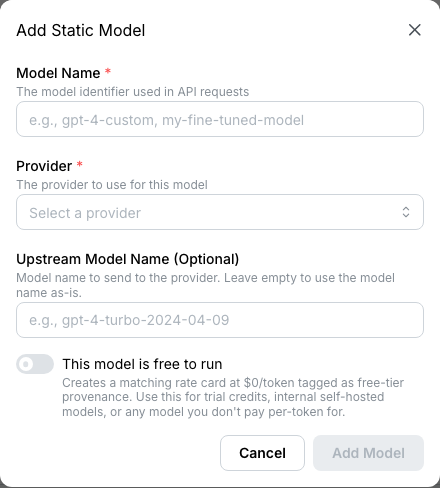
- Fill in:
- Model: the name your applications will use in their
requests (
our-gpt-4o,claude-haiku-4, whatever you've standardised on). - Provider: pick from the registered providers.
- Upstream Name (optional): only set if the upstream knows the model by a different name. Skip if they match.
- Capabilities: tag what this model can do (
chat,vision,function_calling). Affects which routing and fallback validations apply. - Click Add.
The new row shows up with Source: static.
Alias one model to another
Aliasing is when you want clients to use one name but the control plane should send a different name to the upstream. Two common reasons:
- An aggregator like OpenRouter expects
openai/gpt-4o; your applications expect to use the baregpt-4o. - You're transitioning your applications from one model to another and want a soft cut-over without code changes.
To set an alias:
- Click the pencil icon on the model row.
- In the Upstream Name field, type the name the upstream expects.
- Save.
The list now shows gpt-4o → openai/gpt-4o in the Public →
Upstream column.
💡 Pro tip. Multiple client-facing names can point at the same upstream model. Add a static model
gpt4,gpt-4o, andour-gptall with Upstream Name =openai/gpt-4o. All three resolve to the same upstream call.
About the word "upstream"
"Upstream" always means the upstream LLM provider: OpenAI, Anthropic, Gemini, etc. The control plane sits between your applications (downstream) and the providers (upstream). The Upstream Name field is "the name the provider on the far side knows this model by." Calling it "alias" was considered and rejected; it's ambiguous about which side is the canonical name.
Advisory warnings on alias edits
When you type an upstream name, the form runs a quick validation check and surfaces warnings inline:
- Cross-vendor prefix: you've typed
claude-3-opusbut the model's provider is an OpenAI-family one. Most often a typo; sometimes intentional (you genuinely want customers calling this name to get a Claude response through OpenRouter). The save isn't blocked; you just get a "we noticed" nudge. - Public-name clash: the public name uses a
competitor vendor's prefix (e.g.
gpt-somethingon an Anthropic provider). Governance risk; clients may assume the wrong vendor. - Live upstream change: you're PATCHing a model that already had a different upstream name set. The warning exists to make the blast radius visible: every request hitting this model starts going to the new upstream immediately, with no version history.
All three are advisory. Save is never blocked. Take the warning seriously and override when you have a reason to.
Override a model's pricing
The cost engine syncs published rates from each provider, but sometimes you need to override:
- The vendor gave you a custom rate that isn't on their public pricing page.
- The discovered rate is wrong for your contract tier.
- You're running a self-hosted model where the control plane has no rate to discover.
To override:
- Click the pencil icon on the model.
- Expand the Advanced section.
- Pricing Tier + Modality: pick the scope of the
override (defaults are
standard+text, which covers most chat models). - Cost Overrides: set per-1M-token rates for input, output, cached input, reasoning, etc.
- Save.
The override writes through to a manual rate card on the
Cost Engine page. Setting it here is
equivalent to setting it there; both paths feed the same rate
card, with the same SCD2 semantics: a new override closes the
previous card with effective_to = now and opens a new one
with effective_from = now.
To clear an override and revert to the synced rate, blank the cost fields and save.
⚠️ Watch out. Overrides only apply to traffic from the override's
effective_fromonward. Historical traffic still prices against whatever card was effective at the time of the request. To re-price historical traffic with a new override, either backdate the manual rate card'seffective_from(Cost Engine page) and run a ledger replay over the affected range, or accept that the override applies forward-only.
Disable a model
Inline toggle on the row. Disabled models reject incoming
requests with a clear error (404 model_not_found from the
client's perspective).
Configuration is preserved: flipping the toggle back on restores the model with its aliasing, capabilities, and cost overrides intact.
📌 Worth knowing. Disabling a discovered model is the right way to retire it. If you delete a discovered model, the next sync will re-create it. Disable instead.
Delete a model
The trash icon is available only on static models. Discovered models can't be deleted from the console (they'd just come back on the next sync; the action's hidden to avoid the footgun).
To delete a static model: click the trash icon, confirm. The
model row goes away. Any routing rule, fallback chain, or alias
referencing this model breaks at the moment of delete; clients
calling that name start getting 404.
⚠️ Watch out. Confirm no active routing rules or fallback chains point at the model before deleting. The Routing page's search lets you find rules by model name; ditto on Fallback.
Pricing column edge cases
The Pricing column shows the cost in the model's native billing dimension: tokens for chat models, per-image for image models, per-second for audio and video, per-token (input only) for embeddings. The column shows — in two cases:
- The model has no rate card registered yet. Calls succeed
but show
unpricedin cost reports. The dashboard's Misconfigurations panel surfaces these as Model is unpriced (per-tuple) or Provider has many unpriced models (when one provider has 10+ unpriced model slugs in observed traffic). - The model has a rate card but it doesn't match the call's billing dimension. Rare; most often happens when an image-only card is registered for a model the control plane is pricing as text. The unpriced-tooltip on the row tells you which.
Open Cost Engine → Rate Cards for the all-tiers all-modalities view of every card registered for every model.
The cost-engine resolver auto-picks across all 14 (tier × modality) combinations until the first card hits. Order:
- Manual override at the same tier + modality as the call.
- Synced rate at the same tier + modality.
- Standard tier with the call's modality.
- Other tiers (
flex,scale,batch,priority) with the call's modality. - The call's tier with text modality.
- Standard text.
- Other modalities (image, audio, video, embedding) at standard tier.
null: the call is recorded as unpriced and surfaces on the dashboard's Misconfigurations panel.
The model's Resolved Tier and Resolved Modality fields
(visible on its detail page) tell you which step the
resolver landed on.
Reference
Permissions
| Role | Sees Models page | Can do |
|---|---|---|
| admin | Yes | Add static, edit, delete static, alias, override pricing, run discovery, enable / disable. |
| bi_read_only | No | Page hidden. |
| user | No | Page hidden. |
Field reference (edit modal)
Core
| Field | Effect |
|---|---|
| Upstream Name | The name the control plane sends to the upstream when forwarding the request. Empty = use the model's name as-is. |
| Enabled | Inline toggle. Disabled models reject incoming requests. |
Advanced
| Field | Effect |
|---|---|
| Display Name | Friendly UI label. Doesn't affect routing or matching; it's purely display. |
| Description | Free-text. Surfaced on hover in some panels. |
| Context Length | Numeric metadata; informational. |
| Max Output Tokens | Numeric metadata; informational. |
| Capabilities | Tag list. Drives validation in routing and fallback (e.g. you can't fall back a vision model to a text-only one). |
| Provider Display Name | Override the provider's name in the UI for this model only. Cosmetic. |
| Pricing Tier | Scope for cost overrides: standard, flex, scale, batch, priority. Defaults to standard. |
| Modality | Scope for cost overrides: text, image, audio, video, embedding. Defaults to text. |
| Cost Overrides | Per-1M-token rates for input, output, cached input, reasoning. Writes through to a manual rate card. |
Save behaviour
The edit modal fires up to two requests on save:
- Core changes (upstream_name, enabled): one request.
- Advanced changes (display, description, costs, capabilities): a separate request.
If only one group changed, only that one fires. The audit log records both as separate events when both fire.
Audit log records
- Add static model: actor, name, provider, upstream_name.
- Edit model: actor, before/after of every changed field.
Alias edits carry a small
aliasbadge in the audit log for easy filtering. - Toggle enabled: actor, new state.
- Delete static model: actor, full snapshot.
- Sync models: actor, count of new / existing / removed.
Audit Log shows these.
Common questions
A discovered model I deleted came back. Why?
Discovery is idempotent: re-running it re-registers everything the upstream lists. To permanently hide a discovered model, disable it (the toggle, not the trash). Disabled models survive sync.
My static model has the right upstream name but requests fail.
Three usual suspects: (1) upstream-name capitalisation doesn't match the upstream's exact spelling (
GPT-4oandgpt-4oare different names); (2) the provider's credentials don't include this model in the account's entitlement; (3) the model is actually disabled (the toggle is OFF). Request Logs shows the upstream response that came back.Pricing column shows "—" but the cost engine has rates.
The resolver auto-picks across every tier and modality the model has cards for, so a "—" here means there's genuinely no rate card registered, not that one exists on a non-text tier. Hover the dimmed dash for the tooltip; open Cost Engine → Rate Cards to see exactly what's there.
I set a cost override and it shows on the list, but a recent call still priced at the synced rate.
The override applies forward from its
effective_from. Recent calls before that point still price against the previous card. To re-price history, backdate the manual rate card on the Cost Engine page and run a ledger replay.Two models with the same name but different providers: which one gets used?
The control plane never has two enabled models with the same client-facing name pointing at different providers; the discovery conflict resolution renames the second one with a provider-prefix alias (e.g.
groq_whisper-large-v3). If you somehow ended up with two enabled rows of the same name (manual + sync race), disable one. The audit log will tell you which sync introduced which.What happens when I rename a model (change the upstream name)?
Every request hitting the model goes to the new upstream name from the moment of save. There's no version history at the model level; you can't "rollback the alias" without re-saving the old value. The audit log preserves before/after so you can read the change.
My model has capabilities tagged but routing rules still mismatch.
Capability tags here drive validation on the Routing and Fallback pages (e.g. preventing a fallback from a vision model to text-only). They don't drive routing decisions; those are based on model names and provider settings, not capabilities. If a routing rule is matching unexpectedly, the rule's source-model condition is the culprit, not the capability tags.
Can I have a model that lives across multiple providers (multi-region failover)?
Not as a single model row. The model row is one client-facing name → one provider. For multi-region redundancy, set up the per-region providers separately and use Fallback chains to fail over between them. The chain is the multi-provider abstraction.
Where to go next
- Providers: every model belongs to a provider; provider config drives auth, prefixes, and protocol.
- Routing: rules that decide which model a request actually ends up calling (potentially rewriting the requested model on the way through).
- Fallback: multi-provider redundancy per source model.
- Cost Engine: rate cards, SCD2 versioning, ledger replay. The other side of the cost-override coin.
- Client integrations: what
applications send in the
modelfield; matches what you've registered here. - Audit Log: every model edit is logged.